
iOS开发UI篇—在UITableview的应用中使用动态单元格来完成app应用程序管理界面的搭建
iOS开发UI篇—在UITableview的应用中使用动态单元格来完成app应用程序管理界面的搭建
一、实现效果

说明:该示例在storyboard中使用动态单元格来完成。
二、实现
1.项目文件结构和plist文件
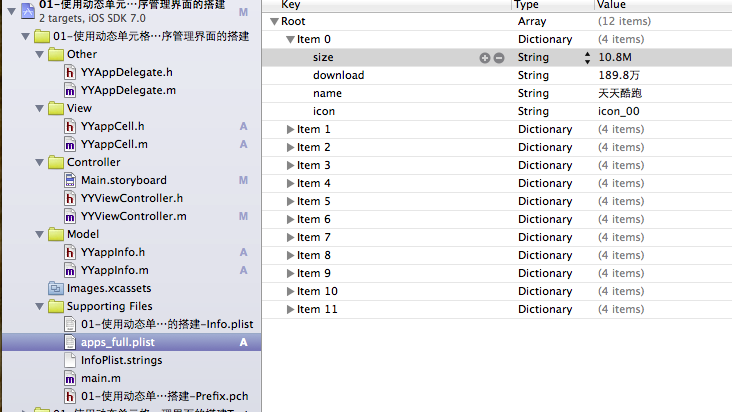
2.实现过程以及代码

在tableview的属性选择器中选择动态单元格。

说明:在storyboard中直接使用其自带的动态单元格完成tableviewcell的定义,并创建了一个管理该cell的类,进行了连线。
实现代码:
数据模型部分:
YYappInfo.h文件
 //

 //  YYappInfo.h

 //  01-使用动态单元格来完成app应用程序管理界面的搭建

 //

 //  Created by 孔医己 on 14-6-2.

 //  Copyright (c) 2014年 itcast. All rights reserved.

 //

 #import <Foundation/Foundation.h>

 @interface YYappInfo : NSObject

 @property(nonatomic,copy)NSString *size;

 @property(nonatomic,copy)NSString *download;

 @property(nonatomic,copy)NSString *icon;

 @property(nonatomic,copy)NSString *name;

 -(instancetype)initWithDict:(NSDictionary *)dict;

 +(instancetype)appInfoWithDict:(NSDictionary *)dict;

 @end
YYappInfo.m文件
 //

 //  YYappInfo.m

 //  01-使用动态单元格来完成app应用程序管理界面的搭建

 //

 //  Created by 孔医己 on 14-6-2.

 //  Copyright (c) 2014年 itcast. All rights reserved.

 //

 #import "YYappInfo.h"

 @implementation YYappInfo

 -(instancetype)initWithDict:(NSDictionary *)dict

 {

     if (self=[super init]) {

         //使用KVC

         [self setValuesForKeysWithDictionary:dict];

     }

     return self;

 }

 +(instancetype)appInfoWithDict:(NSDictionary *)dict

 {

     return [[self alloc]initWithDict:dict];

 }

 @end
视图部分
YYappCell.h文件
 //

 //  YYappCell.h

 //  01-使用动态单元格来完成app应用程序管理界面的搭建

 //

 //  Created by 孔医己 on 14-6-2.

 //  Copyright (c) 2014年 itcast. All rights reserved.

 //

 #import <UIKit/UIKit.h>

 @class YYappInfo,YYappCell;

 @protocol YYappCellDelegate <NSObject>

 -(void)btnDidClick:(YYappCell *)cell;

 @end

 @interface YYappCell : UITableViewCell

 @property(nonatomic,strong)YYappInfo *app;

 //@property(nonatomic,strong)YYViewController *controller;

 @property(nonatomic,strong)id <YYappCellDelegate> delegate;

 @end
YYappCell.m文件
 //

 //  YYappCell.m

 //  01-使用动态单元格来完成app应用程序管理界面的搭建

 //

 //  Created by 孔医己 on 14-6-2.

 //  Copyright (c) 2014年 itcast. All rights reserved.

 //

 #import "YYappCell.h"

 #import "YYappInfo.h"

 @interface YYappCell ()

 @property (weak, nonatomic) IBOutlet UIImageView *appimg;

 @property (weak, nonatomic) IBOutlet UILabel *apptitle;

 @property (weak, nonatomic) IBOutlet UILabel *appdownload;

 @property (weak, nonatomic) IBOutlet UIButton *appbtn;

 @end

 @implementation YYappCell

 -(void)setApp:(YYappInfo *)app

 {

     _app=app;

     self.apptitle.text=_app.name;

     self.appdownload.text=[NSString stringWithFormat:@"大小 %@ | 下载量 %@次",_app.size,_app.download];

     self.appimg.image=[UIImage imageNamed:_app.icon];

 }

 #pragma mark- 完成按钮点击事件

 - (IBAction)btnOnclick:(UIButton *)sender

 {

     //按钮被点击后,变为不可用状态

     sender.enabled=NO;

     //通知代理,完成提示下载已经完成的动画效果

     if ([self.delegate respondsToSelector:@selector(btnDidClick:)]) {

         //一般而言,谁触发就把谁传过去

         [self.delegate  btnDidClick:self];

     }

 }

 @end
主控制器
YYViewController.m文件
 //

 //  YYViewController.m

 //  01-使用动态单元格来完成app应用程序管理界面的搭建

 //

 //  Created by 孔医己 on 14-6-2.

 //  Copyright (c) 2014年 itcast. All rights reserved.

 //

 #import "YYViewController.h"

 #import "YYappInfo.h"

 #import "YYappCell.h"

 @interface YYViewController ()<UITableViewDataSource,YYappCellDelegate>

 @property(nonatomic,strong)NSArray *apps;

 @property (strong, nonatomic) IBOutlet UITableView *tableview;

 @end

 @implementation YYViewController

 - (void)viewDidLoad

 {

     [super viewDidLoad];

 }

 #pragma mark- 使用懒加载先把plist文件中得数据加载进来

 -(NSArray *)apps

 {

     if (_apps==Nil) {

         NSString *fullpath=[[NSBundle mainBundle]pathForResource:@"apps_full.plist" ofType:Nil];

         NSArray *arrayM=[NSArray arrayWithContentsOfFile:fullpath];

         NSMutableArray *modles=[NSMutableArray arrayWithCapacity:arrayM.count];

         for (NSDictionary *dict in arrayM) {

             YYappInfo *appinfo=[YYappInfo appInfoWithDict:dict];

             [modles addObject:appinfo];

         }

         _apps=[modles copy];

     }

     return _apps;

 }

 #pragma mark- 设置tableview的数据源方法

 //组

 -(NSInteger)numberOfSectionsInTableView:(UITableView *)tableView

 {

     return ;

 }

 //行

 -(NSInteger)tableView:(UITableView *)tableView numberOfRowsInSection:(NSInteger)section

 {

     return self.apps.count;

 }

 //组-行-数据

 -(UITableViewCell *)tableView:(UITableView *)tableView cellForRowAtIndexPath:(NSIndexPath *)indexPath

 {

     //创建cell

     static NSString *identifier=@"app";

     YYappCell *cell=[tableView dequeueReusableCellWithIdentifier:identifier];

     //设置cell的数据

     YYappInfo *appinfo=self.apps[indexPath.row];

     //设置代理

     cell.delegate=self;

     cell.app=appinfo;

     //返回cell

     return cell;

 }

 #pragma mark- 设置代理

 -(void)btnDidClick:(YYappCell *)cell

 {

     //取出模型

     YYappInfo *app=cell.app;

     NSLog(@"daili");

     UILabel *lab=[[UILabel alloc]init];

     //提示的显示位置

     lab.frame=CGRectMake(, , , );

     //设置提示文本

     lab.text=[NSString stringWithFormat:@"%@已经下载完成",app.name];

     //设置文本背景颜色

     [lab setBackgroundColor:[UIColor grayColor]];

     [self.view addSubview:lab];

     lab.alpha=1.0;

     //设置动画效果

     [UIView animateWithDuration:2.0 animations:^{

         lab.alpha=0.0;

     } completion:^(BOOL finished) {

         //把弹出的提示信息从父视图中删除

         [lab removeFromSuperview];

     }];

 }

 #pragma mark-隐藏状态栏

 -(BOOL)prefersStatusBarHidden

 {

     return YES;

 }

 @end
补充说明
在程序中通过标示符取出对应的cell,是因为在storyboard中已经对cell打上了标示符(app)的标签。
//组-行-数据

-(UITableViewCell *)tableView:(UITableView *)tableView cellForRowAtIndexPath:(NSIndexPath *)indexPath

{

    //创建cell

    static NSString *identifier=@"app";

    YYappCell *cell=[tableView dequeueReusableCellWithIdentifier:identifier];

    //设置cell的数据

    YYappInfo *appinfo=self.apps[indexPath.row];

    //设置代理

    cell.delegate=self;

    cell.app=appinfo;

    //返回cell

    return cell;

}

iOS开发UI篇—在UITableview的应用中使用动态单元格来完成app应用程序管理界面的搭建的更多相关文章
- iOS开发UI篇—实现UItableview控件数据刷新
iOS开发UI篇—实现UItableview控件数据刷新 一.项目文件结构和plist文件 二.实现效果 1.说明:这是一个英雄展示界面,点击选中行,可以修改改行英雄的名称(完成数据刷新的操作). 运 ...
- iOS开发UI篇—使用UItableview完成一个简单的QQ好友列表(一)
iOS开发UI篇—使用UItableview完成一个简单的QQ好友列表(一) 一.项目结构和plist文件 二.实现代码 1.说明: 主控制器直接继承UITableViewController // ...
- iOS开发——UI篇&文字渐变效果:图层中的mask属性
文字渐变效果:图层中的mask属性 本次文章,主要讲述的是图层中的mask属性,利用它,可以做出文字渐变效果! 一.文字渐变效果: 二.文字渐变实现思路: 1.创建一个颜色渐变层,渐变图层跟文字控件一 ...
- iOS开发UI篇—在UItableview中实现加载更多功能
一.实现效果 点击加载更多按钮,出现一个加载图示,三秒钟后添加两条新的数据. 二.实现代码和说明 当在页面(视图部分)点击加载更多按钮的时候,主页面(主控制器 ...
- iOS开发UI篇—使用UItableview完成一个简单的QQ好友列表(二)
一.实现效果 二.实现代码 1.数据模型部分 YYQQGroupModel.h文件 // // YYQQGroupModel.h // 02-QQ好友列表(基本数据的加载) / ...
- iOS开发UI篇—UITableview控件简单介绍
iOS开发UI篇—UITableview控件简单介绍 一.基本介绍 在众多移动应⽤用中,能看到各式各样的表格数据 . 在iOS中,要实现表格数据展示,最常用的做法就是使用UITableView,UIT ...
- iOS开发UI篇—UITableview控件基本使用
iOS开发UI篇—UITableview控件基本使用 一.一个简单的英雄展示程序 NJHero.h文件代码(字典转模型) #import <Foundation/Foundation.h> ...
- iOS开发UI篇—UITableview控件使用小结
iOS开发UI篇—UITableview控件使用小结 一.UITableview的使用步骤 UITableview的使用就只有简单的三个步骤: 1.告诉一共有多少组数据 方法:- (NSInteger ...
- iOS开发UI篇—直接使用UITableView Controller
iOS开发UI篇—直接使用UITableView Controller 一.一般过程 // // YYViewController.h // UITableView Controller // // ...
随机推荐
- Secretary Problem
最好时机问题 n个值 前n/e都不选 然后取第一个大于前n/e个数中最大值的数 选中最大的概率为1/e
- C++之路进阶——codevs2492(上帝造题的七分钟 2)
2492 上帝造题的七分钟 2 时间限制: 1 s 空间限制: 64000 KB 题目等级 : 大师 Master 题目描述 Description XLk觉得<上帝造题的七分钟&g ...
- Chart 绘制,自带动画效果
package com.example.canvasdemo; import android.annotation.SuppressLint; import android.content.Conte ...
- WinForm中跨线程操作控件
在WinForm编程时会遇到通过后台线程操作界面的情况,直接在后台线程执行的方法中直接操作控件会报错,这时候就要使用跨线程方式间接操作控件.下面是两种实现方式. 1.采用定义delegate的方式 ...
- 2.1.5 计算机网络协议: TCP/IP
应用程序阶段:妳打开浏览器,在浏览器上面输入网址列,按下 [Enter].此时网址列与相关数据会被浏览器包成一个数据, 并向下传给 TCP/IP 的应用层: 应用层:由应用层提供的 HTTP 通讯协议 ...
- 【笔记】jquery阻止冒泡事件发生的语句
时间触发时会执行两个步骤:1.捕获 2.冒泡,而很多浏览器包括jquery都不支持捕获动作所以只能执行冒泡动作. 所谓冒泡就是当点击就是事件的执行顺序,本人的理解为:但某一元素触发时间时它的祖先元素( ...
- Ubuntu16.04搭建LAMP架构服务器
安装Apache: weirubo@weirubo-VirtualBox:~$ sudo apt-get install apache2 查看Apache版本: weirubo@weirubo-Vi ...
- 20145227&20145201 《信息安全系统设计基础》实验二 固件开发
北京电子科技学院(BESTI) 实 验 报 告 课程:信息安全系统设计基础 班级:1452 姓名:(按贡献大小排名)鄢曼君 李子璇 学号:(按贡献大小排名)20145227 20145201 成绩: ...
- windows 中 使用MongoDB
MongoDB简介 MongoDB是一个高性能,开源,无模式的文档型数据库,是当前NoSql数据库中比较热门的一种.它在许多场景下可用于替代传统的关系型数据库或键/值存储方式. 传统的关系数据库一般由 ...
- printf("%*s%s%*s",——)是什么?
我们可能知道scanf里用*修饰符,是起到过滤读入的作用.比如一个有三列数值的数据,我只想得到第2列数值,可以在循环里用scanf(“%*d%d%*d”, a[i])来读入第i行的第2个数值到a[i] ...