
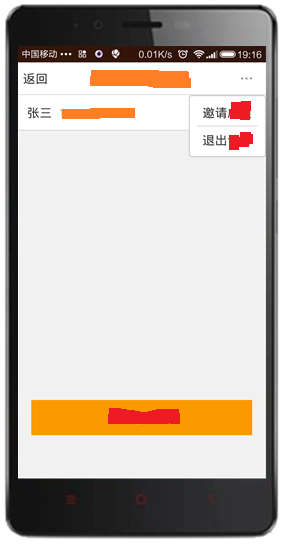
android PopupWindow使用实例
注:点空白或菜单外隐藏popupwindow菜单;
但是,若点击有点击事件的组件则要再写代码手动隐藏;
    @Override

    public boolean onTouchEvent(MotionEvent event) {

        // TODO Auto-generated method stub

        if (mMenuPPW!=null){

            if (mMenuPPW.isShowing())

                mMenuPPW.dismiss();

        }

        return super.onTouchEvent(event);

    }
.java
 private PopupWindow mMenu;

     public void CreatMenu(View view) {

         if (mMenu == null) {

             LayoutInflater inflater = (LayoutInflater) getSystemService(Context.LAYOUT_INFLATER_SERVICE);

             View v = inflater.inflate(R.layout.popuppindow_group,

                     null, false);

             LinearLayout lytRequest = (LinearLayout) v.findViewById(R.id.lyt_pw_groupmember_request);

             lytRequest.setOnClickListener(this);

             LinearLayout lytExit = (LinearLayout) v.findViewById(R.id.lyt_pw_groupmember_exit);

             lytExit.setOnClickListener(this);

             mMenu = new PopupWindow(v);

 //            moreMenu.setWidth(300);

             mMenu.setWidth(LayoutParams.WRAP_CONTENT);

             mMenu.setHeight(LayoutParams.WRAP_CONTENT);

             mMenu.showAsDropDown(view);

         } else {

             if (mMenu.isShowing()) {

                 mMenu.dismiss();

             } else {

                 mMenu.showAsDropDown(view);

             }

         }

     }

 @Override

     public void onClick(View v) {

         // TODO Auto-generated method stub

         switch (v.getId()) {

          case R.id.lyt_activitygroupmembers_menu:

              CreatMenu(v);

          break;

          case R.id.lyt_pw_groupmember_request:

              Toast.makeText(this, "request", Toast.LENGTH_SHORT).show();

              mMenu.dismiss();

          break;

          case R.id.lyt_pw_groupmember_exit:

              Toast.makeText(this, "exit", Toast.LENGTH_SHORT).show();

              mMenu.dismiss();

          break;

         }

     }
.xml
<?xml version="1.0" encoding="utf-8"?>

<RelativeLayout xmlns:android="http://schemas.android.com/apk/res/android"

    android:layout_width="wrap_content"

    android:layout_height="wrap_content"

    android:background="@android:color/darker_gray" >

    <LinearLayout

        android:layout_width="wrap_content"

        android:layout_height="wrap_content"

        android:orientation="vertical" >

        <LinearLayout

            android:id="@+id/lyt_pw_groupmember_request"

            android:layout_width="wrap_content"

            android:layout_height="wrap_content"

            android:orientation="vertical" >

            <TextView

                android:id="@+id/TextView03"

                android:layout_width="match_parent"

                android:layout_height="40dp"

                android:layout_marginLeft="12dp"

                android:layout_marginRight="12dp"

                android:gravity="left|center"

                android:text="request"

                android:textSize="18sp" />

            <TextView

                android:id="@+id/TextView04"

                android:layout_width="match_parent"

                android:layout_height="0.5dp"

                android:layout_marginLeft="4dp"

                android:layout_marginRight="4dp"

                android:background="@android:color/darker_gray"

                android:text="TextView" />

        </LinearLayout>

        <LinearLayout

            android:id="@+id/lyt_pw_groupmember_exit"

            android:layout_width="wrap_content"

            android:layout_height="wrap_content"

            android:orientation="vertical" >

            <TextView

                android:id="@+id/TextView02"

                android:layout_width="match_parent"

                android:layout_height="40dp"

                android:layout_marginLeft="12dp"

                android:layout_marginRight="12dp"

                android:gravity="left|center"

                android:text="exit"

                android:textSize="18sp" />

        </LinearLayout>

    </LinearLayout>

</RelativeLayout>
注:mMenu.showAsDropDown(view, 0, 16);即偏移view,x,y轴的间距
android PopupWindow使用实例的更多相关文章
- Android PopupWindow使用方法小结
前几天要用到PopupWindow,一时竟想不起来怎么用,赶紧上网查了查,自己写了个demo,并在此记录一下PopupWindow的用法. 使用场景 PopupWindow,顾名思义,就是弹窗,在很多 ...
- Android PopupWindow Dialog 关于 is your activity running 崩溃详解
Android PopupWindow Dialog 关于 is your activity running 崩溃详解 [TOC] 起因 对于 PopupWindow Dialog 需要 Activi ...
- Android PopupWindow的使用和分析
Android PopupWindow的使用和分析 PopupWindow使用 PopupWindow这个类用来实现一个弹出框,可以使用任意布局的View作为其内容,这个弹出框是悬浮在当前activi ...
- android widget 开发实例 : 桌面便签程序的实现具体解释和源代码 (上)
如有错漏请不吝拍砖指正,转载请注明出处,很感谢 桌面便签软件是android上经常使用软件的一种,比方比較早的Sticky Note,就曾很流行, Sticky Note的介绍能够參见 http:// ...
- Android PopupWindow的使用技巧(转)
Android PopupWindow的使用技巧 PopupWindow是Android上自定义弹出窗口,使用起来很方便. PopupWindow的构造函数为 public PopupWindow(V ...
- Android进阶(二十三)Android开发过程之实例讲解
Android开发过程之实例讲解 前言 回过头来审视之前做过的Android项目,发觉自己重新开发时忽然间不知所措了,间隔了太长时间没有开发导致自己的Android技能知识急剧下降.温故而知新. 废话 ...
- [转]Android:布局实例之模仿QQ登录界面
Android:布局实例之模仿QQ登录界面 预览图: 准备: 1.找到模仿对象 QQ登陆界面UI下载>>>>> 2.导入工程 3.查看布局结构和使用控件 其对应效果图分布 ...
- Android 应用开发实例之情景模式
2013-07-01 Android 应用开发实例 1. 情景模式 使用TabHost来实现主界面的布局. 设置一组RadioButton来切换不同的情景模式. 对比普通情景模式,定时情景模式需要加上 ...
- Android:布局实例之模仿QQ登录界面
预览图: 准备: 1.找到模仿对象 QQ登陆界面UI下载>>>>> 2.导入工程 3.查看布局结构和使用控件 其对应效果图分布为 4.分析样式选择器 下拉箭头2种样式:点 ...
随机推荐
- Java_Class 16方格拼图游戏
public class Main { public static void main(String[] args) { // TODO Auto-generated method stub Game ...
- Lucene.net站内搜索—3、最简单搜索引擎代码
目录 Lucene.net站内搜索—1.SEO优化 Lucene.net站内搜索—2.Lucene.Net简介和分词Lucene.net站内搜索—3.最简单搜索引擎代码Lucene.net站内搜索—4 ...
- WebDriver多线程并发
要想多线程并发的运行WebDriver,必须同时满足2个条件,首先你的测试程序是多线程,其次需要用到Selenium Server.下载位置如下图: 下载下来后是一个jar包,需要在命令行中运行.里面 ...
- js的一些属性
js attribute(): setAttribute():element.setAttribute(name,balue) getAttribute():element.getAttribute( ...
- Remodal – 支持 Hash 追踪的响应式模态窗口
Remodal 是一个扁平化,响应式,轻量而且容易定制的模态窗口插件,支持使用声明状态和 Hash 跟踪.您可以轻松地定义为模态弹窗定义背景景容器(如模糊效果).支持所有现代的浏览器. 您可能感兴趣的 ...
- 小白详细讲解快速幂--杭电oj2035-A^B
Problem Description 求A^B的最后三位数表示的整数.说明:A^B的含义是“A的B次方” Input 输入数据包含多个测试实例,每个实例占一行,由两个正整数A和B组成(1<= ...
- HTML 表单
HTML 表单包含表单元素. <form> 元素定义 HTML 表单 表单元素指的是不同类型的 input 元素.复选框.单选按钮.提交按钮等等. HTML 表单用于搜集不同类型的用户输入 ...
- SAP学习日志--RFC REMOTE FUNCTION CALL
RFC Remote function Call 远程功能调用, 是SAP系统之间以及非SAP系统之间程序通信的基本接口技术. 例如BAPI , ALE都是基于RFC实现的 SAP系统提供了三种外部 ...
- GPS坐标互转:WGS-84(GPS)、GCJ-02(Google地图)、BD-09(百度地图)(转载)
WGS-84:是国际标准,GPS坐标(Google Earth使用.或者GPS模块)GCJ-02:中国坐标偏移标准,Google Map.高德.腾讯使用BD-09:百度坐标偏移标准,Baidu Map ...
- 之二:CAKeyframeAnimation - 关键帧动画
是CApropertyAnimation的子类,跟CABasicAnimation的区别是:CABasicAnimation只能从一个数值(fromValue)变到另一个数值(toValue),而CA ...