
20、Scaffold属性 BottomNavigationBar 自定义底部导航
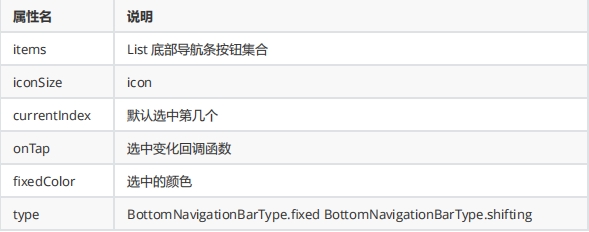
BottomNavigationBar 常见的属性
BottomNavigationBar 底部菜单选中
class MyFlutter1 extends StatefulWidget {

  const MyFlutter1({super.key});

  @override

  State<MyFlutter1> createState() => _MyFlutter1State();

}

class _MyFlutter1State extends State<MyFlutter1> {

  int _currentIndex =0;

  @override

  Widget build(BuildContext context) {

    return Scaffold(

      appBar: AppBar(title: const Text("这是导航栏")),

      bottomNavigationBar: BottomNavigationBar(

       currentIndex: _currentIndex,  //默认选中第几个

       iconSize: 35,
       type:BottomNavigationBarType.fixed, //如果底部有4个或者4个以上的进行选择
       fixedColor: const Color.fromARGB(255, 54, 244, 171), //选中的颜色

       onTap: (index){   //选中变化回调函数

         print("监听$index");

         setState(() {

            _currentIndex = index;

         });

       },

       items: const [

        BottomNavigationBarItem(icon: Icon(Icons.home), label: "首页"),

        BottomNavigationBarItem(icon: Icon(Icons.timeline), label: "时间"),

        BottomNavigationBarItem(icon: Icon(Icons.my_library_add), label: "我的"),

      ]),

      body: const Center(

          child: Column(

        mainAxisAlignment: MainAxisAlignment.center,

        children: [],

      )),

    );

  }

}
BottomNavigationBar 底部菜单选中 换页面内容
class MyFlutter1 extends StatefulWidget {

  const MyFlutter1({super.key});

  @override

  State<MyFlutter1> createState() => _MyFlutter1State();

}

class _MyFlutter1State extends State<MyFlutter1> {

  int _currentIndex =0;

  final List<Widget> _pages = [

    const HomePage(),

    const TimePag(),

    const myHome()

  ];

  @override

  Widget build(BuildContext context) {

    return Scaffold(

      appBar: AppBar(title: const Text("这是导航栏")),

      bottomNavigationBar: BottomNavigationBar(

       currentIndex: _currentIndex,  //默认选中第几个

       fixedColor: const Color.fromARGB(255, 54, 244, 171), //选中的颜色
unselectedItemColor: Colors.grey, // 设置未选中按钮的颜色为灰色 onTap: (index){ //选中变化回调函数 print("监听$index"); setState(() { _currentIndex = index; }); },
       items: const [

        BottomNavigationBarItem(icon: Icon(Icons.home), label: "首页"),

        BottomNavigationBarItem(icon: Icon(Icons.timeline), label: "时间"),

        BottomNavigationBarItem(icon: Icon(Icons.my_library_add), label: "我的"),

      ]),

      body: _pages[_currentIndex],

    );

  }

}
20、Scaffold属性 BottomNavigationBar 自定义底部导航的更多相关文章
- 15 Flutter BottomNavigationBar自定义底部导航条 以及实现页面切换 以及模块化
效果: /** * Flutter BottomNavigationBar 自定义底部导航条.以及实现页面切换: * BottomNavigationBar是底部导航条,可以让我们定义底部Tab ...
- BottomNavigationBar 自定义 底部导航条
在flutter中,BottomNavigationBar 是底部导航条,可以让我们定义底部 Tab 切换,bottomNavigationBar是 Scaffold 组件的参数. BottomNav ...
- tab 切换 和 BottomNavigationBar 自定义 底部导航条
BottomNavigationBar 组件 BottomNavigationBar 是底部导航条,可以让我们定义底部 Tab 切换,bottomNavigationBar是 Scaffold ...
- BottomNavigationBar 自定义 底部导航条、以及实现页面切换
一.Flutter BottomNavigationBar 组件 BottomNavigationBar 是底部导航条,可以让我们定义底部 Tab 切换,bottomNavigationBar是 Sc ...
- 【Flutter】容器类组件之Scaffold、TabBar、底部导航
前言 一个完整的路由页可能会包含导航栏.抽屉菜单(Drawer)以及底部Tab导航菜单等.Flutter Material组件库提供了一些现成的组件来减少开发任务.Scaffold是一个路由页的骨架, ...
- 微信小程序-自定义底部导航
代码地址如下:http://www.demodashi.com/demo/14258.html 一.前期准备工作 软件环境:微信开发者工具 官方下载地址:https://mp.weixin.qq.co ...
- 微信小程序自定义底部导航栏组件+跳转
微信小程序本来封装有底部导航栏,但对于想自定义样式和方法的开发者来说,这并不是很好. 参考链接:https://github.com/ljybill/miniprogram-utils/tree/ma ...
- uniapp 小程序实现自定义底部导航栏(tarbar)
在小程序开发中,默认底部导航栏很难满足实际需求,好在官方给出了自定义形式,效果如下: 话不多说,直接上代码 1.组件 custom-tarbar.vue文件 <template> < ...
- 自定义底部导航栏(tabBar)
前言如果大家用过微信提供的tabBar就会发现,他的tabBar有很大的局限性.暂且不说样式局限性了,他提供的app.json配置文件中没有function.这也就意味着使用它提供的这个组件,你只能用 ...
- 小程序 mpvue自定义底部导航栏
1.在compontents新建文件放入 <template> <section class="tabBar-wrap"> <article clas ...
随机推荐
- 前端三件套系例之HTML——HTML5基础
1.HTML 1-1 什么是HTML HTML是用来制作网页的标记语言 HTML是Hypertext Markup Language的英文缩写,即超文本标记语言 HTML语言是一种标记语言,不需要编译 ...
- ESP32-MicroPython 开发环境
Linux/Mac 下使用MicroPython开发ESP32 刷入固件 使用 esptool.py 将 MicroPython 刷入 ESP32 开发板涉及几个步骤. 1. 安装 esptool 如 ...
- Windows 下修改MySQL的密码
修改密码的两种简单方法 今天需要修改MySQL的密码,记录一下. 第一种用SET PASSWORD命令 1.打开cmd进入MySQL的bin目录:(如我的路径是C:\Program Files\My ...
- ASP.NET CORE MVC的一些说明
1.ASP.NET CORE MVC 是微软公司的Web应用开发框架,结合了MVC架构的高效.简洁等优秀思想并融合了.NET的灵活性. 2.ASP.NET诞生于2002年,当时微软想保持桌面应用程序的 ...
- 🔥🔥你真的知道TCP协议中的序列号确认、上层协议及记录标识问题吗?
引言 在前面的内容中,我们已经详细讲解了一系列与TCP相关的面试问题.然而,这些问题都是基于个别知识点进行扩展的.今天,我们将重点讨论一些场景问题,并探讨如何解决这些问题. 序列号确认问题 当A主机与 ...
- 聊一聊 tcp/ip 在.NET故障分析的重要性
一:背景 1. 讲故事 这段时间分析了几个和网络故障有关的.NET程序之后,真的越来越体会到计算机基础课的重要,比如 计算机网络 课,如果没有对 tcpip协议 的深刻理解,解决这些问题真的很难,因为 ...
- 使用 Hexo 搭建个人博客并部署到云服务器
目录 1 整体流程 2. 本地环境准备 2.1 安装 Node.js 和 Git 2.2 安装 Hexo 3. 服务端环境准备 3.1 Nginx 环境配置 3.1.1 安装 Nginx 3.1.2 ...
- C#/.NET/.NET Core推荐学习书籍(已分类)
前言 古人云:"书中自有黄金屋,书中自有颜如玉",说明了书籍的重要性.作为程序员,我们需要不断学习以提升自己的核心竞争力.以下是一些优秀的C#/.NET/.NET Core相关学习 ...
- mongodb c driver bson的嵌套访问与层次结构
使用c访问mongodb,需要用到mongodb c driver.c++的driver也是基于c driver封装的. 在使用c driver访问mongodb时,需要与bson打交道,不过c dr ...
- 月薪3w的报表工程师要会哪些技能?报表工程师的招聘要求解读
对于月薪3w的报表工程师,通常需要具备以下技能: 1. 数据分析与处理 - 数据仓库:了解数据仓库的设计原则和架构,能够构建和优化数据仓库结构. - SQL语言:熟练掌握SQL查询语言,能够编写复杂的 ...