
Spring的AOP快速实现通用日志打印
需求分析
针对VideoService接口实现日志打印
三个核心包
- spring-aop:AOP核心功能,例如代理工厂
- aspectjweaver:简单理解,支持切入点表达式
- aspectjrt:简单理解,支持aop相关注解
定义Service接口和实现类
VideoService.java
package net.cybclass.sp.servicce;

import net.cybclass.sp.domain.Video;

public interface VideoService {

    int save(Video video);

    Video findById(int id);

}
VideoServiceImpl.java
package net.cybclass.sp.servicce;

import net.cybclass.sp.domain.Video;

public class VideoServiceImpl implements VideoService{

    public int save(Video video) {

        System.out.println("保存Video");

        return 0;

    }

    public Video findById(int id) {

        System.out.println("根据id找视频");

        return new Video();

    }

}
定义横切关注点
   <bean id="timeHandler" class="net.cybclass.sp.aop.TimeHandler"></bean>

    <bean id="videoService" class="net.cybclass.sp.servicce.VideoServiceImpl"></bean>

    <!-- aop的配置 -->

    <aop:config>

        <!--切面-->

        <aop:aspect id="timeAspect" ref="timeHandler">

            <!--连接点-->

            <aop:pointcut id="allMethodLogPointCut" expression="execution(* net.cybclass.sp.servicce.VideoService.*(..))"/>

            <!--前置通知-->

            <aop:before method="printBefore" pointcut-ref="allMethodLogPointCut"></aop:before>

            <!--后置通知-->

            <aop:after method="printBefore" pointcut-ref="allMethodLogPointCut"></aop:after>

        </aop:aspect>

    </aop:config>
完整版applicationContext.xml
<?xml version="1.0" encoding="UTF-8"?>

<beans xmlns="http://www.springframework.org/schema/beans"

       xmlns:xsi="http://www.w3.org/2001/XMLSchema-instance"

       xmlns:aop="http://www.springframework.org/schema/aop"

       xsi:schemaLocation="http://www.springframework.org/schema/beans

        http://www.springframework.org/schema/beans/spring-beans.xsd

        http://www.springframework.org/schema/aop

        http://www.springframework.org/schema/aop/spring-aop.xsd">

    <bean id="timeHandler" class="net.cybclass.sp.aop.TimeHandler"></bean>

    <bean id="videoService" class="net.cybclass.sp.servicce.VideoServiceImpl"></bean>

    <!-- aop的配置 -->

    <aop:config>

        <!--切面-->

        <aop:aspect id="timeAspect" ref="timeHandler">

            <!--连接点-->

            <aop:pointcut id="allMethodLogPointCut" expression="execution(* net.cybclass.sp.servicce.VideoService.*(..))"/>

            <!--前置通知-->

            <aop:before method="printBefore" pointcut-ref="allMethodLogPointCut"></aop:before>

            <!--后置通知-->

            <aop:after method="printBefore" pointcut-ref="allMethodLogPointCut"></aop:after>

        </aop:aspect>

    </aop:config>

</beans>
引入相关包
       <dependency>

            <groupId>org.aspectj</groupId>

            <artifactId>aspectjweaver</artifactId>

            <version>1.9.5</version>

        </dependency>
完整pom.xml
<?xml version="1.0" encoding="UTF-8"?>

<project xmlns="http://maven.apache.org/POM/4.0.0"

         xmlns:xsi="http://www.w3.org/2001/XMLSchema-instance"

         xsi:schemaLocation="http://maven.apache.org/POM/4.0.0 http://maven.apache.org/xsd/maven-4.0.0.xsd">

    <modelVersion>4.0.0</modelVersion>

    <groupId>net.cybcclass</groupId>

    <artifactId>cyb_spring</artifactId>

    <version>1.0-SNAPSHOT</version>

    <dependencies>

        <dependency>

            <groupId>org.springframework</groupId>

            <artifactId>spring-beans</artifactId>

            <version>5.2.5.RELEASE</version>

        </dependency>

        <dependency>

            <groupId>org.springframework</groupId>

            <artifactId>spring-core</artifactId>

            <version>5.2.5.RELEASE</version>

        </dependency>

        <dependency>

            <groupId>org.springframework</groupId>

            <artifactId>spring-context</artifactId>

            <version>5.2.5.RELEASE</version>

        </dependency>

        <dependency>

            <groupId>org.aspectj</groupId>

            <artifactId>aspectjweaver</artifactId>

            <version>1.9.5</version>

        </dependency>

    </dependencies>

</project>
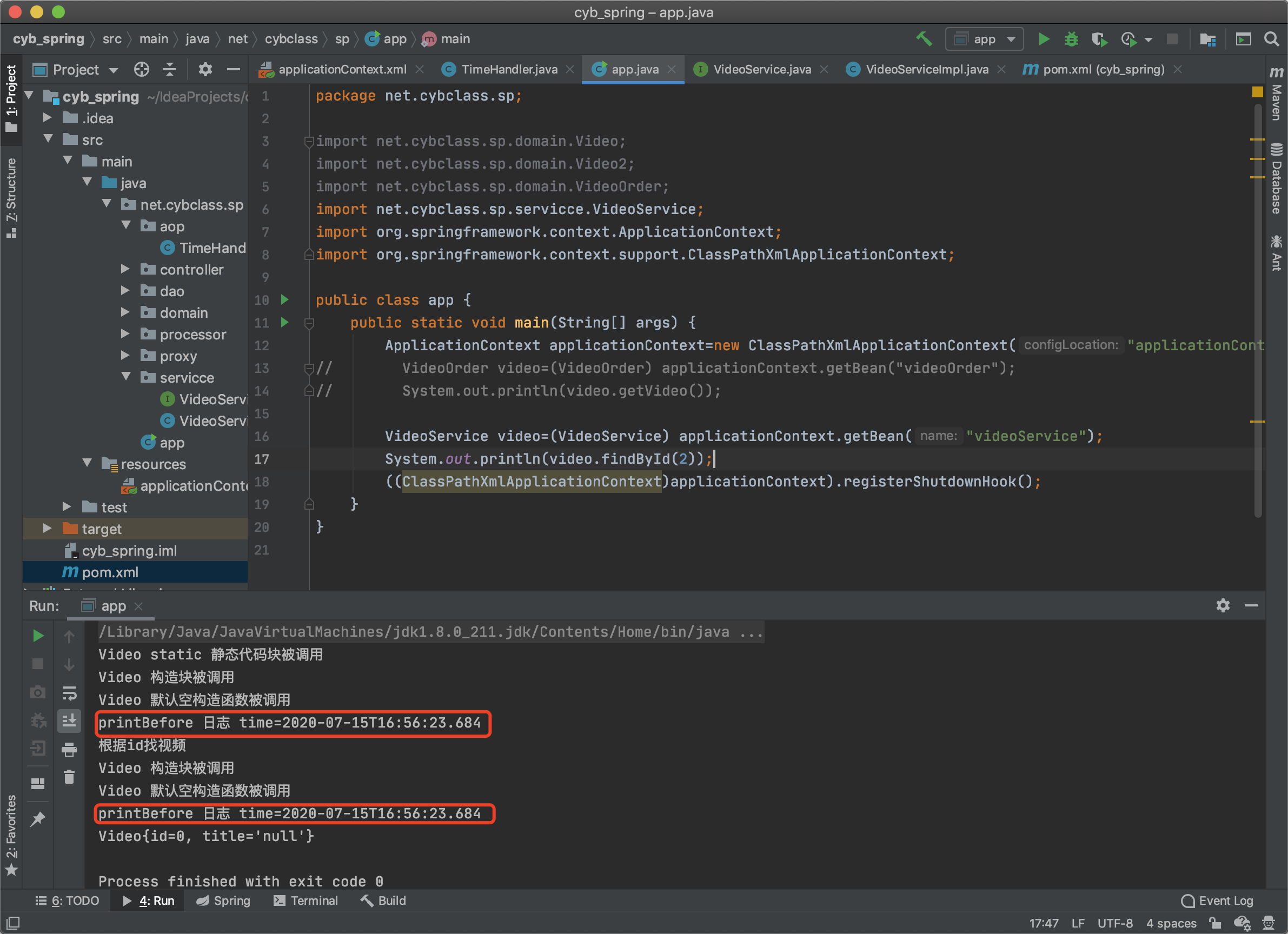
演示
Spring的AOP快速实现通用日志打印的更多相关文章
- 【spring】aop切面通知,日志处理
1.spring的切面编程 概念原理可以看这里:http://blog.csdn.net/moreevan/article/details/11977115 2.所需要的jar包 maven引入jar ...
- spring boot:使用log4j2做异步日志打印(spring boot 2.3.1)
一,为什么要使用log4j2? log4j2是log4j的升级版, 升级后更有优势: 性能更强/吞吐量大/支持异步 功能扩展/支持插件/支持自定义级别等 这些优 ...
- spring boot aop 自定义注解 实现 日志检验 权限过滤
核心代码: package com.tran.demo.aspect; import java.lang.reflect.Method; import java.time.LocalDateTime; ...
- Spring系列.AOP使用
AOP简介 利用面向对象的方法可以很好的组织代码,也可以继承的方式实现代码重用.但是项目中总是会出现一些重复的代码,并且不太方便使用继承的方式把他们重用管理起来,比如说通用日志打印,事务处理和安全检查 ...
- 采用Spring AOP+Log4j记录项目日志
转载请注明出处:http://www.cnblogs.com/Joanna-Yan/p/6567672.html 项目日志记录是项目开发.运营必不可少的内容,有了它可以对系统有整体的把控,出现任何问题 ...
- Spring AOP+Log4j记录项目日志
转载请注明出处:http://www.cnblogs.com/Joanna-Yan/p/6567672.html 项目日志记录是项目开发.运营必不可少的内容,有了它可以对系统有整体的把控,出现任何问题 ...
- spring AOP知识点总结以及日志的输出
AOP的作用就是在基于OCP在不改变原有系统核心业务代码的基础上动态添加一些扩展功能.通常应用于日志的处理,事务处理,权限处理,缓存处理等等 首先,使用AOP需要添加的依赖有:spring-conte ...
- 基于XML配置的AOP实现日志打印
Spring中可以使用注解或XML文件配置的方式实现AOP.1.导入jar包 com.springsource.net.sf.cglib -2.2.0.jar com.springsource.org ...
- 简单的aop实现日志打印(切入点表达式)
Spring中可以使用注解或XML文件配置的方式实现AOP. 1.导入jar包 com.springsource.net.sf.cglib -2.2.0.jar com.springsource.or ...
- AOP与Filter拦截请求打印日志实用例子
相信各位同道在写代码的时候,肯定会写一些日志打印,因为这对往后的运维而言,至关重要的. 那么我们请求一个restfull接口的时候,哪些信息是应该被日志记录的呢? 以下做了一个基本的简单例子,这里只是 ...
随机推荐
- centos 文件系统权限
模板:drwxrwxrwx r表是读 (Read) .w表示写 (Write) .x表示执行 (eXecute) 读.写.运行三项权限可以用数字表示,就是r=4,w=2,x=1, 777就是rwxrw ...
- 可以远程剪视频、做PS设计的远程控制软件体验
编辑切换为居中 在这里插入图片描述 远程连接 资源共享的新时代 过去很长一段时间,计算机网络最主要的用途就是分享数据资源.进入新时代,伴随网络的高速发展以及云计算等技术的发展,我们进入了不仅仅是数 ...
- 2023年的Clion内建立多个子项目(保姆级教程)
目录 下载插件C/C++ Single File Execution 项目操作 其他操作 下载插件C/C++ Single File Execution 项目操作 1.新建项目-->如图所示操作 ...
- dotnet 命令行工具解决方案 PomeloCli
PomeloCli 是什么 中文版 English version 我们已经有相当多的命令行工具实现或解析类库,PomeloCli 并不是替代版本,它基于 Nate McMaster 的杰出工作 Co ...
- 启动Django项目的方式
方式一: python manage.py runserver 方式二: # 加上监听地址和端口 python manage.py runserver 0.0.0.0:8080 方式三: 使用 Pyc ...
- kubernetes 二次开发-认证,鉴权(1)
基于webhook的认证 授权过程 认证授权服务需要满足如下kubernetes的规范 kubernetes api-server组件发送 http post 请求 url:https://authn ...
- MySQL学习笔记-数据控制语言
SQL-数据控制语言(DCL) DCL语句用于管理数据库用户,控制数据库的访问权限 一. 管理用户 1. 查询用户 # 访问mysql数据库 use mysql; #查询user表 select * ...
- Cygwin安装及简单说明
1 简介 官方说明:Cygwin is a Linux-like environment for Windows. It consists of a DLL (cygwin1.dll), which ...
- react 高阶函数
HOC(Higher Order Components)就是一个函数,传给它一个组件,它返回一个新的组件. 高阶组件:就相当于手机壳,通过包装组件,增强组件功能. 实现步骤: 首先创建一个函数 指定函 ...
- 关于前三次pta的总结
前言 这三次pta难度在不断上升的同时,要求我们线上慕课+自主学习来了解更多的java中的各种方法,如:正则表达式 List Map等.与此同时要求我们展开尝试并熟练类的构造,类的引用,链表的基本运用 ...