
Matplotlib---柱状图、直方图(高斯分布)
# _*_ coding: gbk _*_

# @Author: Wonde

# bar 直方图

import matplotlib.pyplot as plt  # 绘图

from matplotlib.font_manager import FontProperties  # 管理字体

font = FontProperties(fname=r'STLITI.TTF')  # 设置字体 设置路径即可

plt.style.use('ggplot')  # 样式可选,默认ggplot和classic

# print(plt.style.available)  #查看可以使用的背景样式

classes = ['class1', 'class2', 'class3', 'class4']  # x轴数据

studentnum = [11, 21, 33, 25]    # y轴数据

classes_index = range(len(classes))  # 传一个可迭代对象range是一个可迭代对象,目的是为了让非数字的X轴均匀分布,通过索引实现

#画布设计

fig = plt.figure()  #实例化一个对象

ax1 = fig.add_subplot(1, 1, 1)  # 将一个画布分为几(1)行(1)列以及选定第(1)张add_subplot(1, 1, 1)

ax1.bar(classes_index, studentnum)  # 设置一些参数

# def bar(self, x, height, width=0.8, bottom=None, *, align="center",**kwargs):

# 设置刻度值的显示位置

ax1.xaxis.set_ticks_position('bottom')  # 刻度 x的刻度在底部,y的刻度在左边

ax1.yaxis.set_ticks_position('left')

#设置X轴的刻度和数据,X轴因为不是具体数据,故用他所在的数组位置进行等差取值。

plt.xticks(classes_index, classes, rotation=0, fontsize=12, FontProperties=font)

# 设置x和y轴以及标题栏的名字

plt.xlabel('班级', FontProperties=font, Fontsize=15)

plt.ylabel('学生人数', FontProperties=font, Fontsize=15)

plt.title('班级----学生人数', FontProperties=font, Fontsize=19)

plt.show()
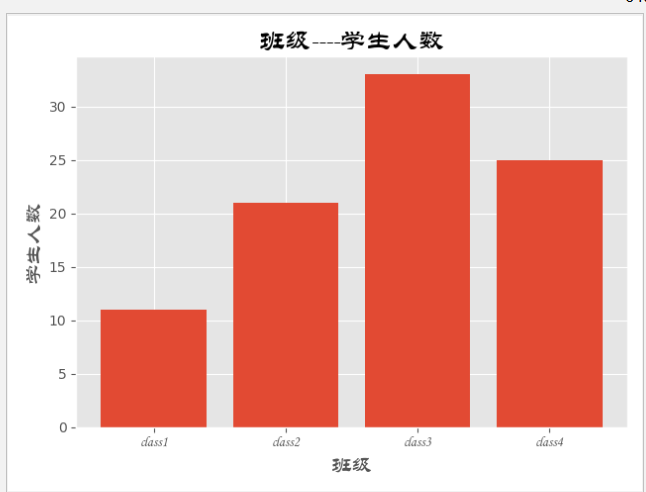
****************************************************************************************************************************************************
# _*_ coding: gbk _*_

# @Author: Wonde

# bar 直方图

import matplotlib.pyplot as plt  # 绘图

from matplotlib.font_manager import FontProperties  # 管理字体

font = FontProperties(fname=r'STLITI.TTF')  # 设置字体 设置路径即可

plt.style.use('ggplot')  # 样式可选,默认ggplot和classic

# print(plt.style.available)  #查看可以使用的背景样式

classes = ['class1', 'class2', 'class3', 'class4']  # x轴数据

studentnum = [11, 21, 33, 25]    # y轴数据

classes_index = range(len(classes))  # 传一个可迭代对象range是一个可迭代对象

#画布设计

fig = plt.figure()  #实例化一个对象

ax1 = fig.add_subplot(1, 1, 1)  # 将一个画布分为几(1)行(1)列以及选定第(1)张add_subplot(1, 1, 1)

ax1.barh( classes_index, studentnum)  # 设置一些参数

#     def barh(self, y, width, height=0.8, left=None, *, align="center",**kwargs):

# 设置刻度值的显示位置

ax1.xaxis.set_ticks_position('bottom')  # 刻度 x的刻度在底部,y的刻度在左边

ax1.yaxis.set_ticks_position('left')

# yticks设置y轴的刻度值 和数据,此时Y轴是班级,不是一个具体数值,所以需要用索引来做均分间隔。

plt.yticks(classes_index, classes, rotation=0, fontsize=12, FontProperties=font)

# 设置x和y轴以及标题栏的名字

plt.xlabel('学生人数', FontProperties=font, Fontsize=15)

plt.ylabel('班级', FontProperties=font, Fontsize=15)

plt.title('班级----学生人数', FontProperties=font, Fontsize=19)

plt.show()

重在理解!!!
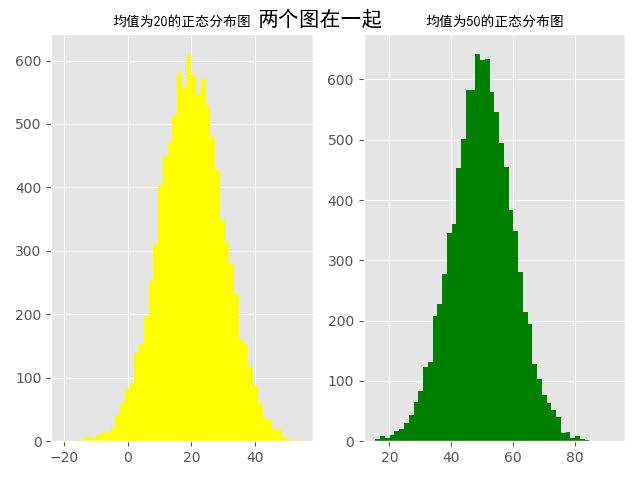
高斯分布,又称为正态分布。秘籍的直方图可以绘制出高斯分布图
# _*_ coding: gbk _*_

# @Author: Wonder

import numpy as np

import matplotlib.pyplot as plt

from matplotlib.font_manager import FontProperties

font = FontProperties(fname='simhei.ttf')

plt.style.use('ggplot')

num1, num2, sigama = , ,

# 构造符合均值为20的正态分布,以及均值为50的正态分布。

x1 = num1 + sigama * np.random.randn()  # 10000为构造随机数的个数

x2 = num2 + sigama * np.random.randn()

fig = plt.figure()  # 初始化画板

ax1 = fig.add_subplot(, , )

ax1.hist(x1, bins=, color='yellow')  # bins=50表示分成50份,即会有50个直方图组成正态分布大图

ax2 = fig.add_subplot()

ax2.hist(x2, bins=, color='green')

fig.suptitle('两个图在一起', fontproperties=font, fontweight='bold',

             fontsize=)  # fontweight为字体粗细,bold为粗体,fontproperties字体属性

ax1.set_title('均值为20的正态分布图', fontproperties=font)

ax2.set_title('均值为50的正态分布图', fontproperties=font)

plt.show()
Matplotlib---柱状图、直方图(高斯分布)的更多相关文章
- numpy和matplotlib绘制直方图
使用 Matplotlib Matplotlib 中有直方图绘制函数:matplotlib.pyplot.hist()它可以直接统计并绘制直方图.你应该使用函数 calcHist() 或 np.his ...
- NumPy使用 Matplotlib 绘制直方图
NumPy - 使用 Matplotlib 绘制直方图 NumPy 有一个numpy.histogram()函数,它是数据的频率分布的图形表示. 水平尺寸相等的矩形对应于类间隔,称为bin,变量hei ...
- matplotlib 柱状图、饼图;直方图、盒图
#-*- coding: utf-8 -*- import matplotlib.pyplot as plt import numpy as np import matplotlib as mpl m ...
- matplotlib绘制直方图【柱状图】
代码: def drawBar(): xticks = ['A', 'B', 'C', 'D', 'E']#每个柱的下标说明 gradeGroup = {'A':200,'B':250,'C':330 ...
- matplotlib柱状图、面积图、直方图、散点图、极坐标图、箱型图
一.柱状图 1.通过obj.plot() 柱状图用bar表示,可通过obj.plot(kind='bar')或者obj.plot.bar()生成:在柱状图中添加参数stacked=True,会形成堆叠 ...
- 【Python】模块学习之matplotlib柱状图、饼状图、动态图及解决中文显示问题
前言 众所周知,通过数据绘图,我们可以将枯燥的数字转换成容易被人们接受的图表,从而让人留下更加深刻的印象.而大多数编程语言都有自己的绘图工具,matplotlib就是基于Python的绘图工具包,使用 ...
- matplotlib柱状图-【老鱼学matplotlib】
柱状图在平常的图表中是非常常用的图,本节我们来看下如何来显示柱状图. 代码为: import numpy as np import pandas as pd import matplotlib.pyp ...
- 关于matplotlib绘制直方图偏移的问题
在使用pyplot绘制直方图的时候我发现了一个问题,在给函数.hist()传参的时候,如果传入的组数不是刚刚好(就是说这个组数如果是使用(最大值-最小值)/组距计算出来,而这个数字不是整除得来而是取整 ...
- Python:matplotlib绘制直方图
使用hist方法来绘制直方图: 绘制直方图,最主要的是一个数据集data和需要划分的区间数量bins,另外你也可以设置一些颜色.类型参数: plt.hist(np.random.randn(1 ...
随机推荐
- static变量、static函数与普通变量、普通函数的区别
转自:http://blog.163.com/sunshine_linting/blog/static/44893323201191294825184/ 全局变量(外部变量)的说明之前再冠以stati ...
- vue-cli中进行微信支付代码详解
最近做微信支付,颇经历一番波折,这里总结一下,便于以后少走弯路: 在进行微信支付,除了需要公众号之外,你还需要一个微信商户.根据商户规则进行商户申请 这是公众号的基本开发配置,这里在微信授权的时候就已 ...
- 在 Keil uVision4 MDK下配置开发STM32F103Z完整教程
转载的,请原作者勿怪,以下为原链接: http://www.51hei.com/bbs/dpj-30359-1.html(欢迎直接查看原作者) 环境搭建: 1.安装 Keil uVision4 MDK ...
- vt-is-UTF8 - check whether current VT is in UTF8- or byte-mode. 检查当前VT是否处于VTF8模式或是字节模式.
总览 vt-is-UTF8 [-h|--help] [-V|--version] [-q|--quiet] 描述 vt-is-UTF8 checks whether the current VT is ...
- shell脚本实现批量端口扫描
#!/bin/bash # Telnet Batach readonly TMOUT= ip_prefix="192.168" ip_network_range="80- ...
- Peasy.NET学习之并发问题处理
Peasy.net之并发处理 BusinessServiceBase是ServiceBase的自定义实现,提供了额外的独特功能 首先,创建一个业务服务,该业务服务必须继承BusinessService ...
- IOS 表单含有input框和有position: fixed导致错位的问题
在input框聚焦失焦的时候,都调用以下js即可 setScrollTop() { let scrollTop = document.body.scrollTop + document.documen ...
- Vue.js 监听属性
demo <!DOCTYPE html> <html lang="en"> <head> <meta charset="utf- ...
- leetcood学习笔记-404-左叶子之和
题目描述: 方法一:递归 class Solution: def sumOfLeftLeaves(self, root: TreeNode) -> int: if not root: retur ...
- 线程池 一 ThreadPoolExecutor
java.util.concurrent public class ThreadPoolExecutor extends AbstractExecutorService ThreadPoolExecu ...