
表结构修改以及sql增删改查
修改表结构
修改表名
alter table 表名 rename 新名
增加字段
alter table 表名 add 字段名 数据类型 约束
删除字段
alter table 表名 drop 字段名
修改字段
alter table 表名 change 旧字段名 新字段名 数据类型 约束条件
修改字段顺序
alter table 表名 add 字段名 数据类型 约束条件 first

#将该字段放在第一行

alter table 表名 add 字段名 数据类型 约束条件 after 字段名2

#将新添的字段放在字段名2后面
增删改查
增
insert into upd01 select * from upd02;

insert into upd02(select id,name from upd03);

insert into upd03(id,name)(select * from upd01);
删
delete from 表名;

delete from 表名 where 条件;

truncate table 表名;
改
update 表名 set 字段1="新值1",字段2="新值2" where 字段="值";
单表查
concat拼接
select concat("姓名:",字段1,"年龄",字段2) from 表名;

#拼接

select concat_ws(":",字段1,字段2) from employee;

#按照指定字符拼接
as设置别名
select 字段,字段名*12 as 别名 from 表名;

#设置别名
加减乘除
select 字段,字段名*12 from 表名;

#对字段值进行运算 加减乘除
distinct去重
select distinct 字段 from 表名;

#对结果去重

select distinct 字段,字段2 from 表名;

#对多个字段结果去重
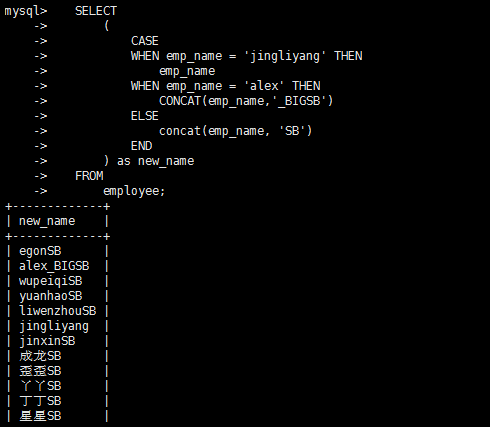
case语句
select

	(

		case

		when 条件1

		then 结果1

		when 条件2

		then 结果2

		end

	)

from 表名;
where判断
比较运算符
select emp_name,age from employee where post = "teacher" and age > 30;
between
select emp_name,age from employee where post = "teacher" and salary between 9000 and 10000;

#between 9000 and 10000 意思就是9000到10000
in
select emp_name,age from employee where post = "teacher" and salary in (9000,10000,30000);

#查看岗位是teacher且薪资是10000或9000或30000的员工姓名、年龄、薪资
not in
select emp_name,age from employee where post = "teacher" and salary not in (9000,10000,30000);

#查看岗位是teacher且薪资不是10000或9000或30000的员工姓名、年龄、薪资
是否为空
select emp_name from employee where post_comment is not null;

#查看岗位描述不为NULL的员工信息
模糊查询
select emp_name,salary*12 from employee where post='teacher' and emp_name like 'jin%';

#查看岗位是teacher且名字是jin开头的员工姓名、年薪
正则表达式
SELECT * FROM employee WHERE emp_name REGEXP '^ale';

#查询emp_name以ale开头的的所有数据

SELECT * FROM employee WHERE emp_name REGEXP 'on$';

#查询emp_name以on结尾的所有数据

select * from employee where emp_name regexp "^jin.*[gn]$";

查看所有员工中名字是jin开头,n或者g结果的员工信息
group by分组
group by 字段

#表示根据这个字段分组

select * from 表名 group by 字段名
group_concat
分组后显示各组的数据

聚合函数
count()
- 总条数
select post,count(id) from employee group by post;
max()
- 最大值
select max(age) from employee;
min()
- 最小值
select min(age) from employee;
avg()
- 平均值
select avg(age) from employee;
sum()
- 求和
select sum(age) from employee;
having过滤
- 执行优先级从高到低:where > group by > having
- Where 发生在分组group by之前,因而Where中可以有任意字段,但是绝对不能使用聚合函数
- Having发生在分组group by之后,因而Having中可以使用分组的字段,无法直接取到其他字段,可以使用聚合函数
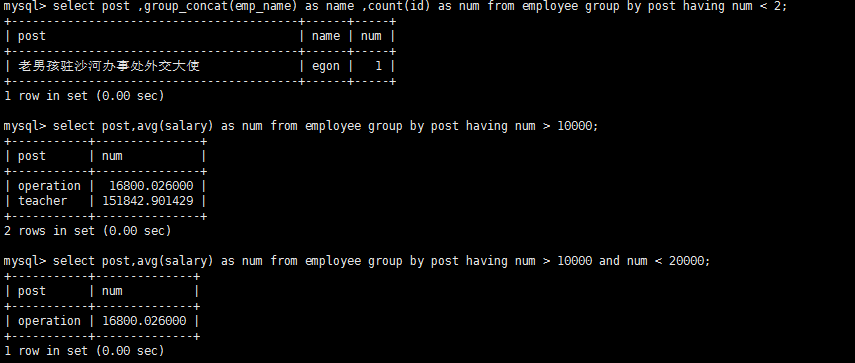
#查询各岗位内包含的员工个数小于2的岗位名、岗位内包含员工名字、个数

select post ,group_concat(emp_name) as name ,count(id) as num from employee group by post having num < 2;

#查询各岗位平均薪资大于10000的岗位名、平均工资

select post,avg(salary) as num from employee group by post having num > 10000;

#查询各岗位平均薪资大于10000且小于20000的岗位名、平均工资

select post,avg(salary) as num from employee group by post having num > 10000 and num < 20000;
order by排序
单列排序
    SELECT * FROM employee ORDER BY salary;  #从小到大

    SELECT * FROM employee ORDER BY salary ASC;  #从小到大

    SELECT * FROM employee ORDER BY salary DESC;  #从大到小
多列排序
#查询所有员工信息,先按照age升序排序,如果age相同则按照hire_date降序排序

select * from employee order by age,hire_date desc;

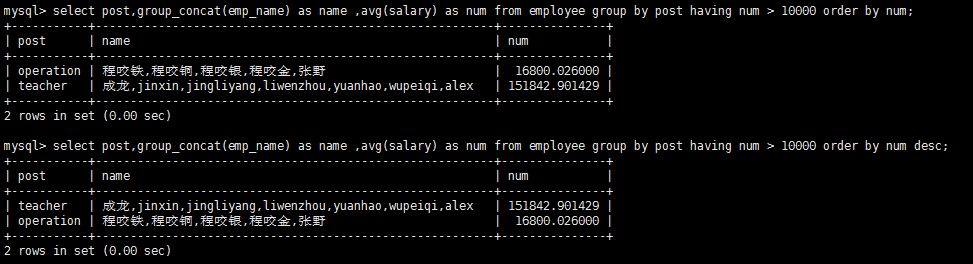
#查询各岗位平均薪资大于10000的岗位名、平均工资,结果按平均薪资升序排列

select post,group_concat(emp_name) as name ,avg(salary) as num from employee group by post having num > 10000 order by num;

#查询各岗位平均薪资大于10000的岗位名、平均工资,结果按平均薪资降序排列

select post,group_concat(emp_name) as name ,avg(salary) as num from employee group by post having num > 10000 order by num desc;
limit记录数
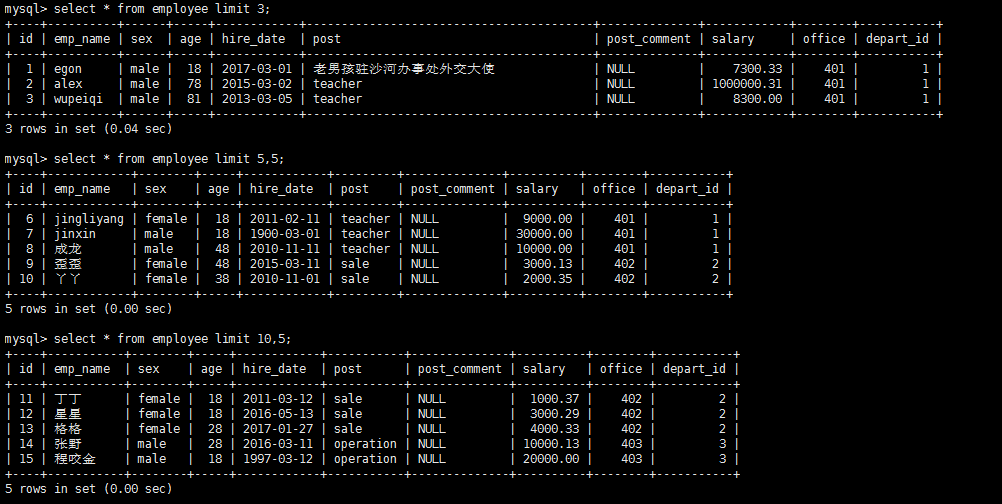
select * from employee limit 3;

#显示三行

select * from employee limit 5,5;

#从第5条开始数,数5条数据,也就是显示6-10行的数据

select * from employee limit 10,5;

#从第10行开始数,数5条数据。
select执行顺序

多表查询
内连接
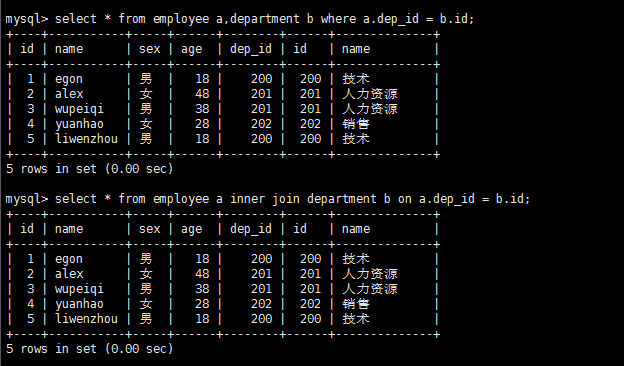
select * from employee a,department b where a.dep_id = b.id;

select * from employee a inner join department b on a.dep_id = b.id;

###两个语句效果一样
外连接之左连接
- left join 优先显示左表的全部记录,就是显示左边有右边没有的结果
select * from employee a left join department b on a.dep_id = b.id
外连接之右连接
- right join 优先显示右表的全部记录,就是显示右边有左边没有的结果
select * from employee a right join department b on a.dep_id = b.id
外连接之全连接
- union
select * from employee a left join department b on a.dep_id = b.id union select * from employee a right join department b on a.dep_id = b.id
- union与union all的区别:union会去掉相同的纪录
子查询
- 带in关键字的子查询
#查询平均年龄在25岁以上的部门名

select id,name from department where id in (select dep_id from employee group by dep_id having avg(age) > 25);

#查看技术部员工姓名

select name from employee where dep_id in (select id from department where name='技术');

#查看不足1人的部门名(子查询得到的是有人的部门id)

select name from department where id not in (select distinct dep_id from employee);
- 带运算符的子查询
#比较运算符:=、!=、>、>=、<、<=、<>

#查询大于所有人平均年龄的员工名与年龄

mysql> select name,age from emp where age > (select avg(age) from emp);

#查询大于部门内平均年龄的员工名、年龄

 select a.name,a.age,b.avg_age from employee a,(select dep_id,avg(age) as avg_age from employee group by dep_id) as b where a.dep_id = b.dep_id and a.age > b.avg_age;
- 带EXISTS关键字的子查询
EXISTS关字键字表示存在。在使用EXISTS关键字时,内层查询语句不返回查询的记录。而是返回一个真假值。True或False

当返回True时,外层查询语句将进行查询;当返回值为False时,外层查询语句不进行查询

#department表中存在dept_id=203,Ture

select * from employee where exists (select id from department where id=200);
表结构修改以及sql增删改查的更多相关文章
- 第三百零七节,Django框架,models.py模块,数据库操作——表类容的增删改查
Django框架,models.py模块,数据库操作——表类容的增删改查 增加数据 create()方法,增加数据 save()方法,写入数据 第一种方式 表类名称(字段=值) 需要save()方法, ...
- 五 Django框架,models.py模块,数据库操作——表类容的增删改查
Django框架,models.py模块,数据库操作——表类容的增删改查 增加数据 create()方法,增加数据 save()方法,写入数据 第一种方式 表类名称(字段=值) 需要save()方法, ...
- 一、数据库表中字段的增删改查,二、路由基础.三、有名无名分组.四、多app共存的路由分配.五、多app共存时模板冲突问题.六、创建app流程.七、路由分发.八、路由别名,九、名称空间.十、反向解析.十一、2.x新特性.十二、自定义转换器
一.数据库表中字段的增删改查 ''' 直接在modules中对字段进行增删改查 然后在tools下点击Run manage.py Task执行makemigrations和migrate 注意在执行字 ...
- Django项目的创建与介绍.应用的创建与介绍.启动项目.pycharm创建启动项目.生命周期.三件套.静态文件.请求及数据.配置Mysql完成数据迁移.单表ORM记录的增删改查
一.Django项目的创建与介绍 ''' 安装Django #在cmd中输入pip3 #出现这个错误Fatal error in launcher: Unable to create process ...
- mysql对库,表及记录的增删改查
破解密码 #1.关闭mysqlnet stop mysqlmysql还在运行时需要输入命令关闭,也可以手动去服务关闭 #2.重新启动mysqld --skip-grant-tables跳过权限 #3m ...
- Oracle学习总结_day01_day02_表的创建_增删改查_约束
本文为博主辛苦总结,希望自己以后返回来看的时候理解更深刻,也希望可以起到帮助初学者的作用. 转载请注明 出自 : luogg的博客园 谢谢配合! 更新: SELECT * FROM (SELECT R ...
- Linq to sql 增删改查(转帖)
http://blog.csdn.net/pan_junbiao/article/details/7015633 (LINQ To SQL 语法及实例大全) 代码 Code highlightin ...
- hibernate课程 初探单表映射3-5 hibernate增删改查
本节简介: 1 增删改查写法 2 查询load和查询get方法的区别 3 demo 1 增删改查写法 增加 session.save() 修改 session.update() 删除 session. ...
- Java代码自动生成,生成前端vue+后端controller、service、dao代码,根据表名自动生成增删改查功能
本项目地址:https://github.com/OceanBBBBbb/ocean-code-generator 项目简介 ocean-code-generator采用(适用): ,并使用m ...
随机推荐
- Lucene之分析器
什么是分析器? 分析(Analysis)在Lucene中指的是将域(Field)文本转换为最基本的索引表示单元—项(Term)的过程. 分析器(Analyzer)对分析操作进行了封装,通过执行一系列操 ...
- Nuget打包没有注释显示
1.选中项目-->属性-->生成-->选中 XML文档文件(xml路径和该项目相同) 2.选择生成序列化程序集:自动/开
- (vue操作storage)Vue plugin for work with local storage,session storage and memo
vue-ls https://www.npmjs.com/package/vue-ls NPM npm install vue-ls --save Yarn yarn add vue-ls Usage ...
- python命令行运行django项目, can't open file 'manage.py' 问题解决
找到manage.py的绝对路径即可运行
- 《手把手教你构建自己的 Linux 系统》学习笔记(5)
交叉编译是什么? 交叉编译就是在一个系统上,编译生成另外一个系统运行的程序文件. 「硬件体系结构」和「操作系统」的关系是什么? 硬件体系结构也可以称为架构,主要是通过 CPU 的指令集来进行区分的,操 ...
- vue_day02
vue_day02 1.绑定事件指令 v-on <body> <div id="app"> <button v-on:click="num+ ...
- 简述react、redux、react-redux、redux-saga、dva之间的关系
[react] 定位:React 是一个用于构建用户界面的JavaScript库. 特点:它采用声明范式来描述应用,建立虚拟dom,支持JSX语法,通过react构建组件,能够很好的去复用代码: 缺点 ...
- vue history模式 ios微信分享 踩过的坑
背景:教育项目,整体依赖于微信环境,涉及到微信分享.微信二次分享 问题:vue使用history模式在iso微信下分享设置出错(签名认证错误.分享设置失败) 问题发现路径 1.按照微信公众号官方文档设 ...
- Vmvare扩展虚拟机磁盘大小
Vmvare设置好虚拟机的磁盘大小之后,发现磁盘空间不够了,这个时候怎么扩展磁盘的大小呢? 首先,在确保虚拟机关闭的情况下,右键设置,选择硬盘,扩展,这样就可以增加磁盘的大小. 但是由于未进行分区和磁 ...
- 剑指offer-面试题36-二叉搜索树与双向链表-中序遍历
/* 题目: 将二叉搜索树转化为排序的双向链表,不能创建新的节点, 只能调整节点的指向,返回双向链表的头节点. */ /* 思路: 递归. 二叉搜索树的中序遍历得到的序列是递增序列. 左子树left& ...