
java基础之I/O操作
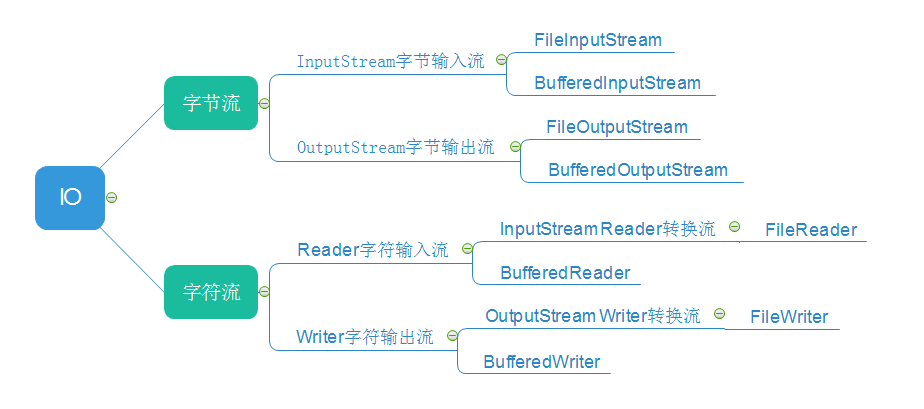
字节流
直接上代码:
import java.io.*;

class Test{

    public static void main(String[] args){

        FileInputStream inputfile = null;

        FileOutputStream outputfile = null;

        try{

            inputfile = new FileInputStream("./input.txt");

            outputfile = new FileOutputStream("./output.txt");

            byte[] buffer = new byte[100];

            int temp = inputfile.read(buffer,0,buffer.length);

            String s = new String(buffer);

            s = s.trim();

            System.out.println(s);

            outputfile.write(buffer,0,temp);

        }

        catch(Exception e){

            System.out.println(e);

        }

    }

}
优化版:
通过循环1M 1M读取文件
import java.io.*;

class Test{

    public static void main(String[] args){

        FileInputStream inputfile = null;

        FileOutputStream outputfile = null;

        try{

            inputfile = new FileInputStream("./input.txt");

            outputfile = new FileOutputStream("./output.txt");

            byte[] buffer = new byte[1024];

            while(true){

                int temp = inputfile.read(buffer,0,buffer.length);

                if(temp == -1){

                    break;

                }

                outputfile.write(buffer,0,temp);

            }

        }

        catch(Exception e){

            System.out.println(e);

        }

        finally{

            try{

                inputfile.close();

                outputfile.close();

            }

            catch(Exception e){

                System.out.println(e);

            }

        }

    }

}
字符流
import java.io.*;

class TestString{

    public static void main(String[] args){

        FileReader inputfile = null;

        FileWriter outputfile = null;

        try{

            inputfile = new FileReader("./input.txt");

            outputfile = new FileWriter("./output.txt");

            char[] buffer = new char[1024];

            while(true){

                int temp = inputfile.read(buffer,0,buffer.length);

                if(temp == -1){

                    break;

                }

                outputfile.write(buffer,0,temp);

            }

        }

        catch(Exception e){

            System.out.println(e);

        }

        finally{

            try{

                inputfile.close();

                outputfile.close();

            }

            catch(Exception e){

                System.out.println(e);

            }

        }

    }

}
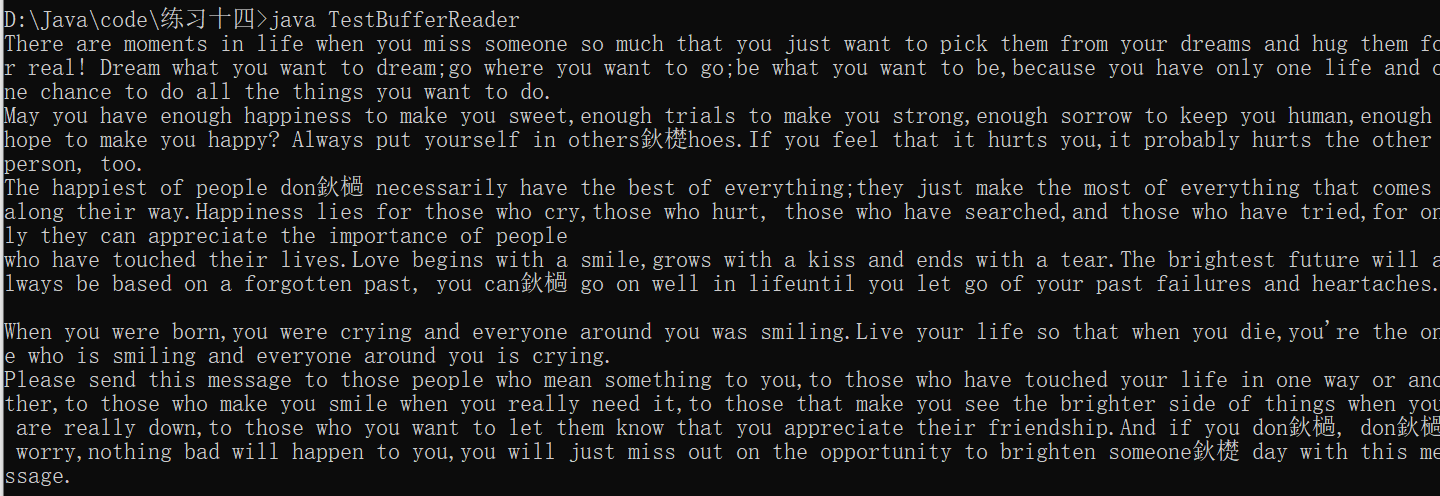
BufferedReader.readLine
import java.io.*;

class TestBufferReader{

    public static void main(String[] args){

        FileReader fileReader = null;

        BufferedReader bufferReader = null;

        try{

            fileReader = new FileReader("./input.txt");

            bufferReader = new BufferedReader(fileReader);

            String line =null;

            while(true){

                line = bufferReader.readLine();

                if(line == null){

                    break;

                }

                System.out.println(line);

            }

        }

        catch(Exception e){

            System.out.println(e);

        }

    }

}
java基础之I/O操作的更多相关文章
- Java基础之原生JDBC操作数据库
前言 日常开发中,我们都习惯了使用ORM框架来帮我们操作数据库,本文复习.记录Java如何使用原生JDBC操作数据库 代码编写 封装几个简单方法 find查询方法 findOne查询方法 update ...
- Java基础知识系列——目录操作
Java对目录操作的许多方法与上一篇文件操作的方法很多是一样的. java.io.File file = new File( "D:\1\2\3\4"); 1.递归创建目录 fil ...
- Java基础知识系列——文件操作
对文件进行操作在编程中比较少用,但是我最近有一个任务需要用到对文件操作. 对文件有如下操作形式: 1.创建新的文件(夹) File fileName = new File("C:/myfil ...
- Java基础知识之文件操作
流与文件的操作在编程中经常遇到,与C语言只有单一类型File*即可工作良好不同,Java拥有一个包含各种流类型的流家族,其数量超过60个!当然我们没必要去记住这60多个类或接口以及它们的层次结构,理解 ...
- java基础之数组常用操作
常用的对数组进行的操作 1.求数组中最大值,最小值 思路:假设下标为0的元素是最大值,遍历数组,依次跟max进行比较,如果有元素比这个max还大,则把这个值赋给max.最小值同样 public cla ...
- Java基础之cmd入门操作笔记
前提:jdk已安装且环境变量配置成功,参考上文jdk 安装及环境变量配置 入门操作步骤: 1.打开记事本或者notepad,编写Abc代码,具体如下: public class Abc{ pub ...
- android基础篇------------java基础(12)(多线程操作)
<一>基本概念理解 1.什么是进程? 进程就是在某种程度上相互隔离,独立运行的程序.一般来说,系统都是支持多进程操作的,这所谓的多进程就是让系统好像同时运行多个程序. 2.什么是线程呢? ...
- 【Java基础】ArrayList初始化操作
要用60个零初始化列表,请执行以下操作: List<Integer> list = new ArrayList<Integer>(Collections.nCopies(60, ...
- Java基础(命令行操作、注释及API、)
一.常用的dos命令. dir:列出当前目录下的文件及文件夹 md:创建目录 rd:删除目录 cd:进入到指定目录 cd..:退出到上一级目录 cd\:退出到根目录 del:删除文件 exit:退出d ...
随机推荐
- webservice之Http传输错误问题
1.背景:调用第三方webservice服务,正常调用,但是最近由于第三方更换远程调用地址,并且发布服务器(A)是通过代理的方式请求真实服务器地址(B),于是本以为很简单的将客户端调用地址修改为发布地 ...
- JavaScirpt 认识DOM和BOM (汇总)
将HTML代码分解为DOM节点层次图 DOM节点有: 1. 元素节点:上图中<html>.<body>.<p>等都是元素节点,即标签. 2. 文本节点:向用户展示的 ...
- Nginx模块之ngx_http_proxy_module
ngx_http_proxy_module模块: 示例: location / { proxy_pass http://localhost:8000; proxy_set_header Host $h ...
- CF1300E Water Balance
题目链接 problem 给出一个长度为n的序列,每次可以选择一个区间\([l,r]\)并将区间\([l,r]\)内的数字全部变为这些数字的平均数.该操作可以进行任意多次. 求出进行任意次操作后可以得 ...
- ABS与PC材质
PC材料和ABS材料都是最常用的塑料材质,它们在材质.价格.性能上都有不同点. (一)PC材料 优点:PC是一种综合性能优良的非晶型热塑性树脂,具有优异的电绝缘性.延伸性.尺寸稳定性及耐化学腐蚀性,较 ...
- c基本语法和数据类型
一.C语言结构 C 程序主要包括以下部分: 预处理器指令 函数 变量 语句 & 表达式 注释 二.基本语法 1. 分号是语句结束符. 2. 单行注释//.多行注释/* */. 3. 标识符是 ...
- 心理学实验程序编程(python)
任务一:实现简单的屏幕的颜色之间的切换 import pygame from pygame.locals import * pygame.init() win = pygame.display.set ...
- 解决NahimicSvc32.exe与bilibili直播姬的音频不兼容的问题
某次测试哔哩哔哩直播姬的时候发现系统声音采集异常的错误 NahimicSvc32.exe是NahimicService下的程序,奇怪的是我的本本所有硬件没有一个微星有关系,怎么就装上了微星的服务程序? ...
- python的for循环的神奇之处
python的for循环太神奇了: 你可以编写这样的语句: for i in range(10) : j= i**2 print(j) 你也可以编写这样的语句: with open('/path/to ...
- 安装AB到CentOS(YUM)
运行环境 系统版本:CentOS Linux release 7.3.1611 (Core) 软件版本:httpd-tools-2.4.6 硬件要求:无 安装过程 1.安装YUM-EPEL源 HTTP ...