
RedHat版本Linux安装chrome-stable配合chromeDriver进行自动化测试环境准备
一、Linux机器安装google-chrome-stable
1、设置google-chrome软件源
sudo vim /etc/yum.repos.d/google-chrome.repo
[google-chrome]

name=google-chrome

baseurl=http://dl.google.com/linux/chrome/rpm/stable/x86_64

enabled=

gpgcheck=

gpgkey=https://dl.google.com/linux/linux_signing_key.pub
2、安装依赖[过程中如提示有其他依赖缺失,可至https://rpmfind.net/linux/rpm2html/search.php 查询对应名字rpm包 执行sudo yum install -y 安装即可]
sudo yum install https://mirrors.dotsrc.org/fedora-epel/7/x86_64/Packages/e/epel-release-7-11.noarch.rpm -y

sudo yum install Xvfb -y

sudo yum install xorg-x11-fonts* -y

sudo yum install https://rpmfind.net/linux/fedora/linux/development/rawhide/Everything/x86_64/os/Packages/l/liberation-fonts-common-2.00.5-6.fc32.noarch.rpm -y

sudo yum install https://rpmfind.net/linux/fedora/linux/development/rawhide/Everything/x86_64/os/Packages/l/liberation-mono-fonts-2.00.5-6.fc32.noarch.rpm -y

sudo yum install https://rpmfind.net/linux/fedora/linux/development/rawhide/Everything/x86_64/os/Packages/l/liberation-sans-fonts-2.00.5-6.fc32.noarch.rpm -y

sudo yum install https://rpmfind.net/linux/fedora/linux/development/rawhide/Everything/x86_64/os/Packages/l/liberation-serif-fonts-2.00.5-6.fc32.noarch.rpm -y

sudo yum install -y https://rpmfind.net/linux/fedora-secondary/development/rawhide/Everything/ppc64le/os/Packages/l/liberation-fonts-2.00.5-6.fc32.noarch.rpm -y
3、安装google-chrome-stable
sudo yum install google-chrome-stable -y
二、准备客户端【webdriver随客户端发放到服务器】
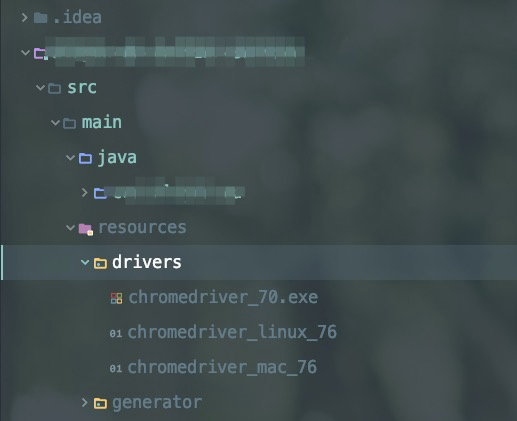
public static WebDriver driver;
/**

     * 初始化Driver

     * @throws Exception

     */

public void initDriver() throws Exception {

     String path;

        File file;

String osName = System.getProperty("os.name").toLowerCase();
          // webdriver 版本做持久化,driver初始化时载入内存,动态调用配置

                if (getClass().getResource("/") == null) {

                    String chromePath = "drivers/".concat(osName.startsWith("windows") ? ContextUtils.getContextStr(CHROME_DRIVER_WINDOWS) : osName.startsWith("mac") ? ContextUtils.getContextStr(CHROME_DRIVER_MAC) : ContextUtils.getContextStr(CHROME_DRIVER_LINUX));

                    path = String.format("%s%starget%s%s", System.getProperty("base.dir"), File.separator, File.separator, chromePath);

                    file = new File(path);

                } else {

                    String chromePath = "drivers/".concat(osName.startsWith("windows") ? ContextUtils.getContextStr(CHROME_DRIVER_WINDOWS) : osName.startsWith("mac") ? ContextUtils.getContextStr(CHROME_DRIVER_MAC) : ContextUtils.getContextStr(CHROME_DRIVER_LINUX));

                    path = String.format("%s%s%s", getClass().getResource("/").getPath(), File.separator, chromePath);

                    file = new File(path);

                    if (file.exists() == false) {

                        FileUtils.copyInputStreamToFile(new ClassPathResource(chromePath).getInputStream(), new File(path));

                    }

                }

                if (!osName.startsWith("windows")) {

                    try {

                        Runtime.getRuntime().exec(String.format("chmod 777 %s", path));

                    } catch (Exception ex) {

                    }

                }

                CartierSystemSettings systemSettings = systemSettingsMapper.selectValueByCode(ChromeDriverService.CHROME_DRIVER_WHITELISTED_IPS_PROPERTY);

                if (null != systemSettings) {

                    System.setProperty(ChromeDriverService.CHROME_DRIVER_WHITELISTED_IPS_PROPERTY, systemSettings.getValue());

                }

                logger.info("webdriver.chrome.driver={}", path);

                System.setProperty(ChromeDriverService.CHROME_DRIVER_EXE_PROPERTY, path);

                ChromeOptions options = getChromeOptions(osName);

                driver = new ChromeDriver(options);

}

/**

     * 对非mac & Windows系统开启隐藏头模式

     * @param osName

     * @return

     */

    public static ChromeOptions getChromeOptions(String osName) {

        ChromeOptions options = new ChromeOptions();

        if (!osName.startsWith("mac") && !osName.startsWith("windows")) {

            options.addArguments("--headless");

            options.addArguments("--disable-gpu");

            options.addArguments("--no-sandbox");

        }

        options.addArguments("--verbose");

        options.addArguments("window-size=1920x1920");

        return options;

    }
RedHat版本Linux安装chrome-stable配合chromeDriver进行自动化测试环境准备的更多相关文章
- 关于Linux部分版本无法安装Chrome的问题
在想要yum安装Chrome浏览器后发现安装没有相应的包,在查询后得知Chrome已经对Redhat和Centos等部分版本停止支持, 所以这些新版的系统中直接安装就显得有些困难了,那么从网上找到了一 ...
- linux安装chrome及chromedriver(转)
1.chrome: curl https://intoli.com/install-google-chrome.sh | bash 1.1.centos安装chrome: 從 Google 下載最新版 ...
- 在Ubuntu上安装Chrome浏览器和ChromeDriver
启动脚本后报错 selenium.common.exceptions.WebDriverException: Message: 'chromedriver' executable may have w ...
- linux安装chrome浏览器
按照下面的方式安装 wget -P /home/linfu/桌面 https://dl.google.com/linux/direct/google-chrome-stable_current_amd ...
- Ubuntu16.4下安装Chrome浏览器以及Chromedriver
一.Chrome浏览器的安装 对于谷歌Chrome32位版本,使用如下链接: wget https://dl.google.com/linux/direct/google-chrome-stable_ ...
- linux 安装 Chrome
一.添加PPA 从Google Linux Repository(http://www.google.com/linuxrepositories/)下载安装Key,或把下面的代码复制进终端,回车,需要 ...
- Redhat/Centos6.x安装Chrome
由于Chrome对rhel6.x不在支持发布版本,只能安装chromium版本! 01.下载地址 http://people.centos.org/hughesjr/chromium/6/x86_64 ...
- linux安装chrome
wget http://chrome.richardlloyd.org.uk/install_chrome.sh chmod u+x install_chrome.sh ./install_chrom ...
- 32位linux安装chrome浏览器
首先你需要一个安装包,可以在CSDN上搜索google-chrome-stable_current_i386.deb. 然后在终端输入 sudo apt-get install gdebi 然后找到安 ...
随机推荐
- ArrayList的几种初始化方法
1.使用Arrays.asList方法 ArrayList<Object> obj = new ArrayList<Object>(Arrays.asList(Object o ...
- Linux下载工具-Wget
一.安装 进入系统后执行: # yum install wget 二.常用命令使用 以下亲测可用:[文件保存在当前命令执行的文件夹中] 1.wget下载单个文件 # wget url(文件地址,如ht ...
- Windows 下安装 nvm 管理 nodejs 版本
摘自https://segmentfault.com/a/1190000007612011 1. 下载安装与使用 Github: Download nvm-windows --- nvm-setup. ...
- xargs使用之空格处理
xargs指定分隔符为'\n' (默认用空格分隔) locate xxx | xargs -d '\n' ls -l xargs使用 -0 参数会以字符串的'\0'结尾为分隔符,可以在文本传给xarg ...
- string参考
#include <iostream> #include <string.h> class string { private: char *data; public: stri ...
- 【luoguP4768】【NOI2018】归程
description 本题的故事发生在魔力之都,在这里我们将为你介绍一些必要的设定. 魔力之都可以抽象成一个 nn 个节点.mm 条边的无向连通图(节点的编号从 11 至 nn).我们依次用 l,a ...
- Unity Document
{ https://docs.unity3d.com/ScriptReference/Events.UnityEventTools.html }
- 富文本 保存转义StringEscapeUtils.unescapeHtml4(
StringEscapeUtils.unescapeHtml4( [org.apache.commons.lang.StringEscapeUtils.escapeHtml(str)] [String ...
- Linux初上手!
虚拟机Virtual Box装的Kali Linux,是Debian的发行版本,安装过程不说了,不是硬盘安装也没什么说的,由于是新手所以只有两个分区,一个[/]和一个[swap] 装好之后是xwind ...
- Android_开发片段(Part 3)
1.Android中的五种布局方式:线性布局(Linear Layout).相对布局(Relative Layout).表格布局(Table Layout).网格视图(Grid View).标签布局( ...