
TensorFlow—多层感知器—MNIST手写数字识别
  1 import tensorflow as tf

 import tensorflow.examples.tutorials.mnist.input_data as input_data

 import matplotlib.pyplot as plt

 import numpy as np

 mnist=input_data.read_data_sets("MNIST_data/",one_hot=True)           #下载据数

 print('train images:',mnist.train.images.shape,                       #查看数据

      'labels:',mnist.train.labels.shape)

 print('validation images:',mnist.validation.images.shape,

      'labels:',mnist.validation.labels.shape)

 print('test images:',mnist.test.images.shape,

      'labels:',mnist.test.labels.shape

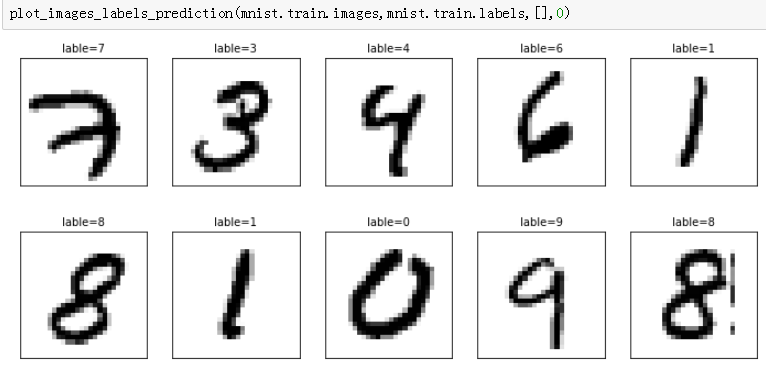
 #定义显示多项图像的函数

 def plot_images_labels_prediction_3(images,labels,prediction,idx,num=):

     fig=plt.gcf()

     fig.set_size_inches(,)

     if num>:num=

     for i in range(,num):

         ax=plt.subplot(,,i+)

         ax.imshow(np.reshape(images[idx],(,)),cmap='binary')

         title='lable='+str(np.argmax(labels[idx]))

         if len(prediction)>:

             title+=",prediction="+str(prediction[idx])

         ax.set_title(title,fontsize=)

         ax.set_xticks([]);ax.set_yticks([])

         idx+=

     plt.show()

 plot_images_labels_prediction_3(mnist.train.images,mnist.train.labels,[],)

 #定义layer函数,构建多层感知器模型

 def layer(output_dim,input_dim,inputs,activation=None):

     W=tf.Variable(tf.random_normal([input_dim,output_dim]))

     b=tf.Variable(tf.random_normal([,output_dim]))

     XWb=tf.matmul(inputs,W)+b

     if activation is None:

         outputs=XWb

     else:

         outputs=activation(XWb)

     return outputs

 #建立输入层

 x=tf.placeholder("float",[None,])

 #建立隐藏层

 h1=layer(output_dim=,input_dim=,inputs=x,

        activation=tf.nn.relu)

 #建立输出层

 y_predict=layer(output_dim=,input_dim=,inputs=h1,

         activation=None)

 y_label=tf.placeholder("float",[None,])

 #定义损失函数

 loss_function=tf.reduce_mean(tf.nn.softmax_cross_entropy_with_logits

                              (logits=y_predict,

                               labels=y_label))

 #定义优化器

 optimizer=tf.train.AdamOptimizer(learning_rate=0.001).minimize(loss_function)

 #计算每一项数据是否预测正确

 correct_prediction=tf.equal(tf.argmax(y_label,),

                             tf.argmax(y_predict,))

 #计算预测正确结果的平均值

 accuracy=tf.reduce_mean(tf.cast(correct_prediction,"float"))

 #、定义训练参数

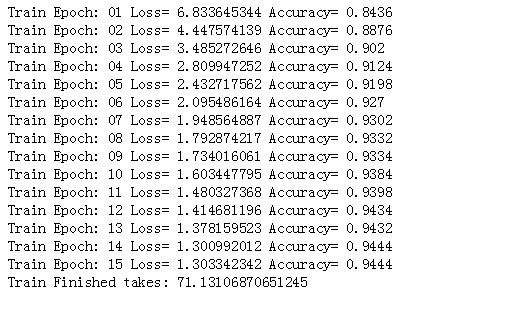
 trainEpochs=                                   #设置执行15个训练周期

 batchSize=                                    #每一批次项数为100

 totalBatchs=int(mnist.train.num_examples/batchSize)        #计算每个训练周期

 loss_list=[];epoch_list=[];accuracy_list=[]      #初始化训练周期、误差、准确率

 from time import time                            #导入时间模块

 startTime=time()                                 #开始计算时间

 sess=tf.Session()                                #建立Session

 sess.run(tf.global_variables_initializer())       #初始化TensorFlow global 变量

 #、进行训练

 for epoch in range(trainEpochs):

     for i in range(totalBatchs):

         batch_x,batch_y=mnist.train.next_batch(batchSize)  #使用mnist.train.next_batch方法读取批次数据,传入参数batchSize是100

         sess.run(optimizer,feed_dict={x:batch_x,

                                       y_label:batch_y})    #执行批次训练

     loss,acc=sess.run([loss_function,accuracy],            #使用验证数据计算准确率

                       feed_dict={x:mnist.validation.images,

                                  y_label:mnist.validation.labels})

     epoch_list.append(epoch);                              #加入训练周期列表

     loss_list.append(loss)                                 #加入误差列表

     accuracy_list.append(acc)                              #加入准确率列表

     print("Train Epoch:",'%02d' % (epoch+),"Loss=",\

           "{:.9f}".format(loss),"Accuracy=",acc)

 duration=time()-startTime

 print("Train Finished takes:",duration)                    #计算并显示全部训练所需时间

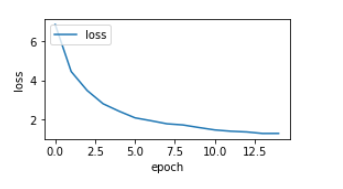
 #画出误差执行结果

 fig=plt.gcf()

 fig.set_size_inches(,)

 plt.plot(epoch_list,loss_list,label='loss')

 plt.ylabel('loss')

 plt.xlabel('epoch')

 plt.legend(['loss'],loc='upper left')

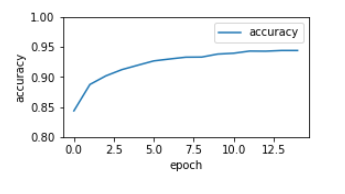
 #画出准确率执行结果

 plt.plot(epoch_list,accuracy_list,label="accuracy")

 fig=plt.gcf()

 fig.set_size_inches(,)

 plt.ylim(0.8,)

 plt.ylabel('accuracy')

 plt.xlabel('epoch')

 plt.legend()

 plt.show()

 #评估模型准确率

 print("accuracy:",sess.run(accuracy,

                            feed_dict={x:mnist.test.images,

                                       y_label:mnist.test.labels}))

 #进行预测

 #.执行预测

 prediction_result=sess.run(tf.argmax(y_predict,),

                            feed_dict={x:mnist.test.images})

 #.预测结果

 print(prediction_result[:])

 #.显示前10项预测结果

 plot_images_labels_prediction_3(mnist.test.images,

                               mnist.test.labels,

                               prediction_result,)
运行结果:

TensorFlow—多层感知器—MNIST手写数字识别的更多相关文章
- 【TensorFlow-windows】(三) 多层感知器进行手写数字识别(mnist)
主要内容: 1.基于多层感知器的mnist手写数字识别(代码注释) 2.该实现中的函数总结 平台: 1.windows 10 64位 2.Anaconda3-4.2.0-Windows-x86_64. ...
- 基于tensorflow的MNIST手写数字识别(二)--入门篇
http://www.jianshu.com/p/4195577585e6 基于tensorflow的MNIST手写字识别(一)--白话卷积神经网络模型 基于tensorflow的MNIST手写数字识 ...
- Tensorflow实现MNIST手写数字识别
之前我们讲了神经网络的起源.单层神经网络.多层神经网络的搭建过程.搭建时要注意到的具体问题.以及解决这些问题的具体方法.本文将通过一个经典的案例:MNIST手写数字识别,以代码的形式来为大家梳理一遍神 ...
- TensorFlow——MNIST手写数字识别
MNIST手写数字识别 MNIST数据集介绍和下载:http://yann.lecun.com/exdb/mnist/ 一.数据集介绍: MNIST是一个入门级的计算机视觉数据集 下载下来的数据集 ...
- mnist手写数字识别——深度学习入门项目(tensorflow+keras+Sequential模型)
前言 今天记录一下深度学习的另外一个入门项目——<mnist数据集手写数字识别>,这是一个入门必备的学习案例,主要使用了tensorflow下的keras网络结构的Sequential模型 ...
- Android+TensorFlow+CNN+MNIST 手写数字识别实现
Android+TensorFlow+CNN+MNIST 手写数字识别实现 SkySeraph 2018 Email:skyseraph00#163.com 更多精彩请直接访问SkySeraph个人站 ...
- Tensorflow之MNIST手写数字识别:分类问题(1)
一.MNIST数据集读取 one hot 独热编码独热编码是一种稀疏向量,其中:一个向量设为1,其他元素均设为0.独热编码常用于表示拥有有限个可能值的字符串或标识符优点: 1.将离散特征的取值扩展 ...
- 基于TensorFlow的MNIST手写数字识别-初级
一:MNIST数据集 下载地址 MNIST是一个包含很多手写数字图片的数据集,一共4个二进制压缩文件 分别是test set images,test set labels,training se ...
- 持久化的基于L2正则化和平均滑动模型的MNIST手写数字识别模型
持久化的基于L2正则化和平均滑动模型的MNIST手写数字识别模型 觉得有用的话,欢迎一起讨论相互学习~Follow Me 参考文献Tensorflow实战Google深度学习框架 实验平台: Tens ...
随机推荐
- springMVC参数绑定JSON类型的数据
需求就是: 现在保存一个Student,并且保存Student的friend,一个student会有多个朋友,这里要传递到后台的参数是: var friends = new Array(); var ...
- 神奇的null和undefined
在JavaScript中,有两个特殊的类型存在,它们都只有一个值,分别null和undefined,之所以将它们放在一块,是因为在使用方面它们有很多相似之处. 相同点 在JavaScript中,nul ...
- Nginx的ip_hash指令
ip_hash 语法:ip_hash 默认值:none 使用环境:upstream 当对后端的多台动态应用服务器做负载均衡时,ip_hash指令能够将某个客户端IP的请求通过哈希算法定位到同一台后端服 ...
- 将ESXI所有的端口组迁移到分布式交换机的步骤
1.如果是DELL服务器,一般有2-4个网口,那么所有的网口都把网线插到交换机上:2.DELL安装ESXI系统,根据不同的DELL硬件,要安装不同的ESXI版本.原则上越高版本,支持的硬件越多向下兼容 ...
- 推荐一个lamp的一键安装包
本来我是一直用的nginx的,现在安全者的服务器是用的tengine,稳定性就不用多说了! 前段时间用thinkphp写了两个两个项目,刚开始放到了国外的服务器上,环境也是lnmp的,最后发现ngin ...
- 浅析Spring框架之一(Spring简介)
免责声明 本文为鄙人搜集网络资源并结合自己所思所得整理而成,如有侵权,敬请谅解. 何为spring框架 Spring是一个开源的轻量级控制反转(IoC)和面向切面(AOP)的容器框架. ◆目的:解决企 ...
- JDK1.5多线程提高
1.名词: 1.任务的执行与任务的提交解耦 2.任务的执行策略-可中断,取消 2.线程封闭机制: 针对单线程池而言,提高任务执行的速度,但是无需锁定 3.饥饿死锁: 任务长期得不到执行,其实就是形成闭 ...
- /PROC/MEMINFO之谜
网站转自:http://linuxperf.com/?p=142 非常技术的网站,够看上一阵子的(一篇文章) /proc/meminfo是了解Linux系统内存使用状况的主要接口,我们最常用的”fre ...
- webpack(4)--module
Module module的配置如何处理模块. 配置Loader rules 配置模块的读取和解析规则, 通常用来配置loader, 其类型是一个数组, 数组里每一项都描述了如何去处理部分文件. 配置 ...
- 常用数据库4 mongodb
知识内容: 1.mongodb介绍与基本使用 2.mongodb操作 一.mongodb介绍与基本使用 1.mongodb介绍 Mongodb是一款强大,灵活,且易于扩展的通用型数据库.它能扩展出非常 ...