
自定义ViewGroup添加布局动画
声明几个属性值:
<declare-styleable name="GridImageViewGroup">

     <attr name="childVerticalSpace" format="dimension"/>

     <attr name="childHorizontalSpace" format="dimension"/>

     <attr name="columnNum" format="integer"/>

</declare-styleable>
GridImageViewGroup.java 代码:
 public class GridImageViewGroup extends ViewGroup {

     private int childVerticalSpace = ;

     private int childHorizontalSpace = ;

     private int columnNum = ;

     private int childWidth = ;

     private int childHeight = ;

     public GridImageViewGroup(Context context, AttributeSet attrs) {

         super(context, attrs);

         TypedArray attributes = context.obtainStyledAttributes(attrs, R.styleable.GridImageViewGroup);

         if (attributes != null) {

             childVerticalSpace = attributes.getDimensionPixelSize(R.styleable.GridImageViewGroup_childVerticalSpace, );

             childHorizontalSpace = attributes.getDimensionPixelSize(R.styleable.GridImageViewGroup_childHorizontalSpace, );

             columnNum = attributes.getInt(R.styleable.GridImageViewGroup_columnNum, );

             attributes.recycle();

         }

     }

     @Override

     protected void onMeasure(int widthMeasureSpec, int heightMeasureSpec) {

         super.onMeasure(widthMeasureSpec, heightMeasureSpec);

         int rw = MeasureSpec.getSize(widthMeasureSpec);

         int rh = MeasureSpec.getSize(heightMeasureSpec);

         int childCount = getChildCount();

         if (childCount > ) {

             childWidth = (rw - (columnNum - ) * childHorizontalSpace) / columnNum;

             childHeight = childWidth;

             int vw = rw;

             if (childCount < columnNum) {

                 vw = childCount * (childHeight + childVerticalSpace);

             }

             int rowCount = childCount / columnNum + (childCount % columnNum !=  ?  : );

             int vh = rowCount * childHeight + (rowCount >  ? rowCount -  : ) * childVerticalSpace;

             setMeasuredDimension(vw, vh);

         }

     }

     @Override

     protected void onLayout(boolean changed, int l, int t, int r, int b) {

         int left = ;

         int top = ;

         int count = getChildCount();

         for (int i = ; i < count; i++) {

             View child = getChildAt(i);

             left = (i % columnNum) * (childWidth + childHorizontalSpace);

             top = (i / columnNum) * (childHeight + childVerticalSpace);

             child.layout(left, top, left + childWidth, top + childHeight);

         }

     }
在xml中引用:
 <com.whoislcj.animation.GridImageViewGroup

             android:id="@+id/image_layout"

             android:layout_width="match_parent"

             android:layout_height="wrap_content"

             android:layout_margin="10dp"

             android:animateLayoutChanges="true"

             lee:childHorizontalSpace="10dp"

             lee:childVerticalSpace="10dp"

             lee:columnNum=""/>
在Activity中调用:
 private void initViews() {

         mImageViewGroup = (GridImageViewGroup) findViewById(R.id.image_layout);

         ImageView imageView = new ImageView(this);

         imageView.setImageResource(R.mipmap.add_image);

         imageView.setOnClickListener(new View.OnClickListener() {

             @Override

             public void onClick(View v) {

                 addImageView();

             }

         });

         mImageViewGroup.addView(imageView);

     }

     public void addImageView() {

         final ImageView imageView = new ImageView(MainActivity4.this);

         imageView.setImageResource(R.mipmap.lottery);

         imageView.setOnClickListener(new View.OnClickListener() {

             @Override

             public void onClick(View v) {

                 mImageViewGroup.removeView(imageView);

             }

         });

         mImageViewGroup.addView(imageView, );

     }
实现效果如下:
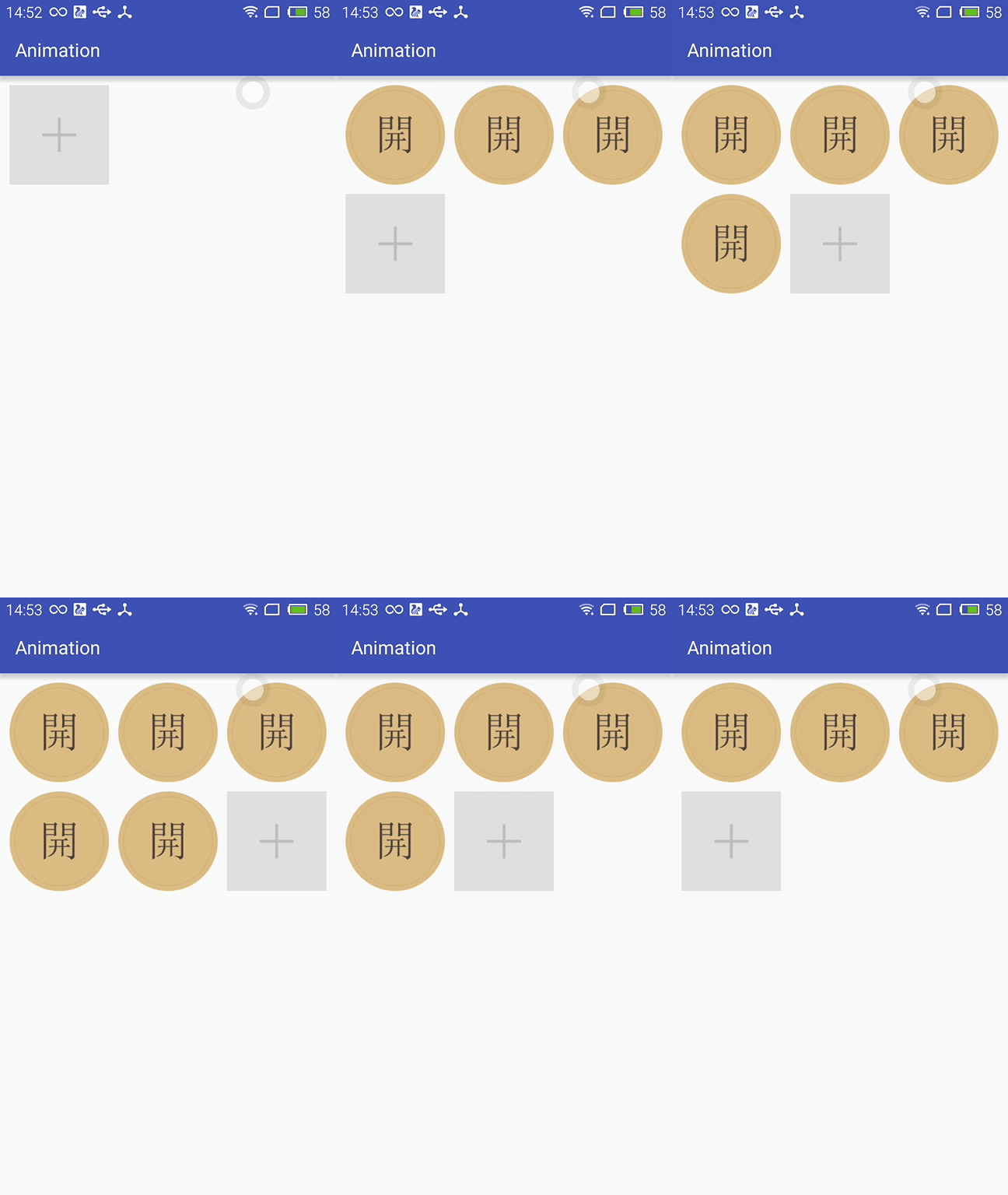
布局动画产生的背景:
凡事总要问个明白,为何要引入布局动画呢?其实通过上面的实现效果可以看出,在添加和删除图片时都显得很突兀,不知道该用什么语言形容了,总之就是感觉不舒服。其实我平时在开发中调用View.setVisibility()方法时也会有这种感受,这也是布局动画产生的一个背景吧。
布局动画:
布局动画是指ViewGroup在布局时产生的动画效果 。实现布局动画有如下几种方式
第一种方式:在xml中,对ViewGrope设置android:animateLayoutChanges="true"属性:
 <com.whoislcj.animation.GridImageViewGroup

             android:id="@+id/image_layout"

             android:layout_width="match_parent"

             android:layout_height="wrap_content"

             android:layout_margin="10dp"

             android:animateLayoutChanges="true"

             lee:childHorizontalSpace="10dp"

             lee:childVerticalSpace="10dp"

             lee:columnNum=""/>
就这么简单的一句话实现的效果就可以实现了,看看效果如何
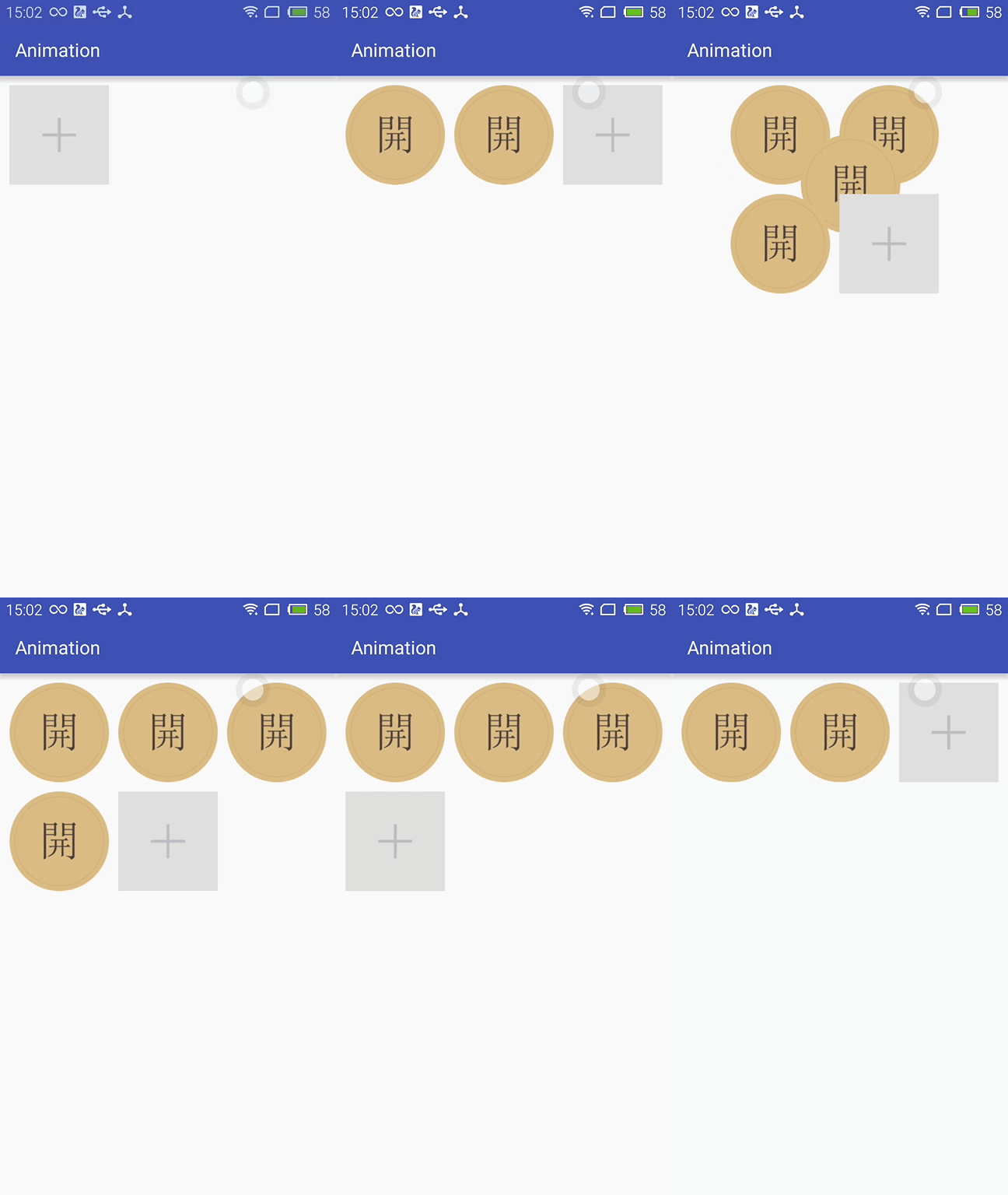
这种方式虽然简单但是实现的布局动画比较单一,下面看第二种方式。
第二种方式:LayoutTransition实现
 LayoutTransition mLayoutTransition = new LayoutTransition();

         //设置每个动画持续的时间

         mLayoutTransition.setStagger(LayoutTransition.CHANGE_APPEARING, );

         mLayoutTransition.setStagger(LayoutTransition.CHANGE_DISAPPEARING, );

         mLayoutTransition.setStagger(LayoutTransition.APPEARING, );

         mLayoutTransition.setStagger(LayoutTransition.DISAPPEARING, );

         PropertyValuesHolder appearingScaleX = PropertyValuesHolder.ofFloat("scaleX", 0.5f, 1.0f);

         PropertyValuesHolder appearingScaleY = PropertyValuesHolder.ofFloat("scaleY", 0.5f, 1.0f);

         PropertyValuesHolder appearingAlpha = PropertyValuesHolder.ofFloat("alpha", 0f, 1f);

         ObjectAnimator mAnimatorAppearing = ObjectAnimator.ofPropertyValuesHolder(this, appearingAlpha, appearingScaleX, appearingScaleY);

         //为LayoutTransition设置动画及动画类型

         mLayoutTransition.setAnimator(LayoutTransition.APPEARING, mAnimatorAppearing);

         PropertyValuesHolder disappearingAlpha = PropertyValuesHolder.ofFloat("alpha", 1f, 0f);

         PropertyValuesHolder disappearingRotationY = PropertyValuesHolder.ofFloat("rotationY", 0.0f, 90.0f);

         ObjectAnimator mAnimatorDisappearing = ObjectAnimator.ofPropertyValuesHolder(this, disappearingAlpha, disappearingRotationY);

         //为LayoutTransition设置动画及动画类型

         mLayoutTransition.setAnimator(LayoutTransition.DISAPPEARING, mAnimatorDisappearing);

         ObjectAnimator mAnimatorChangeDisappearing = ObjectAnimator.ofFloat(null, "alpha", 1f, 0f);

         //为LayoutTransition设置动画及动画类型

         mLayoutTransition.setAnimator(LayoutTransition.CHANGE_DISAPPEARING, mAnimatorChangeDisappearing);

         ObjectAnimator mAnimatorChangeAppearing = ObjectAnimator.ofFloat(null, "alpha", 1f, 0f);

         //为LayoutTransition设置动画及动画类型

         mLayoutTransition.setAnimator(LayoutTransition.CHANGE_APPEARING, mAnimatorChangeAppearing);

         //为mImageViewGroup设置mLayoutTransition对象

         mImageViewGroup.setLayoutTransition(mLayoutTransition);
上面通过自定义LayoutTransition 修改系统提高的默认动画效果,如果不需要自定义的动画效果的话,不调用mLayoutTransition.setAnimator(LayoutTransition.DISAPPEARING, mAnimatorDisappearing);就行了。
LayoutTransition 提供了以下几种过渡类型:
- APPEARING —— 元素在容器中显现时需要动画显示。
- CHANGE_APPEARING —— 由于容器中要显现一个新的元素,其它元素的变化需要动画显示。
- DISAPPEARING —— 元素在容器中消失时需要动画显示。
- CHANGE_DISAPPEARING —— 由于容器中某个元素要消失,其它元素的变化需要动画显示。
看下修改过的动画效果:
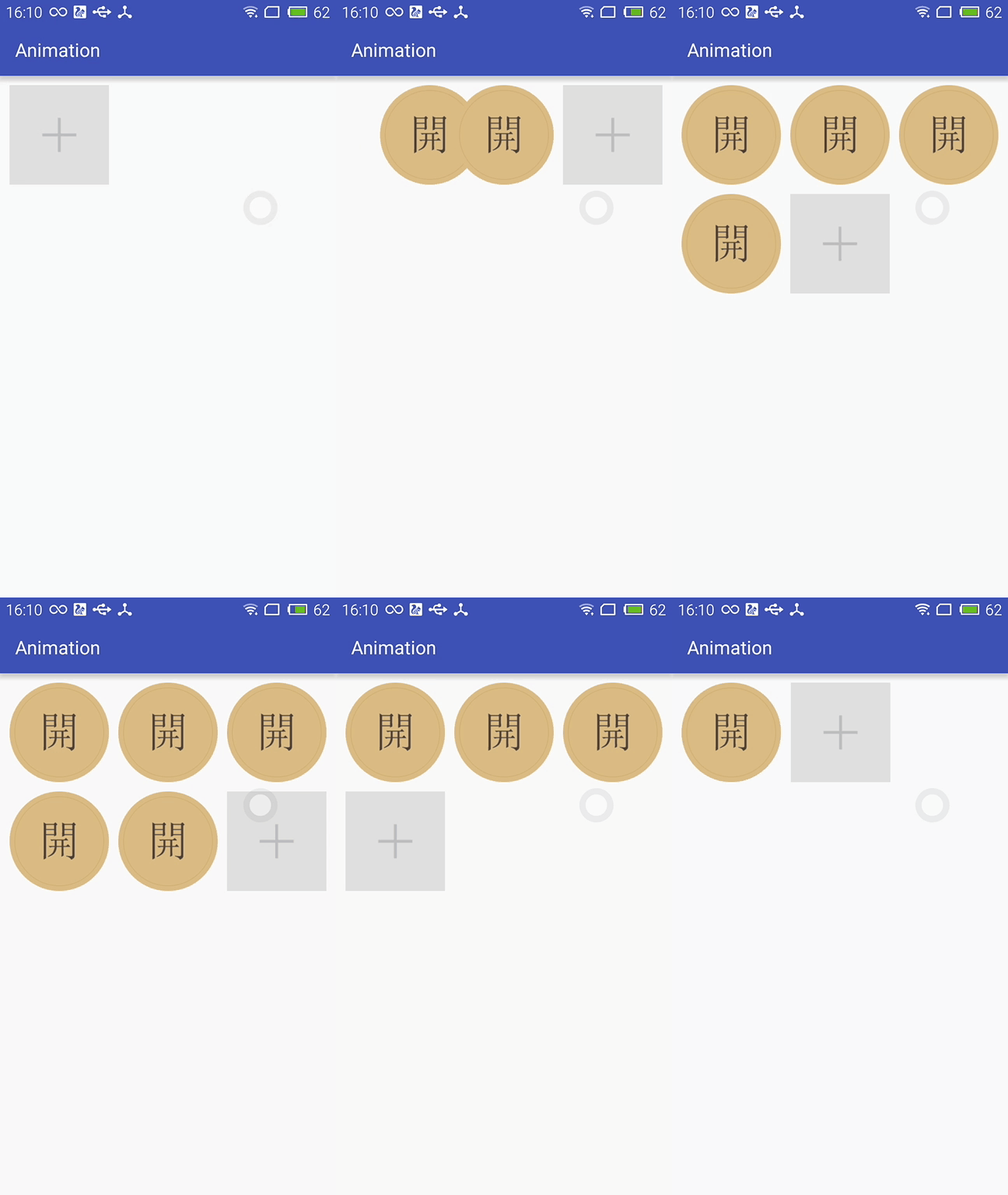
第三种方式:通过设置LayoutAnimation来实现布局动画
  AlphaAnimation alphaAnimation = new AlphaAnimation(0f, 1f);

         alphaAnimation.setDuration();

         LayoutAnimationController animationController = new LayoutAnimationController(alphaAnimation, 0.5f);

         animationController.setOrder(LayoutAnimationController.ORDER_NORMAL);

         mImageViewGroup.setLayoutAnimation(animationController);
显示顺序有以下几种:
- ORDER_NORMAL;//顺序显示
- ORDER_REVERSE;//反显示
- ORDER_RANDOM//随机显示
也可以通过xml实现
<?xml version="1.0" encoding="utf-8"?>

<layoutAnimation

    xmlns:android="http://schemas.android.com/apk/res/android"

    android:delay="0.5"

    android:animationOrder="normal"

    android:animation="@anim/alpha"

    />
ViewGroup xml添加android:layoutAnimation属性
<com.whoislcj.animation.GridImageViewGroup

            android:id="@+id/image_layout"

            android:layout_width="match_parent"

            android:layout_height="wrap_content"

            android:layout_margin="10dp"

            android:layoutAnimation="@anim/layoutanimation"

            lee:childHorizontalSpace="10dp"

            lee:childVerticalSpace="10dp"

            lee:columnNum=""/>
由于这种方式采用的是补间动画,个人不再推荐使用这种方式,原因很简单实现的动画效果相对单一。
总结:
本篇学习了布局动画,自此Android的动画学习也将告一段落了,接下来准备总结一下学习动画的过程中遇见的编程知识,比如链式编程,TreadLocal等。
自定义ViewGroup添加布局动画的更多相关文章
- Android动画效果之自定义ViewGroup添加布局动画
前言: 前面几篇文章介绍了补间动画.逐帧动画.属性动画,大部分都是针对View来实现的动画,那么该如何为了一个ViewGroup添加动画呢?今天结合自定义ViewGroup来学习一下布局动画.本文将通 ...
- Android笔记之为自定义对话框添加移动动画效果
给底部的对话框添加移动动画效果 可通过Window.setWindowAnimations(int resId)设置 SharingDialog.java package com.bu_ish.sha ...
- Android -- 自定义ViewGroup+贝塞尔+属性动画实现仿QQ点赞效果
1,昨天我们写了篇简单的贝塞尔曲线的应用,今天和大家一起写一个QQ名片上常用的给别人点赞的效果,实现效果图如下: 红心的图片比较丑,见谅见谅(哈哈哈哈哈哈).... 2,实现的思路和原理 从上面的效果 ...
- AndroidUI 布局动画-为列表添加布局动画效果
新建一个Android project ,使MainActivity 继承自 ListActivity: public class MainActivity extends ListActivity ...
- Android Animation动画实战(一): 从布局动画引入ListView滑动时,每一Item项的显示动画
前言: 之前,我已经写了两篇博文,给大家介绍了Android的基础动画是如何实现的,如果还不清楚的,可以点击查看:Android Animation动画详解(一): 补间动画 及 Android An ...
- Android中的布局动画
简介 布局动画是给布局的动画,会影响到布局中子对象 使用方法 给布局添加动画效果: 先找到要设置的layout的id,然后创建布局动画,创建一个LayoutAnimationController,并把 ...
- android 自定义ViewGroup和对view进行切图动画实现滑动菜单SlidingMenu
示意图就不展示了,和上一节的一样,滑动菜单SlidingMenu效果如何大家都比较熟悉,在这里我简单说明一下用自定义ViewGroup来实现. 实现方法:我们自定义一个ViewGroup实现左右滑动, ...
- android 自定义ViewGroup和对view进行切图动画实现滑动菜单SlidingMenu[转]
http://blog.csdn.net/jj120522/article/details/8095852 示意图就不展示了,和上一节的一样,滑动菜单SlidingMenu效果如何大家都比较熟悉,在这 ...
- Android 进阶自定义 ViewGroup 自定义布局
前言 在我们的实际应用中, 经常需要用到自定义控件,比如自定义圆形头像,自定义计步器等等.但有时我们不仅需要自定义控件,举个例子,FloatingActionButton 大家都很常用,所以大家也很经 ...
随机推荐
- 14 fragment传值
两个fragment传值 方式一 布局文件代码: <LinearLayout xmlns:android="http://schemas.android.com/apk/res/and ...
- Windows平台下的多线程编程
线程是进程的一条执行路径,它包含独立的堆栈和CPU寄存器状态,每个线程共享所有的进程资源,包括打开的文件.信号标识及动态分配的内存等.一个进程内的所有线程使用同一个地址空间,而这些线程的执行由系统调度 ...
- linux下字节对齐
一,内存地址对齐的概念 计算机内存中排列.访问数据的一种方式,包含基本数据对齐和结构体数据对齐. 32位系统中,数据总线宽度为32,每次能够读取4字节数据.地址总线为32,最大寻址空间为4 ...
- Citrix 桌面虚拟化解决方案与VMware桌面虚拟化解决方案对比
通过 XenDesktop 和 FlexCast为各种场景交付虚拟桌面 企业桌面面临的问题 为每个用户提供安全高效的桌面环境是几乎所有公司或组织的基本要求.如果用户无法使用他们的桌面或应用程序,公司就 ...
- Java并发框架——AQS阻塞队列管理(一)——自旋锁
我们知道一个线程在尝试获取锁失败后将被阻塞并加入等待队列中,它是一个怎样的队列?又是如何管理此队列?这节聊聊CHL Node FIFO队列. 在谈到CHL Node FIFO队列之前,我们先分析这种队 ...
- linux常用的内核镜像格式
linux常用的内核镜像格式 Linux内核有多种格式的镜像,包括vmlinux.Image.zImage等. 1. Linux内核镜像格式 1.1 vmlinux vmlinuz是可引导的. ...
- iOS中 为 iOS 建立 Travis CI 韩俊强的博客
每日更新关注:http://weibo.com/hanjunqiang 新浪微博! 你是否曾经试着为 iOS 项目搭建一台支持持续集成的服务器,从我的个人经验而言,这可不是一个轻松的活.首先需要准备 ...
- JavaI/O体系详解
Java中IO操作主要是指使用Java进行输入,输出操作,Java中所有的IO操作类都存放在Java.io包中,在使用时需要导入此包. 在整个Java.io包中最重要的就是5个类和一个接口.5个类指的 ...
- (七十九)MapKit的基本使用
MapKit是苹果公司开发的用于显示地图和实现定位.导航的地图框架. MapKit View可以通过storyboard.xib创建,也可以通过代码直接创建. 需要注意的是,通过storyboard和 ...
- awk 详解+实例
1. awk简介 awk是一种编程语言,用于在linux/unix下对文本和数据进行处理.数据可以来自标准输入.一个或多个文件,或其它命令的输出.它支持用户自定义函数和动态正则表达式等先进功能,是li ...