
Hue集成Hadoop和Hive
一、环境准备
1、下载Hue:https://dl.dropboxusercontent.com/u/730827/hue/releases/3.12.0/hue-3.12.0.tgz
2、安装依赖
yum groupinstall -y "Development Tools" "Development Libraries"

yum install -y apache-maven ant asciidoc cyrus-sasl-devel cyrus-sasl-gssapi gcc gcc-c++ krb5-devel libxml2-devel libxslt-devel make mysql mysql-devel openldap-devel python-devel sqlite-devel gmp-devel libffi-devel
二、MySQL配置
1、    为root用户设置密码;

2、    配置远程登录

3、    创建hue数据库

4、    flush hosts

5、    flush privileges
三、解压、编译并安装
tar -zxvf hue-3.12.0.tgz -C /opt

cd /opt/ hue-3.12.0

make apps
四、集成环境配置
1、配置HDFS
vim /opt/hadoop-2.7.3/etc/hadoop/hdfs-site.xml
<property>

     <name>dfs.webhdfs.enabled</name>

     <value>true</value>

</property>

<property>

     <name>dfs.permissions.enabled</name>

     <value>false</value>

</property>
2、配置core-site.xml
vim /opt/hadoop-2.7.3/etc/hadoop/core-site.xml
<property>

     <name>hadoop.proxyuser.hue.hosts</name>

      <value>*</value>

</property>

<property>

      <name>hadoop.proxyuser.hue.groups</name>

      <value>*</value>

</property>

<property>

       <name>hadoop.proxyuser.root.hosts</name>

       <value>*</value>
 </property>

  <property>

       <name>hadoop.proxyuser.root.groups</name>

        <value>*</value>

 </property>
3、配置yarn-site.xml
vim /opt/hadoop-2.7.3/etc/hadoop/yarn-site.xml
<!--打开HDFS上日志记录功能-->

<property>

    <name>yarn.log-aggregation-enable</name>

    <value>true</value>

</property>

<!--在HDFS上聚合的日志最长保留多少秒。3天-->

<property>

     <name>yarn.log-aggregation.retain-seconds</name>

     <value>259200</value>

</property>
4、配置httpfs-site.xml
vim /opt/hadoop-2.7.3/etc/hadoop/httpfs-site.xml
<property>

    <name>httpfs.proxyuser.hue.hosts</name>

    <value>*</value>

</property>

<property>

    <name>httpfs.proxyuser.hue.groups</name>

    <value>*</value>

</property>
5、配置文件同步
将以上配置文件同步到其他Hadoop主机
添加hue用户及用户组
sudo useradd hue

sudo chmod -R 755 /opt/hue-3.12.0/

sudo chown -R hue:hue /opt/hue-3.12.0/
五、Hue的配置
vim /opt/hue-3.8.1/desktop/conf/hue.ini
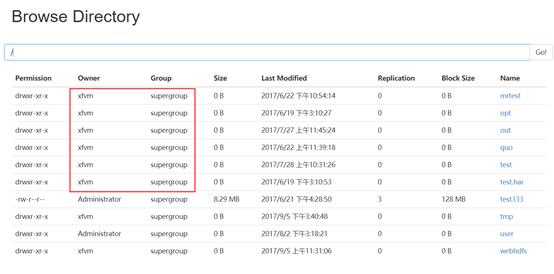
1、配置HDFS超级用户
 # This should be the hadoop cluster admin

  default_hdfs_superuser=xfvm
超级用户参见HDFS WEBUI
2、配置desktop
[desktop]

  # Set this to a random string, the longer the better.

  # This is used for secure hashing in the session store.

  secret_key=jFE93j;2[290-eiw.KEiwN2s3['d;/.q[eIW^y#e=+Iei*@Mn<qW5o

  # Webserver listens on this address and port

  http_host=xfvm04

  http_port=8888

  # Time zone name

  time_zone=Asia/Shanghai
3、配置HDFS
 [[hdfs_clusters]]

    # HA support by using HttpFs

    [[[default]]]

      # Enter the filesystem uri

      fs_defaultfs=hdfs://xfvm01:8020

      # NameNode logical name.

      ## logical_name=

      # Use WebHdfs/HttpFs as the communication mechanism.

      # Domain should be the NameNode or HttpFs host.

      # Default port is 14000 for HttpFs.

      webhdfs_url=http://xfvm01:50070/webhdfs/v1
4、配置YARN
   [[[default]]]

      # Enter the host on which you are running the ResourceManager

      resourcemanager_host=xfvm01

      # The port where the ResourceManager IPC listens on

      resourcemanager_port=8132

      #参考yarn-site.xml中的yarn.resourcemanager.address.rm1

      # Whether to submit jobs to this cluster

      submit_to=True

      # Resource Manager logical name (required for HA)

      ## logical_name=

      # Change this if your YARN cluster is Kerberos-secured

      ## security_enabled=false

      # URL of the ResourceManager API

      resourcemanager_api_url=http://xfvm01:8188

#参考yarn-site.xml中的yarn.resourcemanager.webapp.address.rm1

      # URL of the ProxyServer API

      proxy_api_url=http://xfvm01:8130

      #参考yarn-site.xml中的yarn.resourcemanager.scheduler.address.rm1

      #端口固定:8088

      # URL of the HistoryServer API

      #参考mapred-site.xml中的mapreduce.jobhistory.webapp.address

      history_server_api_url=http://xfvm03:19888
5、配置HIVE
[beeswax]

  # Host where HiveServer2 is running.

  # If Kerberos security is enabled, use fully-qualified domain name (FQDN).

  hive_server_host=xfvm04

  # Port where HiveServer2 Thrift server runs on.

  hive_server_port=10000
6、配置zookeeper
[zookeeper]

  [[clusters]]

    [[[default]]]

      # Zookeeper ensemble. Comma separated list of Host/Port.

      # e.g. localhost:2181,localhost:2182,localhost:2183

      host_ports=xfvm02:2181,xfvm03:2181,xfvm04:2181
7、配置MySQL
 # mysql, oracle, or postgresql configuration.

    ## [[[mysql]]]

      # Name to show in the UI.

      nice_name="My SQL DB"

      # For MySQL and PostgreSQL, name is the name of the database.

      # For Oracle, Name is instance of the Oracle server. For express edition

      # this is 'xe' by default.

      name=mysqldb

      # Database backend to use. This can be:

      # 1. mysql

      # 2. postgresql

      # 3. oracle

      engine=mysql

      # IP or hostname of the database to connect to.

      host=xfvm04

      # Port the database server is listening to. Defaults are:

      # 1. MySQL: 3306

      # 2. PostgreSQL: 5432

      # 3. Oracle Express Edition: 1521

      port=3306

      # Username to authenticate with when connecting to the database.

      user=root

      # Password matching the username to authenticate with when

      # connecting to the database.

      password=123456
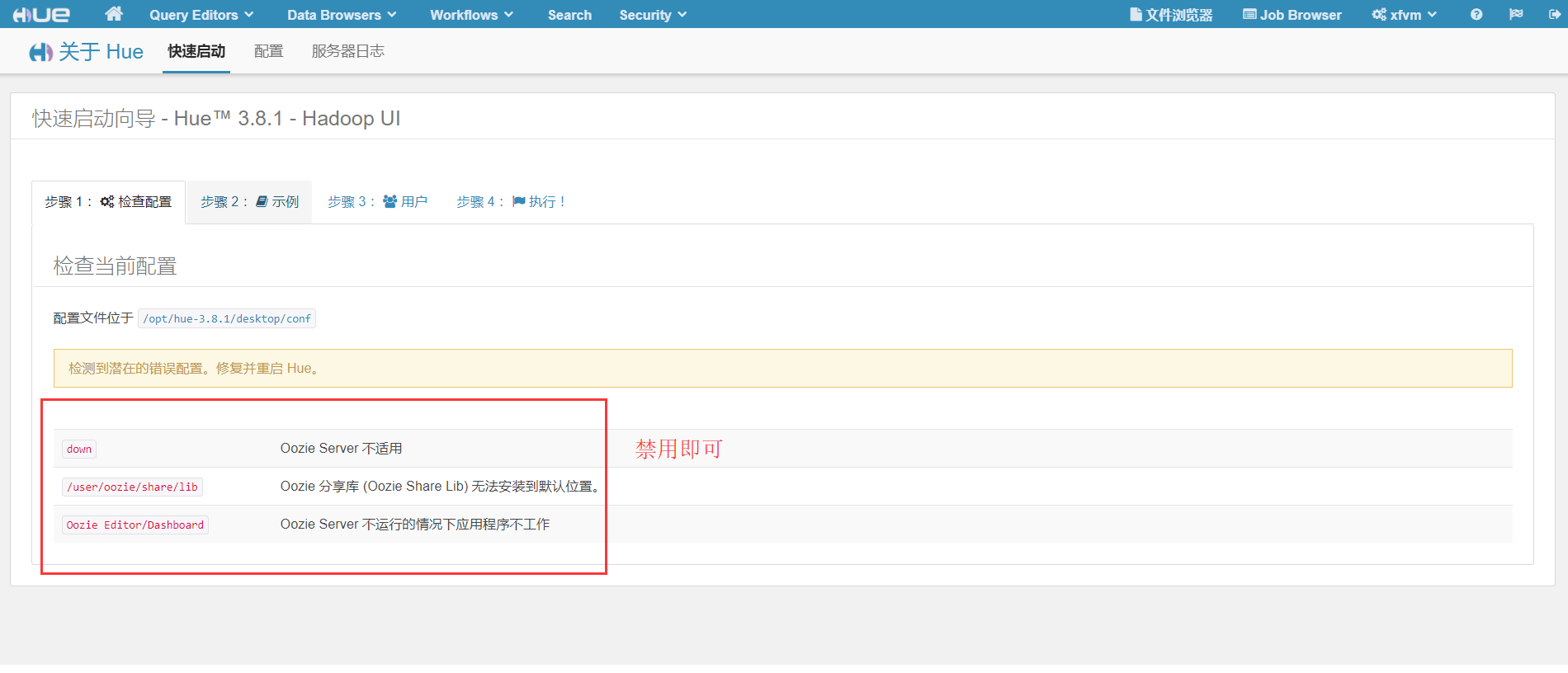
8、配置禁用组件(还未安装的组件)
# Comma separated list of apps to not load at server startup.

  # e.g.: pig,zookeeper

  app_blacklist=pig,hbase,spark,impala,oozie
六、Hive环境变量的配置(hiveserver2,使用Mysql作为独立的元数据库)
1、编辑hive-site.xml
<property>

    <name>hive.metastore.uris</name>

    <value>thrift://192.168.10.24:9083</value>

    <description>Thrift URI for the remote metastore. Used by metastore client to connect to remote metastore.</description>

  </property>

  <property>

    <name>hive.server2.thrift.bind.host</name>

    <value>192.168.10.24</value>

    <description>Bind host on which to run the HiveServer2 Thrift service.</description>

  </property>
七、MySQL初始化
进入hue安装目录的/bin目录
./hue syncdb

./hue migrate
八、启动顺序
1、启动Hive metastore
$ bin/hive --service metastore &
2、启动hiveserver2
$ bin/hive --service hiveserver2 &
3、启动Hue
$bin/supervisor
4、浏览器:http://xfvm04:8888,输入用户名和密码即可登录
Hue集成Hadoop和Hive的更多相关文章
- cdh版本的hue安装配置部署以及集成hadoop hbase hive mysql等权威指南
hue下载地址:https://github.com/cloudera/hue hue学习文档地址:http://archive.cloudera.com/cdh5/cdh/5/hue-3.7.0-c ...
- 安装hue及hadoop和hive整合
环境: centos7 jdk1.8.0_111 Hadoop 2.7.3 Hive1.2.2 hue-3.10.0 Hue安装: 1.下载hue-3.10.0.tgz: https://dl.dro ...
- [转]云计算之hadoop、hive、hue、oozie、sqoop、hbase、zookeeper环境搭建及配置文件
云计算之hadoop.hive.hue.oozie.sqoop.hbase.zookeeper环境搭建及配置文件已经托管到githubhttps://github.com/sxyx2008/clou ...
- 【Hadoop离线基础总结】Hue与Hadoop集成
目录 1.更改所有hadoop节点的core-site.xml配置 2.更改所有hadoop节点的hdfs-site.xml 3.重启hadoop集群 4.停止hue的服务,并继续配置hue.ini ...
- hue集成hive访问报database is locked
这个问题这应该是hue默认的SQLite数据库出现错误,你可以使用mysql postgresql等来替换 hue默认使用sqlite作为元数据库,不推荐在生产环境中使用.会经常出现database ...
- 高可用Hadoop平台-Hue In Hadoop
1.概述 前面一篇博客<高可用Hadoop平台-Ganglia安装部署>,为大家介绍了Ganglia在Hadoop中的集成,今天为大家介绍另一款工具——Hue,该工具功能比较丰富,下面是今 ...
- hue集成各种组件
一.Hue安装 可以编译安装,我这里有已经编译好的,直接解压使用: hue默认端口:8888 http://gethue.com/ https://github.com/cloudera/hue ht ...
- Hadoop生态圈-Hive快速入门篇之Hive环境搭建
Hadoop生态圈-Hive快速入门篇之Hive环境搭建 作者:尹正杰 版权声明:原创作品,谢绝转载!否则将追究法律责任. 一.数据仓库(理论性知识大多摘自百度百科) 1>.什么是数据仓库 数据 ...
- Windows10系统下Hadoop和Hive开发环境搭建填坑指南
前提 笔者目前需要搭建数据平台,发现了Windows系统下,Hadoop和Hive等组件的安装和运行存在大量的坑,而本着有坑必填的目标,笔者还是花了几个晚上的下班时候在多个互联网参考资料的帮助下完成了 ...
随机推荐
- 云游戏学习与实践(二)——安装GamingAnywhere
安装GamingAnywhere 一.GamingAnywhere项目 GamingAnywhere是一个开源的实现云游戏的引擎,并且高效.跨平台.易扩展.可调配. GitHub地址:https:// ...
- 【CSS】div父容器根据子容器大小自适应
Div即父容器不根据内容自动调节高度,我们看下面的代码: <div id="main"> <div id="content"></ ...
- hash冲突随笔
一:hash表 也叫散列表,以key-value的形式存储数据,就是将需要存储的关键码值通过hash函数映射到表中的位置,可加快访问速度. 二:hash冲突 如果两个相同的关键码值通过hash函数映射 ...
- PHP环境搭建——Apache
1.PHP环境安装前我们需要知道PHP给我们带来的功能是什么? Php主要用在三个领域 (1) 网站和web应用程序 (2) 命令行脚本 (3) 桌面(GUI)应用 ...
- [BZOJ 2500] 幸福的道路
照例先贴题面(汪汪汪) 2500: 幸福的道路 Time Limit: 20 Sec Memory Limit: 256 MBSubmit: 368 Solved: 145[Submit][Sta ...
- vc++MFC开发上位机程序
用vc++MFC开发过不少跟单片机通讯的上位机程序了.搞懂了MFC架构,开发还是很快的,与底层单片机程序通讯,可以用串口.usb.网络.短信形式.串口现在用的越来越少了,一般电脑跟单片机在一块,使用串 ...
- [补档][COGS 426]血帆海盗
[COGS 426]血帆海盗 题目 传送门:http://cogs.pro/cogs/problem/problem.php?pid=426 随着资本的扩大,藏宝海湾贸易亲王在卡利姆多和东部王国大陆各 ...
- 在实际项目中使用LiteDB NoSQL数据库
LiteDB 是一个 NoSQL 数据库,特点是 MongoDB like 和 0 配置.100% 原汁原味的 C# 开发, Release 只有一个 DLL,官方有一下适用场景:移动App,桌面小应 ...
- python实战===使用随机的163账号发送邮件
import linecache import smtplib import time import linecache import random #算出txt的行数,163账号_2.txt中,每一 ...
- 2017年最重要的HTML5开发手册,传播正能量
今天给大家推荐这个HTML5开发手册,希望能帮助正在学习web前端的人,鄙人也是刚学习前端没多久,借助于一点资讯平台能够结识更多前端大牛,这是我的HTML5进阶学习一点资讯群:250777811,里面 ...