
vmware之VMware Remote Console (VMRC) SDK(一)
通过console可以实现类似远程桌面的功能,但它的实现方式和远程桌面不同,一般来说远程桌面必须要有网络支持,在机器关闭或者启动过程中无法连接。而console是通过esx的虚拟化组件实现远程桌面。在其sample代码中有一个用html+js编写ActiveX插件的示例。
下方是一个用winform写的console远程截图。
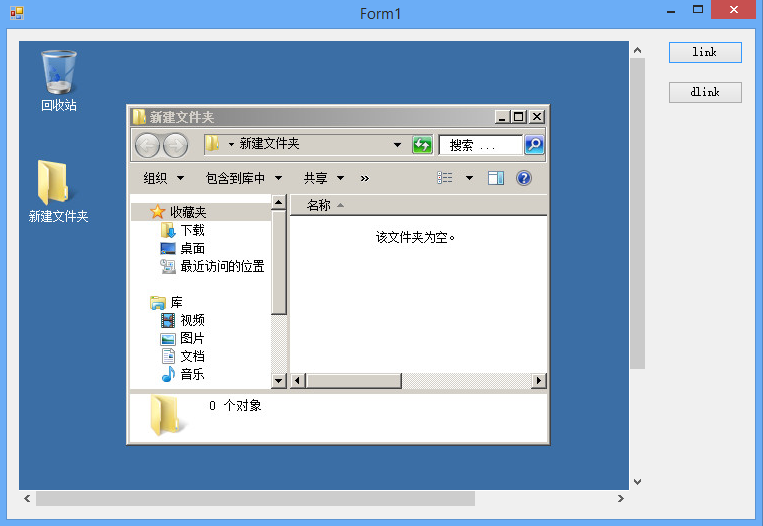
在vmware的developer center中https://developercenter.vmware.com/sdks,下载vmrc sdk,它会以com组件的形式安装,你可以在vs工具箱中找到。
下面上一段sample代码
 using System;

 using System.Linq;

 using System.Windows.Forms;

 using Vim25Api;

 using AppUtil;

 namespace WindowsFormsApplication1

 {

     public partial class Form1 : Form

     {

         public AppUtil.AppUtil util = null;

         public Form1()

         {

             InitializeComponent();

         }

         private void button1_Click(object sender, EventArgs e)

         {

             String[] arguments = new string[] {

                 "--url", "https://192.168.0.161/sdk",

                 "--username","root",

                 "--password","P@ssw0rd",

                 "--disablesso", "true",

                 "--ignorecert", "true"};

             try

             {

                 this.axVMwareEmbeddedRemoteConsole1.startup(, VMwareRemoteConsoleTypeLib.VMRC_MessageMode.VMRC_DIALOG_MESSAGES, null);

                 util = AppUtil.AppUtil.initialize("Connect", constructOptions(), arguments.ToArray());

                 util.connect();

                 ManagedObjectReference mor = util.getConnection().ServiceRef;

                 ManagedObjectReference sessionMor = util._connection.Service.RetrieveServiceContent(mor).sessionManager;

                 string ticket = util._connection.Service.AcquireCloneTicket(sessionMor);

                 ManagedObjectReference vmMor = util.getServiceUtil().GetDecendentMoRef(null, "VirtualMachine", "test");

                 axVMwareEmbeddedRemoteConsole1.connect("192.168.0.161", null, true, ticket, null, null, vmMor.Value, null, null);

             }

             catch(Exception ex)

             {

                 MessageBox.Show(ex.ToString());

                 this.axVMwareEmbeddedRemoteConsole1.disconnect();

                 util.disConnect();

             }

         }

         private static OptionSpec[] constructOptions()

         {

             OptionSpec[] useroptions = new OptionSpec[];

             useroptions[] = new OptionSpec("url", "String", , "ser url", null);

             useroptions[] = new OptionSpec("username", "String", , "user name", null);

             useroptions[] = new OptionSpec("password", "String", , "password", null);

             useroptions[] = new OptionSpec("disablesso", "bool", , "disablesso", null);

             useroptions[] = new OptionSpec("ignorecert", "bool", , "ignorecert", null);

             return useroptions;

         }

         private void button2_Click(object sender, EventArgs e)

         {

             axVMwareEmbeddedRemoteConsole1.disconnect();

             util.disConnect();

         }

     }

 }
在建立connect连接时,有几个重要的参数
url为https://主机ip/sdk,登录帐号也是主机esx的帐号。
disablesso表示禁用sso单点登录验证,这个要加上,因为在我们远程登录验证不会使用sso。
ignorecert这个参数也要加上,不然会证书验证导致The underlying connection was closed: Could not establish trust relationship for the SSL/TLS secure channel.
这些参数如何运作可以到vsphere sdk中的apputil项目下找到。
vmware之VMware Remote Console (VMRC) SDK(一)的更多相关文章
- vmware之VMware Remote Console (VMRC) SDK(二)
在上篇文章中,我们用winform结合vmware的api做了一个demo,在vmrc sdk中作为plugin单独打包出来vmware-vmrc-win32-x86.exe,上篇文章的demo只能基 ...
- vmware之VMware Remote Console (VMRC) SDK(三)
前两节我们介绍了vmrc sdk的基本用法.在前面的demo中,有一个关键的问题是,我们现在所作的工作都是基于局域网的,作为应用层面上,主机不会直接暴露给用户,而是通过一系列的web service服 ...
- VMware实现控制台功能(VMware Remote Console)
说明: 刚开始一脸懵逼,google了一些资料,发现基本没有能快速落地的,自己做完后梳理了一下发上来供大家参考. 如果帮到你了,请点赞评论关注,以资鼓励,多谢~ 实现VMware控制台功能主要有两种方 ...
- VMware vSphere Client5.0与 Windows8不再有问题,解决VMware 5.0 客户端提示VMRC控制台的连接已断开
问题:VMware 5.0 客户端提示VMRC控制台的连接已断开...正在尝试重新连接,系统是win8的 网上解决办法: WIN8,在安装vmware vsphere client 5.0时出现兼容性 ...
- 通过IMM With Remote Console为服务器安装操作系统
现有IBM System x3750 M4(8722A1C)配置 产品类别 机架式 产品结构 2U CPU类型 Intel 至强E5-4600 CPU型号 Xeon E5-4640 CPU频率 2 ...
- VMware workstation创建虚拟机console
1. 使用VMware workstation创建虚拟机硬件2. 安装操作系统3. 操作系统安装过程 1. 使用VMware workstation创建虚拟机硬件 使用VMware workstati ...
- VMware workstation创建虚拟机console图文
1. 概述2. 配置入口3. 新建虚拟机向导3.1 类型配置3.2 硬件兼容性3.3 操作系统安装3.4 客户机操作系统类型3.5 客户机的名称位置4. 客户机硬件配置选择4.1 客户机处理器配置4. ...
- vmware开发包之vSphere Management SDK
vSphere Management SDK关于vmware管理等相关功能的.net和java的代码示例. 在其5.5的解压包中 eam:esx agent management表示esx虚机生产环境 ...
- VMware vCenter重置web console SSO登录密码
On a Windows Platform Services Controller or vCenter Server with Embedded Platform Services Controll ...
随机推荐
- 读《分布式一致性原理》CURATOR客户端
创建会话 使用curator客户端创建会话和其它客户端产品有很大不同 1.使用CuratorFrameworkFactory这个工厂类的两个静态方法来创建一个客户端: public static Cu ...
- vue表单验证--veevalidate使用教程
vue表单验证----vee-validate使用教程 官网:https://baianat.github.io/vee-validate/ 一.安装 npm install vee-validate ...
- libaco: 一个极速的轻量级 C 非对称协程库 🚀 (10 ns/ctxsw + 一千万协程并发仅耗内存 2.8GB + Github Trending)
0 Name 简介 libaco - 一个极速的.轻量级.C语言非对称协程库. 这个项目的代号是Arkenstone
- grideh SelectedRows Bookmark
VCL grideh 选中多行 TBookmark.Bookmark.GotoBookmark TBookmark bm= DataSet->GetBookmark(); DataSet-> ...
- DataSnap 连接池
二. DataSnap连接池 连接池 http://docwiki.embarcadero.com/Libraries/XE8/en/Datasnap.DSSession.TDSSessionMana ...
- 如何用keytool导入证书
先用cmd定位到 jre\lib目录下的security文件夹 例如 C:\Program Files\Java\jre1.8.0_191\lib\security 运行cmd,导入证书 keyt ...
- 关于解决 请求被中止:无法建立SSL / TLS安全通道
我使用HttpWebRequest访问其他网站时,出现"请求被中止:无法建立 SSL / TLS安全通道"错误,于是goog和百度了一番,提供的答案基本 是:ServicePoin ...
- 互联网大规模数据分析技术(自主模式)第五章 大数据平台与技术 第10讲 大数据处理平台Hadoop
大规模的数据计算对于数据挖掘领域当中的作用.两大主要挑战:第一.如何实现分布式的计算 第二.分布式并行编程.Hadoop平台以及Map-reduce的编程方式解决了上面的几个问题.这是谷歌的一个最基本 ...
- 由Strurts2漏洞引开谈谈web代码安全问题
漏洞与补丁齐飞,蓝屏共死机一色. 最近struts2的安全漏洞影响面甚广,此后门为可以在url中直接远程调用脚本的漏洞和一个重定向漏洞.大家可以在s2-016远程执行脚本漏洞和s2-017重定向开放漏 ...
- Java中文乱码解决方案
Java中文乱码解决方案 1.中文乱码解决方案,确保每个文件的默认编码是UTF-8 加入 URIEncoding="UTF-8" 代码中的设置 1>在se ...