
vmware之VMware Remote Console (VMRC) SDK(二)
在上篇文章中,我们用winform结合vmware的api做了一个demo,在vmrc sdk中作为plugin单独打包出来vmware-vmrc-win32-x86.exe,上篇文章的demo只能基于这个plugin运行,在主机的vcenter中默认带有此功能,所以想要以activex插件的形式运行于浏览器之上,就必须安装此插件包,约35MB。此插件集成了包含了可运行于IE之上的ActiveX,以及可运行于Chrome上的应用插件(FF等其他浏览器这里没有经过测试)。下面为一张截图,分别测试于IE11和Chrome。
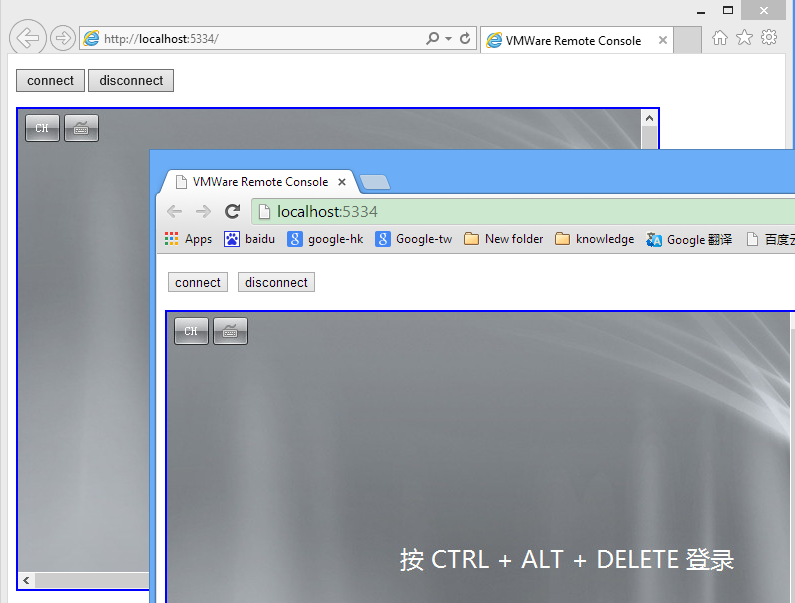
我们先创建console的基本类。
 public class ConsoleModel

 {

     public int Modes { get; set; }

     public int MsgMode { get; set; }

     public string AdvancedConfig { get; set; }

     public string Host { get; set; }

     public string Thumb { get; set; }

     public bool AllowSSLErrors { get; set; }

     public string Ticket { get; set; }

     public string User { get; set; }

     public string Pass { get; set; }

     public string VMId { get; set; }

     public string Datacenter { get; set; }

     public string VMPath { get; set; }

 }
下面是基于mvc用于和javascript交互的方法,最后返回一条json数据。
 public ActionResult Connect(string vmName)

 {

     string[] arguments =  {

         "--url", "https://192.168.0.161/sdk",

         "--username", "root",

         "--password", "P@ssw0rd",

         "--disablesso", "true",

         "--ignorecert", "true"};

     util = AppUtil.AppUtil.initialize("Connect", constructOptions(), arguments);

     util.connect();

     ManagedObjectReference mor = util.getConnection().ServiceRef;

     ManagedObjectReference sessionMor = util._connection.Service.RetrieveServiceContent(mor).sessionManager;

     string ticket = util._connection.Service.AcquireCloneTicket(sessionMor);

     ManagedObjectReference vmMor = util.getServiceUtil().GetDecendentMoRef(null, "VirtualMachine", vmName);

     ConsoleModel console = new ConsoleModel();

     console.Modes = ;

     console.MsgMode = ;

     console.AdvancedConfig = "NaN";

     console.Host = "192.168.0.161";

     console.Thumb = "";

     console.AllowSSLErrors = true;

     console.Ticket = ticket;

     console.User = "";

     console.Pass = "";

     console.VMId = vmMor.Value;

     console.Datacenter = "";

     console.VMPath = "";

     return Json(console, JsonRequestBehavior.AllowGet);

 }
下面是基于jquery的ajax调用上方web方法。
 function vmrc_connect() {

     $.ajax({

         type: 'POST',

         url: 'Home/Connect',

         data: 'vmName=test',

         dataType: 'json',

         success: function (data) {

             startup(data.Modes, data.MsgMode, data.AdvancedConfig);

             connect(data.Host, data.Thumb, data.AllowSSLErrors, data.Ticket, data.User, data.Pass,

             data.VMId, data.Datacenter, data.VMPath);

         },

         error: function () {

             alert('connect failed');

         }

     });

 }
下方是sdk中提供的调用插件的demo,这里已经作了部分修改。
 function startup(modes, msgMode, advancedConfig) {

     log('starting VMRC instance: modes: ' + modes + ', messages: ' + msgMode);

     if (advancedConfig) {

         log('VMRC using advanced config "' + advancedConfig + '"');

     }

     try {

         var ret = vmrc.startup(modes, msgMode, advancedConfig);

         log('startup returned "' + ret + '"');

     } catch (err) {

         alert('startup call failed: ' + err);

     }

 }

 function connect(host, thumb, allowSSLErrors, ticket, user, pass, vmid, datacenter, vmPath) {

     if (thumb.length > 0)

         thumb = thumb.replace(/-/g, ':');

     try {

         var ret = vmrc.connect(host, thumb, allowSSLErrors,

                              ticket, user, pass, vmid, datacenter, vmPath);

         log('connect succeeded');

     } catch (err) {

         alert('connect failed: ' + err);

     }

 }
小结:在sdk demo中,为了兼容各种浏览器,可能要修改部分js方法。
vmware之VMware Remote Console (VMRC) SDK(二)的更多相关文章
- vmware之VMware Remote Console (VMRC) SDK(一)
通过console可以实现类似远程桌面的功能,但它的实现方式和远程桌面不同,一般来说远程桌面必须要有网络支持,在机器关闭或者启动过程中无法连接.而console是通过esx的虚拟化组件实现远程桌面.在 ...
- vmware之VMware Remote Console (VMRC) SDK(三)
前两节我们介绍了vmrc sdk的基本用法.在前面的demo中,有一个关键的问题是,我们现在所作的工作都是基于局域网的,作为应用层面上,主机不会直接暴露给用户,而是通过一系列的web service服 ...
- VMware实现控制台功能(VMware Remote Console)
说明: 刚开始一脸懵逼,google了一些资料,发现基本没有能快速落地的,自己做完后梳理了一下发上来供大家参考. 如果帮到你了,请点赞评论关注,以资鼓励,多谢~ 实现VMware控制台功能主要有两种方 ...
- VMware vSphere Client5.0与 Windows8不再有问题,解决VMware 5.0 客户端提示VMRC控制台的连接已断开
问题:VMware 5.0 客户端提示VMRC控制台的连接已断开...正在尝试重新连接,系统是win8的 网上解决办法: WIN8,在安装vmware vsphere client 5.0时出现兼容性 ...
- 通过IMM With Remote Console为服务器安装操作系统
现有IBM System x3750 M4(8722A1C)配置 产品类别 机架式 产品结构 2U CPU类型 Intel 至强E5-4600 CPU型号 Xeon E5-4640 CPU频率 2 ...
- VMware workstation创建虚拟机console
1. 使用VMware workstation创建虚拟机硬件2. 安装操作系统3. 操作系统安装过程 1. 使用VMware workstation创建虚拟机硬件 使用VMware workstati ...
- VMware workstation创建虚拟机console图文
1. 概述2. 配置入口3. 新建虚拟机向导3.1 类型配置3.2 硬件兼容性3.3 操作系统安装3.4 客户机操作系统类型3.5 客户机的名称位置4. 客户机硬件配置选择4.1 客户机处理器配置4. ...
- vmware开发包之vSphere Management SDK
vSphere Management SDK关于vmware管理等相关功能的.net和java的代码示例. 在其5.5的解压包中 eam:esx agent management表示esx虚机生产环境 ...
- VMware vCenter重置web console SSO登录密码
On a Windows Platform Services Controller or vCenter Server with Embedded Platform Services Controll ...
随机推荐
- 03-23 MVC框架(以查询、删除为例)
1.MVC的定义: MVC(Model-View-Controller,模型-视图-控制器)是用于将应用程序粉好吃呢过如下3个主要方面的体系结构模式: 模型(Model):一组类和业务规则,类用于描述 ...
- 跟着太白老师学python day10 名称空间,作用域和取值顺序,变量的加载顺序
名称空间分为3种: 1. 全局名称空间 2. 内置名称空间 3. 局部名称空间(临时) 作用域 全局作用域 1全局名称空间 2 内置名称空间 局部作用域 ...
- 安装Apache2
Linux下安装Apache 2.4 2012-08-06 09:36:51| 分类: linux|字号 订阅 本文原创,欢迎转载.转载请在文章明显可见处张贴如下内容:(注意:请保留超链接格 ...
- Git(一):Eclipse中配置Git
在Eclipse中配置Git: 一,由于我使用的是新版本的eclipse j2ee 4.4默认集成git,所以不用手动安装git插件 二,Eclipse配置基础信息.Windows->Prefe ...
- Python修饰器讲解
转自:http://www.cnblogs.com/rollenholt/archive/2012/05/02/2479833.html 文章先由stackoverflow上面的一个问题引起吧,如果使 ...
- shell编程——变量的数值计算
在shell脚本中,有时候会需要对数值类型的变量进行计算,通常我们用的是(()) [root@localhost collect]# ((a=1+2)) [root@localhost collect ...
- ubuntu 安装 rtpengine
摘要 RtpEngine推荐使用Debian系统,可以看出Debian系统的安装是最简单的.我是基于ubuntu18.04安装的.需要注意的是如果你的Ubuntu系统版本太低,安装时会遇到各种的版本太 ...
- 解决Eclipse编辑JavaScript时卡的问题
eclipse在开发JavaEE项目时容易卡,特别是在编辑JavaScript时,经过网上各种搜索,综合整理一下,对自己的eclipse设置之后,结果不在出现卡的问题了. 原文地址:http://bl ...
- Python编辑器IDLE傻瓜入门
转自:http://bbs.csdn.net/topics/390451617 下载python进行安装,默认自带此工具开始->程序->Python 2.*/3.*-> IDLE ( ...
- 使用tcmalloc编译启动时宕机
链接时增加了-ltcmalloc,编好之后服务器第一次启动就宕机了,code文件堆栈如下: Program terminated with signal SIGABRT, Aborted. # ) a ...