
[翻译] JFDepthView 给view提供3D景深
JFDepthView 给view提供3D景深
https://github.com/atljeremy/JFDepthView
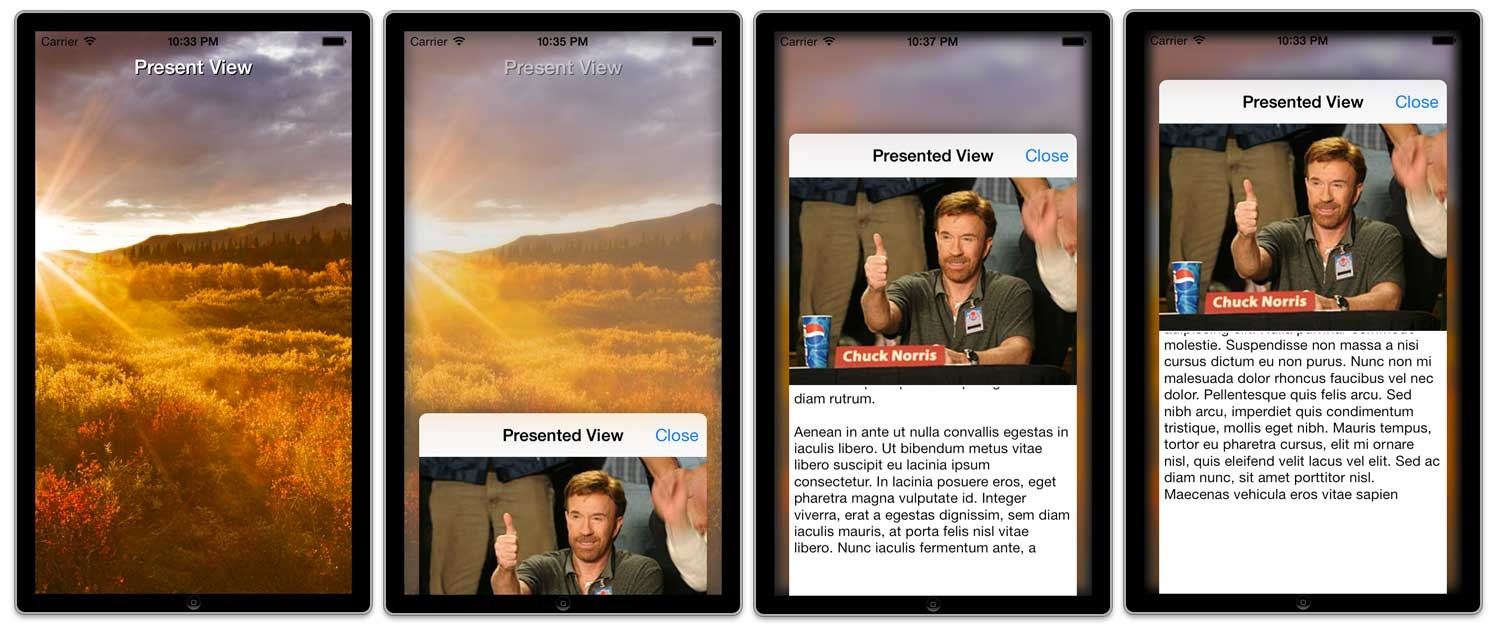
This is an iOS project for presenting views in iOS with a 3D effect to add depth. JFDepthView is only available in ARC and targets iOS 7.0+.
这是一个iOS的工程项目,展示一个带有3D效果以及景深效果的view。JFDepthView仅仅支持ARC以及iOS 7.0+。
What's New:
February 26th, 2014
Added new animation options. In addition to the normal blur/push back affect you can now choose any of the following animation options. 支持更多种类动画
- JFDepthViewAnimationOptionPushBack
- JFDepthViewAnimationOptionPushBackAndBlur
- JFDepthViewAnimationOptionPerspectiveTransform
- JFDepthViewAnimationOptionPerspectiveTransformAndBlur
Removed previously deprecated initializer
initWithGestureRecognizer: 移除之前废弃的初始化方法- Removed GPUImage dependency (Bad idea to add it in the first place, my bad) 移除了GPUImage支持(把他加到工程中,我真蠢)
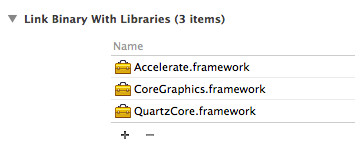
- Reduced the number of frameworks needed down to only 3 (win!) 减少了需要支持的框架
- Now targets iOS 7+ only 现在仅仅支持iOS7+
- Code refactoring and optimization 代码重构以及优化
- Added subtle bounce to presented view (Trust me, it's beautiful, like a baby unicorn) 增加了子标题来展示view
January 29th, 2013
- JFDepthView now supports both iPad and iPhone. 目前已经支持iPad和iPhone了
What It Looks Like:
Video
See it in action here: http://www.youtube.com/watch?v=X5lmn5y-FUw
iPad

iPhone
How To Use It:
Basic Example - 最基本的例子
#import <JFDepthView/JFDepthView.h>

...

- (void)viewDidLoad

{

    [super viewDidLoad];

    self.topViewController = [[TopViewController alloc] initWithNibName:@"TopViewController" bundle:nil];

    UITapGestureRecognizer* tapRec = [[UITapGestureRecognizer alloc] initWithTarget:self action:@selector(dismiss)];

    self.depthView = [[JFDepthView alloc] init];

    self.depthView.delegate = self;

    // Optional properties, use these to customize your presentations

    // self.depthView.presentedViewWidth = 700;

    // self.depthView.presentedViewOriginY = 200;

    // self.depthView.blurAmount = JFDepthViewBlurAmountHard;

    // self.depthView.animationOption = JFDepthViewAnimationOptionPushBackAndBlur;

    self.depthView.recognizer = tapRec;

}

// Here is an IBAction that is called via a UIButton

- (IBAction)presentView:(id)sender {

    // Pass in the view controller you want to present (self.topViewController)

    // and the view you want it to be displayed within (self.view)

    [self.depthView presentViewController:self.topViewController inView:self.view];

    // Optionally, if you don't care about rotation support, you can just pass in

    // the view you want to present (self.topViewController.view)

    // and the view you want it to be displayed within (self.view)

    // [self.depthView presentView:self.topViewController.view inView:self.view];

}

// Here is the simple dismissal method called from the tap recognizer passed into init method of JFDepthView

- (void)dismiss {

    [self.depthView dismissPresentedViewInView:self.view];

}
Customizable Properties - 可定制的属性
/**

 * JFDepthView - presentedViewWidth

 *

 * @return A custom float value representing the desired width of the presented view. Default value is 600.

 */

@property (nonatomic, assign) CGFloat presentedViewWidth;

/**

 * JFDepthView - presentedViewOriginY

 *

 * @return A custom float value representing the desired y origin of the presented view.

 * This is the space from the top of the presented view to the top of the view that it is contained in.

 */

@property (nonatomic, assign) CGFloat presentedViewOriginY;

/**

 * JFDepthView - blurAmount

 *

 * @return A JFDepthViewBlurAmount enum value representing to desired blur amount for the background view behind the presented view. Default value is JFDepthViewBlurAmountMedium.

 */

@property (nonatomic, assign) JFDepthViewBlurAmount blurAmount;

/**

 * JFDepthView - animationOption

 *

 * @return A JFDepthViewAnimationOption enum value representing the desired animation for the presentation. Default value is JFDepthViewAnimationOptionPerspectiveTransform.

 */

@property (nonatomic, assign) JFDepthViewAnimationOption animationOption;

/**

 * JFDepthView - hideStatusBarDuringPresentation

 *

 * @return A BOOL to tell JFDepthView to hide the status bar while presenting or not. Default is NO.

 */

@property (nonatomic, assign) BOOL hideStatusBarDuringPresentation;

/**

 * JFDepthView - recognizer

 *

 * @return The UIGestureRecognizer to be used on the area around the presentedView to dismiss the presentedView.

 */

@property (nonatomic, strong) UIGestureRecognizer* recognizer;
Add rotation support to your Presenting UIViewController - 支持UIViewController的旋转效果
#pragma mark - JFDepthView Rotation Support For Presenting UIViewController

- (void)didRotateFromInterfaceOrientation:(UIInterfaceOrientation)fromInterfaceOrientation

{

    [super didRotateFromInterfaceOrientation:fromInterfaceOrientation];

    [self.depthView didRotateFromInterfaceOrientation:fromInterfaceOrientation];

}

- (void)willRotateToInterfaceOrientation:(UIInterfaceOrientation)toInterfaceOrientation duration:(NSTimeInterval)duration

{

    [super willRotateToInterfaceOrientation:toInterfaceOrientation duration:duration];

    [self.depthView willRotateToInterfaceOrientation:toInterfaceOrientation duration:duration];

}
JFDepthView will notify your Presented UIViewController of the didRotate... and willRotate... events so you can do what ever customizations need to be done to your presented view
JFDepthView会监测你当前的UIViewController的旋转,如果旋转了他也会旋转。所以你可以做你想做的定制效果而无需担心旋转问题。
#pragma mark - JFDepthView Rotation Support for Presented UIViewController

- (void)didRotateFromInterfaceOrientation:(UIInterfaceOrientation)fromInterfaceOrientation

{

    NSLog(@"Top View Controller Received didRotateFromInterfaceOrientation: event from JFDepthView");

}

- (void)willRotateToInterfaceOrientation:(UIInterfaceOrientation)toInterfaceOrientation duration:(NSTimeInterval)duration

{

    NSLog(@"Top View Controller Received willRotateToInterfaceOrientation:duration: event from JFDepthView");

}
Please see the example project include in this repo for an example of how to use this project.
看看demo就知道怎么回事了。
Delegate Methods:
- (void)willPresentDepthView:(JFDepthView*)depthView;

- (void)didPresentDepthView:(JFDepthView*)depthView;

- (void)willDismissDepthView:(JFDepthView*)depthView;

- (void)didDismissDepthView:(JFDepthView*)depthView;
Installation:
Add the JFDepthView project to your project
- Simply copy the JFDepthView folder (containing the JFDepthView class and Vendor/ folder) into your project. 将文件夹JFDepthView拷贝到你的工程中即可
Add Dependencies
- In your application's project app target settings, find the "Build Phases" section and open the "Link Binary With Libraries" block 找到添加框架的地方
- Click the "+" button and add the following frameworks 添加以下框架
Current Known Issues As Of: Oct. 23rd, 2013
- No known issues. If you find any, please report them using a GitHub Issue. Thanks! :) 还没有被报告过问题,欢迎你来提出bug。
[翻译] JFDepthView 给view提供3D景深的更多相关文章
- 5秒让你的View变3D,ThreeDLayout使用和实现
在很久很久以前,写了一篇自定义3d view的博客.但是只是讲了如何实现,实现起来还是比较耗时,所以本着平易近人的心态,把他封装成了一个ViewGroup,只需要在你的view或者布局外面包裹一层Th ...
- Firemonkey实现Mac OS程序中内嵌浏览器的功能(自己动手翻译,调用苹果提供的webkit框架)
XE系列虽然可以跨平台,但是在跨平台的道路上只是走了一小半的路,很多平台下的接口都没实现彻底,所以为了某些功能,还必须自己去摸索. 想实现程序中可以内嵌浏览器的功能,但是Firemonkey还没有对应 ...
- android自定义View之3D索引效果
效果图: 我的小霸王太卡了. 最近工作比较忙,今天搞了一下午才搞出来这个效果,这种效果有很多种实现方式,最常见的应该是用贝塞尔曲线实现的.今天我们来看另一种不同的实现方式,只需要用到 canvas.s ...
- [翻译] PJR Signature View
PJR Signature View https://github.com/paritsohraval100/PJRSignatureDemo It is a UIView subclass by w ...
- [翻译]观察变换View Transform (Direct3D 9)
这一节介绍在Direct3d中观察变换的基本概念和怎么去设置观察矩阵. 视口变换把观察者放在世界坐标系中,并把顶点转化到摄像机空间.在摄像机空间,摄像机或者说观察者在原点,观察方向为z轴正向.Dire ...
- Qt Model/View(官方翻译,图文并茂)
http://doc.trolltech.com/main-snapshot/model-view-programming.html 介绍 Qt 4推出了一组新的item view类,它们使用mode ...
- Qt的Model/View Framework解析(数据是从真正的“肉(raw)”里取得,Model提供肉,所以读写文件、操作数据库、网络通讯等一系列与数据打交道的工作就在model中做了)
最近在看Qt的Model/View Framework,在网上搜了搜,好像中文的除了几篇翻译没有什么有价值的文章.E文的除了Qt的官方介绍,其它文章也很少.看到一个老外在blog中写道Model/Vi ...
- Introduction to 3D Game Programming with DirectX 11 翻译--开篇
Direct3D 11简介 Direct3D 11是一个渲染库,用于在Windows平台上使用现代图形硬件编写高性能3D图形应用程序.Direct3D是一个windows底层库,因为它的应用程序编程接 ...
- 【CSS进阶】试试酷炫的 3D 视角
写这篇文章的缘由是因为看到了这个页面: 戳我看看(移动端页面,使用模拟器观看) 运用 CSS3 完成的 3D 视角,虽然有一些晕3D,但是使人置身于其中的交互体验感觉非常棒,运用在移动端制作一些 H5 ...
随机推荐
- 【PAT】1004. 成绩排名 (20)
1004. 成绩排名 (20) 读入n名学生的姓名.学号.成绩,分别输出成绩最高和成绩最低学生的姓名和学号. 输入格式:每个测试输入包含1个测试用例,格式为 第1行:正整数n 第2行:第1个学生的姓名 ...
- 面试题12:打印1到最大的n位数(大数问题)
面试题是关于n位整数并且没有限定n的取值范围,或者是输入任意大小的整数,那么这个题目就很可能需要考虑大数问题.字符串是一个简单的.有效的表示大数的方法 这题比较难,用递归表达全排列,数字每一位都可能是 ...
- python开发学习-day03(set集合、collection系列 、深浅拷贝、函数)
s12-20160116-day03 *:first-child { margin-top: 0 !important; } body>*:last-child { margin-bottom: ...
- 解决 VUE 微信 IOS 路由跳转问题
watch: { "$route"(){ if (/iPhone|mac|iPod|iPad/i.test(navigator.userAgent)) { location.hre ...
- qrcode 生成二维码
qrcode 生成二维码 Demo: https://www.hgnulb.cn/freedom/qrcode/qrcode.html qrcodeGithub 地址: https://github. ...
- 【转】django 与 vue 的完美结合 实现前后端的分离开发之后在整合
https://blog.csdn.net/guan__ye/article/details/80451318 最近接到一个任务,就是用django后端,前段用vue,做一个普通的简单系统,我就是 ...
- 首次使用ideal构建maven项目web
如附件 链接:https://pan.baidu.com/s/1oH-9VfIKnLPjVt-tOH7fZw 提取码:7s5t
- PHP获取客户端请求头信息
获取HTTP请求头信息 Apache 如果web服务器用的是apache,可以直接用php的库函数getallheaders() Nginx 如果web服务器用的是nginx,则无法直接使用getal ...
- 克鲁斯卡尔(并查集)hdu 1233
还是畅通工程 Time Limit: 4000/2000 MS (Java/Others) Memory Limit: 65536/32768 K (Java/Others) Total Sub ...
- 【BZOJ 2957】 2957: 楼房重建 (线段树)
2957: 楼房重建 Time Limit: 10 Sec Memory Limit: 256 MBSubmit: 1753 Solved: 841 Description 小A的楼房外有一大片施 ...