
MBR和GPT(分区)
MBR:Master Boot Record
GPT:Guid Partition Table (全局唯一标识符分区表)
GPT is the new standard and is gradually replacing MBR
MBR
The MBR resides at the very beginning of the hard disk and it holds the information on how the logical partitions are organized in the storage device
In addition, the MBR also contains executable code that can scan the partitions for the active OS and load up the boot up code/procedure for the OS.
For a MBR disk, you can only have four primary partitions. To create more partitions, you can set the fourth partition as the extended partition and you will be able to create more sub-partitions (or logical drives) within it。
As MBR uses 32-bit to record the partition, each partition can only go up to a maximum of 2TB in size。
typical MBR disk layout
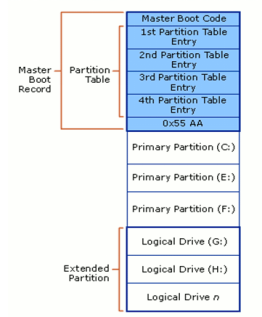
缺点:
There are several pitfalls with MBR. First of all, you can only have 4 partitions in the hard disk and each partition is limited to only 2TB in size. This is not going to work well with hard disk of big storage space, say 100TB. Secondly, the MBR is the only place that holds the partition information. If it ever get corrupted (and yes, it can get corrupted very easily), the entire hard disk is unreadable.
GUID Partition Table (GPT)
It’s a new standard that’s gradually replacing MBR.With GPT, you can create theoretically unlimited partitions on the hard disk, even though it is generally restricted to 128 partitions by most OSes.
Unlike MBR that limits each partition to only 2TB in size, each partition in GPT can hold up to 2^64 blocks in length (as it is using 64-bit), which is equivalent to 9.44ZB for a 512-byte block (1 ZB is 1 billion terabytes).In Microsoft Windows, that size is limited to 256TB.
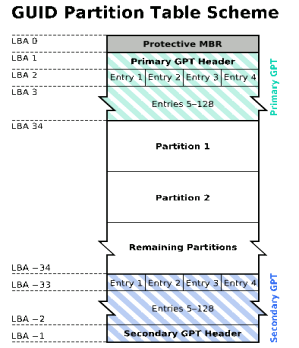
there is a primary GPT at the beginning of the hard disk and a secondary GPT at the end. This is what makes GPT more useful than MBR. GPT stores a backup header and partition table at the end of the disk so it can be recovered if the primary tables are corrupted. It also carry out CRC32 checksums to detect errors and corruption of the header and partition table.
优点:
This system doesn’t have MBR’s limits. Drives can be much, much larger and size limits will depend on the operating system and its file systems. GPT allows for a nearly unlimited amount of partitions, and the limit here will be your operating system — Windows allows up to 128 partitions on a GPT drive, and you don’t have to create an extended partition.
On an MBR disk, the partitioning and boot data is stored in one place. If this data is overwritten or corrupted, you’re in trouble. In contrast, GPT stores multiple copies of this data across the disk, so it’s much more robust and can recover if the data is correupted. GPT also stores cyclic redundancy check (CRC) values to check that its data is intact — if the data is corrupted, GPT can notice the problem and attempt to recover the damaged data from another location on the disk. MBR had no way of knowing if its data was corrupted — you’d only see there was a problem when the boot process failed or your drive’s partitions vanished.the protective MBR protects the GPT data from being overwritten.
MBR和GPT(分区)的更多相关文章
- MBR和GPT分区学习
1.MBR 早期的windows和linux都采用的MBR的方法来处理开机引导程序和分区表,对于linux的MBR分区来讲,0柱面0磁道1扇区用于引导驱动程序,第一扇区有512个字节,前446字节存放 ...
- MBR和GPT分区
MBR是传统的分区表类型,最大缺点是不支持容量大于2T的硬盘.GPT则弥补了MBR这个缺点,最大支持18EB的硬盘,是基于UEFI使用的磁盘分区架构. 其中,目前所有的Windows系统均支持MBR, ...
- Windows 10 MBR转GPT分区
注意:分区有风险,操作需谨慎,提前备份好数据. 说明: 1.有“系统保留”的分区,可以直接删除,用来做GPT分区的UEFI启动分区. 2.没有“系统保留”分区的,需要在分区最前面调整分区大小,留出30 ...
- 预装WIN8的电脑是GPT分区模式,无法安装WIN7
本人的笔记本自带的是WIN8系统,现在想安装WIN7的系统,但是安装不了,提示"windows无法安装到这个磁盘.选中的磁盘采用GPT分区形式". 通过上网搜索得知WIN7一般安装 ...
- Linux磁盘管理——MBR 与 GPT
硬件设备在Linux中文件名 如今IDE 磁盘几乎被淘汰,市面上最常见的磁盘就是SATA和SAS.个人计算机主要是SATA.很多Linux发行版下都将IDE磁盘文件名也都被仿真成 /dev/sd[a- ...
- Linux 学习手记(6): 磁盘、分区、MBR与GPT
1. 磁盘在LINUX中的表示 Linux所有设备都被抽象为一个文件,保存在/dev目录下 设备名称一般为hd[a-z]或者sd[a-z]([a-z]为分区号),如:hda.hdb.sda.sdb I ...
- 系统分区MBR、GPT
分区模式: ①MBR(主引导记录(Master Boot Record))分区:在驱动器最前端的一段引导扇区 缺点:主分区不超过4个,单个分区容量最大2TB 分区工具fdisk只能给硬盘做MBR分区, ...
- 重装系统时,将MBR分区转为GPT 分区
摘要 很多同学在重装系统的时候,或多或少都遇到过这样的问题:镜像文件没有问题,软碟通刻录也没有问题,但偏偏就在选择安装系统盘盘符的时候,跳出对话框,提示:Windows无法安装到这个磁盘,选中的磁盘具 ...
- 硬盘GPT分区与MBR分区的转换
如何将gpt分区更改成mbr分区? "因为笔记本电脑硬盘分区表是GPT而导致大家无法安装引导系统.需要转换为MBR分区还能顺利安装." 问题是,分区工具无法转换MBR,这里小编知道 ...
随机推荐
- Hibernate Annotation 字段 默认值
http://emavaj.blog.163.com/blog/static/133280557201032262741999/ ——————————————————————————————————— ...
- CI框架中 类名不能以方法名相同
昨天晚上一个坑爹的问题折腾了我一晚上,首先我来说下我的代码,我建立了一个index的控制器然后呢 在控制器里有一个index的方法.页面模板都有. if ( ! defined('BASEPATH' ...
- php -- memcached 内存缓存
一.memcached 简介 在很多场合,我们都会听到 memcached 这个名字,但很多同学只是听过,并没有用过或实际了解过,只知道它是一个很不错的东东.这里简单介绍一下,memcached 是高 ...
- pip下载默认绕过代理
centos7下使用pip7.1.0安装软件,在shell下设置了全局http_proxy和https_proxy,但是每次都遇到网络超时问题, 后来使用pip install xxx --proxy ...
- ThinkPHP跳转与重定向的区别
跳转: 浏览器认为: 当前URL请求成功, 重新请求新的URL. 浏览器会 记录当前的URL 和 新的URL 在请求历史记录中. 回退, 是可以回退到, 当前的URL上的. (无论 success, ...
- ReactNative iOS源码解析
http://awhisper.github.io/2016/06/24/ReactNative%E6%B5%81%E7%A8%8B%E6%BA%90%E7%A0%81%E5%88%86%E6%9E% ...
- Node.js的全局对象和全局变量
http://blog.csdn.net/leftfist/article/details/41877279
- android开发环境之ADT安装,卸载,更新
http://hj198703.iteye.com/blog/1316991 1.官网:http://developer.android.com/sdk/index.html2.ADT组件在线安装 ...
- string整理
/* scanf是c语言的,而string是c++的类,所以不能使用scanf直接读入 */ #include<cstdio> #include<string>//注意支持库 ...
- Jwt在Java项目中的简单实际应用
1.什么是jwt 双方之间传递安全信息的简洁的.URL安全的表述性声明规范.JWT作为一个开放的标准(RFC 7519),定义了一种简洁的,自包含的方法用于通信双方之间以Json对象的形式安全的传递信 ...