
AngularJS filter:search 是如何匹配的 ng-repeat filter:search ,filter:{$:search},只取repeat的item的value 不含label
1. filter可以接收参数,参数用 : 进行分割,如下:
{{ expression | filter:argument1:argument2:... }}
2. filter参数是 对象 ,匹配属性中含有value的
$scope.childrenArray = [

        {name:'kimi',age:3},

        {name:'cindy',age:4},

        {name:'anglar',age:4},

        {name:'shitou',age:6},

        {name:'tiantian',age:5}

    ];

{{ childrenArray | filter : {name : 'i'} }} //参数是对象,匹配name属性中含有i的
示例:angular filter多个字段搜索
<input type="text" ng-model="search ">

<!--<li ng-repeat="user in data.users | filter:{name:search}>  -->

<!--此时只搜索了name字段-->

<!--搜索name字段、account字段-->

<li ng-repeat="user in data.users | filter:{name:search}:{account:search}>

<span ng-bind="user.name"></span>

<span ng-bind="user.account"></span>

</li>
3. 没有指定过滤哪个字段的情况下,默认filter会匹配所有字段(name、account)的值,类似 多个字段搜索
ng-repeat="user in data.users | filter:search
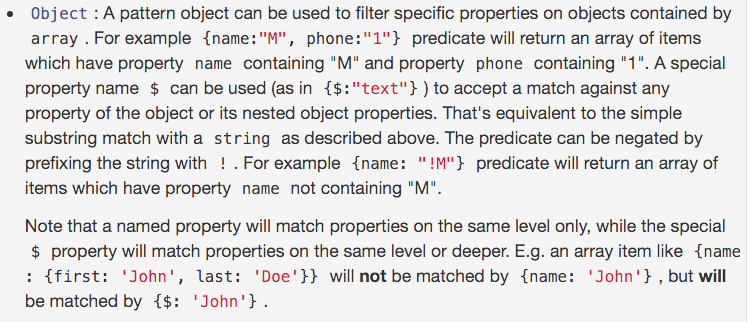
4. $ 匹配 对象 所有属性 和 嵌套对象属性
<li ng-repeat="user in data.users | filter:{$:search}>
5. bind ng-model to the “value” of selected item instead of item for ui-select
  <ui-select ng-model="fm.countryCode" id="countryCode">

      <ui-select-match placeholder="Select a country...">{{$select.selected.label}}</ui-select-match>

      <ui-select-choices repeat="item in countries | filter: $select.search" value="{{$select.selected.value}}">

          <div ng-bind-html="item.label | highlight: $select.search"></div>

          <small ng-bind-html="item.value | highlight: $select.search"></small>

      </ui-select-choices>

  </ui-select>
Currently it's just setting fm.countryCode to the whole country item.
For example if I select Afghanistan, fm.countryCode will be set to {"value":"AF","label":"Afghanistan"}.
What I want is "AF".
so change the repeat part
<ui-select-choices repeat="item in countries | filter: $select.search" value="{{$select.selected.value}}">
to
<ui-select-choices repeat="item.value as item in countries | filter: $select.search" value="{{$select.selected.value}}">
示例:
                                            <ui-select ng-model="networkDefaultValue.resourceId" name="networkname" theme="bootstrap" ng-change="setInputDefaultValue(['resource_id'],networkDefaultValue.resourceId,networkDefaultValue.isResourceIdInput)">

                                                <ui-select-match allow-clear="true" placeholder="{{'Select an option'|translate}}">{{$select.selected.name + ' - ' + $select.selected.properties.datacentername}}</ui-select-match>

                                                <ui-select-choices repeat="resource.id as resource in totalNetworks | filter: { $ : $select.search}">

                                                    <div ng-bind-html="resource.name + ' - ' + resource.properties.datacentername | highlight: $select.search"></div>

                                                </ui-select-choices>

                                            </ui-select>
参考网址:
走进AngularJs(七) 过滤器(filter)
AngularJS filter:search 是如何匹配的 ng-repeat filter:search
AngularJS filter:search 是如何匹配的 ng-repeat filter:search ,filter:{$:search},只取repeat的item的value 不含label的更多相关文章
- Python: re.compile最短匹配模式,只取双引号内的值\“
用正则表达式匹配某个文本模式 1.只取双引号内的值 2.长短匹配模式对比 贪婪模式: 模式r'\"(.*)\" '的意图是匹配被双引号包含的文本,但是这个表达式中*是贪婪的 ...
- Web.xml中设置Servlet和Filter时的url-pattern匹配规则
一.servlet容器对url的匹配过程: 当一个请求发送到servlet容器的时候,容器先会将请求的url减去当前应用上下文的路径作为servlet的映射url,比如我访问的是http://loca ...
- 四十七.iptables防火墙 filter表控制 扩展匹配 nat表典型应用
1.iptables基本管理 关闭firewalld,开启iptables服务 查看防火墙规则 追加.插入防火墙规则 删除.清空防火墙规则 1.1 关闭firewalld,启动iptables服务 ...
- Python:正则表达式(二):如何使用re.search()返回的匹配对象中的具体内容呢??
在上一篇中讲述了re.seach()会返回一个对象格式的数据,如下:<_sre.SRE_Match object; span=(16, 24), match='${phone}'> 那么问 ...
- AngularJS中angular.min.js:80 Error: [ng:areq] http://errors.angularjs.org/1.2.9/ng/areq
报出来的时候,出现这种错误,是因为在引入控制器的时候没有引入成功,我遇到这个错误是在因为没有将父控制器引入到子控制器中.
- C#中正则表达式只取前N个匹配结果
用Regex.Matches方法可以得到同指定正则表达式对应的所有匹配结果.有时,所有匹配结果可能有成千上万个,考虑到性能效率的因素,只需要取出前N个匹配结果.下面的代码演示了做法: 需求:取字符串中 ...
- filter 死循环(tomcat 启动完成 ,自动执行filter.dofilter,导致tomcat 启动超时) , tomcat 启动和 servers 启动 不同
package com.diancai.interceptor; import java.io.IOException; import javax.servlet.Filter; import jav ...
- dubbo白名单通过filter,spring web通过拦截器或者filter即可
在开发中,有时候需要限制访问的权限,白名单就是一种方法.对于Java Web应用,Spring的拦截器可以拦截Web接口的调用:而对于dubbo接口,Spring的拦截器就不管用了. dubbo提供了 ...
- 'org.springframework.web.filter.CharacterEncodingFilter' is not assignable to 'javax.servlet.Filter,This inspection lets you spot the following problems that might occur in descriptors that are used t
1.jar包导入错误,因为maven下载的原因: 删除这样的包,然后让maven重新下载,问题就会解决
随机推荐
- PCB标识说明
VDC (Voltage Direct Current),直流电压 VBAT,电池供电 PWKEY,电源键 RXD,数据接收 TXD,数据发送 Receive Data ,Transmit Data ...
- HTML和CSS的盒子模型(Box model)
本文作为属性篇的最后一篇文章, 将讲述HTML和CSS的关键—盒子模型(Box model). 理解Box model的关键便是margin和padding属性, 而正确理解这两个属性也是学习用css ...
- op bug 修复计划
省-市-区-组-成员 多了一个组的下拉框,说不清它和区的联系 把它删掉,它的点击事件(把组的id和内容传给隐形的text,text通过ajax提交到数据库)给区下面的组
- Struts2的拦截器是如何使用AOP工作的
拦截器(interceptor)是Struts2最强大的特性之一,也可以说是struts2的核心,拦截器可以让你在Action和result被执行之前或之后进行一些处理.同时,拦截器也可以让你将通用的 ...
- HTML的footer置于页面最底部的方法
方法一:footer高度固定+绝对定位 <html> <head> <style type="text/css"> html{height:%; ...
- 多线程环境下调用 HttpWebRequest 并发连接限制
.net 的 HttpWebRequest 或者 WebClient 在多线程情况下存在并发连接限制,这个限制在桌面操作系统如 windows xp , windows 7 下默认是2,在服务器操作 ...
- 传递任意数量的实参*parameter&使用任意数量的关键字实参**parameter
1.*形参名(*parameter) 有时候我们不知道知道函数需要接受多少个实参,所以我们可以在形参名前加一个*,是让python创建一个名为parameter的空元组,并将收到的所有值都封装到这个元 ...
- Numpy库解析
python中的axis 其实问题理解axis有问题,df.mean其实是在每一行上取所有列的均值,而不是保留每一列的均值.也许简单的来记就是axis=0代表往跨行(down),而axis=1代表跨列 ...
- MySQL------存储过程的使用
如图: 1.创建存储过程 create procudure userAdd(na varchar(20),pass varchar(20)) select * from user where name ...
- 如何用C语言读写文件
#include "stdio.h"#include <stdlib.h> main(){ FILE *fp1;//定义文件流指针,用于打开读取的文件 FILE *fp ...