
A Beginner’s Guide to the OUTPUT Clause in SQL Server
原文 A Beginner’s Guide to the OUTPUT Clause in SQL Server
T-SQL supports the OUTPUT clause after the inception of SQL server 2005 and later editions. We can use the OUTPUT clause with DML statements (INSERT, DELETE, UPDATE) to return information from modified rows.
We primarily use the OUTPUT clause for auditing and archiving modified rows. In this tutorial, we will walk through the use of the OUTPUT clause with different DML statements and examples. First, we will create a table, dbo.Songs, and populate it with some data.
IF OBJECT_ID('dbo.Songs') IS NOT NULL

DROP TABLE dbo.Songs

GO

CREATE TABLE dbo.Songs

(

Id int CONSTRAINT PK_Songs_Id PRIMARY KEY,

Name varchar(200) NOT NULL,

Singer varchar(50) NOT NULL

)

GO

INSERT INTO dbo.Songs ( Id, Name, Singer)

VALUES (1, 'I hate everything about you', 'Adam Gontier');

INSERT INTO dbo.Songs ( Id, Name, Singer) VALUES (2, 'Dil se', 'A. R. Rahman');

INSERT INTO dbo.Songs ( Id, Name, Singer) VALUES

(3, 'My heart will go On', 'Celine Dion');

INSERT INTO dbo.Songs ( Id, Name, Singer) VALUES (4, 'Maeri', 'Euphoria');

GO

SELECT * from dbo.Songs

GO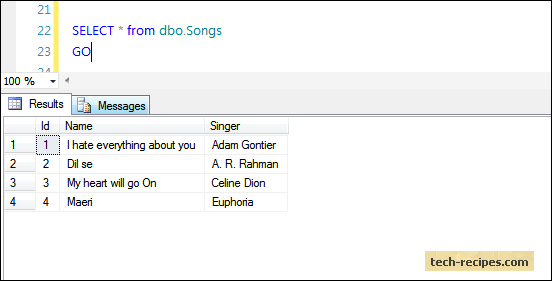
Inserted and Deleted Tables in an OUTPUT Clause
Inserted and Deleted tables are two memory-resident tables that reside within SQL server and are used with the OUTPUT clause.
Whenever any DML (INSERT, DELETE, UPDATE) statement is executed, these tables are populated.
The results of the INSERT statement are stored in the Inserted table, and the results of the Delete statement are stored in the Deleted table. Also, with an UPDATE statement, the deleted rows are stored in the Deleted table. The new inserted rows in the Inserted table as UPDATE are nothing but delete and insert operations combined together.
Note: You cannot directly query Inserted and Deleted tables to see what data they are currently holding, but you can use them with the OUTPUT clause as well as with Triggers.
The OUTPUT Clause with an Insert statement
When we do an Insert operation on a table, we get a message which reads, “(n row(s) affected),” but if we want to see what data rows were inserted into a table, we can use an OUTPUT clause and a memory resident inserted table to return the results back to the screen in the same way that a select statement does.
Let us insert a record, and use an OUTPUT clause to print the results on the screen.
INSERT INTO dbo.Songs ( Id, Name, Singer)

OUTPUT INSERTED.ID, INSERTED.name, INSERTED.Singer

VALUES (5, 'AINT no grave', 'Johnny Cash');

GO
Check the dbo.Songs table. A new row is inserted with id=5.
select * from dbo.Songs;

GO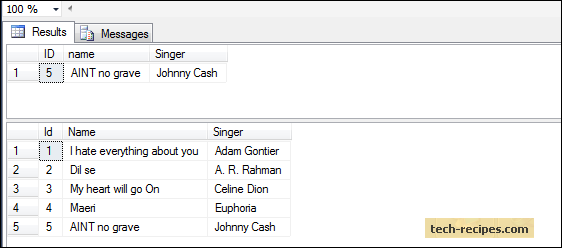
The OUTPUT Clause with a Delete Statement
The same goes with a delete operation. It shows only (n rows(s) affected). We can use an OUTPUT clause and a deleted table to see which rows were actually deleted from the table.
DELETE from dbo.Songs

OUTPUT DELETED.id, DELETED.name, DELETED.singer

WHERE ID=5;

GO
Query the dbo.Songs table row with id = 5 has been deleted.
select * from dbo.Songs;

GO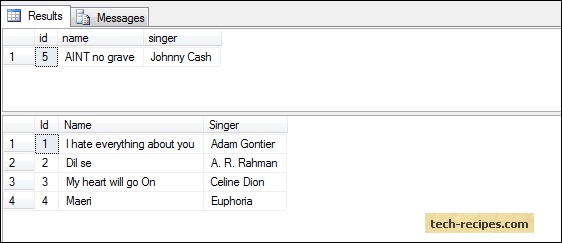
The OUTPUT Clause with an Update Statement
An Update statement does nothing but delete old data and insert new data, so with an Update statement, both memory resident tables are affected and are deleted as well as inserted.
Here we are updating the name of a singer, who has sung ‘Dil se’ song, with ID equal to two.
UPDATE dbo.Songs

SET Singer = 'Rahman'

OUTPUT DELETED.Singer, INSERTED.Singer

WHERE ID = 2;

GO
You can see the old singer’s name along with the new singer’s name.
select * from dbo.Songs;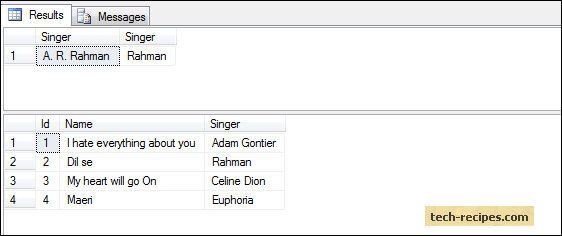
The three examples above show how to use an OUTPUT clause for auditing purposes. Now, we will see how to use it for archiving.
Before, we were just printing the results of a DML statement on the screen, which was temporary, but with the OUTPUT clause, you can store the results of a DML statement in a table, too.
Store Results of an OUTPUT Clause into a Table
Inserting the data return from an OUTPUT clause into a table can be done using an OUTPUT INTO clause. Keep in mind that you first need to create the target table which must have the same number of columns and data types that match the source table.
IF OBJECT_ID('dbo.Songs_Inserted') IS NOT NULL

DROP TABLE dbo.Songs_Inserted

GO

CREATE TABLE dbo.Songs_Inserted

(

Id int CONSTRAINT PK_Songs__Inserted_Id PRIMARY KEY,

Name varchar(200) NOT NULL,

Singer varchar(50) NOT NULL

)

GO

INSERT INTO dbo.Songs ( Id, Name, Singer)

OUTPUT Inserted.* INTO dbo.Songs_Inserted

VALUES (5, 'Duniya', 'Piyush Mishra');

GO

-- Result of Songs_Inserted table and base table.

select * from dbo.Songs_Inserted;

select * from dbo.Songs;

GO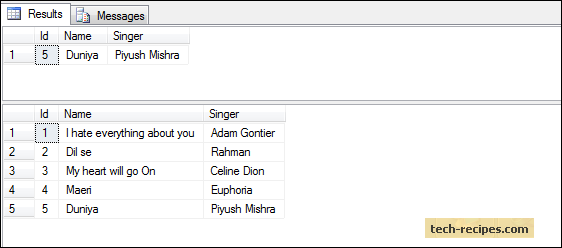
As the results above show, data is inserted into both the tables.
Store Results of an OUTPUT Clause into a Temporary Table
The same goes with a temporary table. Create a temporary table first, and then using an OUTPUT INTO clause, insert the data returned by the OUTPUT clause into a temporary table.
IF OBJECT_ID('tempdb..#Songs_Deleted') IS NOT NULL

DROP TABLE dbo.#Songs_Deleted

GO

CREATE TABLE dbo.#Songs_Deleted

(

Id int,

Name varchar(200) NOT NULL,

Singer varchar(50) NOT NULL

)

GO

DELETE from dbo.Songs

OUTPUT deleted.* INTO dbo.#Songs_Deleted

WHERE ID IN (4,5);

GO

-- Result of temporary table and base table.

SELECT * from dbo.#Songs_Deleted;

Select * from dbo.Songs;
Store Results of an OUTPUT Clause into a Table Variable
Nothing changes for table variables as well. Declare a table variable structure the same as a source table. Do not forget to run the entire script at once so that you can see the output inserted into a table variable.
Declare @Songs_Deleted TABLE

(

Id int,

Name varchar(200) NOT NULL,

Singer varchar(50) NOT NULL

)

DELETE from dbo.Songs

OUTPUT deleted.* INTO @Songs_Deleted

WHERE ID IN (1,2);

-- Result of table variable

SELECT * from @Songs_Deleted;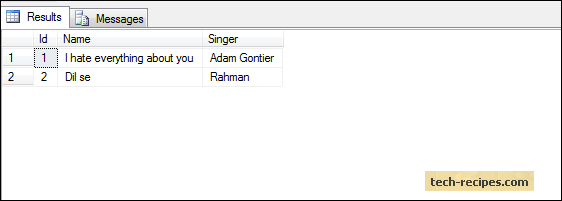
Browse through our SQL server archive articles for more useful information.
A Beginner’s Guide to the OUTPUT Clause in SQL Server的更多相关文章
- Guide to Database Migration from Microsoft SQL Server using MySQL Workbench
http://mysqlworkbench.org/2012/07/migrating-from-ms-sql-server-to-mysql-using-workbench-migration-wi ...
- A Beginner's Guide To Understanding Convolutional Neural Networks(转)
A Beginner's Guide To Understanding Convolutional Neural Networks Introduction Convolutional neural ...
- (转)A Beginner's Guide To Understanding Convolutional Neural Networks Part 2
Adit Deshpande CS Undergrad at UCLA ('19) Blog About A Beginner's Guide To Understanding Convolution ...
- (转)A Beginner's Guide To Understanding Convolutional Neural Networks
Adit Deshpande CS Undergrad at UCLA ('19) Blog About A Beginner's Guide To Understanding Convolution ...
- A Beginner’s Guide to Eigenvectors, PCA, Covariance and Entropy
A Beginner’s Guide to Eigenvectors, PCA, Covariance and Entropy Content: Linear Transformations Prin ...
- A Beginner's Guide to Paxos
Google Drive: A Beginner's Guide to Paxos The code ideas of Paxos protocol: 1) Optimistic concurrenc ...
- Beginner's Guide to Python-新手指导
Refer English Version: http://wiki.python.org/moin/BeginnersGuide New to programming? Python is free ...
- 新手教程之:循环网络和LSTM指南 (A Beginner’s Guide to Recurrent Networks and LSTMs)
新手教程之:循环网络和LSTM指南 (A Beginner’s Guide to Recurrent Networks and LSTMs) 本文翻译自:http://deeplearning4j.o ...
- Photography theory: a beginner's guide(telegraph.co.uk)
By Diane Smyth, Tim Clark, Rachel Segal Hamilton and Lewis Bush 11:00AM BST 09 Jun 2014 Have you r ...
随机推荐
- STL之map&multimap使用简介
map 1.insert 第一种:用insert函数插入pair数据 #include <map> #include <string> #include <iostrea ...
- Android记事本05
昨天: intentFilter 今天: URL和logcat 问题: ADK更新后无法打开布局文件.xml
- 软件架构---.net框架介绍
https://www.cnblogs.com/hgmyz/p/5313983.html 自从学习.NET以来,优雅的编程风格,极度简单的可扩展性,足够强大开发工具,极小的学习曲线,让我对这个平台产生 ...
- hadoop生态圈列式存储系统--kudu介绍及安装配置
介绍 Kudu 是一个针对 Apache Hadoop 平台而开发的列式存储管理器.Kudu 共享 Hadoop 生态系统应用的常见技术特性: 它在 commodity hardware(商品硬件)上 ...
- 论文笔记《Hand Gesture Recognition with 3D Convolutional Neural Networks》
一.概述 Nvidia提出的一种基于3DCNN的动态手势识别的方法,主要亮点是提出了一个novel的data augmentation的方法,以及LRN和HRn两个CNN网络结合的方式. 3D的CNN ...
- codechef AUG17 T1 Chef and Rainbow Array
Chef and Rainbow Array Problem Code: RAINBOWA Chef likes all arrays equally. But he likes some array ...
- 接下来打算写一下visual stuido 2013使用git进行远端管理。
虽然我有了vs的账号,也vs2013开始已经可以进行远端的账户管理了,可是vs的版控毕竟有些依赖vs,想想还是用git吧 今天把这个环境的整套都弄地基本熟了.记录一下,算是一个小结.开始搭建系统框架
- FIRST SCRAPY PRJ
zpc@Lenovo-PC:/prj/pyscrapy/a$ scrapy startproject helloword New Scrapy project 'helloword' created ...
- (未解决)WIN8下使用POWERSHELL安装python easy_install无法成功
按照https://pypi.python.org/pypi/setuptools#windows-8-powershell介绍的方法, 安装未成功.安装似乎没有启动, 也未安装成功. Windows ...
- 再议gluPerspective和gluLookAt的关系
http://www.cnblogs.com/chengmin/archive/2011/09/12/2174004.html 看了Opengl的相关程序,发现有些东西还是特别迷茫,尤其是gluLoo ...