
基于IDEA 最新Spirng3.2+hibernate4+struts2.3 全注解配置 登录
原文 基于IDEA 最新Spirng3.2+hibernate4+struts2.3 全注解配置 登录
首先说说 IDEA 12,由于myeclipse越来越卡,我改用idea12 了,发现其功能强悍到eclipse无法比拟,此款ide理解上下文是一等一的,不用什么jquery插件,extjs插件,都可以实现全智能的代码提示。速度什么的都比myeclipse快。而且IDEA提供了android支持struts spring hibernate 支持。下面,我讲教大家完成一个基于全注解的Spirng3.2+hibernate4+struts2.3 登录项目,本人对Java极其热爱,爱好Java编程的朋友可以加QQ群:185441009
第一步 创建工程:
图中的project name 就是eclipse里的workspace,下面有个额module name,这个module 才是真正的项目,如果你不改名字,它会自动创建一个跟project name一样的工程。
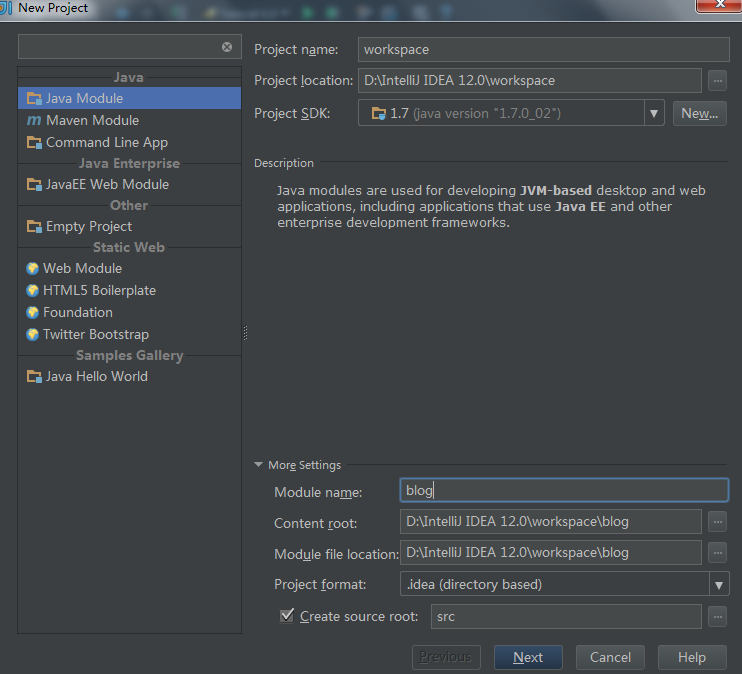
点 next
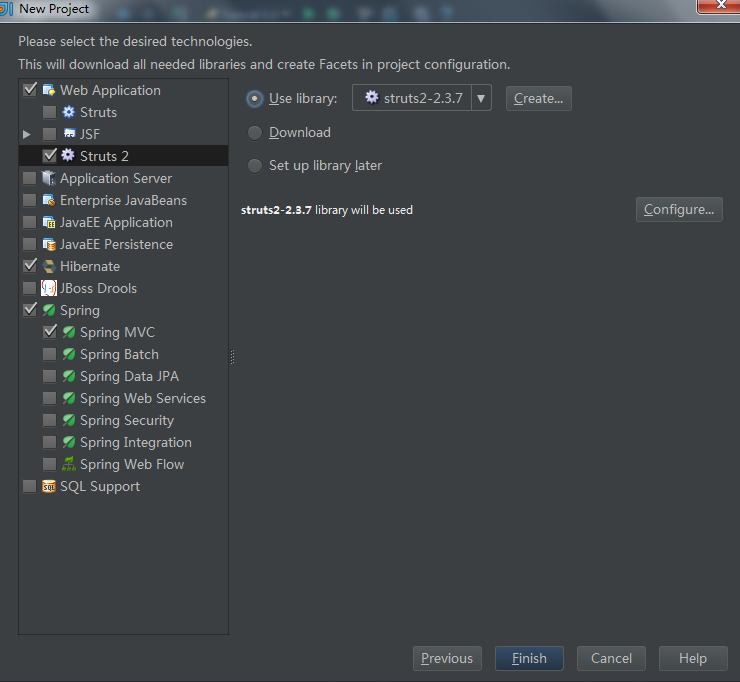
选择相应的框架,包括application server tomcat,这里要说明的是,选择的时候它会提示是否下载所依赖的jar


记住要选中上图中Level为为global 意思就是这个lib是Userlibary,同理,spring hibernate 亦是如此。
完了之后 finish,项目就创建完毕了。
第二步,配置lib
ide下载的jar并不是完美的,有些冲突,有些少包多包。项目上右键,选择打开project Structure 选择global library,这里可以配置lib。

经过修整,最终导入的包如下。
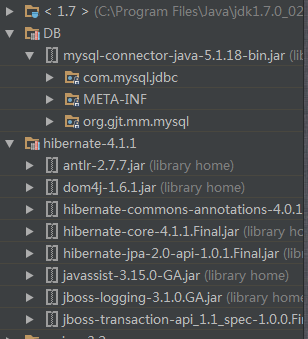
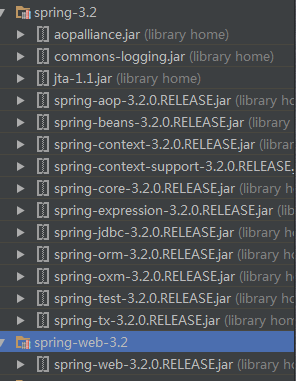
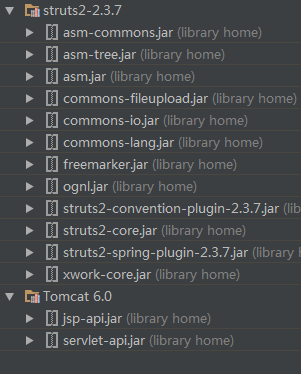
第三步 搭建ssh框架
web.xml
<?xml version="1.0" encoding="UTF-8"?>
<web-app xmlns="http://java.sun.com/xml/ns/javaee"
xmlns:xsi="http://www.w3.org/2001/XMLSchema-instance"
xsi:schemaLocation="http://java.sun.com/xml/ns/javaee
http://java.sun.com/xml/ns/javaee/web-app_2_5.xsd"
version="2.5">
<context-param>
<param-name>contextConfigLocation</param-name>
<param-value>classpath:applicationContext.xml</param-value>
</context-param>
<listener>
<listener-class>org.springframework.web.context.ContextLoaderListener</listener-class>
</listener>
<filter>
<filter-name>struts2</filter-name>
<filter-class>org.apache.struts2.dispatcher.ng.filter.StrutsPrepareAndExecuteFilter</filter-class>
<init-param>
<param-name>struts.ui.theme</param-name>
<param-value>simple</param-value>
</init-param>
<init-param>
<param-name>struts.objectFactory</param-name>
<param-value>spring</param-value>
</init-param>
<init-param>
<param-name>struts.convention.action.packages</param-name> //这是注解加载action类的时候用的
<param-value>com.blog.actions</param-value>
</init-param>
</filter>
<filter-mapping>
<filter-name>struts2</filter-name>
<url-pattern>/*</url-pattern>
</filter-mapping>
</web-app>
第二步 配置数据源
点击ide右边的database

然后右击 add 按照步骤一步一步添加数据源 完成之后如图所示
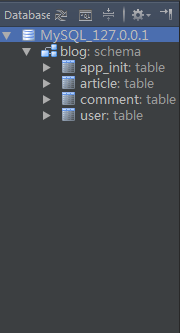
之后选中IDE侧面的 persistence 选中hibernate.cfg.xml 右击
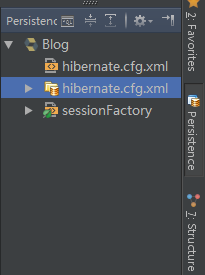
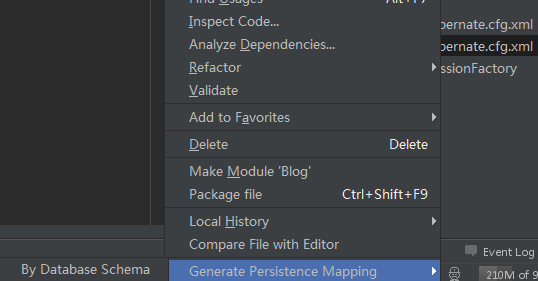
选择 genernate mapping,按照步骤生成带注解的pojo类。
创建相应的配置文件 和 java 类 工程结构如图所示 struts无需配置。


hibernate 配置文件:
<?xml version='1.0' encoding='utf-8'?>
<!DOCTYPE hibernate-configuration PUBLIC
"-//Hibernate/Hibernate Configuration DTD//EN"
" http://hibernate.sourceforge.net/hibernate-configuration-3.0.dtd">
<hibernate-configuration>
<session-factory>
<property name="connection.url">jdbc:mysql://localhost:3306/blog</property>
<property name="connection.driver_class">com.mysql.jdbc.Driver</property>
<property name="connection.username">root</property>
<property name="connection.password">123456</property>
<property name="hibernate.dialect">org.hibernate.dialect.MySQLDialect</property>
<property name="hibernate.c3p0.min_size">5</property>
<property name="hibernate.c3p0.max_size">20</property>
<property name="hibernate.c3p0.timeout">1800</property>
<property name="hibernate.c3p0.max_statements">50</property>
<mapping class="com.blog.entity.AppInitEntity"/>
<mapping class="com.blog.entity.ArticleEntity"/>
<mapping class="com.blog.entity.CommentEntity"/>
<mapping class="com.blog.entity.UserEntity"/>
<!-- DB schema will be updated if needed -->
<!-- <property name="hbm2ddl.auto">update</property> -->
</session-factory>
</hibernate-configuration>
spring 配置文件
<?xml version="1.0" encoding="UTF-8"?>
<beans xmlns="http://www.springframework.org/schema/beans"
xmlns:xsi="http://www.w3.org/2001/XMLSchema-instance" xmlns:context="http://www.springframework.org/schema/context"
xsi:schemaLocation="http://www.springframework.org/schema/beans http://www.springframework.org/schema/beans/spring-beans.xsd http://www.springframework.org/schema/context http://www.springframework.org/schema/context/spring-context.xsd">
<context:component-scan base-package="com.blog">
</context:component-scan>
<bean id="sessionFactory"
class="org.springframework.orm.hibernate4.LocalSessionFactoryBean">
<property name="configLocation" value="classpath:hibernate.cfg.xml"></property>
</bean>
</beans>
loginAction
package com.blog.actions;
import com.blog.dao.UserDao;
import com.blog.entity.UserEntity;
import com.blog.service.UserService;
import com.opensymphony.xwork2.ActionSupport;
import org.apache.struts2.convention.annotation.Action;
import org.apache.struts2.convention.annotation.Namespace;
import org.apache.struts2.convention.annotation.Result;
import org.apache.struts2.convention.annotation.Results;
import org.springframework.beans.factory.annotation.Qualifier;
import org.springframework.stereotype.Controller;
import javax.annotation.Resource;
/**
* Created with IntelliJ IDEA.
* User: Juyan
* Date: 12-12-15
* Time: 下午12:31
* To change this template use File | Settings | File Templates.
*/
@Controller
@Namespace("/")
@Action("login")
@Results({@Result(name = "success", location = "/welcome.jsp"), @Result(name = "error", location = "/index.jsp")})
public class LoginAction extends ActionSupport {
public String getUserName() {
return userName;
}
public void setUserName(String userName) {
this.userName = userName;
}
public String getPwd() {
return pwd;
}
public void setPwd(String pwd) {
this.pwd = pwd;
}
private String userName;
private String pwd;
public String getMessage() {
return message;
}
public void setMessage(String message) {
this.message = message;
}
private String message;
@Resource
UserService userService;
public void check() {
Integer id = 1;
UserEntity userEntity = userService.findById(id);
System.out.println(userEntity.getUserName());
}
}
UserDao
package com.blog.dao;
import com.blog.entity.UserEntity;
/**
* Created with IntelliJ IDEA.
* User: Juyan
* Date: 12-12-15
* Time: 下午8:46
* To change this template use File | Settings | File Templates.
*/
public interface UserDao {
public UserEntity findById(Object id);
}
UserDaoImpl
package com.blog.daoimpl;
import com.blog.dao.UserDao;
import com.blog.entity.UserEntity;
import org.hibernate.Session;
import org.springframework.dao.DataAccessException;
import org.springframework.stereotype.Repository;
import java.io.Serializable;
import java.util.logging.Logger;
/**
* Created with IntelliJ IDEA.
* User: Juyan
* Date: 12-12-15
* Time: 下午8:52
* To change this template use File | Settings | File Templates.
*/
@Repository
public class UserDaoImpl extends SuperDao implements UserDao {
static Logger logger = Logger.getLogger(UserDaoImpl.class.toString());
@Override
public UserEntity findById(Object id) {
UserEntity userEntity = null;
try {
Session session=sessionFactory.openSession();
userEntity = (UserEntity) session.load(UserEntity.class, (Serializable) id);
logger.info("id:" + id);
} catch (DataAccessException e) {
logger.info(e.toString());
}
return userEntity;
}
超类 SuperDao
package com.blog.daoimpl;
import org.hibernate.SessionFactory;
import org.springframework.orm.hibernate3.HibernateTemplate;
import org.springframework.orm.hibernate3.support.HibernateDaoSupport;
import org.springframework.stereotype.Component;
import javax.annotation.Resource;
/**
* Created with IntelliJ IDEA.
* User: Juyan
* Date: 12-12-15
* Time: 下午8:49
* To change this template use File | Settings | File Templates.
*/
@Component
public class SuperDao {
@Resource
SessionFactory sessionFactory;
}
UserEntity 实体类
package com.blog.entity;
import javax.persistence.Basic;
import javax.persistence.Entity;
import javax.persistence.Id;
import javax.persistence.OneToMany;
import java.sql.Timestamp;
import java.util.Collection;
/**
* Created with IntelliJ IDEA.
* User: Juyan
* Date: 12-12-15
* Time: 下午2:05
* To change this template use File | Settings | File Templates.
*/
@javax.persistence.Table(name = "user", schema = "", catalog = "blog")
@Entity
public class UserEntity {
private int userId;
@javax.persistence.Column(name = "user_id", nullable = false, insertable = true, updatable = true, length = 10, precision = 0)
@Id
public int getUserId() {
return userId;
}
public void setUserId(int userId) {
this.userId = userId;
}
private String userName;
@javax.persistence.Column(name = "user_name", nullable = false, insertable = true, updatable = true, length = 50, precision = 0)
@Basic
public String getUserName() {
return userName;
}
public void setUserName(String userName) {
this.userName = userName;
}
private String pwd;
@javax.persistence.Column(name = "pwd", nullable = false, insertable = true, updatable = true, length = 50, precision = 0)
@Basic
public String getPwd() {
return pwd;
}
public void setPwd(String pwd) {
this.pwd = pwd;
}
private String email;
@javax.persistence.Column(name = "email", nullable = false, insertable = true, updatable = true, length = 50, precision = 0)
@Basic
public String getEmail() {
return email;
}
public void setEmail(String email) {
this.email = email;
}
private Timestamp regTime;
@javax.persistence.Column(name = "reg_time", nullable = false, insertable = true, updatable = true, length = 19, precision = 0)
@Basic
public Timestamp getRegTime() {
return regTime;
}
public void setRegTime(Timestamp regTime) {
this.regTime = regTime;
}
@Override
public boolean equals(Object o) {
if (this == o) return true;
if (o == null || getClass() != o.getClass()) return false;
UserEntity that = (UserEntity) o;
if (userId != that.userId) return false;
if (email != null ? !email.equals(that.email) : that.email != null) return false;
if (pwd != null ? !pwd.equals(that.pwd) : that.pwd != null) return false;
if (regTime != null ? !regTime.equals(that.regTime) : that.regTime != null) return false;
if (userName != null ? !userName.equals(that.userName) : that.userName != null) return false;
return true;
}
@Override
public int hashCode() {
int result = userId;
result = 31 * result + (userName != null ? userName.hashCode() : 0);
result = 31 * result + (pwd != null ? pwd.hashCode() : 0);
result = 31 * result + (email != null ? email.hashCode() : 0);
result = 31 * result + (regTime != null ? regTime.hashCode() : 0);
return result;
}
private Collection<ArticleEntity> articlesByUserId;
@OneToMany(mappedBy = "userByUserId")
public Collection<ArticleEntity> getArticlesByUserId() {
return articlesByUserId;
}
public void setArticlesByUserId(Collection<ArticleEntity> articlesByUserId) {
this.articlesByUserId = articlesByUserId;
}
}
UserService
package com.blog.service;
import com.blog.entity.UserEntity;
import java.security.PrivateKey;
/**
* Created with IntelliJ IDEA.
* User: Juyan
* Date: 12-12-15
* Time: 下午8:43
* To change this template use File | Settings | File Templates.
*/
public interface UserService {
public UserEntity findById(Object id);
}
UserServiceImpl
package com.blog.serviceimpl;
import com.blog.dao.UserDao;
import com.blog.daoimpl.UserDaoImpl;
import com.blog.entity.UserEntity;
import com.blog.service.UserService;
import org.springframework.stereotype.Service;
import javax.annotation.Resource;
/**
* Created with IntelliJ IDEA.
* User: Juyan
* Date: 12-12-15
* Time: 下午8:47
* To change this template use File | Settings | File Templates.
*/
@Service
public class UserServiceImpl implements UserService {
@Resource
UserDao userDao;
@Override
public UserEntity findById(Object id) {
return userDao.findById(id);
}
}
index.jsp
<%@ taglib prefix="s" uri="/struts-tags" %>
<%--
Created by IntelliJ IDEA.
User: Juyan
Date: 12-12-15
Time: 下午12:14
To change this template use File | Settings | File Templates.
--%>
<%@ page contentType="text/html;charset=UTF-8" language="java" %>
<html>
<head>
<title>Login</title>
</head>
<body>
<s:form action="login" namespace="/" method="POST">
用户名:<s:textfield name="userName" />
密码:<s:password name="pwd"/>
<s:submit name="登录" method="check"/>
</s:form>
<s:property value="message"/>
</body>
</html>
配置完毕后,点击上面的tomcat毛旁边的 运行按钮。说是登陆,其实我只查询了对象。数据库是mysql,自己创建吧。user表里面有个id字段。道理是一样的。
还有什么问题加我QQ.
基于IDEA 最新Spirng3.2+hibernate4+struts2.3 全注解配置 登录的更多相关文章
- Struts2的使用注解配置Action(零配置)
1.首先引入struts2注解的jar包:struts2-convention-plugin.jar ------------------------------第一种方式-------------- ...
- spring+hibernate+Struts2 整合(全注解及注意事项)
最近帮同学做毕设,一个物流管理系统,一个点餐系统,用注解开发起来还是很快的,就是刚开始搭环境费了点事,今天把物流管理系统的一部分跟环境都贴出来,有什么不足的,请大神不吝赐教. 1.结构如下 2.jar ...
- 基于已构建S2SH项目配置全注解方式简化配置文件
如果还不熟悉s2sh项目搭建的朋友可以先阅读 eclipse环境下基于tomcat-7.0.82构建struts2项目 eclipse环境下基于已构建struts2项目整合spring+hiberna ...
- struts2学习笔记之十四:使用注解配置Action(不是和spring集成使用)
Struts2支持使用注解配置Action,减少配置文件的配置 Struts2如果要支持注解配置Action,需要插件的支持,导入插件struts2-convention-plugin-2.1.8.1 ...
- struts2基于注解配置action
如果使用struts2,就需要配置文件或者注解,关于struts2的配置文件struts.xml非常熟悉,对于注解可能spring使用的比较多.配置文件的繁琐衬托出了注解的简洁方便,一条或者几条注解解 ...
- 基于APNs最新HTTP/2接口实现iOS的高性能消息推送(服务端篇)
1.前言 本文要分享的消息推送指的是当iOS端APP被关闭或者处于后台时,还能收到消息/信息/指令的能力. 这种在APP处于后台或关闭情况下的消息推送能力,通常在以下场景下非常有用: 1)IM即时通讯 ...
- 基于全注解的SpringMVC+Spring4.2+hibernate4.3框架搭建
概述 从0到1教你搭建spring+springMVC+hibernate整合框架,基于注解. 本教程框架为基于全注解的SpringMVC+Spring4.2+hibernate4.3,开发工具为my ...
- SSH(Struts2+Spring4+Hibernate4)框架教程之配置篇
SSH(Struts2+Spring4+Hibernate4)框架教程之配置篇 - 若明天不见 - 博客频道 - CSDN.NEThttp://blog.csdn.net/why_still_conf ...
- struts2基础学习--环境配置(*原创)
1) -->下载开发包,网址:http://struts.apache.org/download.cgi 本文使用的是struts-2.5.2-all开发包 2) -->导入jar包,具体 ...
随机推荐
- python初试牛刀
需求:在L7的一台机器上做nginx配置,然后代码分发到别的所有的机器上.由于目录中有很多配置文件,而且防止误操作,需要修改配置之前先备份原配置.然后需要在运行修改配置的脚本之前,先弹出界面,告知操作 ...
- hadoop集群默认配置和常用配置【转】
转自http://www.cnblogs.com/ggjucheng/archive/2012/04/17/2454590.html 获取默认配置 配置hadoop,主要是配置core-site.xm ...
- mariadb 10 多源复制(Multi-source replication) 业务使用场景分析,及使用方法
mariadb 10 多源复制(Multi-source replication) 业务使用场景分析,及使用方法 官方mysql一个slave只能对应一个master,mariadb 10开始支持多源 ...
- WPF-控件-ListView
<Window x:Class="DataTemplate2.MainWindow" xmlns="http://schemas.microsoft.com/win ...
- sql2008还原问题
2003的服务器系统不知是因为对SSD的支持不好还是别的原因,系统使用有很多奇怪的问题,所以就升级一下系统,在备份数据库的时候出现了各种问题 源数据库与现数据库都为sqlserver2008,并都安装 ...
- bnuoj 25659 A Famous City (单调栈)
http://www.bnuoj.com/bnuoj/problem_show.php?pid=25659 #include <iostream> #include <stdio.h ...
- bnuoj 33656 J. C.S.I.: P15(图形搜索题)
http://www.bnuoj.com/bnuoj/problem_show.php?pid=33656 [题解]:暴力搜索题 [code]: #include <iostream> # ...
- cmd下windows批处理,获取当前系统时间,生成日志文件名
示例: rdGetRTData_log%date:~0,4%%date:~5,2%%date:~8,2%.txt 生成格式: rdGetRTData_log20151103.txt 编写Windows ...
- IOS crash分析
此处不讨论具体的如何根据.dsym文件解析crash log的方式. 什么是崩溃: 不希望出现的中断,APP收到了系统发出的unhandle signal,来源主要由系统内核,处理器,或者应用程序本身 ...
- HTML5 本地裁剪图片
下面奉上我自己写的一个demo,代码写得比较少,很多细节不会处理.如果有不得当的地方恳请指教,谢谢啦 ^_^ ^_^ 功能实现步奏: 一:获取文件,读取文件并生成url 二:根据容器的大小 ...