
InvokeHelper,让跨线程访问/修改主界面控件不再麻烦(转)
http://bbs.csdn.net/topics/390162519
事实上,本文内容很简单且浅显,所以取消前戏,直接开始。。
源代码:在本文最后
这里是一张动画,演示在多线程(无限循环+Thread.Sleep)情况下主界面操作不受影响。
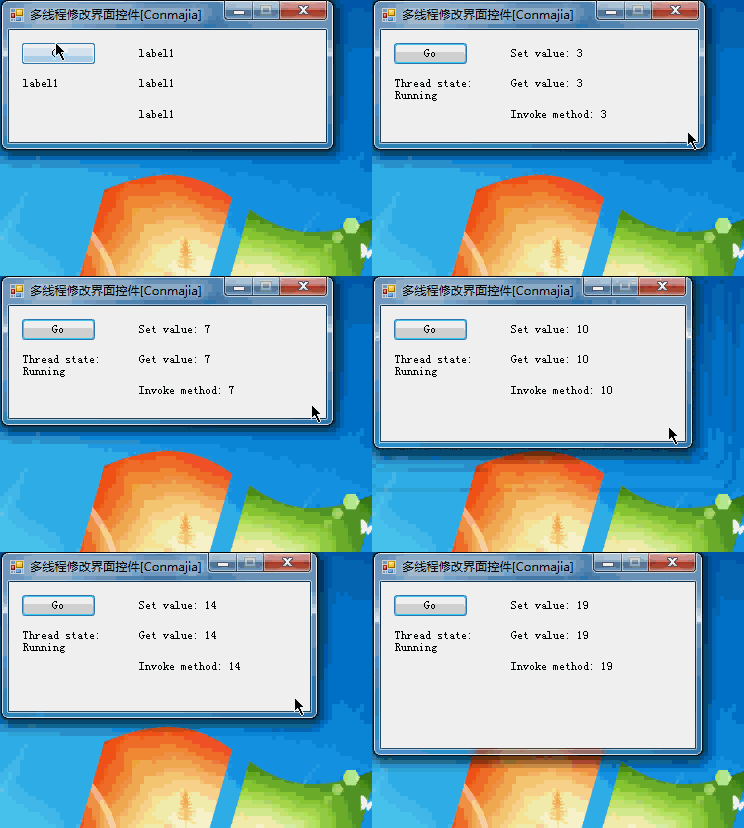
多线程是一种提高程序运行效率和性能的常用技术。随着我们学习工作的深入,在编程中或多或少会涉及到需要多线程的情况。多数时候,我们的操作模式是后台线程中处理数据,计算结果,然后在前台界面(GUI)中更新显示。
在.NET Framework中,为了保证线程安全,避免出现访问竞争等问题,是不允许跨线程访问窗体控件的。如果强行访问,则会引发InvalidOperationException无效操作异常,如下图: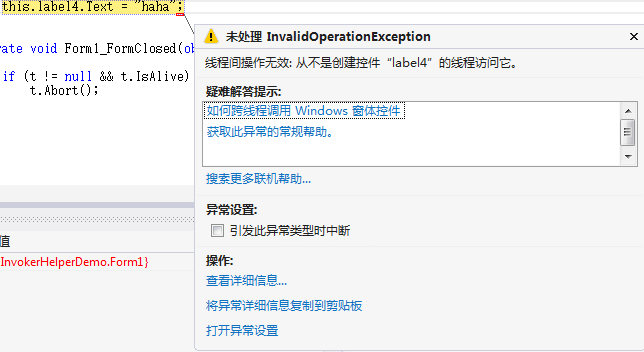
为了实现跨线程访问控件,.NET Framework为每个控件提供了InvokeRequired属性和Invoke方法。使用这些技巧,就可以实现我们在其他线程中直接修改界面的需要。看起来似乎很简单,但实际每次调用都有不少代码需要编写,还需要自行处理各种异常。下面是典型的调用例子:
|
1
2
3
4
5
6
7
8
9
10
11
|
public void DoWork() { if (control.InvokeRequired) { control.Invoke(DoWork); } else { // do work } } |
为了便于使用,我封装了实现细节,在这里给出一个InvokeHelper类,使用该类即可方便地实现跨线程调用主界面控件方法、获取/设置控件属性等功能。
该类实现非常简单,有效代码约150行,主要有以下3个方法:
1.Invoke
该方法可以调用主界面控件的某个方法,并返回方法执行结果。用法如下:
|
1
|
InvokeHelper.Invoke(<控件>, "<方法名称>", <参数>); |
其中“参数”为参数列表,支持0个或多个参数。
2.Get
该方法可以获取主界面控件的某个属性。用法如下:
|
1
|
InvokeHelper.Get(<控件>, "<属性名称>"); |
3.Set
该方法可以设置主界面控件的某个属性。用法如下:
|
1
|
InvokeHelper.Set(<控件>, "<属性名称>", <属性值>); |
下面是整个类的实现代码。最后是一个演示用的例子。
|
1
2
3
4
5
6
7
8
9
10
11
12
13
14
15
16
17
18
19
20
21
22
23
24
25
26
27
28
29
30
31
32
33
34
35
36
37
38
39
40
41
42
43
44
45
46
47
48
49
50
51
52
53
54
55
56
57
58
59
60
61
62
63
64
65
66
67
68
69
70
71
72
73
74
75
76
77
78
79
80
81
82
83
84
85
86
87
88
89
90
91
92
93
94
95
96
97
98
99
100
101
102
103
104
105
106
107
108
109
110
111
112
113
114
115
116
117
118
119
120
121
122
123
124
125
126
127
128
129
130
131
132
133
134
135
136
137
138
139
140
141
142
143
144
145
146
147
148
149
150
151
152
153
154
155
156
157
158
159
160
161
162
163
164
165
166
167
168
169
170
171
172
173
174
|
/******************************************************************************* * InvokeHelper.cs * A thread-safe control invoker helper class. * ----------------------------------------------------------------------------- * Project:Conmajia.Controls * Author:Conmajia * Url:conmajia@gmail.com * History: * 4th Aug., 2012 * Added support for "Non-control" controls (such as ToolStripItem). * * 4th Aug., 2012 * Initiated. ******************************************************************************/ using System; using System.Collections.Generic; using System.Reflection; using System.Text; using System.Windows.Forms; namespace InvokerHelperDemo { /// <summary> /// A thread-safe control invoker helper class. /// </summary> public class InvokeHelper { #region delegates private delegate object MethodInvoker(Control control, string methodName, params object[] args); private delegate object PropertyGetInvoker(Control control, object noncontrol, string propertyName); private delegate void PropertySetInvoker(Control control, object noncontrol, string propertyName, object value); #endregion #region static methods // helpers private static PropertyInfo GetPropertyInfo(Control control, object noncontrol, string propertyName) { if (control != null && !string.IsNullOrEmpty(propertyName)) { PropertyInfo pi = null; Type t = null; if (noncontrol != null) t = noncontrol.GetType(); else t = control.GetType(); pi = t.GetProperty(propertyName); if (pi == null) throw new InvalidOperationException( string.Format( "Can't find property {0} in {1}.", propertyName, t.ToString() )); return pi; } else throw new ArgumentNullException("Invalid argument."); } // outlines public static object Invoke(Control control, string methodName, params object[] args) { if (control != null && !string.IsNullOrEmpty(methodName)) if (control.InvokeRequired) return control.Invoke( new MethodInvoker(Invoke), control, methodName, args ); else { MethodInfo mi = null; if (args != null && args.Length > 0) { Type[] types = new Type[args.Length]; for (int i = 0; i < args.Length; i++) { if (args[i] != null) types[i] = args[i].GetType(); } mi = control.GetType().GetMethod(methodName, types); } else mi = control.GetType().GetMethod(methodName); // check method info you get if (mi != null) return mi.Invoke(control, args); else throw new InvalidOperationException("Invalid method."); } else throw new ArgumentNullException("Invalid argument."); } public static object Get(Control control, string propertyName) { return Get(control, null, propertyName); } public static object Get(Control control, object noncontrol, string propertyName) { if (control != null && !string.IsNullOrEmpty(propertyName)) if (control.InvokeRequired) return control.Invoke(new PropertyGetInvoker(Get), control, noncontrol, propertyName ); else { PropertyInfo pi = GetPropertyInfo(control, noncontrol, propertyName); object invokee = (noncontrol == null) ? control : noncontrol; if (pi != null) if (pi.CanRead) return pi.GetValue(invokee, null); else throw new FieldAccessException( string.Format( "{0}.{1} is a write-only property.", invokee.GetType().ToString(), propertyName )); return null; } else throw new ArgumentNullException("Invalid argument."); } public static void Set(Control control, string propertyName, object value) { Set(control, null, propertyName, value); } public static void Set(Control control, object noncontrol, string propertyName, object value) { if (control != null && !string.IsNullOrEmpty(propertyName)) if (control.InvokeRequired) control.Invoke(new PropertySetInvoker(Set), control, noncontrol, propertyName, value ); else { PropertyInfo pi = GetPropertyInfo(control, noncontrol, propertyName); object invokee = (noncontrol == null) ? control : noncontrol; if (pi != null) if (pi.CanWrite) pi.SetValue(invokee, value, null); else throw new FieldAccessException( string.Format( "{0}.{1} is a read-only property.", invokee.GetType().ToString(), propertyName )); } else throw new ArgumentNullException("Invalid argument."); } #endregion } } |
下面是一个演示用的例子。在该例子中,创建了一个永久循环的线程,该线程每隔500毫秒修改一次界面显示。主要代码如下:
|
1
2
3
4
5
6
7
8
9
10
11
12
13
14
15
16
17
18
19
20
21
22
23
24
25
26
27
28
29
30
31
32
33
34
35
36
|
Thread t; private void button1_Click(object sender, EventArgs e) { if (t == null) { t = new Thread(multithread); t.Start(); label4.Text = string.Format( "Thread state:\n{0}", t.ThreadState.ToString() ); } } public void DoWork(string msg) { this.label3.Text = string.Format("Invoke method: {0}", msg); } int count = 0; void multithread() { while (true) { InvokeHelper.Set(this.label1, "Text", string.Format("Set value: {0}", count)); InvokeHelper.Set(this.label1, "Tag", count); string value = InvokeHelper.Get(this.label1, "Tag").ToString(); InvokeHelper.Set(this.label2, "Text", string.Format("Get value: {0}", value)); InvokeHelper.Invoke(this, "DoWork", value); Thread.Sleep(500); count++; } } |
详细代码请参阅源代码。运行后效果正常,尽管线程t是无限循环的线程,但主界面并不受其阻塞,操作一切正常。
源代码:点击下载
InvokeHelper,让跨线程访问/修改主界面控件不再麻烦(转)的更多相关文章
- winform 跨线程访问问题
一.问题描述 进行winform 开发我们在进行数据交换时避免不了使用多线程或异步方法,这样操作也将避免不了跨线程对控件进行操作(赋值.修改属性). 下面通过一个测试说明一下问题 点击一个按钮异步对t ...
- wpf(怎么跨线程访问wpf控件)
在编写代码时,我们经常会碰到一些子线程中处理完的信息,需要通知另一个线程(我这边处理完了,该你了). 但是当我们通知WPF的UI线程时需要用到Dispatcher. 首先我们需要想好在UI控件上需要显 ...
- C#多线程操作界面控件的解决方案(转)
C#中利用委托实现多线程跨线程操作 - 张小鱼 2010-10-22 08:38 在使用VS2005的时候,如果你从非创建这个控件的线程中访问这个控件或者操作这个控件的话就会抛出这个异常.这是微软为了 ...
- MFC中 自定义类访问主对话框控件的方法
之前一直在找有木有好点的方法.现在终于被我找到,收藏之~~~~~~ 在使用mfc的时候经常遇到自定义类访问主对话框控件的问题,例如自定义类中的方法要输出一段字符串到主对话框的EDIT控件.控制对话框的 ...
- c#使用MethodInvoker解决跨线程访问控件
功能函数测试集锦(77) C#专区(114) 版权声明:本文为博主原创文章,未经博主允许不得转载. .net 原则上禁止跨线程访问控件,因为这样可能造成错误的发生,有一种方法是禁止编译器对跨线 ...
- C#之Winform跨线程访问控件
C#中禁止跨线程直接访问控件,InvokeRequired是为了解决这个问题而产生的,当一个控件的InvokeRequired属性值为真时,说明有一个创建它以外的线程想访问它.此时它将会在内部调用ne ...
- C# 关于跨线程访问控件问题
跨线程访问控件问题的原因是:控件都是在主线程中创建的,而系统默认控件的修改权归其创建线程所有.在子线程中如果需要直接修改控件的内容,需要使用委托机制将控件的修改操作交给主线程处理.因此,当没有使用委托 ...
- .NET设计篇08-线程统一取消模型和跨线程访问UI
知识需要不断积累.总结和沉淀,思考和写作是成长的催化剂,输出倒逼输入 内容目录 一.线程统一取消模型1.取消令牌2.可以中断的线程1.设计一个中断函数2.创建CancellationTokenSour ...
- .NET设计篇08-线程取消模型和跨线程访问UI
知识需要不断积累.总结和沉淀,思考和写作是成长的催化剂,输出倒逼输入 内容目录 一.线程统一取消模型1.取消令牌2.可以中断的线程1.设计一个中断函数2.创建CancellationTokenSour ...
随机推荐
- ti processor sdk linux am335x evm setup.sh hacking
#!/bin/sh # # ti processor sdk linux am335x evm setup.sh hacking # 说明: # 本文主要对TI的sdk中的setup.sh脚本进行解读 ...
- mysql 索引与优化like查询
索引与优化like查询 1. like %keyword 索引失效,使用全表扫描.但可以通过翻转函数+like前模糊查询+建立翻转函数索引=走翻转函数索引,不走全表扫描. 2. like key ...
- Mysql,SqlServer,Oracle主键自动增长的设置
1.把主键定义为自动增长标识符类型 MySql 在mysql中,如果把表的主键设为auto_increment类型,数据库就会自动为主键赋值.例如: )); insert into customers ...
- dpkg-query
1.功能作用 查看软件包信息 2.位置 /usr/bin 3.格式用法 dpkg-query [<选项> ...] <命令> 4.主要参数 Commands: -s|--sta ...
- 庖丁解牛-----Live555源码彻底解密(RTP解包)
Live555 客户端解包 以testRTSPClient.cpp为例讲解: Medium<-MediaSource<-FramedSource<-RTPSource<-Mul ...
- 锋利的jQuery读书笔记---选择器
前段时间入手了锋利的jQuery(第二版),想着加强下自己的js能力,可前段时间一只在熟悉Spring和Hibernate.最近抽时间开始读这本书了,随便也做了些记录. 读书的过程是边看边代码测试,所 ...
- 【转】一个windows线程池实现
#ifndef _ThreadPool_H_ #define _ThreadPool_H_ #pragma warning(disable: 4530) #pragma warning(disable ...
- HDU 5389 Zero Escape
题意:有一些人,每人拿一个号码,有两个门,门的值分别为A和B,要求把人分成两堆(可以为空)一堆人手持号码之和的数字根若等于A或者B就可以进入A门或者B门,要求两堆人分别进入不同的门,求有几种分配方式, ...
- Mysql 多表联合查询效率分析及优化
1. 多表连接类型 1. 笛卡尔积(交叉连接) 在MySQL中可以为CROSS JOIN或者省略CROSS即JOIN,或者使用',' 如: SELECT * FROM table1 CROSS JO ...
- Winform之SpreadSheetGear转DevExpress.XtraSpreadsheet.v13.2 z
DevExpress.XtraSpreadsheet.v13.2 允许用户创建.管理.打印.转换spreadsheet文件而不需要用户安装Office. 什么是Spreadsheet 可以看到最后就是 ...