
QMessageBox 在MAC下更加自然
说明
在MAC写过QT程序的程序员应该都知道,QT默认的QMessageBox没有MAC系统的效果,在网上找到了一篇关于这方面的文章,但是这篇文章写的有个缺点,就是使用信号的方式,使用起来很不方便。
解决
我自己写了一个类文件,以达到更好的使用QMessageBox。将下面的代码复制到你的工程中,就可以方便的使用。
头文件#ifndef QMESSAGEBOXEX_H

#define QMESSAGEBOXEX_H

#include <QMessageBox>

class QMessageBoxEx : public QMessageBox

{

public:

    static QMessageBoxEx *shareQMessageBoxEx();

public:

    QMessageBoxEx();

    int information(QWidget *parent, const QString &title,

                    const QString &text, StandardButtons buttons = Ok,

                    StandardButton defaultButton = NoButton);

    int question(QWidget *parent, const QString &title,

                 const QString &text, StandardButtons buttons = StandardButtons(Yes | No),

                 StandardButton defaultButton = NoButton);

    int warning(QWidget *parent, const QString &title,

                const QString &text, StandardButtons buttons = Ok,

                StandardButton defaultButton = NoButton);

    int critical(QWidget *parent, const QString &title,

                 const QString &text, StandardButtons buttons = Ok,

                 StandardButton defaultButton = NoButton);

};

#endif // QMESSAGEBOXEX_H
源文件#include "qmessageboxex.h"

static QMessageBoxEx *m_pThis = NULL;

QMessageBoxEx *QMessageBoxEx::shareQMessageBoxEx()

{

    if (m_pThis == NULL)

        m_pThis = new QMessageBoxEx();

    return m_pThis;

}

QMessageBoxEx::QMessageBoxEx()

{

}

int QMessageBoxEx::information(QWidget *parent, const QString &title, const QString &text, QMessageBox::StandardButtons buttons, QMessageBox::StandardButton defaultButton)

{

    this->setIcon(QMessageBox::Information);

    this->setParent(parent);

    this->setWindowTitle(title);

    this->setText(text);

    this->setStandardButtons(buttons);

    this->setDefaultButton(defaultButton);

    this->setWindowModality(Qt::WindowModal);

    return this->exec();

}

int QMessageBoxEx::question(QWidget *parent, const QString &title, const QString &text, QMessageBox::StandardButtons buttons, QMessageBox::StandardButton defaultButton)

{

    this->setIcon(QMessageBox::Question);

    this->setParent(parent);

    this->setWindowTitle(title);

    this->setText(text);

    this->setStandardButtons(buttons);

    this->setDefaultButton(defaultButton);

    this->setWindowModality(Qt::WindowModal);

    return this->exec();

}

int QMessageBoxEx::warning(QWidget *parent, const QString &title, const QString &text, QMessageBox::StandardButtons buttons, QMessageBox::StandardButton defaultButton)

{

    this->setIcon(QMessageBox::Warning);

    this->setParent(parent);

    this->setWindowTitle(title);

    this->setText(text);

    this->setStandardButtons(buttons);

    this->setDefaultButton(defaultButton);

    this->setWindowModality(Qt::WindowModal);

    return this->exec();

}

int QMessageBoxEx::critical(QWidget *parent, const QString &title, const QString &text, QMessageBox::StandardButtons buttons, QMessageBox::StandardButton defaultButton)

{

    this->setIcon(QMessageBox::Critical);

    this->setParent(parent);

    this->setWindowTitle(title);

    this->setText(text);

    this->setStandardButtons(buttons);

    this->setDefaultButton(defaultButton);

    this->setWindowModality(Qt::WindowModal);

    return this->exec();

}
使用
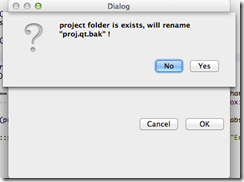
调用事例        if (QMessageBox::Yes == QMessageBoxEx::shareQMessageBoxEx()->question(Dialog::shareDialog(),tr("Question"),tr("project folder is exists, will rename \"proj.qt.bak\" !"),

                                                                              QMessageBox::Yes|QMessageBox::No,QMessageBox::No))

        {

            if (false == QDir(projectFileInfo.absoluteFilePath()).rename(qtProFileInfo.absoluteFilePath(),"proj.qt.bak"))

            {

                QMessageBoxEx::shareQMessageBoxEx()->critical(Dialog::shareDialog(),tr("Error"),tr("rename proj.qt failure"));

                return;

            }

        }
预览
QMessageBox 在MAC下更加自然的更多相关文章
- 在MAC下搭建JSP开发环境
1.Mac下JDK的下载安装及配置 在安装jdk之后,需要为jdk安装目录配置环境变量: 任意打开终端,默认是家目录的,然后直接输入: touch .bash_profile 然后输入:vi .bas ...
- Mac下改动Android Studio 所用的JDK版本号
Mac下改动Android Studio 所用的JDK版本号 @author ASCE1885 近期项目从Eclipse+Ant构建模式转移到了Android Studio+Gradle构建模式.自然 ...
- MAC下Xcode配置opencv(2017.3.29最新实践,亲测可行)
本文原创,未经同意,谢绝转载!(转载请告知本人并且经过本人同意--By Pacific-hong) 本人小硕一枚,因为专业方向图像相关,所以用到opencv,然后网上MAC下Xcode配置opencv ...
- MAC下Xcode配置opencv(2017.3.29最新实践,亲测可行)(转)
本文原创,未经同意,谢绝转载!(转载请告知本人并且经过本人同意--By Pacific-hong) 本人小硕一枚,因为专业方向图像相关,所以用到opencv,然后网上MAC下Xcode配置opencv ...
- SQL语句:Mac 下 处理myql 不能远程登录和本地登录问题
mac下,mysql5.7.18连接出错,错误信息为:Access denied for user 'root'@'localhost' (using password: YES) ()里面的为she ...
- Mac下安装SQLmap的安装
1.cd /usr/bin/ 2.sudo git clone https://github.com/sqlmapproject/sqlmap.git sqlmap-dev3.重新打开terminal ...
- mac下安装及配置tomcat
mac下的软件不像windows下的程序那样写注册表,对于tomcat的安装来说,在mac下是名符其实的绿色软件,具体操作如下: 1.到 apache官方主页 下载完整 tar.gz文件包.(没有专门 ...
- MAC下 mysql不能插入中文和中文乱码的问题总结
MAC下 mysql不能插入中文和中文乱码的问题总结 前言 本文中所提到的问题解决方案,都是基于mac环境下的,但其他环境,比如windows应该也适用. 问题描述 本文解决下边两个问题: 往mysq ...
- 【开发软件】 在Mac下配置php开发环境:Apache+php+MySql
本文地址 原文地址 本文提纲: 1. 启动Apache 2. 运行PHP 3. 配置Mysql 4. 使用PHPMyAdmin 5. 附录 有问题请先 看最后的附录 摘要: 系统OS X ...
随机推荐
- Spark Core源代码分析: Spark任务运行模型
DAGScheduler 面向stage的调度层,为job生成以stage组成的DAG,提交TaskSet给TaskScheduler运行. 每个Stage内,都是独立的tasks,他们共同运行同一个 ...
- Meteor 加入账户系统
Meteor 加入账户系统 我们给meteor加入一个账户系统 导入包 meteor add ian:accounts-ui-bootstrap-3 meteor add accounts-passw ...
- 通过ulimit改善linux系统性能(摘自IBM)
本文介绍了 ulimit 内键指令的主要功能以及用于改善系统性能的 ulimit 用法.通过这篇文章,读者不仅能够了解 ulimit 所起的作用.而且能够学会怎样更好地通过 ulimit 限制资源的使 ...
- 关于学习netty的两个完整服务器客户端范例
https://github.com/wangyi793797714/IMServer https://github.com/wangyi793797714/IMClient https://gith ...
- 整型数组与vector对象之间的相互初始化
#include<iostream> #include<vector> #include<string> using namespace std; int main ...
- dubbo-RPC学习(二) http protocol
dubbo中的协议默认支持很多种,从简单的开始,先解读HttpProtocol吧. dubbo中的http-RPC基于spring web支持的http invoker,web容器默认使用jetty. ...
- 《C++ 并发编程》- 第1章 你好,C++的并发世界
<C++ 并发编程>- 第1章 你好,C++的并发世界 转载自并发编程网 – ifeve.com 本文是<C++ 并发编程>的第一章,感谢人民邮电出版社授权并发编程网发表此文, ...
- s实现指定时间自动跳转到某个页面
--js实现指定时间自动跳转到某个页面 <!DOCTYPE html PUBLIC "-//W3C//DTD XHTML 1.0 Transitional//EN" &quo ...
- 给jdk写注释系列之jdk1.6容器(13)-总结篇之Java集合与数据结构
是的,这篇blogs是一个总结篇,最开始的时候我提到过,对于java容器或集合的学习也可以看做是对数据结构的学习与应用.在前面我们分析了很多的java容器,也接触了好多种常用的数据结构,今天 ...
- 关于Override在JDK1.5和JDK1.6上子类实现接口中方法使用@Override注解编译错误.
遇到这个问题说来也怪.新开了一个path的工作空间用来打patch.该Eclipse的默认全局的编译版本是1.6.但是唯独其中的一个插件项目的版本是1.5(可能是唯一的一个,不确定,不知道为什么会是这 ...