
QMessageBox 在MAC下更加自然
说明
在MAC写过QT程序的程序员应该都知道,QT默认的QMessageBox没有MAC系统的效果,在网上找到了一篇关于这方面的文章,但是这篇文章写的有个缺点,就是使用信号的方式,使用起来很不方便。
解决
我自己写了一个类文件,以达到更好的使用QMessageBox。将下面的代码复制到你的工程中,就可以方便的使用。
头文件#ifndef QMESSAGEBOXEX_H

#define QMESSAGEBOXEX_H

#include <QMessageBox>

class QMessageBoxEx : public QMessageBox

{

public:

    static QMessageBoxEx *shareQMessageBoxEx();

public:

    QMessageBoxEx();

    int information(QWidget *parent, const QString &title,

                    const QString &text, StandardButtons buttons = Ok,

                    StandardButton defaultButton = NoButton);

    int question(QWidget *parent, const QString &title,

                 const QString &text, StandardButtons buttons = StandardButtons(Yes | No),

                 StandardButton defaultButton = NoButton);

    int warning(QWidget *parent, const QString &title,

                const QString &text, StandardButtons buttons = Ok,

                StandardButton defaultButton = NoButton);

    int critical(QWidget *parent, const QString &title,

                 const QString &text, StandardButtons buttons = Ok,

                 StandardButton defaultButton = NoButton);

};

#endif // QMESSAGEBOXEX_H
源文件#include "qmessageboxex.h"

static QMessageBoxEx *m_pThis = NULL;

QMessageBoxEx *QMessageBoxEx::shareQMessageBoxEx()

{

    if (m_pThis == NULL)

        m_pThis = new QMessageBoxEx();

    return m_pThis;

}

QMessageBoxEx::QMessageBoxEx()

{

}

int QMessageBoxEx::information(QWidget *parent, const QString &title, const QString &text, QMessageBox::StandardButtons buttons, QMessageBox::StandardButton defaultButton)

{

    this->setIcon(QMessageBox::Information);

    this->setParent(parent);

    this->setWindowTitle(title);

    this->setText(text);

    this->setStandardButtons(buttons);

    this->setDefaultButton(defaultButton);

    this->setWindowModality(Qt::WindowModal);

    return this->exec();

}

int QMessageBoxEx::question(QWidget *parent, const QString &title, const QString &text, QMessageBox::StandardButtons buttons, QMessageBox::StandardButton defaultButton)

{

    this->setIcon(QMessageBox::Question);

    this->setParent(parent);

    this->setWindowTitle(title);

    this->setText(text);

    this->setStandardButtons(buttons);

    this->setDefaultButton(defaultButton);

    this->setWindowModality(Qt::WindowModal);

    return this->exec();

}

int QMessageBoxEx::warning(QWidget *parent, const QString &title, const QString &text, QMessageBox::StandardButtons buttons, QMessageBox::StandardButton defaultButton)

{

    this->setIcon(QMessageBox::Warning);

    this->setParent(parent);

    this->setWindowTitle(title);

    this->setText(text);

    this->setStandardButtons(buttons);

    this->setDefaultButton(defaultButton);

    this->setWindowModality(Qt::WindowModal);

    return this->exec();

}

int QMessageBoxEx::critical(QWidget *parent, const QString &title, const QString &text, QMessageBox::StandardButtons buttons, QMessageBox::StandardButton defaultButton)

{

    this->setIcon(QMessageBox::Critical);

    this->setParent(parent);

    this->setWindowTitle(title);

    this->setText(text);

    this->setStandardButtons(buttons);

    this->setDefaultButton(defaultButton);

    this->setWindowModality(Qt::WindowModal);

    return this->exec();

}
使用
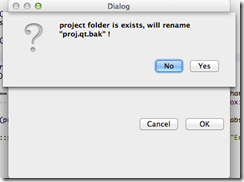
调用事例        if (QMessageBox::Yes == QMessageBoxEx::shareQMessageBoxEx()->question(Dialog::shareDialog(),tr("Question"),tr("project folder is exists, will rename \"proj.qt.bak\" !"),

                                                                              QMessageBox::Yes|QMessageBox::No,QMessageBox::No))

        {

            if (false == QDir(projectFileInfo.absoluteFilePath()).rename(qtProFileInfo.absoluteFilePath(),"proj.qt.bak"))

            {

                QMessageBoxEx::shareQMessageBoxEx()->critical(Dialog::shareDialog(),tr("Error"),tr("rename proj.qt failure"));

                return;

            }

        }
预览
QMessageBox 在MAC下更加自然的更多相关文章
- 在MAC下搭建JSP开发环境
1.Mac下JDK的下载安装及配置 在安装jdk之后,需要为jdk安装目录配置环境变量: 任意打开终端,默认是家目录的,然后直接输入: touch .bash_profile 然后输入:vi .bas ...
- Mac下改动Android Studio 所用的JDK版本号
Mac下改动Android Studio 所用的JDK版本号 @author ASCE1885 近期项目从Eclipse+Ant构建模式转移到了Android Studio+Gradle构建模式.自然 ...
- MAC下Xcode配置opencv(2017.3.29最新实践,亲测可行)
本文原创,未经同意,谢绝转载!(转载请告知本人并且经过本人同意--By Pacific-hong) 本人小硕一枚,因为专业方向图像相关,所以用到opencv,然后网上MAC下Xcode配置opencv ...
- MAC下Xcode配置opencv(2017.3.29最新实践,亲测可行)(转)
本文原创,未经同意,谢绝转载!(转载请告知本人并且经过本人同意--By Pacific-hong) 本人小硕一枚,因为专业方向图像相关,所以用到opencv,然后网上MAC下Xcode配置opencv ...
- SQL语句:Mac 下 处理myql 不能远程登录和本地登录问题
mac下,mysql5.7.18连接出错,错误信息为:Access denied for user 'root'@'localhost' (using password: YES) ()里面的为she ...
- Mac下安装SQLmap的安装
1.cd /usr/bin/ 2.sudo git clone https://github.com/sqlmapproject/sqlmap.git sqlmap-dev3.重新打开terminal ...
- mac下安装及配置tomcat
mac下的软件不像windows下的程序那样写注册表,对于tomcat的安装来说,在mac下是名符其实的绿色软件,具体操作如下: 1.到 apache官方主页 下载完整 tar.gz文件包.(没有专门 ...
- MAC下 mysql不能插入中文和中文乱码的问题总结
MAC下 mysql不能插入中文和中文乱码的问题总结 前言 本文中所提到的问题解决方案,都是基于mac环境下的,但其他环境,比如windows应该也适用. 问题描述 本文解决下边两个问题: 往mysq ...
- 【开发软件】 在Mac下配置php开发环境:Apache+php+MySql
本文地址 原文地址 本文提纲: 1. 启动Apache 2. 运行PHP 3. 配置Mysql 4. 使用PHPMyAdmin 5. 附录 有问题请先 看最后的附录 摘要: 系统OS X ...
随机推荐
- c# socket通信较完善方案
c#的socket通信应用.文件较多.附件为工程. core AbstractBytesWorker.cs 字节工作器(基类),用于用于同一不同功能的字节工作器 BinaryHand.c ...
- UVA 1401 - Remember the Word(Trie+DP)
UVA 1401 - Remember the Word [题目链接] 题意:给定一些单词.和一个长串.问这个长串拆分成已有单词,能拆分成几种方式 思路:Trie,先把单词建成Trie.然后进行dp. ...
- as 中的反射
flash.utils包中的getDefinitionByName,getQualifiedClassName,getQualifiedSuperclassName..可以当做反射用. 1.getDe ...
- spring源码分析之spring-jms模块详解
0 概述 spring提供了一个jms集成框架,这个框架如spring 集成jdbc api一样,简化了jms api的使用. jms可以简单的分成两个功能区,消息的生产和消息的消费.JmsTempl ...
- myeclipse2014 安装maven3.3.9和mave配置本地仓库
昨天晚上发现eclipse下一个aptana JS的编辑插件,就想装到myeclipse下,结果悲剧了,myeclipse每次启动都闪退,虽然最后解决了,但是myeclipse里面的自带插件不知少了好 ...
- angular 项目回顾
从学习angular,到实际项目开发不到一周,完全是边写边学呀,都是为了项目,已使用angular 开发了两个项目了,有些技术当时只是会用,都没好好回顾一下,现在有时间回顾一下,项目中用到的一些指令, ...
- android scrollview主要的问题
项目做多了之后,会发现其实 ScrollView嵌套ListVew或者GridView等很常用,但是你也会发现各种奇怪问题产生.根据个人经验现在列出常见问题以及代码最少最简单的解决方法. 问题一 : ...
- ubuntu14_pip 安装
1:install pip python-dev sudo apt-get install python-dev sudo apt-get install libevent-dev ...
- [转]"Windows Phone 7程序设计”完全版电子书可以免费下载了
本文转自:http://www.cnblogs.com/salam/archive/2010/10/29/1864246.html 现在学习Windows Phone 7开发资料十分有限,除了MSDN ...
- 关于线程池ThreadPoolExecutor使用总结
本文引用自: http://blog.chinaunix.net/uid-20577907-id-3519578.html 一.简介 线程池类为 java.util.concurrent.Thread ...