
maven插件mybatis-generator生成代码配置
鸣谢:http://my.oschina.net/u/1763011/blog/324106?fromerr=nJakGh4P (也可参看此博客进行配置)
http://www.cnblogs.com/zcy_soft/p/3358132.html(补充1)
http://blog.csdn.net/sunny243788557/article/details/45166397 (补充2)
http://www.cnblogs.com/yjmyzz/p/4210554.html (补充3)
http://www.myexception.cn/software-architecture-design/621662.html (补充4)
http://mbg.cndocs.tk (MyBatis Generator介绍)
http://blog.csdn.net/isea533/article/details/42102297 (MyBatis Generator详解)
http://www.cnblogs.com/daxin/p/3545040.html (Mybatis MapperScannerConfigurer 自动扫描 将Mapper接口生成代理注入到Spring)
---------------------------------------------------------------------------------------------------------------------------
测试项目:Test
1.新建maven项目
2.pom.xml文件中添加插件,如:
<build>

        <finalName>org.zsl.hnust</finalName>

        <plugins>

          <plugin>

              <groupId>org.mybatis.generator</groupId>

              <artifactId>mybatis-generator-maven-plugin</artifactId>

              <version>1.3.2</version>

              <configuration>

                  <verbose>true</verbose>

                  <overwrite>true</overwrite>

              </configuration>

          </plugin>

      </plugins>

</build>
3.在项目的/src/main/resources(默认目录)的文件目录下加入generateConfig.xml
如:
<?xml version="1.0" encoding="UTF-8" ?>

<!DOCTYPE generatorConfiguration PUBLIC "-//mybatis.org//DTD MyBatis Generator Configuration 1.0//EN" "http://mybatis.org/dtd/mybatis-generator-config_1_0.dtd" >

<generatorConfiguration>

    <classPathEntry

            location="D:\repo\mysql-connector-java-5.1.26.jar" />

    <context id="context1" targetRuntime="MyBatis3">

        <commentGenerator>

            <!-- 是否去除自动生成的注释 true:是 : false:否 -->

            <property name="suppressAllComments" value="true" />

        </commentGenerator>

        <jdbcConnection driverClass="com.mysql.jdbc.Driver"

                        connectionURL="jdbc:mysql://localhost:3306/test"

                        userId="root" password="" />

        <javaModelGenerator targetPackage="com.cn.hnust.pojo"

                            targetProject="D:\Eclipse_Workspace\HNUST\org.zsl.hnust Maven Webapp\src\main\java" />

        <sqlMapGenerator targetPackage="com.cn.hnust.mapping"

                         targetProject="D:\Eclipse_Workspace\HNUST\org.zsl.hnust Maven Webapp\src\main\java" />

        <javaClientGenerator type="XMLMAPPER" targetPackage="com.cn.hnust.dao"

                          targetProject="D:\Eclipse_Workspace\HNUST\org.zsl.hnust Maven Webapp\src\main\java">

        </javaClientGenerator>

        <table tableName="t_student" domainObjectName="Address"

            enableCountByExample="false" enableUpdateByExample="false" enableDeleteByExample="false"

            enableSelectByExample="false" selectByExampleQueryId="false" >

            <property name="useActualColumnNames" value="true"/>

        </table>

    </context>

</generatorConfiguration>
注:
javaModelGenerator :指定生成pojo的包和此包在项目中的地址;
sqlMapGenerator :指定生成pojo的映射xml文件的所在包和此包在项目中的地址;
javaClientGenerator :指定生成访问映射xml文件的接口所在包和此包在项目中的地址;
table属性:
enableCountByExample="false"
enableUpdateByExample="false"
enableDeleteByExample="false"
enableSelectByExample="false"
selectByExampleQueryId="false"
schema为数据库名, tableName为对应的数据库表, domainObjectName是要生成的实体类,
如果想要mapper配置文件加入sql的where条件查询, 可以将enableCountByExample等设为true,
这样就会生成一个对应domainObjectName的Example类, enableCountByExample等设为false时,
就不会生成对应的Example类了.
如果table里边不配置property,默认字段都生成为类属性。
<ignoreColumn column="FRED" />//忽略字段
<columnOverride column="LONG_VARCHAR_FIELD" jdbcType="VARCHAR" />//无论字段是什么类型,生成的类属性都是varchar。
4.项目 右键--》run as --》 maven bulid --》弹出对话框 --》在goals中输入mybatis-generator:generate (或者 点击select --》选择你的mybatis插件 --》apply --》run)
5:选择项目 按 F5 刷新项目 出现生成的代码。
说明:上面示例的generateConfig.xml 可简化成以下写法:即把targetProject的决定路径改为项目中的相对路径。以后要用可直接复制下面的。
<?xml version="1.0" encoding="UTF-8" ?>

<!DOCTYPE generatorConfiguration PUBLIC "-//mybatis.org//DTD MyBatis Generator Configuration 1.0//EN" "http://mybatis.org/dtd/mybatis-generator-config_1_0.dtd" >

<generatorConfiguration>

    <classPathEntry

            location="D:\repo\mysql-connector-java-5.1.26.jar" />

    <context id="context1" targetRuntime="MyBatis3">

        <commentGenerator>

            <!-- 是否去除自动生成的注释 true:是 : false:否 -->

            <property name="suppressAllComments" value="true" />

        </commentGenerator>

        <jdbcConnection driverClass="com.mysql.jdbc.Driver"

                        connectionURL="jdbc:mysql://localhost:3306/test"

                        userId="root" password="" />

        <javaModelGenerator targetPackage="com.cn.hnust.pojo"

                            targetProject="src/main/java" />

        <sqlMapGenerator targetPackage="sqlMap"

                         targetProject="src/main/resources" />

        <javaClientGenerator type="XMLMAPPER" targetPackage="com.cn.hnust.dao"

                          targetProject="src/main/java">

        </javaClientGenerator>

        <table tableName="t_student" domainObjectName="Student"

            enableCountByExample="false" enableUpdateByExample="false" enableDeleteByExample="false"

            enableSelectByExample="false" selectByExampleQueryId="false" >

            <property name="useActualColumnNames" value="true"/>

        </table>

    </context>

</generatorConfiguration>
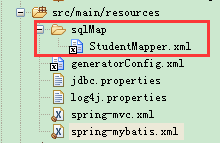
值得注意的是pojo映射文件的存放地址在项目中要记得配对哦,如:
spring-mybatis.xml中下面的配置:这里sql映射文件存放在src/main/resources目录
<!-- spring和MyBatis完美整合,不需要mybatis的配置映射文件 -->

    <bean id="sqlSessionFactory" class="org.mybatis.spring.SqlSessionFactoryBean">

        <property name="dataSource" ref="dataSource" />

        <!-- 自动扫描mapping.xml文件 原:value="classpath:com/cn/hnust/mapping/*.xml"-->

        <property name="mapperLocations" value="classpath:sqlMap/*.xml"/>

    </bean>
sql映射文件存放地址:
实践:
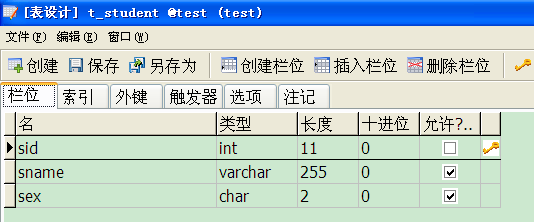
1.建表 t_student
2.项目 右键--》run as --》 maven bulid 生成代码(按上面简化的generateConfig.xml)
3.查看生成的代码
a.Student.java 略
b.StudentMapper 注意:1.访问pojo的映射文件可直接通过此接口访问,不需要建立实现类。2.在spring-mybatis.xml中MapperScannerConfigurer会把sqlSessionFactory注入此类,所以也不需要注入sqlSessionFactory、SqlSessionTemplate 。具体参见:http://www.cnblogs.com/daxin/p/3545040.html
package com.cn.hnust.dao;

import com.cn.hnust.pojo.Student;

public interface StudentMapper {

    int deleteByPrimaryKey(Integer sid);

    int insert(Student record);

    int insertSelective(Student record);

    Student selectByPrimaryKey(Integer sid);

    int updateByPrimaryKeySelective(Student record);

    int updateByPrimaryKey(Student record);

}
c.StudentMapper.xml
<?xml version="1.0" encoding="UTF-8" ?>

<!DOCTYPE mapper PUBLIC "-//mybatis.org//DTD Mapper 3.0//EN" "http://mybatis.org/dtd/mybatis-3-mapper.dtd" >

<mapper namespace="com.cn.hnust.dao.StudentMapper" >

  <resultMap id="BaseResultMap" type="com.cn.hnust.pojo.Student" >

    <id column="sid" property="sid" jdbcType="INTEGER" />

    <result column="sname" property="sname" jdbcType="VARCHAR" />

    <result column="sex" property="sex" jdbcType="CHAR" />

  </resultMap>

  <sql id="Base_Column_List" >

    sid, sname, sex

  </sql>

  <select id="selectByPrimaryKey" resultMap="BaseResultMap" parameterType="java.lang.Integer" >

    select

    <include refid="Base_Column_List" />

    from t_student

    where sid = #{sid,jdbcType=INTEGER}

  </select>

  <delete id="deleteByPrimaryKey" parameterType="java.lang.Integer" >

    delete from t_student

    where sid = #{sid,jdbcType=INTEGER}

  </delete>

  <insert id="insert" parameterType="com.cn.hnust.pojo.Student" >

    insert into t_student (sid, sname, sex)

    values (#{sid,jdbcType=INTEGER}, #{sname,jdbcType=VARCHAR}, #{sex,jdbcType=CHAR})

  </insert>

  <insert id="insertSelective" parameterType="com.cn.hnust.pojo.Student" >

    insert into t_student

    <trim prefix="(" suffix=")" suffixOverrides="," >

      <if test="sid != null" >

        sid,

      </if>

      <if test="sname != null" >

        sname,

      </if>

      <if test="sex != null" >

        sex,

      </if>

    </trim>

    <trim prefix="values (" suffix=")" suffixOverrides="," >

      <if test="sid != null" >

        #{sid,jdbcType=INTEGER},

      </if>

      <if test="sname != null" >

        #{sname,jdbcType=VARCHAR},

      </if>

      <if test="sex != null" >

        #{sex,jdbcType=CHAR},

      </if>

    </trim>

  </insert>

  <update id="updateByPrimaryKeySelective" parameterType="com.cn.hnust.pojo.Student" >

    update t_student

    <set >

      <if test="sname != null" >

        sname = #{sname,jdbcType=VARCHAR},

      </if>

      <if test="sex != null" >

        sex = #{sex,jdbcType=CHAR},

      </if>

    </set>

    where sid = #{sid,jdbcType=INTEGER}

  </update>

  <update id="updateByPrimaryKey" parameterType="com.cn.hnust.pojo.Student" >

    update t_student

    set sname = #{sname,jdbcType=VARCHAR},

      sex = #{sex,jdbcType=CHAR}

    where sid = #{sid,jdbcType=INTEGER}

  </update>

</mapper>
4.测试
package org.zsl.testmybatis;

import javax.annotation.Resource;

import org.junit.Test;

import org.junit.runner.RunWith;

import org.springframework.test.context.ContextConfiguration;

import org.springframework.test.context.junit4.SpringJUnit4ClassRunner;

import com.cn.hnust.dao.StudentMapper;

import com.cn.hnust.pojo.Address;

import com.cn.hnust.pojo.Student;

@RunWith(SpringJUnit4ClassRunner.class)        //表示继承了SpringJUnit4ClassRunner类

@ContextConfiguration(locations = {"classpath:spring-mybatis.xml"})

public class StudentTest {

    @Resource

    private StudentMapper studentMapper;

    @Test

    public void insert(){

        Student s = new Student();

        s.setSex("女");

        s.setSname("李浩");

        studentMapper.insert(s);

    }

    @Test

    public void deleteByPrimaryKey(){

        studentMapper.deleteByPrimaryKey(1);

    }

    @Test

    public void insertSelective(){

        Student s = new Student();

        s.setSname("李浩");

        studentMapper.insertSelective(s);

    }

    @Test

    public void selectByPrimaryKey(){

        Student s = studentMapper.selectByPrimaryKey(2);

        System.out.println(s);

    }

    @Test

    public void updateByPrimaryKeySelective(){

        Student s = studentMapper.selectByPrimaryKey(2);

        s.setSname("张三");

        studentMapper.updateByPrimaryKeySelective(s);

    }

    @Test

    public void updateByPrimaryKey(){

        Student s = studentMapper.selectByPrimaryKey(2);

        s.setSname("王五");

        s.setSex("男");

        studentMapper.updateByPrimaryKeySelective(s);

    }

}
附:
spring-mybatis.xml
<?xml version="1.0" encoding="UTF-8"?>

<beans xmlns="http://www.springframework.org/schema/beans"

    xmlns:xsi="http://www.w3.org/2001/XMLSchema-instance" xmlns:p="http://www.springframework.org/schema/p"

    xmlns:context="http://www.springframework.org/schema/context"

    xmlns:mvc="http://www.springframework.org/schema/mvc"

    xsi:schemaLocation="http://www.springframework.org/schema/beans

                        http://www.springframework.org/schema/beans/spring-beans-3.1.xsd

                        http://www.springframework.org/schema/context

                        http://www.springframework.org/schema/context/spring-context-3.1.xsd

                        http://www.springframework.org/schema/mvc

                        http://www.springframework.org/schema/mvc/spring-mvc-4.0.xsd">

    <!-- 自动扫描 -->

    <context:component-scan base-package="com.cn.hnust" />

    <!-- 引入配置文件 -->

    <bean id="propertyConfigurer"

        class="org.springframework.beans.factory.config.PropertyPlaceholderConfigurer">

        <property name="location" value="classpath:jdbc.properties" />

    </bean>

    <bean id="dataSource" class="org.apache.commons.dbcp.BasicDataSource"

        destroy-method="close">

        <property name="driverClassName" value="${driver}" />

        <property name="url" value="${url}" />

        <property name="username" value="${username}" />

        <property name="password" value="${password}" />

        <!-- 初始化连接大小 -->

        <property name="initialSize" value="${initialSize}"></property>

        <!-- 连接池最大数量 -->

        <property name="maxActive" value="${maxActive}"></property>

        <!-- 连接池最大空闲 -->

        <property name="maxIdle" value="${maxIdle}"></property>

        <!-- 连接池最小空闲 -->

        <property name="minIdle" value="${minIdle}"></property>

        <!-- 获取连接最大等待时间 -->

        <property name="maxWait" value="${maxWait}"></property>

    </bean>

    <!-- spring和MyBatis完美整合,不需要mybatis的配置映射文件 -->

    <bean id="sqlSessionFactory" class="org.mybatis.spring.SqlSessionFactoryBean">

        <property name="dataSource" ref="dataSource" />

        <!-- 自动扫描mapping.xml文件 原:value="classpath:com/cn/hnust/mapping/*.xml"-->

        <property name="mapperLocations" value="classpath:sqlMap/*.xml"/>

    </bean>

    <!-- DAO接口所在包名,Spring会自动查找其下的类 -->

    <bean class="org.mybatis.spring.mapper.MapperScannerConfigurer">

        <property name="basePackage" value="com.cn.hnust.dao" />

        <property name="sqlSessionFactoryBeanName" value="sqlSessionFactory"></property>

    </bean>

    <!-- (事务管理)transaction manager, use JtaTransactionManager for global tx -->

    <bean id="transactionManager"

        class="org.springframework.jdbc.datasource.DataSourceTransactionManager">

        <property name="dataSource" ref="dataSource" />

    </bean>

</beans>
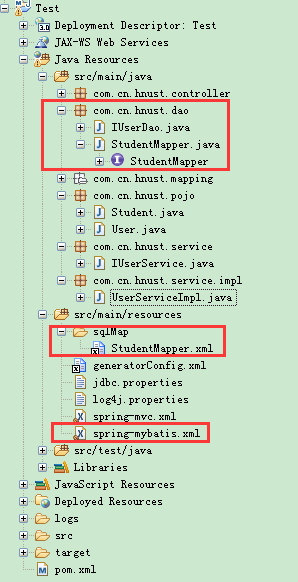
项目结构:
maven插件mybatis-generator生成代码配置的更多相关文章
- mybatis Generator生成代码及使用方式
本文原创,转载请注明:http://www.cnblogs.com/fengzheng/p/5889312.html 为什么要有mybatis mybatis 是一个 Java 的 ORM 框架,OR ...
- 用org.mybatis.generator 生成代码
1:引入pom 2:增加生成配置xml: <?xml version="1.0" encoding="UTF-8" ?> <!DOCTYPE ...
- 2016.7.12 eclispe使用mybatis generator生成代码时提示project E is not exist
运行mybatis-generator之后,出现错误:project E is not exist 错误原因:使用了项目的绝对路径. http://bbs.csdn.net/topics/3914 ...
- mybatis Generator生成代码及使用方式(转载)
转载自:http://www.cnblogs.com/fengzheng/p/5889312.html 文章很棒,很不错,转了.
- MyBatis Generator 超详细配置
想快速开始,请直接拉到最后,看整体配置. MyBatis Generator 是 MyBatis 提供的一个代码生成工具.可以帮我们生成 表对应的持久化对象(po).操作数据库的接口(dao).CRU ...
- mybatis自动生成代码插件mybatis-generator使用流程(亲测可用)
mybatis-generator是一款在使用mybatis框架时,自动生成model,dao和mapper的工具,很大程度上减少了业务开发人员的手动编码时间 坐着在idea上用maven构建spri ...
- mybatis generator配置,Mybatis自动生成文件配置,Mybatis自动生成实体Bean配置
mybatis generator配置,Mybatis自动生成文件配置,Mybatis自动生成实体Bean配置 ============================== 蕃薯耀 2018年3月14 ...
- springboot mybatis 自动生成代码(maven+IntelliJ IDEA)
1.在pom文件中加入需要的依赖(mybatis-generator-core) 和 插件(mybatis-generator-maven-plugin) <dependency> < ...
- Maven下用MyBatis Generator生成文件
使用Maven命令用MyBatis Generator生成MyBatis的文件步骤如下: 1.在mop文件内添加plugin <build> <finalName>KenShr ...
- mybatis-generator:generate 生成代码配置踩坑详解
mybatis-generator:generate 生成代码配置踩坑不少,在此留下笔记以便后续填坑 一.mysql返回时间问题 错误信息: [ERROR] Failed to execute goa ...
随机推荐
- 【Knockout】二、监控属性Observables
MVVM和viewModel Knockout是建立在以下三大核心功能之上的: 监控属性和依赖跟踪(Observables and dependency tracking) 声明式绑定(Declara ...
- WCF简介
WCF(Windows communication Foundation),顾名思义,就是在windows平台下解决通信的基础框架.WCF做为.NET Framework 3.0的一个组件发布出来的, ...
- Linux C编程--fork()详解
以下给出说明: fork函数 #include <sys/types.h> #include <unistd.h> pid_t fork(void); fork调用失败则返回 ...
- React Native之ViewPagerAndroid跳转页面问题
前言: 网上目前react-native的教程较少,加上许多帖子还是用的ES5(2015年6月已发布ES6标准),有些细节很难找到答案,这里把遇到的问题做一个分享,让学习者尽量少踩坑. 出现问题: 1 ...
- ios swift reduce Method
Swift’s API includes many functions and instance methods that reflect its functional programming her ...
- Linux环境下Websphere重启
一.Websphere控制台重启 1.更新class文件发布,Websphere自动重启. 2.更新web.xml发布,需要手动更新web.xml或者更新项目. web.config 缓存位置: We ...
- JAVA生成EXCEL图表
跟据客户的要求,需要开发一套包括图形的报表,还需要导出WORD 图表需要这样: 这样: 这样: 还有这样: 接下来是实现思路: 以往用的最多的就是JFreechart,手上也有实现各种图形的资源,但是 ...
- 第五十九篇、OC录制小视频
用 AVCaptureSession + AVCaptureMovieFileOutput 来录制视频,并通过AVAssetExportSeeion 手段来压缩视频并转换为 MP4 格 AVFound ...
- Objective-C 【单个对象内存管理(野指针&内存泄露)】
------------------------------------------- 单个对象内存管理 (1)野指针 ①定义了一个指针变量,但是并没有赋初值,它随机指向一个东西 ②某指针变量指向的内 ...
- (转)19个必须知道的Visual Studio快捷键
本文将为大家列出在 Visual Studio 中常用的快捷键,正确熟练地使用快捷键,将大大提高你的编程工作效率. 项目相关的快捷键 Ctrl + Shift + B = 生成项目 Ctrl + Al ...