
Spark Streaming 结合FlumeNG使用实例
SparkStreaming是一个对实时数据流进行高通量、容错处理的流式处理系统,可以对多种数据源(如Kdfka、Flume、Twitter、Zero和TCP 套接字)进行类似map、reduce、join、window等复杂操作,并将结果保存到外部文件系统、数据库或应用到实时仪表盘。
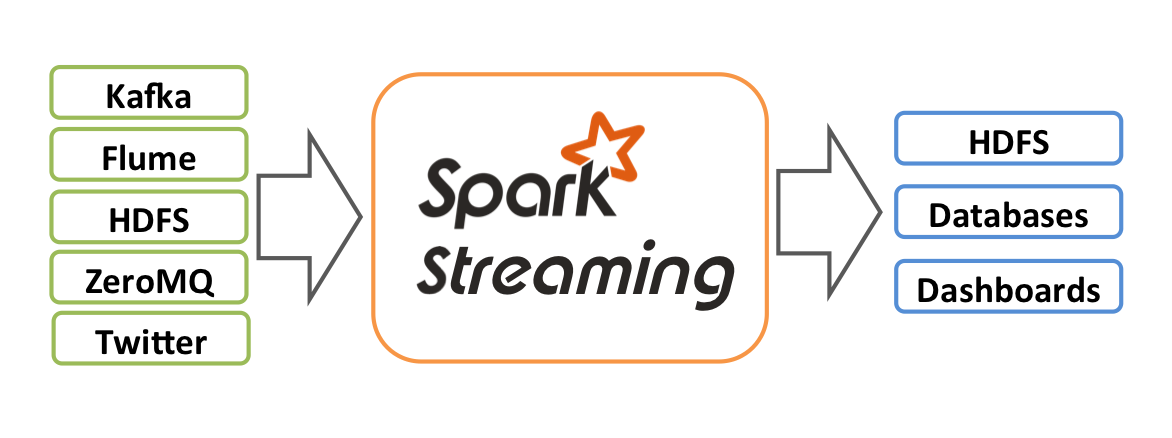
Spark Streaming流式处理系统特点有:
- 将流式计算分解成一系列短小的批处理作业
- 将失败或者执行较慢的任务在其它节点上并行执行
- 较强的容错能力(基于RDD继承关系Lineage)
- 使用和RDD一样的语义
本文将Spark Streaming结合FlumeNG,然后以源码中的JavaFlumeEventCount作参考,建立maven工程,打包在spark standalone集群运行。
一、步骤
1.建立maven工程,写好pom.xml
需要spark streaming的flume插件包,jar的maven地址如下,填入pom.xml中
 <dependency>

     <groupId>org.apache.spark</groupId>

     <artifactId>spark-streaming-flume_2.10</artifactId>

     <version>1.1.0</version>

 </dependency>
完整的pom.xml
<project xmlns="http://maven.apache.org/POM/4.0.0" xmlns:xsi="http://www.w3.org/2001/XMLSchema-instance"

    xsi:schemaLocation="http://maven.apache.org/POM/4.0.0 http://maven.apache.org/xsd/maven-4.0.0.xsd">

    <modelVersion>4.0.0</modelVersion>

    <groupId>test</groupId>

    <artifactId>hq</artifactId>

    <version>0.0.1-SNAPSHOT</version>

    <build>

    <plugins>

            <plugin>

                <groupId>org.apache.maven.plugins</groupId>

                <artifactId>maven-compiler-plugin</artifactId>

                <version>2.3.2</version>

                <configuration>

                    <source>1.6</source>

                    <target>1.6</target>

                    <compilerVersion>1.6</compilerVersion>

                    <encoding>UTF-8</encoding>

                </configuration>

            </plugin>

            <plugin>

                <groupId>org.apache.maven.plugins</groupId>

                <artifactId>maven-jar-plugin</artifactId>

                <version>2.3.2</version>

                <configuration>

                    <archive>

                        <manifest>

                            <addClasspath>true</addClasspath>

                            <classpathPrefix>.</classpathPrefix>

                            <mainClass>JavaFlumeEventCount</mainClass>

                        </manifest>

                    </archive>

                </configuration>

            </plugin>

            <plugin>

                <groupId>org.apache.maven.plugins</groupId>

                <artifactId>maven-assembly-plugin</artifactId>

                <version>2.4</version>

                <configuration>

                  <descriptorRefs>

                    <descriptorRef>jar-with-dependencies</descriptorRef>

                  </descriptorRefs>

                </configuration>

            </plugin>

        </plugins>

    </build>

    <dependencies>

        <dependency>

            <groupId>org.apache.spark</groupId>

            <artifactId>spark-streaming-flume_2.10</artifactId>

            <version>1.1.0</version>

        </dependency>

    </dependencies>

</project>
2.编码并且打包
JavaCode:
import org.apache.spark.SparkConf;

import org.apache.spark.api.java.function.Function;

import org.apache.spark.streaming.*;

import org.apache.spark.streaming.api.java.*;

import org.apache.spark.streaming.flume.FlumeUtils;

import org.apache.spark.streaming.flume.SparkFlumeEvent;

public final class JavaFlumeEventCount {

    private JavaFlumeEventCount() {

    }

    public static void main(String[] args) {

        String host = args[0];

        int port = Integer.parseInt(args[1]);

        Duration batchInterval = new Duration(Integer.parseInt(args[2]));

        SparkConf sparkConf = new SparkConf().setAppName("JavaFlumeEventCount");

        JavaStreamingContext ssc = new JavaStreamingContext(sparkConf,

                batchInterval);

        JavaReceiverInputDStream<SparkFlumeEvent> flumeStream = FlumeUtils

                .createStream(ssc, host, port);

        flumeStream.count();

        flumeStream.count().map(new Function<Long, String>() {

            private static final long serialVersionUID = -572435064083746235L;

            public String call(Long in) {

                return "Received " + in + " flume events.";

            }

        }).print();

        ssc.start();

        ssc.awaitTermination();

    }

}
maven 命令:eclipse中run as -> Maven Assembly:assembly
得到工程的target目录下得到jar包:hq-0.0.1-SNAPSHOT.jar
3.将3个jar包上传到服务器,准备运行
除了自身打的jar包外,运行还需要:spark-streaming-flume_2.10-1.1.0.jar,flume-ng-sdk-1.4.0.jar 这2个jar包(我使用的flume-ng版本是1.4.0)
将3个jar包上传到服务器~/spark/test/目录下。
4.命令行提交任务,运行
[ebupt@eb174 test]$ spark-submit --master spark://eb174:7077 --name FlumeStreaming --class JavaFlumeEventCount --executor-memory 1G --total-executor-cores 2 --jars spark-streaming-flume_2.10-1.1.0.jar,flume-ng-sdk-1.4.0.jar hq.jar eb174 11000 5000
注意:参数解释:spark-submit --help。自己可以根据需要修改内存,防止OOM。另外jars可以同时加载多个jar包,逗号分隔。指定的运行类后需要指定3个参数。
5.开启flume-ng,启动数据源
书写好flume的agent配置文件spark-flumeng.conf,内容如下:
 #Agent5

 #List the sources, sinks and channels for the agent

 agent5.sources =  source1

 agent5.sinks =  hdfs01

 agent5.channels = channel1

 #set channel for sources and sinks

 agent5.sources.source1.channels = channel1

 agent5.sinks.hdfs01.channel = channel1

 #properties of someone source

 agent5.sources.source1.type = spooldir

 agent5.sources.source1.spoolDir = /home/hadoop/huangq/spark-flumeng-data/

 agent5.sources.source1.ignorePattern = .*(\\.index|\\.tmp|\\.xml)$

 agent5.sources.source1.fileSuffix = .1

 agent5.sources.source1.fileHeader = true

 agent5.sources.source1.fileHeaderKey = filename

 # set interceptors

 agent5.sources.source1.interceptors = i1 i2

 agent5.sources.source1.interceptors.i1.type = org.apache.flume.interceptor.HostInterceptor$Builder

 agent5.sources.source1.interceptors.i1.preserveExisting = false

 agent5.sources.source1.interceptors.i1.hostHeader = hostname

 agent5.sources.source1.interceptors.i1.useIP=false

 agent5.sources.source1.interceptors.i2.type = org.apache.flume.interceptor.TimestampInterceptor$Builder

 #properties of mem-channel-1

 agent5.channels.channel1.type = memory

 agent5.channels.channel1.capacity = 100000

 agent5.channels.channel1.transactionCapacity = 100000

 agent5.channels.channel1.keep-alive = 30

 #properties of sink

 agent5.sinks.hdfs01.type = avro

 agent5.sinks.hdfs01.hostname = eb174

 agent5.sinks.hdfs01.port = 11000
启动flume-ng: [hadoop@eb170 flume]$ bin/flume-ng agent -n agent5 -c conf -f conf/spark-flumeng.conf
注意:
①flume的sink要用avro,指定要发送到的spark集群中的一个节点,我们这里是eb174:11000。
②如果没有指定Flume的sdk包,会出现错误: java.lang.NoClassDefFoundError: Lorg/apache/flume/source/avro/AvroFlumeEvent;没有找到类。这个类在flume的sdk包内,在jars参数中指定jar包位置就可以。
③将自己定义的运行jar包单独列出,不要放在jars参数指定,否则也会有错误抛出。
6.运行结果
在提交spark任务的客户端可以看到,看到大量的输出信息,然后可以看到有数据的RDD会统计出这个RDD有多少行,统计结果如下:
 Spark assembly has been built with Hive, including Datanucleus jars on classpath

 Using Spark's default log4j profile: org/apache/spark/log4j-defaults.properties

 14/10/13 19:00:44 INFO SecurityManager: Changing view acls to: ebupt,

 14/10/13 19:00:44 INFO SecurityManager: Changing modify acls to: ebupt,

 14/10/13 19:00:44 INFO SecurityManager: SecurityManager: authentication disabled; ui acls disabled; users with view permissions: Set(ebupt, ); users with modify permissions: Set(ebupt, )

 14/10/13 19:00:45 INFO Slf4jLogger: Slf4jLogger started

 14/10/13 19:00:45 INFO Remoting: Starting remoting

 14/10/13 19:00:45 INFO Remoting: Remoting started; listening on addresses :[akka.tcp://sparkDriver@eb174:51147]

 14/10/13 19:00:45 INFO Remoting: Remoting now listens on addresses: [akka.tcp://sparkDriver@eb174:51147]

 14/10/13 19:00:45 INFO Utils: Successfully started service 'sparkDriver' on port 51147.

 14/10/13 19:00:45 INFO SparkEnv: Registering MapOutputTracker

 14/10/13 19:00:45 INFO SparkEnv: Registering BlockManagerMaster

 ....

 .....

 14/10/13 19:09:21 INFO DAGScheduler: Missing parents: List()

 14/10/13 19:09:21 INFO DAGScheduler: Submitting Stage 145 (MappedRDD[291] at map at MappedDStream.scala:35), which has no missing parents

 14/10/13 19:09:21 INFO MemoryStore: ensureFreeSpace(3400) called with curMem=13047, maxMem=278302556

 14/10/13 19:09:21 INFO MemoryStore: Block broadcast_110 stored as values in memory (estimated size 3.3 KB, free 265.4 MB)

 14/10/13 19:09:21 INFO MemoryStore: ensureFreeSpace(2020) called with curMem=16447, maxMem=278302556

 14/10/13 19:09:21 INFO MemoryStore: Block broadcast_110_piece0 stored as bytes in memory (estimated size 2020.0 B, free 265.4 MB)

 14/10/13 19:09:21 INFO BlockManagerInfo: Added broadcast_110_piece0 in memory on eb174:41187 (size: 2020.0 B, free: 265.4 MB)

 14/10/13 19:09:21 INFO BlockManagerMaster: Updated info of block broadcast_110_piece0

 14/10/13 19:09:21 INFO DAGScheduler: Submitting 1 missing tasks from Stage 145 (MappedRDD[291] at map at MappedDStream.scala:35)

 14/10/13 19:09:21 INFO TaskSchedulerImpl: Adding task set 145.0 with 1 tasks

 14/10/13 19:09:21 INFO TaskSetManager: Starting task 0.0 in stage 145.0 (TID 190, eb175, PROCESS_LOCAL, 1132 bytes)

 14/10/13 19:09:21 INFO BlockManagerInfo: Added broadcast_110_piece0 in memory on eb175:57696 (size: 2020.0 B, free: 519.6 MB)

 14/10/13 19:09:21 INFO TaskSetManager: Finished task 0.0 in stage 145.0 (TID 190) in 25 ms on eb175 (1/1)

 14/10/13 19:09:21 INFO DAGScheduler: Stage 145 (take at DStream.scala:608) finished in 0.026 s

 14/10/13 19:09:21 INFO TaskSchedulerImpl: Removed TaskSet 145.0, whose tasks have all completed, from pool

 14/10/13 19:09:21 INFO SparkContext: Job finished: take at DStream.scala:608, took 0.036589357 s

 -------------------------------------------

 Time: 1413198560000 ms

 -------------------------------------------

 Received 35300 flume events.

 14/10/13 19:09:55 INFO JobScheduler: Finished job streaming job 1413198595000 ms.0 from job set of time 1413198595000 ms

 14/10/13 19:09:55 INFO JobScheduler: Total delay: 0.126 s for time 1413198595000 ms (execution: 0.112 s)

 14/10/13 19:09:55 INFO MappedRDD: Removing RDD 339 from persistence list

 14/10/13 19:09:55 INFO BlockManager: Removing RDD 339

 14/10/13 19:09:55 INFO MappedRDD: Removing RDD 338 from persistence list

 14/10/13 19:09:55 INFO BlockManager: Removing RDD 338

 14/10/13 19:09:55 INFO MappedRDD: Removing RDD 337 from persistence list

 14/10/13 19:09:55 INFO BlockManager: Removing RDD 337

 14/10/13 19:09:55 INFO ShuffledRDD: Removing RDD 336 from persistence list

 14/10/13 19:09:55 INFO BlockManager: Removing RDD 336

 14/10/13 19:09:55 INFO UnionRDD: Removing RDD 335 from persistence list

 14/10/13 19:09:55 INFO BlockManager: Removing RDD 335

 14/10/13 19:09:55 INFO MappedRDD: Removing RDD 333 from persistence list

 14/10/13 19:09:55 INFO BlockManager: Removing RDD 333

 14/10/13 19:09:55 INFO BlockRDD: Removing RDD 332 from persistence list

 14/10/13 19:09:55 INFO BlockManager: Removing RDD 332

 ...

 ...

 14/10/13 19:10:00 INFO TaskSchedulerImpl: Adding task set 177.0 with 1 tasks

 14/10/13 19:10:00 INFO TaskSetManager: Starting task 0.0 in stage 177.0 (TID 215, eb175, PROCESS_LOCAL, 1132 bytes)

 14/10/13 19:10:00 INFO BlockManagerInfo: Added broadcast_134_piece0 in memory on eb175:57696 (size: 2021.0 B, free: 530.2 MB)

 14/10/13 19:10:00 INFO TaskSetManager: Finished task 0.0 in stage 177.0 (TID 215) in 24 ms on eb175 (1/1)

 14/10/13 19:10:00 INFO DAGScheduler: Stage 177 (take at DStream.scala:608) finished in 0.024 s

 14/10/13 19:10:00 INFO TaskSchedulerImpl: Removed TaskSet 177.0, whose tasks have all completed, from pool

 14/10/13 19:10:00 INFO SparkContext: Job finished: take at DStream.scala:608, took 0.033844743 s

 -------------------------------------------

 Time: 1413198600000 ms

 -------------------------------------------

 Received 0 flume events.
二、结论
- flume-ng与spark的结合成功,可根据需要灵活编写相关的类来实现实时处理FlumeNG传输的数据。
- spark streaming和多种数据源结合,达到实时计算处理的能力。
三、参考资料
Spark Streaming 结合FlumeNG使用实例的更多相关文章
- Spark Streaming和Flume-NG对接实验
Spark Streaming是一个新的实时计算的利器,而且还在快速的发展.它将输入流切分成一个个的DStream转换为RDD,从而可以使用Spark来处理.它直接支持多种数据源:Kafka, Flu ...
- Spark Streaming流式处理
Spark Streaming介绍 Spark Streaming概述 Spark Streaming makes it easy to build scalable fault-tolerant s ...
- 7.spark Streaming 技术内幕 : 从DSteam到RDD全过程解析
原创文章,转载请注明:转载自 听风居士博客(http://www.cnblogs.com/zhouyf/) 上篇博客讨论了Spark Streaming 程序动态生成Job的过程,并留下一个疑问: ...
- Spark Streaming实例
Spark Streaming实例分析 2015-02-02 21:00 4343人阅读 评论(0) 收藏 举报 分类: spark(11) 转载地址:http://www.aboutyun.co ...
- Spark源码系列(八)Spark Streaming实例分析
这一章要讲Spark Streaming,讲之前首先回顾下它的用法,具体用法请参照<Spark Streaming编程指南>. Example代码分析 val ssc = )); // 获 ...
- spark streaming 实例
spark-streaming读hdfs,统计文件中单词数量,并写入mysql package com.yeliang; import java.sql.Connection; import java ...
- Spark Streaming之dataset实例
Spark Streaming是核心Spark API的扩展,可实现实时数据流的可扩展,高吞吐量,容错流处理. bin/spark-submit --class Streaming /home/wx/ ...
- 大数据技术之_19_Spark学习_04_Spark Streaming 应用解析 + Spark Streaming 概述、运行、解析 + DStream 的输入、转换、输出 + 优化
第1章 Spark Streaming 概述1.1 什么是 Spark Streaming1.2 为什么要学习 Spark Streaming1.3 Spark 与 Storm 的对比第2章 运行 S ...
- 【自动化】基于Spark streaming的SQL服务实时自动化运维
设计背景 spark thriftserver目前线上有10个实例,以往通过监控端口存活的方式很不准确,当出故障时进程不退出情况很多,而手动去查看日志再重启处理服务这个过程很低效,故设计利用Spark ...
随机推荐
- ubuntu15.10下sublime text3 无法输入中文解决办法
原文链接:http://geek.csdn.net/news/detail/44464 1.首先保证你的电脑有c++编译环境 如果没有,通过以下指令安装 sudo apt-get install bu ...
- Linux文件查找命令find用法整理(locate/find)
Linux文件查找查找主要包括:locate和find 1.locate 用法简单,根据数据库查找,非实时,用法: locate FILENAME 手动更新数据库(时间可能较长) updatedb 2 ...
- SQL Server中建立外键的方法
在SQL中建立外键约束,可以级联查询表中的数据,在C#代码生成器中,也能根据外键关系生成相应的外键表数据模型.外键也可防止删除有外键关系的记录,一定程度上保护了数据的安全性. 步骤: 1.要建立外键关 ...
- 解决Flash挡住层用z-index无效的问题
有时我们要用flash做透明背景结果发现加好之后下面的文字连接点击不了了,div下拉也给flash档住了,后来百度发现我们只要设置wmode参数就可解决了. 在HTML中,如果嵌入Flash,默认 ...
- phpMyAdmin教程 之 创建新用户/导入/导出数据库
盗用了被人的教程. 需要看就点击进去吧.复制过来实在是过意不去 http://www.wpdaxue.com/phpmyadmin-import-export-database.html
- linux常用命令(自我积累)
创建目录:mkdir + 目录名 使文件可执行:chmod +x filename 执行文件:./filename 来执行您的脚本 {程序必须以下面的行开始(必须方在文件的第一行): #!/bin/s ...
- oracle session 相关优化
导读: 同学们是不是都用遇到过这种情况,一个业务系统开发期业务并发量只是估算一个值,而系统上线后这个并发量可能会出现溢出或是不够的 情况.在这种情况下我们DBA怎么给出合理的性能优化建议呢?本文就 ...
- Java Map集合按照key和value排序之法
一.理论基点 Map是键值对的集合接口,它的实现类主要包括:HashMap,TreeMap,Hashtable以及LinkedHashMap等. TreeMap:基于红黑树(Red-Black-Tre ...
- storm简介[ZZ]
场景 伴随着信息科技日新月异的发展,信息呈现出爆发式的膨胀,人们获取信息的途径也更加多样.更加便捷,同时对于信息的时效性要求也越来越高.举个搜索 场景中的例子,当一个卖家发布了一条宝贝信息时,他希望的 ...
- Linux的cat、more、less的区别
cat命令功能用于显示整个文件的内容单独使用没有翻页功能因此经常和more命令搭配使用,cat命令还有就是将数个文件合并成一个文件的功能. more命令功能:让画面在显示满一页时暂停,此时可按空格健继 ...