
Maven Build Profiles--reference
What is Build Profile?
A Build profile is a set of configuration values which can be used to set or override default values of Maven build. Using a build profile, you can customize build for different environments such asProduction v/s Development environments.
Profiles are specified in pom.xml file using its activeProfiles / profiles elements and are triggered in variety of ways. Profiles modify the POM at build time, and are used to give parameters different target environments (for example, the path of the database server in the development, testing, and production environments).
Types of Build Profile
Build profiles are majorly of three types
| Type | Where it is defined |
|---|---|
| Per Project | Defined in the project POM file, pom.xml |
| Per User | Defined in Maven settings xml file (%USER_HOME%/.m2/settings.xml) |
| Global | Defined in Maven global settings xml file (%M2_HOME%/conf/settings.xml) |
Profile Activation
A Maven Build Profile can be activated in various ways.
Explicitly using command console input.
Through maven settings.
Based on environment variables (User/System variables).
OS Settings (for example, Windows family).
Present/missing files.
Profile Activation Examples
Let us assume following directory structure of your project:
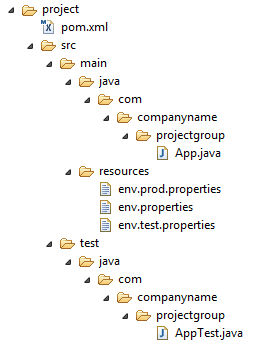
Now, under src/main/resources there are three environment specific files:
| File Name | Description |
|---|---|
| env.properties | default configuration used if no profile is mentioned. |
| env.test.properties | test configuration when test profile is used. |
| env.prod.properties | production configuration when prod profile is used. |
Explicit Profile Activation
In the following example, We'll attach maven-antrun-plugin:run goal to test phase. This will allow us to echo text messages for different profiles. We will be using pom.xml to define different profiles and will activate profile at command console using maven command.
Assume, we've created following pom.xml in C:\MVN\project folder.
<projectxmlns="http://maven.apache.org/POM/4.0.0"xmlns:xsi="http://www.w3.org/2001/XMLSchema-instance"xsi:schemaLocation="http://maven.apache.org/POM/4.0.0

   http://maven.apache.org/xsd/maven-4.0.0.xsd"><modelVersion>4.0.0</modelVersion><groupId>com.companyname.projectgroup</groupId><artifactId>project</artifactId><version>1.0</version><profiles><profile><id>test</id><build><plugins><plugin><groupId>org.apache.maven.plugins</groupId><artifactId>maven-antrun-plugin</artifactId><version>1.1</version><executions><execution><phase>test</phase><goals><goal>run</goal></goals><configuration><tasks><echo>Using env.test.properties</echo><copyfile="src/main/resources/env.test.properties"tofile="${project.build.outputDirectory}/env.properties"/></tasks></configuration></execution></executions></plugin></plugins></build></profile></profiles></project>
Now open command console, go to the folder containing pom.xml and execute the following mvncommand. Pass the profile name as argument using -P option.
C:\MVN\project>mvn test -Ptest
Maven will start processing and display the result of test build profile.
[INFO] Scanning for projects...

[INFO] ------------------------------------------------------------------

[INFO] Building Unnamed - com.companyname.projectgroup:project:jar:1.0

[INFO]    task-segment: [test]

[INFO] ------------------------------------------------------------------

[INFO] [resources:resources {execution: default-resources}]

[WARNING] Using platform encoding (Cp1252 actually) to copy filtered resources,

i.e. build is platform dependent!

[INFO] Copying 3 resources

[INFO] [compiler:compile {execution: default-compile}]

[INFO] Nothing to compile - all classes are up to date

[INFO] [resources:testResources {execution: default-testResources}]

[WARNING] Using platform encoding (Cp1252 actually) to copy filtered resources,

i.e. build is platform dependent!

[INFO] skip non existing resourceDirectory C:\MVN\project\src\test\resources

[INFO] [compiler:testCompile {execution: default-testCompile}]

[INFO] Nothing to compile - all classes are up to date

[INFO] [surefire:test {execution: default-test}]

[INFO] Surefire report directory: C:\MVN\project\target\surefire-reports

-------------------------------------------------------

 T E S T S

-------------------------------------------------------

There are no tests to run.

Results :

Tests run: 0, Failures: 0, Errors: 0, Skipped: 0

[INFO] [antrun:run {execution: default}]

[INFO] Executing tasks

     [echo] Using env.test.properties

[INFO] Executed tasks

[INFO] ------------------------------------------------------------------

[INFO] BUILD SUCCESSFUL

[INFO] ------------------------------------------------------------------

[INFO] Total time: 1 second

[INFO] Finished at: Sun Jul 08 14:55:41 IST 2012

[INFO] Final Memory: 8M/64M

[INFO] ------------------------------------------------------------------
Now as an exercise, you can do the following steps
Add another profile element to profiles element of pom.xml (copy existing profile element and paste it where profile elements ends).
Update id of this profile element from test to normal.
Update task section to echo env.properties and copy env.properties to target directory
Again repeat above three steps, update id to prod and task section for env.prod.properties
That's all. Now you've three build profiles ready (normal / test / prod).
Now open command console, go to the folder containing pom.xml and execute the following mvncommands. Pass the profile names as argument using -P option.
C:\MVN\project>mvn test -Pnormal
C:\MVN\project>mvn test -Pprod
Check the output of build to see the difference.
Profile Activation via Maven Settings
Open Maven settings.xml file available in %USER_HOME%/.m2 directory where %USER_HOME%represents user home directory. If settings.xml file is not there then create a new one.
Add test profile as an active profile using activeProfiles node as shown below in example
<settingsxmlns="http://maven.apache.org/POM/4.0.0"xmlns:xsi="http://www.w3.org/2001/XMLSchema-instance"xsi:schemaLocation="http://maven.apache.org/POM/4.0.0

   http://maven.apache.org/xsd/settings-1.0.0.xsd"><mirrors><mirror><id>maven.dev.snaponglobal.com</id><name>Internal Artifactory Maven repository</name><url>http://repo1.maven.org/maven2/</url><mirrorOf>*</mirrorOf></mirror></mirrors><activeProfiles><activeProfile>test</activeProfile></activeProfiles></settings>
Now open command console, go to the folder containing pom.xml and execute the following mvncommand. Do not pass the profile name using -P option.Maven will display result of test profile being an active profile.
C:\MVN\project>mvn test
Profile Activation via Environment Variables
Now remove active profile from maven settings.xml and update the test profile mentioned in pom.xml. Add activation element to profile element as shown below.
The test profile will trigger when the system property "env" is specified with the value "test". Create a environment variable "env" and set its value as "test".
<profile><id>test</id><activation><property><name>env</name><value>test</value></property></activation></profile>
Let's open command console, go to the folder containing pom.xml and execute the following mvncommand.
C:\MVN\project>mvn test
Profile Activation via Operating System
Activation element to include os detail as shown below. This test profile will trigger when the system is windows XP.
<profile><id>test</id><activation><os><name>Windows XP</name><family>Windows</family><arch>x86</arch><version>5.1.2600</version></os></activation></profile>
Now open command console, go to the folder containing pom.xml and execute the following mvncommands. Do not pass the profile name using -P option.Maven will display result of test profile being an active profile.
C:\MVN\project>mvn test
Profile Activation via Present/Missing File
Now activation element to include os detail as shown below. The test profile will trigger whentarget/generated-sources/axistools/wsdl2java/com/companyname/group is missing.
<profile><id>test</id><activation><file><missing>target/generated-sources/axistools/wsdl2java/com/companyname/group</missing></file></activation></profile>
Now open command console, go to the folder containing pom.xml and execute the following mvncommands. Do not pass the profile name using -P option.Maven will display result of test profile being an active profile.
C:\MVN\project>mvn test

reference from :http://www.tutorialspoint.com/maven/maven_build_profiles.htm
Maven Build Profiles--reference的更多相关文章
- Maven Build profiles
They modify the POM at build time, and are meant to be used in complementary sets to give equivalent ...
- Spring Boot-右键maven build成功但是直接运行main方法出错的解决方案
1.代码就一个Controller,从官网复制过来的,如下 package com.springboot.controller; import org.springframework.boot.Spr ...
- Maven build标签
前言: <build >设置,主要用于编译设置 1.分类 在Maven的pom.xml文件中,存在如下两种<build>: (1)全局配置(project build) 针对整 ...
- maven中profiles使用详解
使用的场景 常常遇到一些项目中多环境切换的问题.比如在开发过程中用到开发环境,在测试中使用测试环境,在生产中用生产环境的情况.springboot中提供了 spring.profile.active的 ...
- maven:log4j:WARN No appenders could be found for logger (loggerInfo).或者maven build error:org.apache.maven.lifecycle.LifecycleExecutionExceptio
maven在build构建时,加载资源文件时需要配置资源文件插件: 1,在pom.xml文件中加入 <build> <finalName>${project.build.tar ...
- 在eclipse如何删除无效的maven build
在Eclipse的maven项目中,点击一次“maven build...”明明没有配置,它也就会产生一个maven build,那么如何删除这些无效的配置呢?
- Maven Build Life Cycle--reference
What is Build Lifecycle? A Build Lifecycle is a well defined sequence of phases which define the ord ...
- No compiler is provided in this environment. --Maven build失败
今天,maven build 失败了, 遇到下面的问题 经过查找,通过这个大佬的blog( https://blog.csdn.net/lslk9898/article/details/738367 ...
- 转:eclipse maven build、maven install 等区别
原文地址:eclipse maven build.maven install 等区别
随机推荐
- 使用Oracle的存储过程批量插入数据
原文地址:http://www.cnblogs.com/liaoyu/p/oracle-procedure-batch-insert.html 作者:L君还在说之乎者也 最近在工作中,需要使用生成一些 ...
- tcpdump dump 网络流量
tcpdump dump 网络流量 描述: Tcpdump 打印一个包的内容的描述在一个网络接口 匹配布尔值表达式 它也可以运行使用-w flag, 这样会保存包的数据到一个文件用于后面分析, 使用- ...
- Android开发之Fragment的介绍、使用及生命周期
Fragment官网介绍-http://developer.android.com/guide/components/fragments.html 郭大神的使用实例文章:http://blog.csd ...
- hadoop运行流程分析源代码级
前言: 最近一直在分析hadoop的运行流程,我们查阅了大量的资料,虽然从感性上对这个流程有了一个认识但是我总是感觉对mapreduce的运行还是没有一个全面的认识,所以决定从源代码级别对mapred ...
- hadoop2.2编程: 数据压缩
本文主要讨论hadoop的数据压缩与解压缩代码的书写 Compressing and decompressing streams with CompressionCodec import org.ap ...
- -_-#【减少 DOM 访问】“离线”更新节点,再将它们添加到树中
Minimize DOM Access javascript 之 DOM 优化 <!DOCTYPE html> <html> <head> <meta cha ...
- maven安装步骤
第一步:配置maven环境 maven3 安装: 安装 Maven 之前要求先确定你的 JDK 已经安装配置完成.Maven是 Apache 下的一个项目,目前最新版本是 3.0.4,我用的也是这个. ...
- C#父类对象和子类对象之间的转化
1. 子类到父类 Chinese c = new Chinese(); Person p1 = c; //从变量c看是一个中国人,所以可以把人的标签贴上去 2. 父类到子类 Chinese c2 = ...
- Mac OS X Mountain Lion安装Bochs
基本步骤可以看这个帖子 http://hi.baidu.com/any_where/item/990c0acdfbd6542c47d5c003 大体是: 1.安装x11; 2.开启Mac OS X的r ...
- 【原】数据库SQL语句入门
1.数据定义DDL(Data Definition Language)语言即对表结构的一些定义,主要包括动词为CREATE/DROP/ALTER. 1.1.CREATE语句 CREATE TABLE ...