
[原] XAF ListView 凍結列
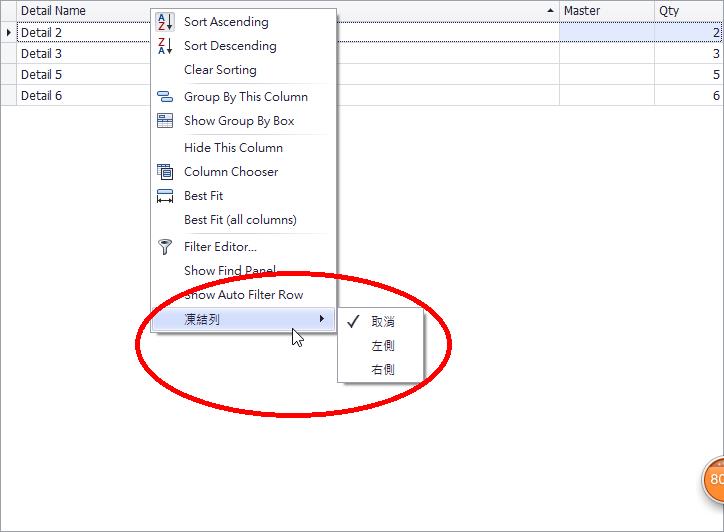
using System;

using System.ComponentModel;

using System.Collections.Generic;

using System.Diagnostics;

using System.Text;

using DevExpress.ExpressApp;

using DevExpress.ExpressApp.Actions;

using DevExpress.Persistent.Base;

using DevExpress.ExpressApp.Win.Editors;

using DevExpress.XtraGrid.Views.Grid;

using DevExpress.XtraGrid.Columns;

using DevExpress.Utils.Menu;

using DevExpress.XtraGrid.Menu;

using System.Drawing;

using DevExpress.ExpressApp.Utils;

namespace E1554.Module

{

    public partial class FixclomunViewController : ViewController<ListView>

    {

        public FixclomunViewController()

        {

            InitializeComponent();

        }

        protected override void OnDeactivated()

        {

            base.OnDeactivated();

        }

        protected override void OnViewControlsCreated()

        {

            base.OnViewControlsCreated();

            // Access and customize the target View control.

            GridListEditor listEditor = ((ListView)View).Editor as GridListEditor;

            if (listEditor != null)

            {

                XafGridView gridView = listEditor.GridView as XafGridView;

                gridView.PopupMenuShowing += new PopupMenuShowingEventHandler(gridView_PopupMenuShowing);

            }

        }

        private void gridView_PopupMenuShowing(object sender, PopupMenuShowingEventArgs e)

        {

            if (e.MenuType == DevExpress.XtraGrid.Views.Grid.GridMenuType.Column)

            {

                DevExpress.XtraGrid.Menu.GridViewColumnMenu menu = e.Menu as GridViewColumnMenu;

                if (menu.Column != null)

                {

                    //Adding new items

                    DXPopupMenu popMenu = new DXPopupMenu();

                    popMenu.Caption = "凍結列";

                    menu.Items.Add(popMenu);

                    popMenu.Items.Add(CreateCheckItem("取消", menu.Column, FixedStyle.None,

                     ImageLoader.Instance.GetImageInfo("NotFixed").Image));

                    popMenu.Items.Add(CreateCheckItem("左側", menu.Column, FixedStyle.Left,

                     ImageLoader.Instance.GetImageInfo("FixedLeft").Image));

                    popMenu.Items.Add(CreateCheckItem("右側", menu.Column, FixedStyle.Right,

                      ImageLoader.Instance.GetImageInfo("FixedRight").Image));

                }

            }

        }

        //Create a menu item

        DXMenuCheckItem CreateCheckItem(string caption, GridColumn column, FixedStyle style, Image image)

        {

            DXMenuCheckItem item = new DXMenuCheckItem(caption, column.Fixed == style,

              image, new EventHandler(OnFixedClick));

            item.Tag = new MenuInfo(column, style);

            return item;

        }

        //Menu item click handler

        void OnFixedClick(object sender, EventArgs e)

        {

            DXMenuItem item = sender as DXMenuItem;

            MenuInfo info = item.Tag as MenuInfo;

            if (info == null) return;

            info.Column.Fixed = info.Style;

        }

        //The class that stores menu specific information

        class MenuInfo

        {

            public MenuInfo(GridColumn column, FixedStyle style)

            {

                this.Column = column;

                this.Style = style;

            }

            public FixedStyle Style;

            public GridColumn Column;

        }

    }

}
[原] XAF ListView 凍結列的更多相关文章
- [原] XAF ListView显示隐藏Footer菜单
using System; using DevExpress.ExpressApp; using DevExpress.ExpressApp.Win.Editors; using DevExpress ...
- [WPF]ListView点击列头排序功能实现
[转] [WPF]ListView点击列头排序功能实现 这是一个非常常见的功能,要求也很简单,在Column Header上显示一个小三角表示表示现在是在哪个Header上的正序还是倒序就可以了. ...
- [原] XAF 如何启用ListView Top N records 提升用户使用体验
為了提升用戶使用體驗,特擴展此功能(來源與Xafari Framework).1.可在模型編輯器中設置是否啓用,默認啓用.2.DataAccessMode為Client模式才啓用.其它模式自動關閉.3 ...
- [原] XAF 如何啟用ListView橫向滾動條
using System; using DevExpress.ExpressApp; using DevExpress.ExpressApp.Win.Editors; using DevExpress ...
- [原] XAF How to bind a stored procedure to a ListView in XAF
First, I suggest that you review the following topic to learn how to show a custom set of objects in ...
- [原] XAF How to Edit multiple objects in a ListViewAndDetailView
2014年好久没有更新Blog了,工作调换了,很少用XAF,但还是很关注XAF的发展和学习,对中国的中小企业数据管理软件开发真的太实用了!! 功能比较简单,但很实用,直接上图和代码! ListView ...
- 【原】sql 将某列拼成一个字符串
SQL Server中,写存储过程,时常会碰到这样一个需求:从某个表中取某一列,然后需要将这一列数据以某种形式拼成一个字符串,以供后面使用,下面这种方法能够实现此需求. --取说明书模块枚举,结果格式 ...
- C# ListView点击列头进行排序
/// <summary> /// This class is an implementation of the 'IComparer' interface. /// </summa ...
- [原] XAF 添加日期筛选下拉选择
1.ListView 添加日期筛选下拉选择,选择指定,可指定日期范围 2.Code using DevExpress.Data.Filtering; using DevExpress.ExpressA ...
随机推荐
- 【译】RabbitMQ:路由(Routing)
在前一篇中,我们构建了一个简单的日志系统,我们已经能够广播消息到许多的接收者.在这一篇中,我们希望增加一个特性,让订阅消息的子集成为可能.例如,我们可以将重要的错误日志存放到日志文件(即,磁盘上面), ...
- Linux 中 Vi 编辑器的简单操作
Linux 中 Vi 编辑器的简单操作 Vi 编辑器一共有3种模式:命名模式(默认),尾行模式,编辑模式.3种模式彼此需要切换. 一.进入 Vi 编辑器的的命令 vi filename //打开或新 ...
- ubuntu14.04 安装系统
p { margin-bottom: 0.1in; line-height: 120% } code.cjk { font-family: "Droid Sans Fallback" ...
- 说一说line-height
line-height这个样式相信大家一定不会陌生,我们经常用它来让文本上下居中,这样做一般不出出现什么问题,但是如果对这个属性不是很熟悉的话,可能会踩到一些坑,今天亲自去试验了一下,并总结了一下li ...
- Div+CSS命名规范
注意事项:1.命名遵循驼峰式 2.尽量用中文 3.不加中杠和下划线 4.尽量不缩写,除非一看就明白的单词 头:header 标志:logo 友情链接:friendlink 内容:c ...
- 【Lua】Lua的几点优化原则
Lua是一门以性能著称的脚本语言,被广泛的应用在很多方面,比如很多游戏的插件. 很多时候,没有必要去考虑性能的问题,不过,如果我们在开始编写代码的时候就以更适当,性能更高的方式与结构去组织代码,对于程 ...
- js汉语转拼音(全拼、首字母、拼音首字母)
新建js文件first_alphabet.js // JavaScript Document // 汉字拼音首字母列表 本列表包含了20902个汉字,用于配合 ToChineseSpell //函数使 ...
- Python 3.5 连接Mysql数据库(pymysql 方式)
由于 MySQLdb 模块还不支持 Python3.x,官方的Mysql连接包只支持到3.4,所以 Python3.5 如果想连接MySQL需要安装 pymysql 模块. pymysql 模块可以通 ...
- Sql Server 2008卸载后再次安装一直报错
sql server 2008卸载之后再次安装一直报错问题. 第一:由于上一次的卸载不干净,可参照百度完全卸载sql server2008 的方式 1. 用WindowsInstaller删除所有与S ...
- 实战录 | 一起唠唠那些常见的DDoS攻击
<实战录>导语 云端卫士<实战录>栏目定期会向粉丝朋友们分享一些在开发运维中的经验和技巧,希望对于关注我们的朋友有所裨益.本期分享人为云端卫士系统架构师高鹏,将带来常见的DDo ...