
SpringMVC学习笔记(六)
一.SpringMVC文件的上传
1.1.需要导入两个jar包
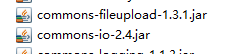
1.2在SpringMVC配置文件中加入
<!-- upload settings -->

<bean id="multipartResolver"  class="org.springframework.web.multipart.commons.CommonsMultipartResolver">

    <property name="maxUploadSize" value="102400000">

    <property name="defaultEncoding" value="utf-8">

</property>

</bean>
注意:bean的id必须有而且必须叫multipartResolver
1.3方法代码
@RequestMapping(value="/upload",method=RequestMethod.POST)

public String upload(HttpServletRequest req) throws Exception{

    MultipartHttpServletRequest mreq = (MultipartHttpServletRequest)req;

    MultipartFile file = mreq.getFile("file");

    String fileName = file.getOriginalFilename();

    SimpleDateFormat sdf = new SimpleDateFormat("yyyyMMddHHmmss");

    FileOutputStream fos = new FileOutputStream(req.getSession().getServletContext().getRealPath("/")+

            "upload/"+sdf.format(new Date())+fileName.substring(fileName.lastIndexOf('.')));

    fos.write(file.getBytes());

    fos.flush();

    fos.close();

    return "hello";

}
二. SpringMVC文件的下载.
2.1 准备下载源
在WebContent下新建files目录,放入aaa.txt,作为下载源
2.2 在index.jsp添加超链接作为下载入口
<a href="testResponseEntity" id="testJson">testResponseEntity</a><br/>
2.3 在handler SpringMVCTest中添加接口
@RequestMapping("testResponseEntity")

public ResponseEntity<byte[]> testResponseEntity(HttpSession session) throws IOException{

    byte[] body = null;

    ServletContext servletContext = session.getServletContext();

    InputStream in = servletContext.getResourceAsStream("/files/aaa.txt");

    body = new byte[in.available()];

    in.read(body);

    HttpHeaders headers = new HttpHeaders();

    headers.add("Content-Disposition", "attachment;filename=aaa.txt");

    HttpStatus statusCode = HttpStatus.OK;

    ResponseEntity<byte[]> response = new ResponseEntity<>(body, headers, statusCode);

    return response;

}
SpringMVC学习笔记(六)的更多相关文章
- SpringMVC学习笔记六:使用 hibernate-validator注解式数据校验
对客户端传过来的参数,在使用前一般需要进行校验. SpringMVC框架内置了Validator验证接口,但是实现起来太麻烦.我们一般使用 hibernate-validator进行数据校验. 1:j ...
- SpringMVC学习笔记六:使用Formatter解析或格式化数据
转载请注明原文地址:http://www.cnblogs.com/ygj0930/p/6832903.html Converter可以将一种类型转换成另一种类型,是任意Object之间的类型 ...
- SpringMVC学习笔记六:类型转换器及类型转换异常处理
SpringMVC内部有类型转换器,当从Request中获取参数后,放入Controller中时,会根据Controller中指定的类型进行自动转换,当指的类型SpringMVC不能自动转换时,就需要 ...
- SpringMVC 学习笔记(六)拦截器
5.1.处理器拦截器简介 Spring Web MVC的处理器拦截器(如无特殊说明,下文所说的拦截器即处理器拦截器) 类似于Servlet开发中的过滤器Filter,用于对处理器进行预处理和后处理. ...
- 史上最全的SpringMVC学习笔记
SpringMVC学习笔记---- 一.SpringMVC基础入门,创建一个HelloWorld程序 1.首先,导入SpringMVC需要的jar包. 2.添加Web.xml配置文件中关于Spring ...
- SpringMVC学习笔记之二(SpringMVC高级参数绑定)
一.高级参数绑定 1.1 绑定数组 需求:在商品列表页面选中多个商品,然后删除. 需求分析:功能要求商品列表页面中的每个商品前有一个checkbok,选中多个商品后点击删除按钮把商品id传递给Cont ...
- springmvc学习笔记--REST API的异常处理
前言: 最近使用springmvc写了不少rest api, 觉得真是一个好框架. 之前描述的几篇关于rest api的文章, 其实还是不够完善. 比如当遇到参数缺失, 类型不匹配的情况时, 直接抛出 ...
- springmvc学习笔记---面向移动端支持REST API
前言: springmvc对注解的支持非常灵活和飘逸, 也得web编程少了以往很大一坨配置项. 另一方面移动互联网的到来, 使得REST API变得流行, 甚至成为主流. 因此我们来关注下spring ...
- java之jvm学习笔记六-十二(实践写自己的安全管理器)(jar包的代码认证和签名) (实践对jar包的代码签名) (策略文件)(策略和保护域) (访问控制器) (访问控制器的栈校验机制) (jvm基本结构)
java之jvm学习笔记六(实践写自己的安全管理器) 安全管理器SecurityManager里设计的内容实在是非常的庞大,它的核心方法就是checkPerssiom这个方法里又调用 AccessCo ...
随机推荐
- 如何通过WPS 2013 API 将Office(Word、Excel和PPT)文件转PDF文件
1. 描述 PDF 文件是一种便携文件格式,是由Adobe公司所开发的独特的跨平台文件格式.PDF文件以PostScript语言图象模型为基础,无论在哪种打印机上都可保证精确的颜色和准确的打印效果,即 ...
- 安装 SQL Server 2008 时提示需要删除 SQL Server 2005 Express 工具
已安装 SQL Server 2005,安装 SQL Server 2008 时提示需要删除 SQL Server 2005 Express 工具 错误提示:已安装 SQL Server 2005 E ...
- 关于redis的主从复制
redis主从复制需要注意的一个问题 这两天我朋友在使用redis偶尔会遇见一个问题,就是所有的缓存莫名其妙会不见,找了好久都没找到,他一直以为 有人错误执行了什么命令 他跟我说的时候我估计是主从复制 ...
- web页面如何播放amr的音频文件
这个需求由来已久,公司的语音订单很多,每次客服都是从服务器down下语音来听.很不方便..于是我就上网扒拉看有么有什么web播放器能播放amr格式的音频文件,amr百度百科 总之找了很久.,,然后发现 ...
- 延时函数出错,volatile一例
莫名其妙的错误.使用Systick做的延时. 初始化是这样的: //SysTick配置 SysTick_CLKSourceConfig(SysTick_CLKSource_HCLK_Div8); if ...
- 【学】jQuery的源码思路1——后代选择器
jQuery的源码思路1--后代选择器 这里探讨一下jQuery中后代选择器的封装原理,并自己写一下 getEle('#div1 ul li .box');接受的参数就是个后代选择器,类似于这样: # ...
- 用Intellij打可执行jar包
1.添加maven-assembly-plugin和maven-dependency-plugin assembly:用于打可执行jar包 dependency: 导出依赖包 <plugin&g ...
- 由system.currentTimeMillis() 获得当前的时间
System类代表系统,系统级的很多属性和控制方法都放置在该类的内部.该类位于java.lang包. currentTimeMillis方法 public static long currentTim ...
- 04 Linux字符设备驱动
一.结构体 1. cdev 结构体 struct cdev { struct kobject kobj; /* 内嵌的 kobject 对象 */ struct module *owner; /*所属 ...
- DIJ产品系列