
SpringMVC学习笔记六:类型转换器及类型转换异常处理
SpringMVC内部有类型转换器,当从Request中获取参数后,放入Controller中时,会根据Controller中指定的类型进行自动转换,当指的类型SpringMVC不能自动转换时,就需要自定义类转换器
项目目录树:
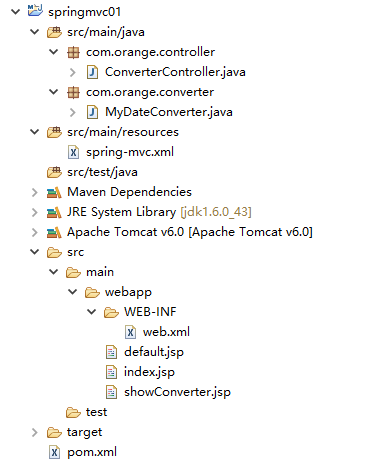
请求页面index.jsp
<%@ page language="java" contentType="text/html; charset=GBK"

    pageEncoding="GBK"%>

<%@ taglib prefix="c" uri="http://java.sun.com/jstl/core" %>

<%@ taglib prefix="fn" uri="http://java.sun.com/jsp/jstl/functions" %>

<%

    String path = request.getContextPath();

    String basePath = request.getScheme()+"://"+request.getServerName()+":"+request.getServerPort()+path+"/";

%>

<!DOCTYPE html PUBLIC "-//W3C//DTD HTML 4.01 Transitional//EN" "http://www.w3.org/TR/html4/loose.dtd">

<html>

<head>

<meta http-equiv="Content-Type" content="text/html; charset=GBK">

<base href="<%=basePath %>">

<title>IndexPage</title>

</head>

<body>

<c:out value="${ex.message }"></c:out>

<form action="converter/converter">

    name: <input type="text" name="name"><br>

    age: <input type="text" name="age"><br>

    Date: <input type="text" name="date"><br>

    <input type="submit" value="submit">

</form>

</body>

</html>
控制器ConverterController.java
package com.orange.controller;

import java.util.Date;

import javax.servlet.http.HttpServletRequest;

import org.springframework.beans.TypeMismatchException;

import org.springframework.stereotype.Controller;

import org.springframework.web.bind.annotation.ExceptionHandler;

import org.springframework.web.bind.annotation.RequestMapping;

import org.springframework.web.servlet.ModelAndView;

@Controller

@RequestMapping(value="/converter")

public class ConverterController {

    @RequestMapping(value="/converter")

    public ModelAndView doConverter(String name, int age, Date date, ModelAndView mav){

        mav.addObject("name", name);

        mav.addObject("age", age);

        mav.addObject("date", date);

        mav.setViewName("/showConverter.jsp");

        return mav;

    }

    //注释式异常处理方式,当发生类型转换异常时,必须使用注解式异常处理,应该该异常在进入Controller之前就已经发生

    @ExceptionHandler(value=TypeMismatchException.class)

    public ModelAndView exceptionResolver(Exception ex, HttpServletRequest request){

        ModelAndView mav = new ModelAndView();

        mav.addObject("ex", ex);

        mav.setViewName("/index.jsp");

        return mav;

    }

}
自定义类型转换器
package com.orange.converter;

import java.text.ParseException;

import java.text.SimpleDateFormat;

import java.util.Date;

import java.util.regex.Pattern;

import org.springframework.core.convert.converter.Converter;

public class MyDateConverter implements Converter<String, Date> {

    public Date convert(String source) {

        try {

            SimpleDateFormat sdf = getSimpleDateFormat(source);

            return sdf.parse(source);

        } catch (ParseException e) {

            e.printStackTrace();

        }

        return null;

    }

    private SimpleDateFormat getSimpleDateFormat(String source){

        SimpleDateFormat sdf = null;

        if(Pattern.matches("^\\d{4}-\\d{2}-\\d{2}$", source)){

            sdf = new SimpleDateFormat("yyyy-MM-dd");

        }else if(Pattern.matches("^\\d{4}\\d{2}\\d{2}$", source)){

            sdf = new SimpleDateFormat("yyyyMMdd");

        }else if(Pattern.matches("^\\d{4}/\\d{2}/\\d{2}$", source)){

            sdf = new SimpleDateFormat("yyyy/MM/dd");

        }

        return sdf;

    }

}
注册类型转换器,配置spring-mvc.xml
<?xml version="1.0" encoding="UTF-8"?>

<beans xmlns="http://www.springframework.org/schema/beans"

    xmlns:xsi="http://www.w3.org/2001/XMLSchema-instance"

    xmlns:mvc="http://www.springframework.org/schema/mvc"

    xmlns:context="http://www.springframework.org/schema/context"

    xsi:schemaLocation="

        http://www.springframework.org/schema/mvc

        http://www.springframework.org/schema/mvc/spring-mvc-4.0.xsd

        http://www.springframework.org/schema/beans

        http://www.springframework.org/schema/beans/spring-beans-4.0.xsd

        http://www.springframework.org/schema/context

        http://www.springframework.org/schema/context/spring-context-4.0.xsd">

    <!-- 扫描注解 -->

    <context:component-scan base-package="com.orange.controller" />

    <!-- 开启类型转换服务 -->

    <mvc:annotation-driven conversion-service="conversionService"/>

    <!-- 注册自定义类型转换器 -->

    <bean id="dateConverter" class="com.orange.converter.MyDateConverter"></bean>

    <!-- 注册类型转换服务 -->

    <bean id="conversionService" class="org.springframework.context.support.ConversionServiceFactoryBean">

        <property name="converters" ref="dateConverter"></property>

    </bean>

</beans>
跳转后的页面showConverter.jsp
<%@ page language="java" contentType="text/html; charset=GBK"

    pageEncoding="GBK"%>

<%@ taglib prefix="c" uri="http://java.sun.com/jstl/core" %>

<%@ taglib prefix="fn" uri="http://java.sun.com/jsp/jstl/functions" %>

<%

    String path = request.getContextPath();

    String basePath = request.getScheme()+"://"+request.getServerName()+":"+request.getServerPort()+path+"/";

%>

<!DOCTYPE html PUBLIC "-//W3C//DTD HTML 4.01 Transitional//EN" "http://www.w3.org/TR/html4/loose.dtd">

<html>

<head>

<meta http-equiv="Content-Type" content="text/html; charset=GBK">

<base href="<%=basePath %>">

<title>showController Page</title>

</head>

<body>

<c:out value="${name }"></c:out><br>

<c:out value="${age }"></c:out>

<c:out value="${date }"></c:out>

</body>

</html>
当输入信息正确时

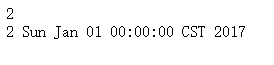
当输入格式不支持时(自定义类型转换器支持yyyy-MM-dd,yyyyMMMdd,yyyy/MM/dd)


可以把异常信息展示到输入的页面
SpringMVC学习笔记六:类型转换器及类型转换异常处理的更多相关文章
- SpringMVC学习笔记六:使用Formatter解析或格式化数据
转载请注明原文地址:http://www.cnblogs.com/ygj0930/p/6832903.html Converter可以将一种类型转换成另一种类型,是任意Object之间的类型 ...
- SpringMVC学习笔记六:使用 hibernate-validator注解式数据校验
对客户端传过来的参数,在使用前一般需要进行校验. SpringMVC框架内置了Validator验证接口,但是实现起来太麻烦.我们一般使用 hibernate-validator进行数据校验. 1:j ...
- SpringMVC 学习笔记(六)拦截器
5.1.处理器拦截器简介 Spring Web MVC的处理器拦截器(如无特殊说明,下文所说的拦截器即处理器拦截器) 类似于Servlet开发中的过滤器Filter,用于对处理器进行预处理和后处理. ...
- SpringMVC学习笔记(六)
一.SpringMVC文件的上传 1.1.需要导入两个jar包 1.2在SpringMVC配置文件中加入 <!-- upload settings --> <bean id=&quo ...
- springmvc学习笔记(13)-springmvc注解开发之集合类型參数绑定
springmvc学习笔记(13)-springmvc注解开发之集合类型參数绑定 标签: springmvc springmvc学习笔记13-springmvc注解开发之集合类型參数绑定 数组绑定 需 ...
- springmvc学习笔记(12)-springmvc注解开发之包装类型參数绑定
springmvc学习笔记(12)-springmvc注解开发之包装类型參数绑定 标签: springmvc springmvc学习笔记12-springmvc注解开发之包装类型參数绑定 需求 实现方 ...
- SpringMVC学习笔记之二(SpringMVC高级参数绑定)
一.高级参数绑定 1.1 绑定数组 需求:在商品列表页面选中多个商品,然后删除. 需求分析:功能要求商品列表页面中的每个商品前有一个checkbok,选中多个商品后点击删除按钮把商品id传递给Cont ...
- 史上最全的SpringMVC学习笔记
SpringMVC学习笔记---- 一.SpringMVC基础入门,创建一个HelloWorld程序 1.首先,导入SpringMVC需要的jar包. 2.添加Web.xml配置文件中关于Spring ...
- springmvc学习笔记--REST API的异常处理
前言: 最近使用springmvc写了不少rest api, 觉得真是一个好框架. 之前描述的几篇关于rest api的文章, 其实还是不够完善. 比如当遇到参数缺失, 类型不匹配的情况时, 直接抛出 ...
随机推荐
- PAT Advanced 1049 Counting Ones (30) [数学问题-简单数学问题]
题目 The task is simple: given any positive integer N, you are supposed to count the total number of 1 ...
- 内存管理-ARC
推荐文章:http://blog.csdn.net/primer_programer/article/details/14442899 strong:强指针,指向对象,会持有对象,只有当对象无stro ...
- 【网易官方】极客战记(codecombat)攻略-森林-流星雨star-shower
流星雨不仅是一个了不起的现象,而且是获得一些钱的好机会. 简介 流星雨正在下着你的宝石和硬币! 但星形金属不是很长寿,硬币很快就消失了. 宝石不会消失. 使用或语句提取密切的金币或宝石: if ite ...
- github新手使用教程
1.首先打开https://github.com/官网 注册一个github账号 2.注册成功之后,登录账号,创建一个属于自己的库 3.创建完成之后,为了方便电脑上的代码上传到github 仓库上,要 ...
- javascript阻止事件冒泡和浏览器的默认行为
1.阻止事件冒泡,使成为捕获型事件触发机制. 1 function stopBubble(e) { 2 //如果提供了事件对象,则这是一个非IE浏览器 3 if ( e && e.st ...
- Python的变量和注释
变量 python的变量就像一个名字,一个变量对应一个内存地址.当我们定义一个变量时,Python解释器会在内存中开辟一片空间,用于存放各种数据(字符串.列表.元组.字典.对象....). 不同的变量 ...
- OpenCV On Android环境配置最新&最全指南(Android Studio篇)
本文是从本人简书上搬运而来,属本人原创,如有转载,请注明出处:http://www.jianshu.com/p/6e16c0429044 简介 本文是<OpenCV On Android环境配置 ...
- 在Eclipse下远程调试Beagleboneblack
安装调试器 1. gdbserver 2. gdb-multiarch 建立工程 新建一个cpp工程,ToolChains选择Cross GCC 这里使用的是arm-linux-gnueabihf-的 ...
- jedis异常Broken pipe (Write failed)
异常:java.net.SocketException: Broken pipe (Write failed); nested exception is redis.clients.jedis.exc ...
- 黑科技如何制造人类V2.0?
黑科技泛指人类尚未成熟但具有巨大潜力的科学技术,智能手机.大数据.扫码支付.电子地图等等都曾属于黑科技范畴,随着时间的推移,它们慢慢成熟,且展现出巨大的能力,影响人类进程,最终黑科技转变成人类伟大的创 ...