
Draw_extend使用OpenGL显示数据点
//alter load_map.dev

//safety verion 2016/1/12

    #include <iostream>

    #include <fstream>

    #include <vector>

    #include <stdlib.h>

    #include<sstream>  //使用istringstream必须包含的头文件

    #include<string>

    #include "string2num.hpp"

    #include "map.hpp"

    #include <windows.h>

    #include <GL/glut.h>

    using namespace std;

    void test_map(){

    unsigned int sum;double Sa;

    double north=polys[]->north();

    double south=polys[]->south();

    double east=polys[]->east();

    double west=polys[]->west();

    for(int i=;i<polys.size();i++){

        sum+=polys[i]->points.size();

        Sa+=polys[i]->area();

    }

    for(int i=;i<polys.size();i++){

        //比较每一个polygon的边界值,求出整个地图的四个边界值

        if(polys[i]->north()>=north)north=polys[i]->north();

        if(polys[i]->south()<=south)south=polys[i]->south();

        if(polys[i]->east()>=east)east=polys[i]->east();

        if(polys[i]->west()<=west)west=polys[i]->west();

    }

    ofstream out("map_para.txt");

        if(out.is_open())

        {

            out <<"map parameter:\n";

            out<<"count polygon="<<polys.size()<<endl;

            out<<"size="<<sum<<endl;

            out<<"area="<<Sa<<endl;

            out<<"north="<<north<<endl;

            out<<"south="<<south<<endl;

            out<<"east="<<east<<endl;

            out<<"west="<<west<<endl;

            out.close();

        }

}

void display(void)

{

    glClear (GL_COLOR_BUFFER_BIT);

    //用蓝色色绘制各省边界

    glColor3f (0.0, 0.0, 1.0);

    glPolygonMode(GL_BACK, GL_LINE);

    for(int i=;i<polys.size();i++)

    {

        vector<MapPoint> points=polys[i]->points;

        glBegin(GL_LINE_STRIP);

        for(int j=;j<points.size();j++)

        {

            glVertex3f (points[j].longitude, points[j].latitude, 0.0);

        }

        glEnd();

    }

    glFlush();

}

void init (void)

{

    //设置背景颜色

    glClearColor (, 1.0, , 0.0);

    //初始化观察值

    glMatrixMode(GL_PROJECTION);    //将矩阵模式设为投影

    glLoadIdentity();                 //对矩阵进行单位化

    glOrtho(110.0, 118.0, 30.0, 38.0, -1.0, 1.0);   //构造平行投影矩阵

}

     int main(int argc, char *argv[]){

    //数据文件请到http://files.cnblogs.com/opengl/HenanCounty.rar下载放到D盘根目录下并解压

    string filename="HenanCounty.txt";//在当前工程目录下

  //  ReadData2num(filename);

    polys=ReadMapData(filename);

    test_map();

    glutInit(&argc, argv);

    glutInitDisplayMode (GLUT_SINGLE | GLUT_RGB);  //单缓存和RGB

    glutInitWindowSize (, );

    glutInitWindowPosition (, );

    glutCreateWindow ("Map_henan");

    init ();

    glutDisplayFunc(display);     //显示回调函数

    glutMainLoop();

    return ;

    }
"HenanCounty.txt"是一份文本格式的地图:
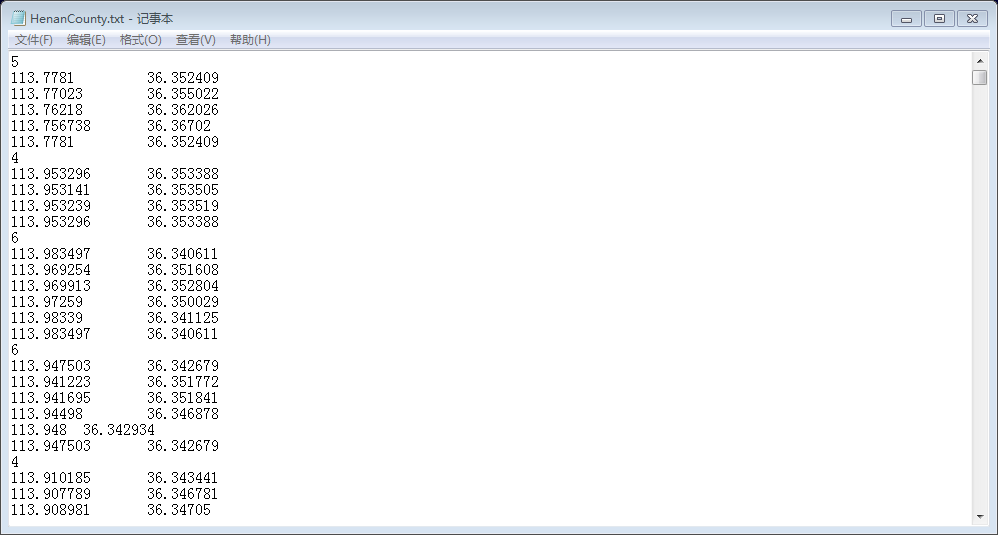
单个整数代表点数(包含的点可能是某个省内市区的范围),整数n下面紧接着的数据行共有n行,是以经纬度表示的地理坐标。
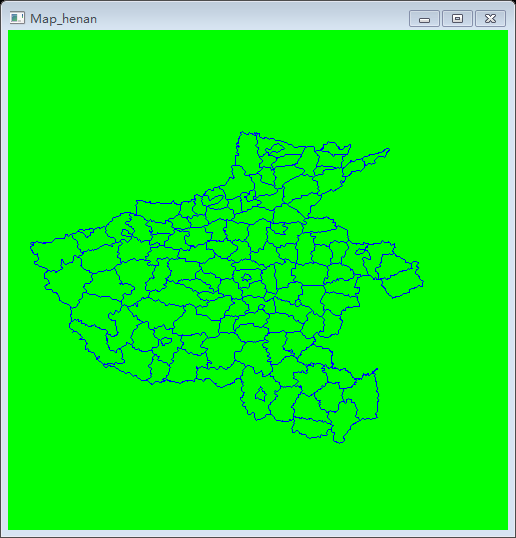
程序运行结果:
关于地图的信息(多边形数目、总点数、面积、边界)通过test_map()函数写入map_para.txt
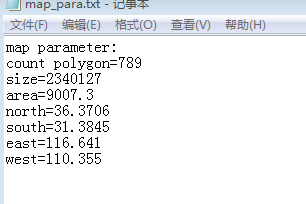
目前算得的面积还有问题,这通过边界值就可以看出来,这还有待解决。
string2num.hpp定义了模板函数用于字符串形式的数字向基本数值类型的转化(其实这个定义比较多余<sstream>里面定义的字符串处理类包含此功能)
#ifndef _STRING2NUM_HPP_

#define _STRING2NUM_HPP_

#include<sstream>  //使用istringstream必须包含的头文件

#include<string>

using namespace std;

//模板函数:将string类型变量转换为常用的数值类型  by maowei

template <class Type>

Type stringToNum(const string& str)

{

    istringstream iss(str);

    Type num;

    iss>>num;

    return num;

}

#endif
map.hpp包括了基本类的定义,这是在map_origin.cpp的基础上修改得到的,主要是增加了一些获取地图信息相关的函数。其中多边形容器的定义部分值得充分学习消化。
#ifndef _MAP_HPP_

#define _MAP_HPP_

#include <vector>

#include <math.h>

using namespace std;

    class MapPoint

{

public:

    double longitude;//经度

    double latitude;//纬度

    MapPoint(){}

    MapPoint(double x,double y){longitude=x;latitude=y;}

};

class Map

{

public:

    int mapsize;

    vector<MapPoint> points; //多边形的顶点序列

    Map(){}

    Map(int i){mapsize=i;}

};

//unsigned int count,num;

//%%%%%%%%%%%%%%%%%%%%%%%%%%%%%%%%%%%%%%%%%%%%%%translate from origin

class Polygon

{

public:

    vector<MapPoint> points; //多边形的顶点序列

    double area(void){

        double A=;unsigned int N=points.size();

        for(int i=;i<(N-);i++){

            A+=fabs(points[i].longitude*points[i+].latitude-points[i].latitude*points[i+].longitude);

        }

        A+=fabs(points[N-].longitude*points[].latitude-points[N-].latitude*points[].longitude);

        return A/;

    }

    double north(void){

        double N=points[].latitude;

        for(int i=;i<points.size();i++){if(points[i].latitude>=N)N=points[i].latitude;    }

        return N;

    }

    double south(void){

        double S=points[].latitude;

        for(int i=;i<points.size();i++){if(points[i].latitude<=S)S=points[i].latitude;    }

        return S;

    }

    double east(void){

        double E=points[].longitude;

        for(int i=;i<points.size();i++){if(points[i].longitude>=E)E=points[i].longitude;    }

        return E;

    }

    double west(void){

        double W=points[].longitude;

        for(int i=;i<points.size();i++){if(points[i].longitude<=W)W=points[i].longitude;    }

        return W;

    }

};

vector<Polygon*> polys; //多边形集合

vector<Polygon*> ReadMapData(const string filename)

{

    int PointCount;

    vector<Polygon*> polygons;

    ifstream fs(filename.c_str());

    while(fs.eof()!=true)

    {

        Polygon* poly=new Polygon;

        fs>>PointCount;

       // cout<<PointCount<<endl;

        for(int i=;i<PointCount;i++)

        {

            MapPoint p;

            fs>>p.longitude>>p.latitude;

            poly->points.push_back(p);

        }

        polygons.push_back(poly);

    }

    return polygons;

}

//%%%%%%%%%%%%%%%%%%%%%%%%%%%%%%%%%%%%%%%%%%%%%%%%%%%%

Map ReadData2num(const string str)  //逐行读取 并转化为常用数据类型 by mememagic

{

    cout<<"start read map"<<endl;

    ifstream fin(str.c_str());

    if (! fin.is_open())

        { cout << "Error opening file"; exit (); }

    string s;  Map Imap;

    int Size=,i=;bool flag;

    while( getline(fin,s) )

    {

        if(i==Size){int s_i=stringToNum<int>(s);Size=s_i+;i=;//count+=s_i;num++;

        //cout << "(vertex num): " << s_i << endl;

        }

        else

        {

        istringstream is(s);//采用istringstream从string对象str中读取字符

        string s1;double x,y;

        while(is>>s1){

            double s_d=stringToNum<double>(s1);

            if(!flag){x=s_d;flag=!flag;   }

            else{y=s_d;flag=!flag;      }

            //cout<<s_d<<' ';

           }

        //cout<<"x="<<x<<' '<<"y="<<y<<endl;

        MapPoint p(x,y);

        Imap.points.push_back(p);

        }

        i++;

    }

    return Imap;

}

#endif
与Draw_v1相比,这个程序有了不少变化:数据来源不再靠手工在命令窗口输入,而是一个有确定“格式”的简单文本,数据量也较大,程序里面对数据的处理代码自然不同;多边形容器(vector<Polygon*> polys )是对图形(vector<Shape>)容器的拓展;利用OpenGL实现了数据的可视化(关于OpenGL绘图的原理有待进一步学习理解).
Draw_extend使用OpenGL显示数据点的更多相关文章
- ZingChart 隐藏数据点
正常情况下 zingChart 的数据点会显示到图表中,但是如果数据点很多的情况下,可能会让你无法准确的预测趋势,而且也不美观 在 js 配置中添加最多允许显示的数据点,超过这个值将不显示数据点 效果 ...
- 理解数据点,自变量和因变量(参数和值)ChartControl
WinForms Controls > Controls > Chart Control > Fundamentals > Charting Basics > Under ...
- Keil UV4 BUG(带字库液晶不能显示“数、正、过”问题的请看)
Keil UV3一直存在汉字显示(0xFD)的bug,以前在用到带字库的12864液晶的时候,“数”字总是不能正常显示,后来有网友告诉我这是keil的bug,解决掉了.后来keil升级了,我也换了新版 ...
- OpenGL显示图片
最近想用C++在windows下实现一个基本的图像查看器功能,目前只想到了使用GDI或OpenGL两种方式.由于实在不想用GDI的API了,就用OpenGL的方式实现了一下基本的显示功能. 用GDAL ...
- 第12课 OpenGL 显示列表
显示列表: 想知道如何加速你的OpenGL程序么?这一课将告诉你如何使用OpenGL的显示列表,它通过预编译OpenGL命令来加速你的程序,并可以为你省去很多重复的代码. 这次我将教你如何使用显示列表 ...
- android linphone中opengl显示的实现
1,java层 在界面中创建GL2JNIView(基类为GLSurfaceView). 创建对象AndroidVideoWindowImpl,将GL2JNIView作为参数传入构造函数.在该对象中监听 ...
- VS+OpenGl 显示三维STL模型 代码
今天调出了用VS环境结合OpenGL glut工具包进行显示STL模型的模块,进行了渲染.效果: 如下,后期会进行进一步优化,先贴上: #ifndef DATA_H #define DATA_H st ...
- [记录]使用openGL显示点云的一个程序
#include <GL/glut.h> #include <stdio.h> #include <iostream> using namespace std; v ...
- OPENGL 显示BMP图片+旋转
VS2010/Windows 7/ 1. 需包含头文件 stdio.h, glaux.h, glut.h.需要对应的lib,并添加包含路径 2. 窗口显示用glut库的函数 3. bmp图片从本地读取 ...
随机推荐
- 查找增强出口和BADI程序
*&---------------------------------------------------------------------* *& Report Z_FIND_EX ...
- Scala练习(二)
3.计算指定目录下以".txt"为扩展名的文件个数.注:随便建个目录,建几个.txt文件即可. 4.计算"input_4.txt"文件中搜索词的出现次数,并按次 ...
- .net中excel遇到的一些问题
Excel.Application app; 错误 1 未能找到类型或命名空间名称“Excel”(是否缺少 using 指令或程序集引用?) 解决方法: 添加引用 Interop.Excel.dll ...
- 学jQuery Mobile后的感想
jQuery Mobile是jQuery 在手机上和平板设备上的版本.jQuery Mobile 不仅会给主流移动平台带来jQuery核心库,而且会发布一个完整统一的jQuery移动UI框架.支持全球 ...
- running programmer——spring-01(初谈spring)
今天主要是通过一个简单的登录程序学习一些spring做基础的配置和功能. I.spring的核心配置applicationContext.xml 关于bean的配置官方给出的最基础的配置文件如下: & ...
- Java 设计模式之代理模式
1. 定义:为其它对象提供一种代理以控制对这个对象的访问.在某些情况下,一个对象不适合或者不能直接引用另一个对象,而代理对象可以在客户端和目标对象之间起到中介的作用. 2. 类图:代理对象和被代理 ...
- WCF传输大数据的设置
在从客户端向WCF服务端传送较大数据(>65535B)的时候,发现程序直接从Reference的BeginInvoke跳到EndInvoke,没有进入服务端的Service实际逻辑中,怀疑是由于 ...
- Ubuntu上安装MySql过程,以及遇到的一些问题
今天在Ubuntu服务器上安装MySql的时候遇到了一些问题,记录下来,以防以后忘记. 安装环境:Ubuntu14.04 安装命令: //安装Mysal服务端//会提示输入root密码 sudo ap ...
- spring定时器
本人小菜鸟一枚,今天在公司看到一段spring定时器配置,自己总结一下! <!-- 定义调用对象和调用对象的方法 --><bean id="jobtask9" c ...
- mysql的卸载方法
sudo rm /var/lib/mysql/ -R 删除mysql的数据文件 2 sudo rm /etc/mysql/ -R 删除mqsql的配置文件 3 sudo apt-get autorem ...