
【代码笔记】iOS-iCarouselDemo
一,效果图。

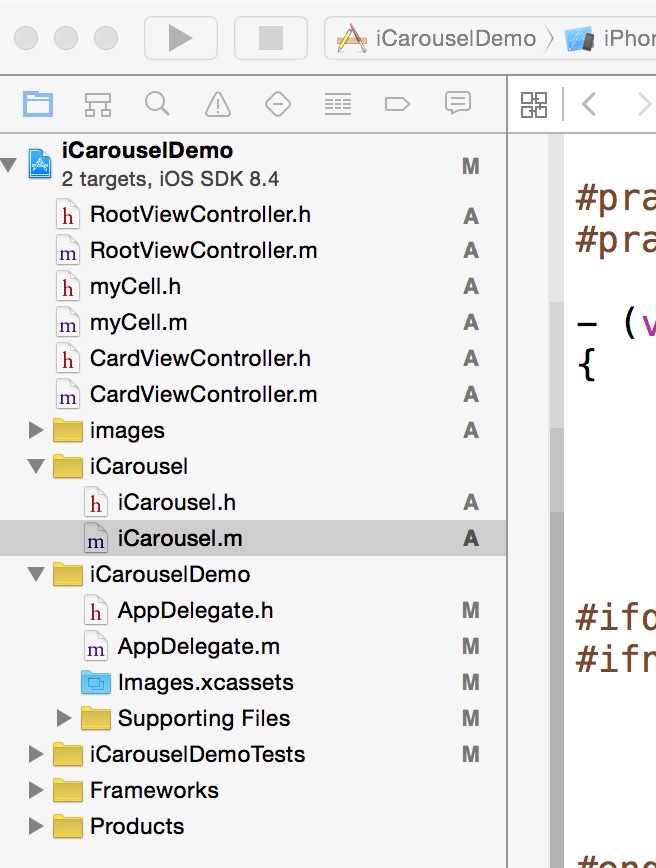
二,工程图。
三,代码。
RootViewController.h
RootViewController.m
myCell.h

#import <UIKit/UIKit.h>

#import <QuartzCore/QuartzCore.h>

@interface myCell : UITableViewCell

{

    UILabel * myLable;

    UIImageView * myImageView;

    UILabel * title;

}

@property (strong,nonatomic) UILabel * myLabel;

@property (strong,nonatomic) UIImageView * myImageView;

@property (strong,nonatomic) UILabel * title;

@end
myCell.m
#import "myCell.h"

@implementation myCell

@synthesize myLabel;

@synthesize myImageView;

@synthesize title;

- (id)initWithStyle:(UITableViewCellStyle)style reuseIdentifier:(NSString *)reuseIdentifier

{

    self = [super initWithStyle:style reuseIdentifier:reuseIdentifier];

    if (self) {

        myLabel = [[UILabel alloc] init];

        myLabel.lineBreakMode=NSLineBreakByCharWrapping;

        myLabel.numberOfLines = 0;

        myLabel.font = [UIFont fontWithName:@"MicrosoftYaHei" size:20.0];

        [self addSubview:myLabel];

        myImageView = [[UIImageView alloc] init];

        [self addSubview:myImageView];

        title = [[UILabel alloc] init];

        title.frame = CGRectMake(10, 10, 50, 30);

        title.backgroundColor = [UIColor colorWithRed:230/255.0 green:192/255.0 blue:203/255.0 alpha:1.0];

        title.layer.cornerRadius = 10.0;

        [self addSubview:title];

       ;

    }

    return self;

}

- (void)setSelected:(BOOL)selected animated:(BOOL)animated

{

    [super setSelected:selected animated:animated];

    // Configure the view for the selected state

}

@end
CardViewController.h
#import <UIKit/UIKit.h>

@interface CardViewController : UIViewController

<UITableViewDataSource,UITableViewDelegate>

{

    NSMutableArray *array ;

    NSMutableArray * titleArray;

}

@property (strong ,nonatomic) NSMutableArray *array;

@property (strong,nonatomic) NSString * month;

@property (strong,nonatomic) NSString * imageName;

@property (strong,nonatomic) NSString * title;

@end
CardViewController.m
#import "CardViewController.h"

#import "myCell.h"

@interface CardViewController ()

@end

@implementation CardViewController

@synthesize array;

@synthesize month;

@synthesize imageName;

@synthesize title;

- (id)initWithNibName:(NSString *)nibNameOrNil bundle:(NSBundle *)nibBundleOrNil

{

    self = [super initWithNibName:nibNameOrNil bundle:nibBundleOrNil];

    if (self) {

        // Custom initialization

    }

    return self;

}

-(void)viewDidLoad

{

    [super viewDidLoad];

    NSDictionary * dic1 = [[NSDictionary alloc] initWithContentsOfFile:[[NSBundle mainBundle] pathForResource:@"BabyCard" ofType:@"plist"]];

    self.array = [dic1 objectForKey:month];

    NSDictionary * dic2 = [[NSDictionary alloc] initWithContentsOfFile:[[NSBundle mainBundle] pathForResource:@"Title" ofType:@"plist"]];

    titleArray = [[NSMutableArray alloc] init];

    titleArray = [dic2 objectForKey:title];

    UITableView * tableView = [[UITableView alloc] initWithFrame:CGRectMake(0, 0, 320, 460) style:UITableViewStylePlain];

    tableView.delegate = self;

    tableView.dataSource = self;

    tableView.showsVerticalScrollIndicator = NO;

    [self.view addSubview:tableView];

    UIButton * back = [UIButton buttonWithType:UIButtonTypeCustom];

    back.frame = CGRectMake(10, 10, 25, 31);

    [back setImage:[UIImage imageNamed:@"back.png"] forState:UIControlStateNormal];

    [back addTarget:self action:@selector(back) forControlEvents:UIControlEventTouchUpInside];

    [tableView addSubview:back];

}

#pragma -mark -doClickActions

-(void)back

{

    CATransition *animation = [CATransition animation];

    animation.delegate = self;

    animation.duration = 0.7;

    animation.type = @"oglFlip";

    animation.subtype = kCATransitionFromLeft;

    [self.view.layer addAnimation:animation forKey:@"animation"];

    [self.navigationController dismissViewControllerAnimated:YES completion:nil];

}

#pragma -mark -UITableViewDelegate

-(NSInteger)tableView:(UITableView *)tableView numberOfRowsInSection:(NSInteger)section

{

    return array.count;

}

-(CGFloat)tableView:(UITableView *)tableView heightForRowAtIndexPath:(NSIndexPath *)indexPath

{

    NSString * str = [array objectAtIndex:indexPath.row];

    CGSize size=[str boundingRectWithSize:CGSizeMake(300, 1000) options:NSStringDrawingUsesLineFragmentOrigin attributes:@{NSFontAttributeName: [UIFont systemFontOfSize:20.0]} context:nil].size;

    if(indexPath.row == 0)

    {

         return size.height + 350;

    }

    else

    {

        return size.height + 60;

    }

}

-(UITableViewCell *)tableView:(UITableView *)tableView cellForRowAtIndexPath:(NSIndexPath *)indexPath

{

    myCell * cell = [tableView dequeueReusableCellWithIdentifier:@"id"];

    if(cell == nil){

        cell = [[myCell alloc] initWithStyle:UITableViewCellStyleValue1 reuseIdentifier:@"id"];

    }

    NSString * str = [array objectAtIndex:indexPath.row];

    CGSize size=[str boundingRectWithSize:CGSizeMake(300, 1000) options:NSStringDrawingUsesLineFragmentOrigin attributes:@{NSFontAttributeName: [UIFont systemFontOfSize:20.0]} context:nil].size;

    cell.selectionStyle = UITableViewCellSelectionStyleNone;

    NSString * str2 = [NSString stringWithFormat:@" %@ ",[titleArray objectAtIndex:indexPath.row]];

    CGSize size2=[str boundingRectWithSize:CGSizeMake(300, 1000) options:NSStringDrawingUsesLineFragmentOrigin attributes:@{NSFontAttributeName: [UIFont systemFontOfSize:10.0]} context:nil].size;

    cell.title.text = str2;

    if(indexPath.row == 0){

        cell.myImageView.hidden = NO;

        cell.myImageView.image = [UIImage imageNamed:imageName];

        cell.myImageView.frame = CGRectMake(0, 0, 320, 300);

        cell.myLabel.frame = CGRectMake(10, 350, 300, size.height);

        cell.title.frame = CGRectMake(10, 310, size2.width, 30);

    }else{

        cell.myImageView.hidden = YES;

        cell.myLabel.frame = CGRectMake(10, 50, 300, size.height);

        cell.title.frame = CGRectMake(10, 10,size2.width, 30);

    }

    cell.myLabel.text = str;

    return cell;

}

@end
【代码笔记】iOS-iCarouselDemo的更多相关文章
- IOS开发笔记 IOS如何访问通讯录
IOS开发笔记 IOS如何访问通讯录 其实我是反对这类的需求,你说你读我的隐私,我肯定不愿意的. 幸好ios6.0 以后给了个权限控制.当打开app的时候你可以选择拒绝. 实现方法: [plain] ...
- 【hadoop代码笔记】Mapreduce shuffle过程之Map输出过程
一.概要描述 shuffle是MapReduce的一个核心过程,因此没有在前面的MapReduce作业提交的过程中描述,而是单独拿出来比较详细的描述. 根据官方的流程图示如下: 本篇文章中只是想尝试从 ...
- 【hadoop代码笔记】hadoop作业提交之汇总
一.概述 在本篇博文中,试图通过代码了解hadoop job执行的整个流程.即用户提交的mapreduce的jar文件.输入提交到hadoop的集群,并在集群中运行.重点在代码的角度描述整个流程,有些 ...
- 【Hadoop代码笔记】目录
整理09年时候做的Hadoop的代码笔记. 开始. [Hadoop代码笔记]Hadoop作业提交之客户端作业提交 [Hadoop代码笔记]通过JobClient对Jobtracker的调用看详细了解H ...
- 笔记-iOS 视图控制器转场详解(上)
这是一篇长文,详细讲解了视图控制器转场的方方面面,配有详细的示意图和代码,为了使得文章在微信公众号中易于阅读,seedante 辛苦将大量长篇代码用截图的方式呈现,另外作者也在 Github 上附上了 ...
- <Python Text Processing with NLTK 2.0 Cookbook>代码笔记
如下是<Python Text Processing with NLTK 2.0 Cookbook>一书部分章节的代码笔记. Tokenizing text into sentences ...
- [学习笔记] SSD代码笔记 + EifficientNet backbone 练习
SSD代码笔记 + EifficientNet backbone 练习 ssd代码完全ok了,然后用最近性能和速度都非常牛的Eifficient Net做backbone设计了自己的TinySSD网络 ...
- DW网页代码笔记
DW网页代码笔记 1.样式. class 插入类样式 标签技术(html)解决页面的内容样式技术(css)解决页面的外观脚本技术 解决页面动态交互问题<form> ...
- 前端学习:JS(面向对象)代码笔记
前端学习:JS(面向对象)代码笔记 前端学习:JS面向对象知识学习(图解) 创建类和对象 创建对象方式1调用Object函数 <body> </body> <script ...
- 离屏渲染学习笔记 /iOS圆角性能问题
离屏渲染学习笔记 一.概念理解 OpenGL中,GPU屏幕渲染有以下两种方式: On-Screen Rendering 意为当前屏幕渲染,指的是GPU的渲染操作是在当前用于显示的屏幕缓冲区中进行. O ...
随机推荐
- 用redux完成事务清单
今天再来一个例子,我们从组件开始. App.js import React, { PropTypes } from 'react' import { bindActionCreators } from ...
- 用Eclipse新建一个web项目没有自动生成web.xml
我们首先打开Eclipse,如下: 我们可以看到在"WEB-INF"文件夹下没有web.xml文件. 这是是什么原因呢,我们来看看,我们首先来新建一个web工程,如下: ...
- 【人在江湖飘,哪有不带刀】神器Jumony
大神博客:http://www.cnblogs.com/Ivony/p/3447536.html 项目地址:https://github.com/Ivony/Jumony 1.安装Jumony包 在N ...
- 15天玩转redis —— 第五篇 集合对象类型
这篇我们来看看Redis五大类型中的第四大类型:“集合类型”,集合类型还是蛮有意思的,第一个是因为它算是只使用key的Dictionary简易版, 这样说来的话,它就比Dictionary节省很多内存 ...
- BitCoin - BlockChain
BitCoin 比特币, 参考: BlockChain 区块链, 参考: 参考
- Tarjan算法---强联通分量
1.基础知识 在有向图G,如果两个顶点间至少存在一条路径,称两个顶点强连通(strongly connected).如果有向图G的每两个顶点都强连通,称G是一个强连通图.非强连通图有向图的极大强连通子 ...
- 【C#】第3章补充(二)如何将图形作为对象
分类:C#.VS2015 创建日期:2016-06-23 使用教材:(十二五国家级规划教材)<C#程序设计及应用教程>(第3版) 一.要点 该例子属于高级技术中的基本用法.对于初学者来说这 ...
- Maximum length of a table name in MySQL
http://dev.mysql.com/doc/refman/5.7/en/identifiers.html The following table describes the maximum le ...
- spring的事务操作
我们项目一期已经差不多结束了,所以一些细节也被拿了出来,出现最多的就是事务的操作了.因为自己负责的是一个模块(因为是另外一个项目的负责人),所以组员经常会遇到事务的问题,会出现很多奇葩的用法,各种乱用 ...
- 第 29 章 CSS3 弹性伸缩布局[下]
学习要点: 1.新版本 主讲教师:李炎恢 本章主要探讨 HTML5 中 CSS3 提供的用来实现未来响应式弹性伸缩布局方案,这里做一个初步的了解. 一.新版本 新版本的 Flexbox 模型是 201 ...