
SpringBoot---Web开发---WebSocket
【广播式】
1、
<?xml version="1.0" encoding="UTF-8"?>

<project xmlns="http://maven.apache.org/POM/4.0.0" xmlns:xsi="http://www.w3.org/2001/XMLSchema-instance"

         xsi:schemaLocation="http://maven.apache.org/POM/4.0.0 http://maven.apache.org/xsd/maven-4.0.0.xsd">

    <modelVersion>4.0.0</modelVersion>

    <parent>

        <groupId>org.springframework.boot</groupId>

        <artifactId>spring-boot-starter-parent</artifactId>

        <version>2.1.1.RELEASE</version>

        <relativePath/> <!-- lookup parent from repository -->

    </parent>

    <groupId>com.an</groupId>

    <artifactId>springbootwebsocket</artifactId>

    <version>0.0.1-SNAPSHOT</version>

    <name>springbootwebsocket</name>

    <description>Demo project for Spring Boot</description>

    <properties>

        <java.version>1.8</java.version>

    </properties>

    <dependencies>

        <dependency>

            <groupId>org.springframework.boot</groupId>

            <artifactId>spring-boot-starter-thymeleaf</artifactId>

        </dependency>

        <dependency>

            <groupId>org.springframework.boot</groupId>

            <artifactId>spring-boot-starter-websocket</artifactId>

        </dependency>

        <dependency>

            <groupId>org.springframework.boot</groupId>

            <artifactId>spring-boot-starter-test</artifactId>

            <scope>test</scope>

        </dependency>

    </dependencies>

    <build>

        <plugins>

            <plugin>

                <groupId>org.springframework.boot</groupId>

                <artifactId>spring-boot-maven-plugin</artifactId>

            </plugin>

        </plugins>

    </build>

</project>
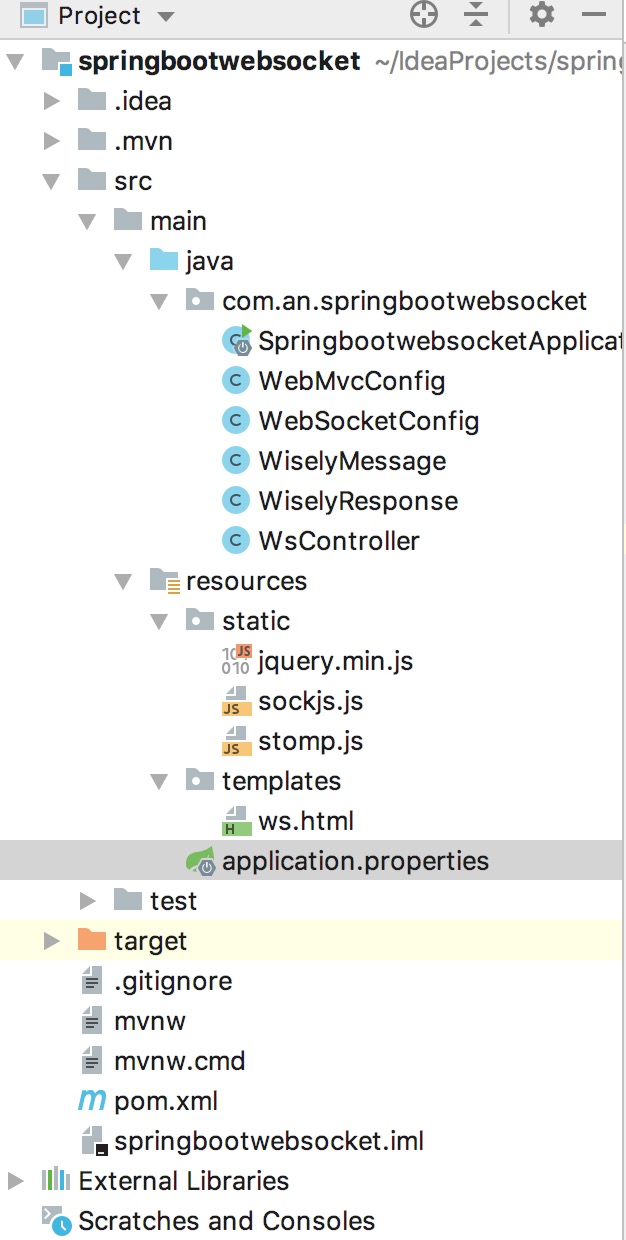
2、application.properties
#Tomcat

server.tomcat.uri-encoding=utf-8

server.tomcat.max-threads=1000

server.tomcat.min-spare-threads=100

server.port=8080

server.servlet.context-path=/

#Thymeleaf

spring.thymeleaf.cache=false

spring.thymeleaf.prefix=classpath:/templates/

spring.thymeleaf.suffix=.html

spring.thymeleaf.mode=HTML5

spring.thymeleaf.servlet.content-type=text/html

spring.resources.static-locations=classpath:/static/
3、ws.html
<!DOCTYPE html>

<html lang="en" xmlns:th="http://www.thymeleaf.org">

<head>

    <meta charset="UTF-8">

    <title>SpringBoot+WebSocket【广播模式】</title>

</head>

<body onload="disconnect();">

<noscript>

    <h2>您的浏览器不支持WebSocket!</h2>

</noscript>

<div>

    <div>

        <button id="connect" onclick="connect();">连接</button>

        <button id="disconnect" disabled="disabled" onclick="disconnect();">断开连接</button>

    </div>

    <div id="conversationDiv">

        <label>输入你的名字</label><input type="text" id="name"/>

        <button id="sendName" onclick="sendName();">发送</button>

        <p id="response"></p>

    </div>

</div>

<script th:src="@{stomp.js}"></script>

<script th:src="@{sockjs.js}"></script>

<script th:src="@{jquery.min.js}"></script>

<script type="text/javascript">

    var stompClient=null;

    function setConnected(connected) {

        document.getElementById("connect").disabled=connected;

        document.getElementById("disconnect").disabled=!connected;

        document.getElementById("conversationDiv").style.visibility=connected?'visible':'hidden';

        $("#response").html();

    }

    function connect() {

        var socket=new SockJS("/endpointWisely");

        stompClient=Stomp.over(socket);

        stompClient.connect({},function (frame) {

            setConnected(true);

            console.log('Connected'+frame);

            //通过stompClient.subscribe订阅   /topic/getResponse目标(在Controller的@SendTo中定义)  发送的消息

            stompClient.subscribe('/topic/getResponse',function (response) {

                showResponse(JSON.parse(response.body).responseMessage);

            });

        });

    }

    function disconnect() {

        if (stompClient!=null){

            stompClient.disconnect();

        }

        setConnected(false);

        console.log('DisConnected');

    }

    function sendName() {

        var name=$("#name").val();

        //通过stompClient.send向  /welcome目标(在Controller的@MessageMapping中定义)  发送消息

        stompClient.send("/welcome",{},JSON.stringify({'name':name}));

    }

    function showResponse(message) {

        var response=$("#response");

        response.html(message);

    }

</script>

</body>

</html>
4、
package com.an.springbootwebsocket;

/**

 * 浏览器向服务器发送消息,用此类接受

 */

public class WiselyMessage {

    private String name;

    public String getName() {

        return name;

    }

}
5、
package com.an.springbootwebsocket;

/**

 * 服务器向浏览器发送的消息

 */

public class WiselyResponse {

    private String responseMessage;

    public WiselyResponse(String responseMessage){

        this.responseMessage=responseMessage;

    }

    public String getResponseMessage() {

        return responseMessage;

    }

}
6、
package com.an.springbootwebsocket;

import org.springframework.context.annotation.Configuration;

import org.springframework.messaging.simp.config.MessageBrokerRegistry;

import org.springframework.web.socket.config.annotation.AbstractWebSocketMessageBrokerConfigurer;

import org.springframework.web.socket.config.annotation.EnableWebSocketMessageBroker;

import org.springframework.web.socket.config.annotation.StompEndpointRegistry;

/**

 * 通过@EnableWebSocketMessageBroker开启使用STOMP协议来传输基于代理的消息;

 * Controller使用@MessageMapping,类似于@RequestMapping

 */

@Configuration

@EnableWebSocketMessageBroker

public class WebSocketConfig extends AbstractWebSocketMessageBrokerConfigurer {

    /**

     * 注册STOMP协议的节点,并映射指定的URL

     * @param registry

     */

    @Override

    public void registerStompEndpoints(StompEndpointRegistry registry) {

        //注册一个STOMP协议的endpoint,并指定使用SockJS协议

        registry.addEndpoint("/endpointWisely").withSockJS();

    }

    /**

     * 配置消息代理

     * @param registry

     */

    @Override

    public void configureMessageBroker(MessageBrokerRegistry registry) {

        //广播式应配置一个/topic消息代理

        registry.enableSimpleBroker("/topic");

    }

}
7、
package com.an.springbootwebsocket;

import org.springframework.context.annotation.Configuration;

import org.springframework.web.servlet.config.annotation.ViewControllerRegistry;

import org.springframework.web.servlet.config.annotation.WebMvcConfigurerAdapter;

@Configuration

public class WebMvcConfig extends WebMvcConfigurerAdapter {

    @Override

    public void addViewControllers(ViewControllerRegistry registry) {

        registry.addViewController("/ws").setViewName("/ws");

    }

}
8、
package com.an.springbootwebsocket;

import org.springframework.messaging.handler.annotation.MessageMapping;

import org.springframework.messaging.handler.annotation.SendTo;

import org.springframework.stereotype.Controller;

@Controller

public class WsController {

    /**

     * 1、当浏览器向服务器发送请求时,通过@MessageMapping映射/welcome地址;

     * 2、当服务器有消息时,会对订阅了@SendTo中的路径的浏览器发送消息

     * @param wiselyMessage

     * @return

     */

    @MessageMapping(value = "/welcome")

    @SendTo(value = "/topic/getResponse")

    public WiselyResponse say(WiselyMessage wiselyMessage){

        return new WiselyResponse(wiselyMessage.getName());

    }

}
SpringBoot---Web开发---WebSocket的更多相关文章
- SpringBoot Web开发(5) 开发页面国际化+登录拦截
SpringBoot Web开发(5) 开发页面国际化+登录拦截 一.页面国际化 页面国际化目的:根据浏览器语言设置的信息对页面信息进行切换,或者用户点击链接自行对页面语言信息进行切换. **效果演示 ...
- SpringBoot Web开发(4) Thymeleaf模板与freemaker
SpringBoot Web开发(4) Thymeleaf模板与freemaker 一.模板引擎 常用得模板引擎有JSP.Velocity.Freemarker.Thymeleaf SpringBoo ...
- 【SpringBoot】SpringBoot Web开发(八)
本周介绍SpringBoot项目Web开发的项目内容,及常用的CRUD操作,阅读本章前请阅读[SpringBoot]SpringBoot与Thymeleaf模版(六)的相关内容 Web开发 项目搭建 ...
- springboot web开发【转】【补】
pom.xml引入webjars的官网 https://www.webjars.org/ https://www.thymeleaf.org/doc/tutorials/3.0/usingthymel ...
- SpringBoot(四): SpringBoot web开发 SpringBoot使用jsp
1.在SpringBoot中使用jsp,需要在pom.xml文件中添加依赖 <!--引入Spring Boot内嵌的Tomcat对JSP的解析包--> <dependency> ...
- Spring-boot -Web开发
1).创建SpringBoot应用,选中我们需要的模块: 2).SpringBoot已经默认将这些场景配置好了,只需要在配置文件中指定少量配置就可以运行起来 3).自己编写业务代码: 文件名的功能 x ...
- SpringBoot Web开发(3) WebMvcConfigurerAdapter过期替代方案
springboot2.0中 WebMvcConfigurerAdapter过期替代方案 最近在学习尚硅谷的<springboot核心技术篇>,项目中用到SpringMVC的自动配置和扩展 ...
- SpringBoot——Web开发(静态资源映射)
静态资源映射 SpringBoot对于SpringMVC的自动化配置都在WebMVCAutoConfiguration类中. 其中一个静态内部类WebMvcAutoConfigurationAdapt ...
- [SpringBoot——Web开发(使用Thymeleaf模板引擎)]
[文字只能描述片段信息,具体细节参考代码] https://github.com/HCJ-shadow/SpringBootPlus 引入POM依赖 <properties> <ja ...
- web开发-CORS支持
一.简介 Web 开发经常会遇到跨域问题,解决方案有:jsonp,iframe,CORS 等等 1.1.CORS与JSONP相比 1.JSONP只能实现GET请求,而CORS支持所有类型的HTTP请求 ...
随机推荐
- UVALive - 7831 :ACM Tax (主席树求树路径上中位数:LCA+主席树)
题意:给定一棵带权树,Q次询问,每次询问路径上的中位数. 思路:中位数分边数奇偶考虑,当当边数为num=奇时,结果就算路径第num/2+1大,用主席树做即可... (做了几道比较难的主席树,都wa了. ...
- python 动态添加属性及方法及“__slots__的作用”
1.动态添加属性 class Person(object): def __init__(self, newName, newAge): self.name = newName self.age = n ...
- MySQL-left join _20160928
left join 左连接 返回from 后面表的全部记录和 left join 后面表和from 后面表条件相符的全部记录 一般格式为下面,首先table A 和tableB都有两个唯一的字段标识I ...
- mysql客户首末单时间 group by用法_20160927
一.取用户第一次下单时间 SELECT city,username,`order_date` AS 首单日期,金额 AS 首单金额 FROM ( SELECT city,username,`order ...
- nginx 轮询模式 nginx_upstream_jvm_route 插件安装
使用nginx_upstream_jvm_route插件的目的是为了保证在轮询机制下的session的共享 前提:源码方式安装nginx.patch命令 1.下载nginx_upstream_jvm_ ...
- 洛谷P1352——动规
题目:https://www.luogu.org/problemnew/show/P1352 代码如下: #include<iostream> #include<cstdio> ...
- HBase键值分片的简单运用
1.基本原理介绍 HBase的存储是通过行键建立索引进行存储的,而且HBase只支持一级索引,因此只要通过行键才能很快的找到需要的数据. HBase是一个分布式的系统,HBase通过行 ...
- KCF+Opencv3.0+Cmake+Win10 测试
配置 需要的文件下载 安装CMake,安装opencv3.0.0 在KCFcpp-master 目录下新建一个文件夹,命名为build 打开CMake-GUI配置如下: 点击Configure,编译器 ...
- VijosP1250:分组背包
背景 Wind设计了很多机器人.但是它们都认为自己是最强的,于是,一场比赛开始了~ 描述 机器人们都想知道谁是最勇敢的,于是它们比赛搬运一些物品. 它们到了一个仓库,里面有n个物品,每个物品都有一个价 ...
- MangoDB篇章(1)
关系型数据库遵循ACID规则 事务(transaction)4个特性:原子性(A).一致性(C).独立性(I).持久性(D) : 分布式系统(distributed system): 由多台计算机和通 ...