
VS2013Z学习java插件
https://visualstudiogallery.msdn.microsoft.com/bc561769-36ff-4a40-9504-e266e8706f93
Bugs and Feature Requests: Issue Tracker
This extension provides basic features for the Java programming language. Current editing features include:
- Syntax highlighting and brace matching
- Outlining support for quickly collapsing classes and functions
- Dropdown bars listing classes, enums, interfaces, fields, and methods within the current document
The latest version of this extension also includes an experimental project system and debugger for Java code. More information about these features is included below.
This extension is not meant to replace a full IDE, but has certainly helped when I wanted to quickly reference a Java source file while working within Visual Studio.
Debugger Support
Current features of the debugger include:
- Support for multiple JVMs
- Support for the 32- and 64-bit releases of the standard JDK 6 and 7 (HotSpot VM)
- Support for the 32- and 64-bit releases of JRockit R28.x
- Full support for “Java Runtime Environment” exceptions in the Debug → Exceptions dialog
- Standard packages and exceptions are shown in the Java Runtime Environment category
- Users can add their own exceptions by name
- Users may select which exceptions the debugger should break on at the time they are thrown
- Unhandled exceptions automatically trigger a breakpoint
- When an exception is thrown, a message is printed to the output window (similar to the way it’s handled in C# debugging)
- Standard (unconditional) breakpoints
- Stepping in the editor
- Step Into/Over/Out
- The Step Over command steps over a statement – with proper support for multiple statements on a single line
- Disassembly window
- Shows JVM bytecode interleaved with the original source code
- The Step Over command steps by bytecode instruction instead of by statement
- Support for the Locals, Autos, and Watch windows
- Support for the Immediate window
- Support for pinnable data tips
- Support for the Threads window
- Support for user-friendly representation of collections (lists, maps, arrays, etc.)
Stepping over statements
In our opinion, this is hands-down the coolest feature of our debugger.
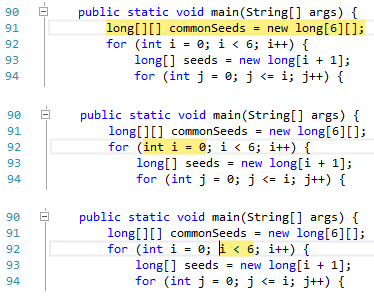
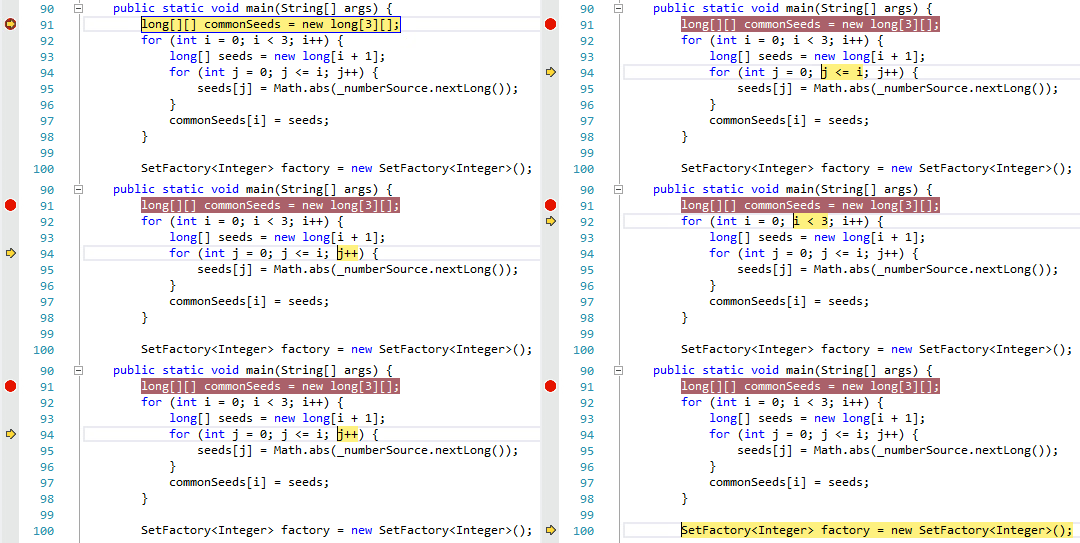
We’ve been looking, but so far it seems that no current Java IDE can properly distinguish between multiple statements on a single line. We aim to change that.The image below shows a series of steps in the debugger (the Step Over command was executed exactly one time between each image). As you can see, our debugger follows the logical stepping sequence from the initializer to the condition of the for statement.
Here is an animated image showing a more complete example.
Intuitive display of collections without hiding data
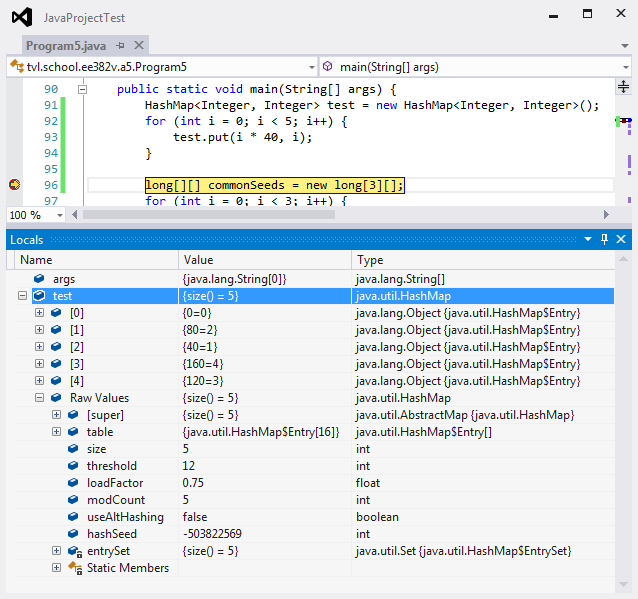
The debugger provides special handling for arrays and classes implementing Collection, Map, and a few other interfaces. To ensure that the debugger doesn’t restrict access to information you need, a special Raw Values property is provided which the user can expand to see the object’s true internal structure. Direct access to the Static Members of classes is provided as well (standard for all classes).
Bytecode disassembly
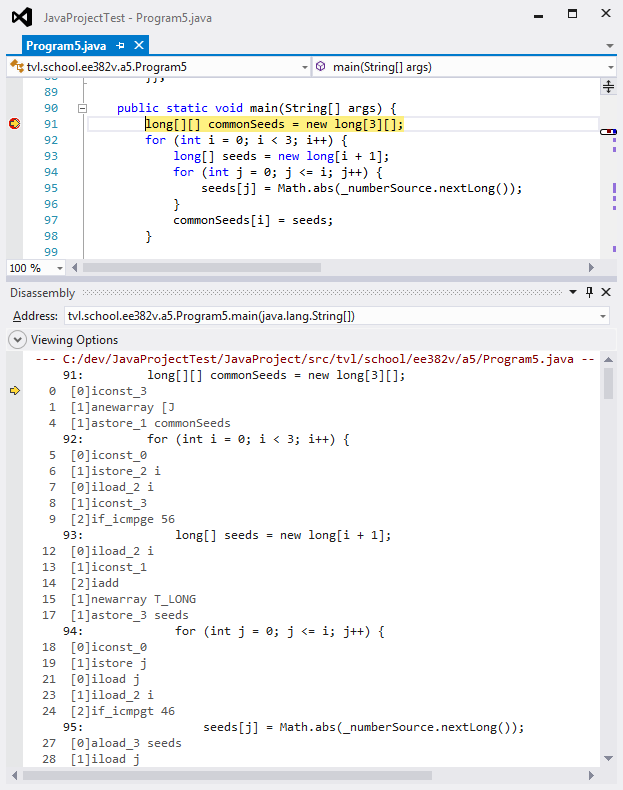
Curious about what your code is compiling to? The disassembly window fully supports Java bytecode while debugging your program.
Exceptions
The Java debugger extends the Debug → Exceptions window with support for Java Runtime Environment exceptions.
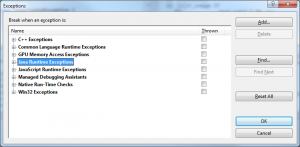
Handling behavior for exceptions may be configured by package or by individual exception type. The following example shows a user configuration requesting the debugger stop immediately when an IllegalArgumentException is thrown.
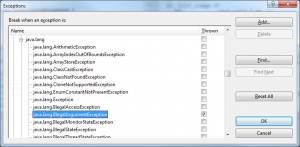
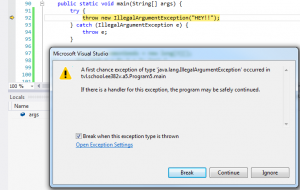
When an exception is thrown, the debugger first checks to see if the user has requested the debugger stop when the exception is thrown. In this case, we configured the debugger to stop when an IllegalArgumentException is thrown, whether or not a catch statement is available to handle the exception.
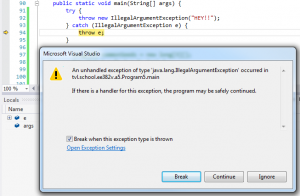
If an exception is thrown and no exception handler is available to handle the exception, the debugger stops immediately at the point the unhandled exception is thrown. The user does not need to specially configure the debugger to respond to this error case.
Debugger tool windows
The following image shows the contents of many (but not all) of the currently supported debugger windows in Visual Studio.
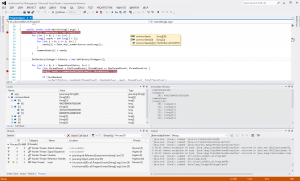
Version History
1.2.0 (April 25, 2015)
This should be considered a preview release of the new features of this extension.
- Moved the project to its own GitHub repository
- Support Visual Studio 2015
- Fixed many debugger bugs
- See the release notes for additional information
1.1.0 (March 16, 2014)
This should be considered an early preview release of the new features of this extension.
- Disable the Empty Project template since it isn't working properly
- Stability improvements
1.0.8 (February 20, 2014)
This should be considered an early preview release of the new features of this extension.
- Add Java project system, with support for building and debugging Java code
- Support Visual Studio 2012 and Visual Studio 2013
1.0.6.318 (July 9, 2011)
- Add syntax highlighting for Javadoc comments
- Addressed several potential performance problems
1.0.5.311 (July 8, 2011)
- Original release
VS2013Z学习java插件的更多相关文章
- 坚持:学习Java后台的第一阶段,我学习了那些知识
最近的计划是业余时间学习Java后台方面的知识,发现学习的过程中,要学的东西真多啊,让我一下子感觉很遥远.但是还好我制定了计划,自己选择的路,跪着也要走完!关于计划是<终于,我还是下决心学Jav ...
- 使用mac学习java的一些基本操作
使用mac学习java的一些基本操作 本文主要讲一下MacOS与windows的不同 iTerm2 使用mac的同学是不需要安装虚拟机来学习linux命令的.只需要使用iTerm2[下载地址]+zsh ...
- 如何学习Java?
一点感悟 java作为一门编程语言,在各类编程语言中作为弄潮儿始终排在前三的位置,这充分肯定了java语言的魅力,在实际项目应用中,我们已经无法脱离javaa(Ps当然你可以选择不使用),但它的高性能 ...
- Gradle Java 插件
Java 插件是构建 JVM 项目的基础,它为项目增加了很多能力,例如编译,测试,打包,发布等等. 很多插件都是基于 Java 插件实现的,例如 Android 插件. 用法 使用 id 应用插件 p ...
- 解决Ubuntu下Firefox+OpenJDK没有Java插件的问题
如果是安装的OpenJDK,很遗憾它是没有libnpjp2.so的. 此时按照网上各种奇怪的方法都挣扎无效,但可以用icedtea插件来解决这个问题. icedtea的版本与本机安装的OpenJDK版 ...
- 零基础如何学习java更有效呢?
零基础学java,不知道该如何入手?也不知道学习的方向,很多人会问零基础怎么样学习,有没有什么入门的书籍推荐:只要方法正确,零基础学好java也是有机会的哦. 一.理解Java思想 Java是一门面向 ...
- 积极主动敲代码,使用Junit学习Java程序设计
积极主动敲代码,使用JUnit学习Java 早起看到周筠老师在知乎的回答软件专业成绩很好但是实际能力很差怎么办?,很有感触. 从读大学算起,我敲过不下100本程序设计图书的代码,我的学习经验带来我的程 ...
- 如何接触学习java
信息科技必将是未来的潮流,Java语言必将在时代的进步中发挥不可估量的作用,未来,掌握好一门实用而且有良好应用前景的技术是你们的首要任务. 零基础怎么学Java 多年Java教育培训经验事实表明,零基 ...
- 零基础如何系统学习Java Web
零基础如何系统学习Java Web? 我来给你说一说 你要下决心,我要转行做开发,这样你才能学成. 你要会打字,我公司原来有一个程序员,打字都是两个手一指禅,身为程序员你一指禅怎么写出的代码,半个 ...
随机推荐
- hdu 5389 Zero Escape (dp)
题目:http://acm.hdu.edu.cn/showproblem.php? pid=5389 题意:定义数根:①把每一位上的数字加起来得到一个新的数,②反复①直到得到的数仅仅有1位.给定n,A ...
- 1、CRM2011编程实战——清空指定页签以下的全部选项,并对页签以下的指定控件进行操作
需求:当页面载入时,"呼叫编号"保持不变,"任务号"自己主动更新."接报时间"和"发生日期"自己主动设置为当天日期和时间 ...
- C# 操作摄像头
如有雷同,不胜荣幸,若转载,请注明 这个是大众普通方法,鉴于有网友和朋友问相同的问题.在这里将我的拙劣的代码关键部分贴出来.以便帮助很多其它的朋友们,不足之处甚多,我能够学习,交流,请教阁下 废话到此 ...
- python(27)- 面向对象练习Ⅰ
一:定义如下类,并最大程度地重用代码(继承,派生:子类重用父类方法,组合) 老师类 学生类 分数类 课程类 生日类 class People: def __init__(self,name,age,b ...
- Node.js 笔记(一) nodejs、npm、express安装(转)
转载地址:http://blog.csdn.net/haidaochen/article/details/7257655 Windows平台下的node.js安装 直接去nodejs的官网http:/ ...
- inception安装步骤---自己整理的安装步骤
inception安装步骤---自己整理的安装步骤2015-09-18 15:51 6185人阅读 评论(1) 收藏 举报 分类: inception相关版权声明:本文为博主原创文章,未经博主允许不得 ...
- nodejs-runoob
是否安装成功nodejs - node -v 是否安装成功npm - npm -v
- Ubuntu 静态IP
linux 用了好多年了,每次设置静态ip都上网查,就是记不住.唉~ cat /etc/network/interfaces auto lo iface lo inet loopback #auto ...
- CIDR(无类域间路由)(转载)
来源:百度百科 CIDR(无类型域间选路,Classless Inter-Domain Routing)是一个在Internet上创建附加地址的方法,这些地址提供给服务提供商(ISP),再由ISP分配 ...
- 使用 lstat 函数获取文件信息
前言 在之前的文章中,描述过如何用 fcntl 函数改变文件的状态标记.但,文件还有很多信息,如文件类型,权限设置,设备编号,访问时间等等.如果要获取这些信息,则使用函数 lstat 可以轻松达到这个 ...