最近公司出于安全考虑,需要将登录页做成https访问,其他页面仍采用http访问,环境是Linux平台,web服务器采用Tomcat + Nginx。之前没接触过nginx,这两天网上查资料,试了好多,终于有点小成果,特此做一下记录。目前还存在一些问题,希望各位多多指教。下面说一下我的具体做法:
1.将nginx解压到C盘根目录,重命名文件夹为Nginx(版本:1.3.5)。
2.生成自签名证书(采用OpenSSL生成),生成工具下载:绿色版OpenSSL工具.rar、自签名测试证书工具.rar。
3.将生成的证书文件server.cer和server.key分别都拷贝到Tomcat和Nginx的conf目录下,双击生成的root.cer根证书,然后安装证书,将其安装到受信任的根证书颁发机构(如不安装,访问时浏览器会提示证书错误)。
4.配置Tomcat的server.xml文件和web工程的web.xml文件:
https配置:
1 |
<Connector port="8443" protocol="org.apache.coyote.http11.Http11AprProtocol" |
2 |
SSLEnabled="true" maxThreads="150" |
3 |
scheme="https" secure="true" disableUploadTimeout="true" |
4 |
enableLookups="false" acceptCount="100" clientAuth="false" |
5 |
SSLCertificateFile="C:/Program Files/Tomcat 6.0/conf/server.cer" |
6 |
SSLCertificateKeyFile="C:/Program Files/Tomcat 6.0/conf/server.key" |
7 |
SSLVerifyClient="none" sslProtocol="TLS" /> |
虚拟目录配置:
1 |
<Host name="localhost" appBase="C:\nginx\html" |
2 |
unpackWARs="true" autoDeploy="true" |
3 |
xmlValidation="false" xmlNamespaceAware="false"> |
web.xml文件中加入如下配置:
03 |
<web-resource-collection> |
04 |
<web-resource-name>SSL</web-resource-name> |
05 |
<url-pattern>/index/*</url-pattern> |
06 |
</web-resource-collection> |
07 |
<user-data-constraint> |
08 |
<transport-guarantee>CONFIDENTIAL</transport-guarantee> |
09 |
</user-data-constraint> |
10 |
</security-constraint> |
5.配置Nginx的nginx.conf文件:
03 |
server_name localhost;#域名,可以多个 |
07 |
#access_log logs/host.access.log main; |
11 |
if (!-f $request_filename){ |
12 |
rewrite ^/pages/common/(.*)$ /error.jsp; |
16 |
proxy_pass http://localhost:8080; |
17 |
proxy_set_header Host $host:80; |
18 |
proxy_set_header X-Real-IP $remote_addr; |
19 |
proxy_set_header X-Forwarded-For $proxy_add_x_forwarded_for; |
20 |
proxy_set_header Via "nginx"; |
23 |
location ^~ /pages/$ { |
26 |
proxy_pass http://localhost:8080; |
27 |
proxy_set_header Host $host:80; |
28 |
proxy_set_header X-Real-IP $remote_addr; |
29 |
proxy_set_header X-Forwarded-For $proxy_add_x_forwarded_for; |
30 |
proxy_set_header Via "nginx"; |
33 |
#location ~ \.(gif|jpg|png|js|css)$ { |
42 |
server_name localhost:443; |
45 |
ssl_certificate server.cer;# |
46 |
ssl_certificate_key server.key; |
48 |
ssl_session_timeout 5m; |
50 |
#ssl_protocols SSLv2 SSLv3 TLSv1; |
51 |
#ssl_ciphers HIGH:!aNULL:!MD5; |
52 |
#ssl_prefer_server_ciphers on; |
55 |
location ^~ /index/.jsp$ { |
58 |
proxy_pass https://localhost:8443; |
59 |
proxy_set_header Host $host:443; |
60 |
proxy_set_header X-Real-IP $remote_addr; |
61 |
proxy_set_header X-Forwarded-For $proxy_add_x_forwarded_for; |
62 |
proxy_set_header Via "nginx"; |
64 |
location ~ ^/(WEB-INF)/ { |
6.web工程的截图:
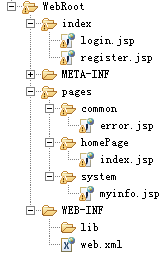
LoginServlet的代码:
1 |
HttpSession session = request.getSession(true); |
2 |
String name = request.getParameter("name").trim(); |
3 |
session.setAttribute("curuser", name); |
4 |
String url = "http://"+request.getServerName()+request.getContextPath()+"/pages/system/myinfo.jsp"; response.sendRedirect(url); |
目前存在的问题(希望各位多多指教):
1.在本机访问https正常,其他机器访问浏览器提示证书错误。
2.location规则的配置,由于本人水平有限,对location规则的配置不是很了解,所以location目前不太会配置(配置要求:index目录下的页面采用https访问,其他页面全部采用http访问)。
参考资料:
证书生成与配置:http://www.ert7.com/install/sslinstall/1244.html
- windows下tomcat+nginx+openssl配置双向认证
1. 基础知识 CA证书:https://blog.csdn.net/yangyuge1987/article/details/79209473 SSL双向认证原理:https://blog.csdn ...
- windows下用nginx配置https服务器
1.安装nginx 先到nginx官网下在nginx http://nginx.org/en/download.html 将下载好的文件解压出来修改文件名为 nginx ,然后拷贝到C盘下,目录如下: ...
- Windows下用Nginx配置遇到的问题
Nginx是一款轻量级的web服务器/反向代理服务器,更详细的释义自己百度了.目前国内像新浪.网易等都在使用它.先说下我的服务器软件环境: 系统:Windows Server + IIS + ngin ...
- windows下使用nginx配置tomcat集群
转自:https://blog.csdn.net/csdn15698845876/article/details/80658599
- 烂泥:Windows下安装与配置Nginx web服务器
本文由秀依林枫提供友情赞助,首发于烂泥行天下. 前几篇文章,我们使用nginx都是在linux环境下,今天由于工作的需要.需要在windows环境也使用nginx搭建web服务器. 下面记录下有关ng ...
- windows下基于IIS配置ssl证书遇到的坑
前几天配置windows下基于IIS配置ssl证书 完全按照步骤执行 绑定https网址后,一直显示:无法访问此网站 检查了443端口,还有防火墙限制,没发现什么 足足困扰了我好几天 后来突然想到前不 ...
- 环境变量(windows下tomcat问题);shh连接虚拟机网络配置
环境变量(windows下tomcat问题) 有tomcat有jdk 再配置环境变量:参考 提示:若选择“用户变量”,则本次配置的变量只对该用户有效 若选择“系统变量”,则对所有用户 ...
- windows下安装和配置nginx
下载nginx 到官网下载window版的nginx http://nginx.org/ 配置环境变量 解压到本地的某个路径下, 打开cmd窗口,cd到nginx的目录下 这里要注意cd的时候要加/d ...
- Windows下tomcat进程监控批处理程序
在Windows下tomcat进程监控批处理程序脚本如下: @echo off ::tomcat安装目录 set _tomcatDir=E:\myFiles\apache-tomcat-8.5.31 ...
随机推荐
- java的图像界面
package test; import java.awt.FlowLayout; import java.awt.event.ActionListener; import java.awt.even ...
- shell的简单介绍
一 什么叫shell,shell 是什么 如果考虑到操作系统其实是一组软件,我们可以发现应用程序其实是在最外层,就如同鸡蛋的外壳一样,因此这个也就被称为shell. 其实shell的功能只是提供用户操 ...
- NodeJS学习(1)--- 安装配置介绍
Node.js 安装配置 本章节我们将向大家介绍在window和Linux上安装Node.js的方法. 本安装教程以Node.js v6.10.1 LTS(长期支持版本)版本为例. Node.js安装 ...
- 01.mp4v2应用—mp4转h264
1.h264文件基本功能 NAL 头 0x00 0x00 0x00 0x01 sps :nal+0x67开头 pps :nal+0x68开头 I帧 0x65 开头 ...... 2.mp4v2提取26 ...
- C#执行CMD命令并接收返回结果的实现方法
using System; using System.Collections.Generic; using System.Linq; using System.Windows.Forms; using ...
- web项目中引入jquery easyui
jQuery easyui是一个基于jquery的用户界面插件集合,可以做出各种炫酷页面效果,大中型项目都可以使用些框架,非常好用,而且它有中文网,提供了大量的demo.下面我们看怎么将它引入到项目中 ...
- 关于getSystemResource, getResource 的总结
项目中, 有时候要读取当前classpath下的一些配置文件. 之前用的读取配置文件的代码如下 public static Properties loadPropertiesFile(String f ...
- DOM和jquery对象之间的转换
<!DOCTYPE html> <html> <head> <meta charset="UTF-8"> <title> ...
- hdu 3440(差分约束好题)
House Man Time Limit: 2000/1000 MS (Java/Others) Memory Limit: 32768/32768 K (Java/Others)Total S ...
- LeetCode OJ-- Distinct Subsequences ** 递推
https://oj.leetcode.com/problems/distinct-subsequences/ 对于string S 和 T求,T 是 S的几种子串. 首先想到了递归方法,列出递归公式 ...
