
01.mp4v2应用—mp4转h264
1.h264文件基本功能
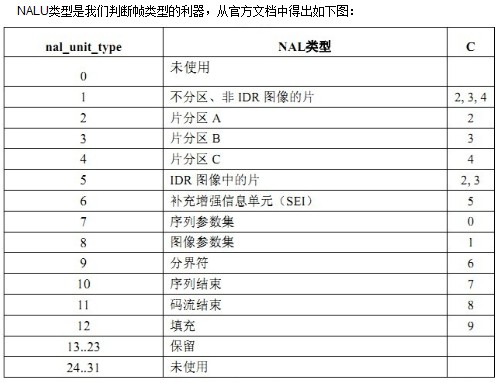
NAL 头 0x00 0x00 0x00 0x01
sps :nal+0x67开头
pps :nal+0x68开头
I帧 0x65 开头
......
2.mp4v2提取264文件的代码
#include <stdlib.h>

#include <stdio.h>

#include <string.h>

#include <sys/types.h>

#include <dirent.h>

#include <time.h>

#include <sys/time.h>

#include <mp4v2/mp4v2.h>

unsigned char sps[],pps[];

int spslen = ,ppslen = ;

int get264stream(MP4FileHandle oMp4File,int VTrackId,int totalFrame)

{

    if(!oMp4File) return -;

    char NAL[] = {0x00,0x00,0x00,0x01};

    unsigned char *pData = NULL;

    unsigned int nSize = ;

    MP4Timestamp pStartTime;

    MP4Duration pDuration;

    MP4Duration pRenderingOffset;

    bool pIsSyncSample = ;

    int nReadIndex = ;

    FILE *pFile = NULL;

    pFile = fopen("out.h264","wb");

    while(nReadIndex < totalFrame)

    {

        nReadIndex ++;

        //printf("nReadIndex:%d\n",nReadIndex);

        MP4ReadSample(oMp4File,VTrackId,nReadIndex,&pData,&nSize,&pStartTime,&pDuration,&pRenderingOffset,&pIsSyncSample);

        //IDR֡ 帧,写入sps pps先

        if(pIsSyncSample)

        {

            fwrite(NAL,,,pFile);

            fwrite(sps,spslen,,pFile);

            fwrite(NAL,,,pFile);

            fwrite(pps,ppslen,,pFile);

        }

        //264frame

        if(pData && nSize > )

        {

            //标准的264帧,前面几个字节就是frame的长度.

            //需要替换为标准的264 nal 头.

            pData[] = 0x00;

            pData[] = 0x00;

            pData[] = 0x00;

            pData[] = 0x01;

            fwrite(pData,nSize,,pFile);

        }

        //如果传入MP4ReadSample的视频pData是null

        // 它内部就会new 一个内存

        //如果传入的是已知的内存区域,

        //则需要保证空间bigger then max frames size.

        free(pData);

        pData = NULL;

    }

    fflush(pFile);

    fclose(pFile);

    return ;

}

int openmp4file(char *sMp4file)

{

    MP4FileHandle oMp4File;

    int i;

    //unsigned int oStreamDuration;

    unsigned int oFrameCount;

    oMp4File = MP4Read(sMp4file);

    int videoindex = -,audioindex = -;

    uint32_t numSamples;

    //uint32_t timescale;

    //uint64_t duration;

    if (!oMp4File)

    {

        printf("Read error....%s\r\n",sMp4file);

        return -;

    }

    MP4TrackId trackId = MP4_INVALID_TRACK_ID;

    uint32_t numTracks = MP4GetNumberOfTracks(oMp4File,NULL,);

    printf("numTracks:%d\n",numTracks);

    for (i = ; i < numTracks; i++)

    {

        trackId = MP4FindTrackId(oMp4File, i,NULL,);

        const char* trackType = MP4GetTrackType(oMp4File, trackId);

        if (MP4_IS_VIDEO_TRACK_TYPE(trackType))

        {

            //printf("[%s %d] trackId:%d\r\n",__FUNCTION__,__LINE__,trackId);

            videoindex= trackId;

            //duration = MP4GetTrackDuration(oMp4File, trackId );

            numSamples = MP4GetTrackNumberOfSamples(oMp4File, trackId);

            //timescale = MP4GetTrackTimeScale(oMp4File, trackId);

            //oStreamDuration = duration/(timescale/1000);

            oFrameCount = numSamples;

            // read sps/pps

            uint8_t **seqheader;

            uint8_t **pictheader;

            uint32_t *pictheadersize;

            uint32_t *seqheadersize;

            uint32_t ix;

            MP4GetTrackH264SeqPictHeaders(oMp4File, trackId, &seqheader, &seqheadersize, &pictheader, &pictheadersize);

            for (ix = ; seqheadersize[ix] != ; ix++)

            {

                memcpy(sps, seqheader[ix], seqheadersize[ix]);

                spslen = seqheadersize[ix];

                free(seqheader[ix]);

            }

            free(seqheader);

            free(seqheadersize);

            for (ix = ; pictheadersize[ix] != ; ix++)

            {

                memcpy(pps, pictheader[ix], pictheadersize[ix]);

                ppslen = pictheadersize[ix];

                free(pictheader[ix]);

            }

          free(pictheader);

                free(pictheadersize);

        }         else if (MP4_IS_AUDIO_TRACK_TYPE(trackType))

        {

            audioindex = trackId;

            printf("audioindex:%d\n",audioindex);

        }

    }

    //解析完了mp4,主要是为了获取sps pps 还有video的trackID

    if(videoindex >= )

        get264stream(oMp4File,videoindex,oFrameCount);

    //需要mp4close 否则在嵌入式设备打开mp4上多了会内存泄露挂掉.

    MP4Close(oMp4File,);

    return ;

}

int main(void)

{

    openmp4file("test.mp4");

    return ;

}
01.mp4v2应用—mp4转h264的更多相关文章
- FFMPEG_avi转码到mp4(aac+h264)源码
#include <ffmpeg/avcodec.h>#include <ffmpeg/avformat.h>#include <stdio.h>#include ...
- mp4格式的视频,编码方式mpeg4,转化为h264
知识点:在使用vcastr3.swf播放器播放flv视频,(同时在html5页面,使用<video>标签时),发现某些MP4格式的代码不能播放 原因:vcastr3.swf和video,不 ...
- 树莓派环境下使用python将h264格式的视频转为mp4
个人博客 地址:https://www.wenhaofan.com/a/20190430144809 下载安装MP4Box 命令行下执行以下指令安装MP4Box sudo apt-get inst ...
- ffmpeg 编程常用 pcm 转 aac aac 转 pcm mp4 h264解码
ffmpeg 是现在开源的全能编解码器,基本上全格式都支持,纯 c 语言作成,相对比其它的 VLC ,GStreamer glib2 写的,开发更简单些,文档很棒,就是 examples 比较少. 常 ...
- mp4v2 基本知识
mp4v2 和mp4的一些基础知识 由于项目需要做mp4文件的合成(264+aac)和mp4文件的解析: MP4文件本身就是一个容器,对于视频来说就是把不同的内容放按照mp4的规则存放而已: 如果完全 ...
- MP4v2 基本使用(二)
MP4转H264文件 本文最目标是基本的MP4v2接口的使用,并且实现一个简单的提取mp4文件里面264流的功能: 1.264文件基本知识 下看看H264文件的基本常识 NAL 头 0x00 0x00 ...
- 使用librtmp进行H264与AAC直播
libx264 版本是 128libfaac 版本是 1.28 1.帧的划分 1.1 H.264 帧 对于 H.264 而言每帧的界定符为 00 00 00 01 或者 00 00 01. 比如下面的 ...
- rtmp 推送h264 + aac 的数据
相关源码下载: http://download.csdn.net/detail/keepingstudying/8340431 需要libfaac,librtmp 的支持, 1.帧的划分 1.1 H. ...
- chrome mp4格式支持问题
经过一些搜索得知,其实根本的问题是虽然大家都是.mp4后缀的文件,但是编码方式不同,而video标签的标准是用H.264方式编码视频的MP4文件(当然video标签还可以播放WebM和OGG格式的文件 ...
随机推荐
- 四 python并发编程之协程
一 引子 本节的主题是基于单线程来实现并发,即只用一个主线程(很明显可利用的cpu只有一个)情况下实现并发,为此我们需要先回顾下并发的本质:切换+保存状态 cpu正在运行一个任务,会在两种情况下切走去 ...
- GoF23种设计模式之创建型模式之抽象工厂模式
一.概述 提供一个创建一系列相关或相互依赖对象的接口,而无需指定它们具体的类. 二.适用性 1.一个系统要独立于它的产品的创建.组合和表示的时候. 2.一个系统要由多个产品系列中的一个来配置的时候. ...
- Diycode开源项目 磁盘图片缓存+自定义webViewClient+图片点击js方法
1.磁盘图片缓存器DiskImageCache 1.1.这个类很多情况都可能用的到,耦合性很低,所以分开讲. 源代码: /* * Copyright 2017 GcsSloop * * License ...
- WPF学习笔记(8):DataGrid单元格数字为空时避免验证问题的解决
原文:WPF学习笔记(8):DataGrid单元格数字为空时避免验证问题的解决 如下图,在凭证编辑窗体中,有的单元格不需要数字,但如果录入数字后再删除,会触发数字验证,单元格显示红色框线,导致不能执行 ...
- HTML5——7个最牛的HTML5移动开发框架
月的iPhoneDevCamp上写成的.创建它的一个主要动力是基于一个几乎每一个单独的iPhone开发新手都要面对的简单事实:Objective-C是一个对Web开发人员来说非常陌生的环境,并且Web ...
- Google Authenticator(谷歌身份验证器)C#版
摘要:Google Authenticator(谷歌身份验证器),是谷歌公司推出的一款动态令牌工具,解决账户使用时遭到的一些不安全的操作进行的"二次验证",认证器基于RFC文档中的 ...
- 连续小波变换CWT(2)
如果让你说说连续小波变换最大的特点是什么?多分辨分析肯定是标准答案.所谓多分辨分析即是指小波在不同频率段会有不同的分辨率.具体表现形式,我们回到前一篇文章的第一个图, 图一 对应的信号为 低频时(频率 ...
- Event log c++ sample.
1. Init regedit. bool InitLog( TCHAR *logName, TCHAR *sourceName, TCHAR *MessageDllName ) { // This ...
- Boost入门
[转载网友转载的 不过不知道原作者地址] Boost入门向导 简介:boost是一套开源的.高度可移植的C++模板库.它由C++标准委员发起,且里面很多组件有望成为下一代的C++标准库,其地位将会与S ...
- web 大规模并发访问的解决方案
电商的秒杀和抢购,对我们来说,都不是一个陌生的东西.然而,从技术的角度来说,这对于Web系统是一个巨大的考验.当一个Web系统,在一秒钟内收到数以万计甚至更多请求时,系统的优化和稳定至关重要.这次我们 ...