最近公司出于安全考虑,需要将登录页做成https访问,其他页面仍采用http访问,环境是Linux平台,web服务器采用Tomcat + Nginx。之前没接触过nginx,这两天网上查资料,试了好多,终于有点小成果,特此做一下记录。目前还存在一些问题,希望各位多多指教。下面说一下我的具体做法:
1.将nginx解压到C盘根目录,重命名文件夹为Nginx(版本:1.3.5)。
2.生成自签名证书(采用OpenSSL生成),生成工具下载:绿色版OpenSSL工具.rar、自签名测试证书工具.rar。
3.将生成的证书文件server.cer和server.key分别都拷贝到Tomcat和Nginx的conf目录下,双击生成的root.cer根证书,然后安装证书,将其安装到受信任的根证书颁发机构(如不安装,访问时浏览器会提示证书错误)。
4.配置Tomcat的server.xml文件和web工程的web.xml文件:
https配置:
1 |
<Connector port="8443" protocol="org.apache.coyote.http11.Http11AprProtocol" |
2 |
SSLEnabled="true" maxThreads="150" |
3 |
scheme="https" secure="true" disableUploadTimeout="true" |
4 |
enableLookups="false" acceptCount="100" clientAuth="false" |
5 |
SSLCertificateFile="C:/Program Files/Tomcat 6.0/conf/server.cer" |
6 |
SSLCertificateKeyFile="C:/Program Files/Tomcat 6.0/conf/server.key" |
7 |
SSLVerifyClient="none" sslProtocol="TLS" /> |
虚拟目录配置:
1 |
<Host name="localhost" appBase="C:\nginx\html" |
2 |
unpackWARs="true" autoDeploy="true" |
3 |
xmlValidation="false" xmlNamespaceAware="false"> |
web.xml文件中加入如下配置:
03 |
<web-resource-collection> |
04 |
<web-resource-name>SSL</web-resource-name> |
05 |
<url-pattern>/index/*</url-pattern> |
06 |
</web-resource-collection> |
07 |
<user-data-constraint> |
08 |
<transport-guarantee>CONFIDENTIAL</transport-guarantee> |
09 |
</user-data-constraint> |
10 |
</security-constraint> |
5.配置Nginx的nginx.conf文件:
03 |
server_name localhost;#域名,可以多个 |
07 |
#access_log logs/host.access.log main; |
11 |
if (!-f $request_filename){ |
12 |
rewrite ^/pages/common/(.*)$ /error.jsp; |
16 |
proxy_pass http://localhost:8080; |
17 |
proxy_set_header Host $host:80; |
18 |
proxy_set_header X-Real-IP $remote_addr; |
19 |
proxy_set_header X-Forwarded-For $proxy_add_x_forwarded_for; |
20 |
proxy_set_header Via "nginx"; |
23 |
location ^~ /pages/$ { |
26 |
proxy_pass http://localhost:8080; |
27 |
proxy_set_header Host $host:80; |
28 |
proxy_set_header X-Real-IP $remote_addr; |
29 |
proxy_set_header X-Forwarded-For $proxy_add_x_forwarded_for; |
30 |
proxy_set_header Via "nginx"; |
33 |
#location ~ \.(gif|jpg|png|js|css)$ { |
42 |
server_name localhost:443; |
45 |
ssl_certificate server.cer;# |
46 |
ssl_certificate_key server.key; |
48 |
ssl_session_timeout 5m; |
50 |
#ssl_protocols SSLv2 SSLv3 TLSv1; |
51 |
#ssl_ciphers HIGH:!aNULL:!MD5; |
52 |
#ssl_prefer_server_ciphers on; |
55 |
location ^~ /index/.jsp$ { |
58 |
proxy_pass https://localhost:8443; |
59 |
proxy_set_header Host $host:443; |
60 |
proxy_set_header X-Real-IP $remote_addr; |
61 |
proxy_set_header X-Forwarded-For $proxy_add_x_forwarded_for; |
62 |
proxy_set_header Via "nginx"; |
64 |
location ~ ^/(WEB-INF)/ { |
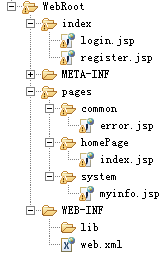
6.web工程的截图:
LoginServlet的代码:
1 |
HttpSession session = request.getSession(true); |
2 |
String name = request.getParameter("name").trim(); |
3 |
session.setAttribute("curuser", name); |
4 |
String url = "http://"+request.getServerName()+request.getContextPath()+"/pages/system/myinfo.jsp"; response.sendRedirect(url); |
目前存在的问题(希望各位多多指教):
1.在本机访问https正常,其他机器访问浏览器提示证书错误。
2.location规则的配置,由于本人水平有限,对location规则的配置不是很了解,所以location目前不太会配置(配置要求:index目录下的页面采用https访问,其他页面全部采用http访问)。
参考资料:
证书生成与配置:http://www.ert7.com/install/sslinstall/1244.html
- windows下tomcat+nginx+openssl配置双向认证
1. 基础知识 CA证书:https://blog.csdn.net/yangyuge1987/article/details/79209473 SSL双向认证原理:https://blog.csdn ...
- windows下用nginx配置https服务器
1.安装nginx 先到nginx官网下在nginx http://nginx.org/en/download.html 将下载好的文件解压出来修改文件名为 nginx ,然后拷贝到C盘下,目录如下: ...
- Windows下用Nginx配置遇到的问题
Nginx是一款轻量级的web服务器/反向代理服务器,更详细的释义自己百度了.目前国内像新浪.网易等都在使用它.先说下我的服务器软件环境: 系统:Windows Server + IIS + ngin ...
- windows下使用nginx配置tomcat集群
转自:https://blog.csdn.net/csdn15698845876/article/details/80658599
- 烂泥:Windows下安装与配置Nginx web服务器
本文由秀依林枫提供友情赞助,首发于烂泥行天下. 前几篇文章,我们使用nginx都是在linux环境下,今天由于工作的需要.需要在windows环境也使用nginx搭建web服务器. 下面记录下有关ng ...
- windows下基于IIS配置ssl证书遇到的坑
前几天配置windows下基于IIS配置ssl证书 完全按照步骤执行 绑定https网址后,一直显示:无法访问此网站 检查了443端口,还有防火墙限制,没发现什么 足足困扰了我好几天 后来突然想到前不 ...
- 环境变量(windows下tomcat问题);shh连接虚拟机网络配置
环境变量(windows下tomcat问题) 有tomcat有jdk 再配置环境变量:参考 提示:若选择“用户变量”,则本次配置的变量只对该用户有效 若选择“系统变量”,则对所有用户 ...
- windows下安装和配置nginx
下载nginx 到官网下载window版的nginx http://nginx.org/ 配置环境变量 解压到本地的某个路径下, 打开cmd窗口,cd到nginx的目录下 这里要注意cd的时候要加/d ...
- Windows下tomcat进程监控批处理程序
在Windows下tomcat进程监控批处理程序脚本如下: @echo off ::tomcat安装目录 set _tomcatDir=E:\myFiles\apache-tomcat-8.5.31 ...
随机推荐
- MFC 禁用输入法
#include <Imm.h> HIMC m_hImc; // 全局或者成员变量 // Function for Disabling IME void CMyDialog::Disabl ...
- chrome浏览器警告:Failed to decode downloaded font:
使用iconfont字体时chrome报错 Failed to decode downloaded font: 在服务器设置一下自己定义MIME类型. 扩展名: .woff Mime类型:applic ...
- using要写多少
原文发布时间为:2009-10-25 -- 来源于本人的百度文章 [由搬家工具导入] 有时候未必要像默认的这样要using这么多。。。 using System;using System.Data;u ...
- js81:Image对象,几张图像缓存完之后动画显示,form.elements[],document.images[]
原文发布时间为:2008-11-09 -- 来源于本人的百度文章 [由搬家工具导入] <!DOCTYPE html PUBLIC "-//W3C//DTD XHTML 1.0 Tran ...
- Android Win7 上使用cmd生成Jks
Android Win7 上使用cmd生成Jks cmd 命令 C:\Program Files\Java\jre1.8.0_111\bin>keytool -genkeypair -alias ...
- class.getDeclaredFields()与class.getFields()
* getFields()与getDeclaredFields()区别:getFields()只能访问类中声明为公有的字段,私有的字段它无法访问.getDeclaredFields()能访问类中所有的 ...
- 设置自定义Dialog背景不变暗
设置Dialog弹窗的背景不变暗,有两种方式,一种是通过在style中设置,一种是通过代码设置. 一.在style中设置 <style name="dialog_waiting&quo ...
- 2016集训测试赛(十九)Problem A: 24点大师
Solution 这到题目有意思. 首先题目描述给我们提供了一种非常管用的模型. 按照题目的方法, 我们可以轻松用暴力解决20+的问题; 关键在于如何构造更大的情况: 我们发现 \[ [(n + n) ...
- UVA 11039 Building designing 贪心
题目链接:UVA - 11039 题意描述:建筑师设计房子有两条要求:第一,每一层楼的大小一定比此层楼以上的房子尺寸要大:第二,用蓝色和红色为建筑染色,每相邻的两层楼不能染同一种颜色.现在给出楼层数量 ...
- 全栈一路坑(4)——创建博客的API
上一篇博客:全站之路一路坑(3)——使用百度站长工具提交站点地图 这一篇要搭建一个API平台,一是为了给博客补充一些功能,二是为以后做APP提供数据接口. 首先需要安装Django REST Fram ...
