
Android 模仿苹果虚拟悬浮按钮(自动靠边、可浮现任何界面上)
由于最近小蔡的手机音量键坏了,调节音量有点麻烦,突发奇想,想自己实现一个快捷键来调节音量。在忘上参考了一些代码,总结出一般本章,分享给大家。
首先 按钮要想实现悬浮在任何界面,那么必须是要写在服务里面的,使用定时器,2.5s不触摸后,背景变淡
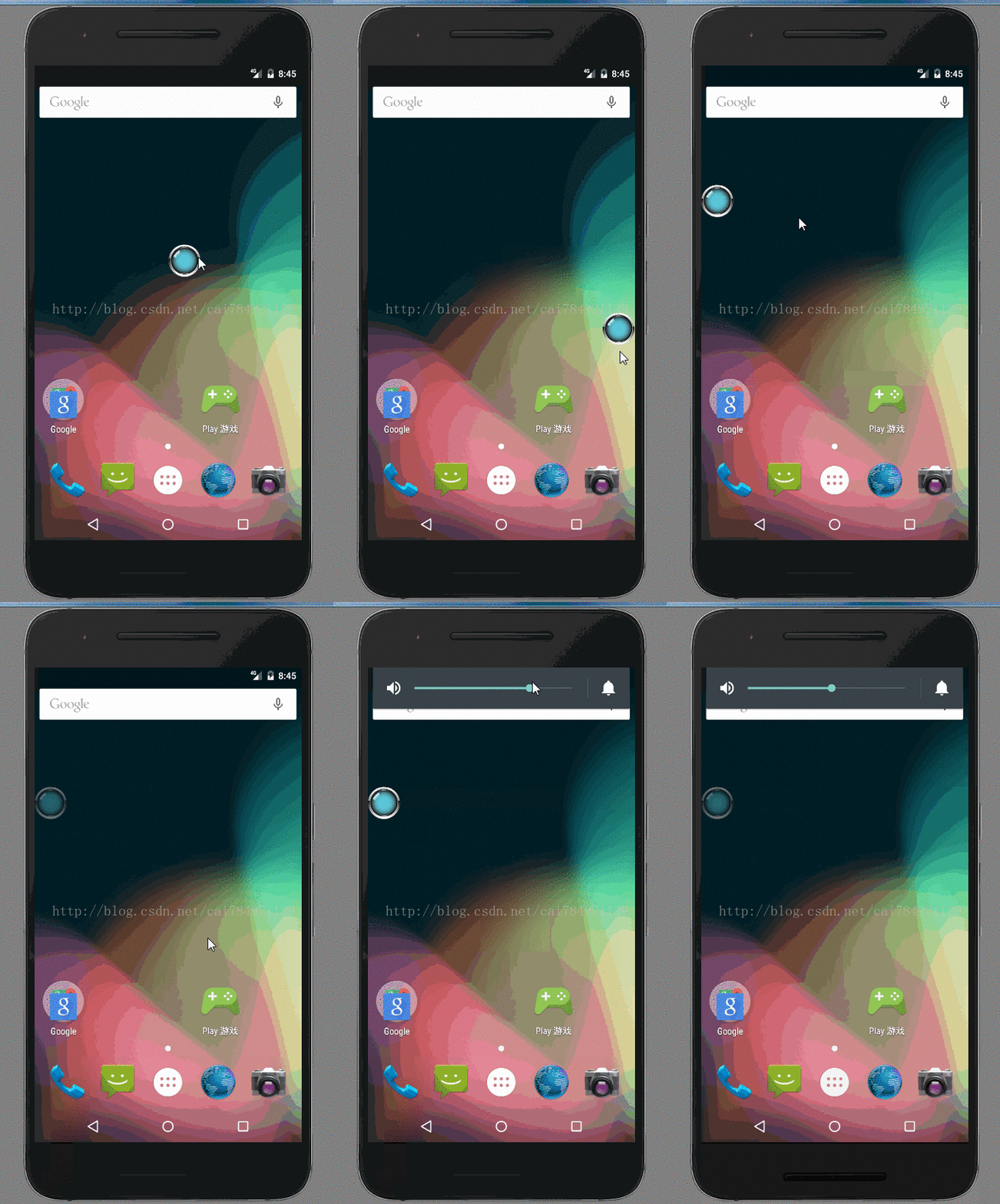
清单文件中加权限
<uses-permission android:name="android.permission.SYSTEM_ALERT_WINDOW" />
public class FloatViewService extends Service {

    private static final String TAG = "FloatViewService";

    // 定义浮动窗口布局

    private LinearLayout mFloatLayout;

    private WindowManager.LayoutParams wmParams;

    // 创建浮动窗口设置布局参数的对象

    private WindowManager mWindowManager;

    private ImageButton mFloatView;

    private int screenHeight;

    private int screenWidth;

    private MyCountDownTimer myCountDownTimer;

    @Override

    public void onCreate() {

        super.onCreate();

        Log.i(TAG, "onCreate");

        screenHeight = ScreenParam.getInstance().height;//自己写的工具类用来获取屏幕宽高。

        screenWidth = ScreenParam.getInstance().width;

        createFloatView();

        myCountDownTimer = new MyCountDownTimer(, ); //设置计时2.5s

        myCountDownTimer.start();

    }

    @SuppressWarnings("static-access")

    @SuppressLint("InflateParams")

    private void createFloatView() {

        wmParams = new WindowManager.LayoutParams();

        // 通过getApplication获取的是WindowManagerImpl.CompatModeWrapper

        mWindowManager = (WindowManager) getApplication().getSystemService(

                getApplication().WINDOW_SERVICE);

        // 设置window type

        wmParams.type = LayoutParams.TYPE_PHONE;

        // 设置图片格式,效果为背景透明

        wmParams.format = PixelFormat.RGBA_8888;

        // 设置浮动窗口不可聚焦(实现操作除浮动窗口外的其他可见窗口的操作)

        wmParams.flags = LayoutParams.FLAG_NOT_FOCUSABLE;

        // 调整悬浮窗显示的停靠位置为右侧底部

        wmParams.gravity = Gravity.RIGHT | Gravity.BOTTOM;

        // 以屏幕左上角为原点,设置x、y初始值,相对于gravity

        wmParams.x = ;

        wmParams.y = ;

        // 设置悬浮窗口长宽数据

        wmParams.width = WindowManager.LayoutParams.WRAP_CONTENT;

        wmParams.height = WindowManager.LayoutParams.WRAP_CONTENT;

        LayoutInflater inflater = LayoutInflater.from(getApplication());

        // 获取浮动窗口视图所在布局

        mFloatLayout = (LinearLayout) inflater.inflate(

                R.layout.alert_window_menu, null);

        // 添加mFloatLayout

        mWindowManager.addView(mFloatLayout, wmParams);

        // 浮动窗口按钮

        mFloatView = (ImageButton) mFloatLayout

                .findViewById(R.id.alert_window_imagebtn);

        mFloatLayout.measure(View.MeasureSpec.makeMeasureSpec(,

                View.MeasureSpec.UNSPECIFIED), View.MeasureSpec

                .makeMeasureSpec(, View.MeasureSpec.UNSPECIFIED));

        // 设置监听浮动窗口的触摸移动

        mFloatView.setOnTouchListener(new OnTouchListener() {

            boolean isClick;

            private int leftDistance;

            private float rawX;

            private float rawY;

            @SuppressLint("ClickableViewAccessibility")

            @Override

            public boolean onTouch(View v, MotionEvent event) {

                switch (event.getAction()) {

                case MotionEvent.ACTION_DOWN:

                    mFloatLayout.setAlpha(1.0f);

                    myCountDownTimer.cancel();取消计时

                    rawX = event.getRawX();

                    rawY = event.getRawY();

                    break;

                case MotionEvent.ACTION_MOVE:

                    // getRawX是触摸位置相对于屏幕的坐标,getX是相对于按钮的坐标

                    int distanceX = (int) (event.getRawX()-rawX);

                    int distanceY = (int) (event.getRawY()-rawY);

                    leftDistance = (int) event.getRawX()

                            + mFloatView.getMeasuredWidth() / ;

                    wmParams.x = wmParams.x-distanceX;

                    wmParams.y = wmParams.y-distanceY;

                    // 刷新

                    mWindowManager.updateViewLayout(mFloatLayout, wmParams);

                    rawX = event.getRawX();

                    rawY = event.getRawY();

                    break;

                case MotionEvent.ACTION_UP:

                    myCountDownTimer.start();重新开始计时

                    if(wmParams.x>leftDistance){

                        wmParams.x = screenWidth-mFloatView.getMeasuredWidth() / ;

                    }else{

                        wmParams.x = ;

                    }

                    mWindowManager.updateViewLayout(mFloatLayout, wmParams);

                    break;

                }

                return false;

            }

        });

        mFloatView.setOnClickListener(new OnClickListener() {

            @Override

            public void onClick(View v) {

                AudioManager audioManager = (AudioManager) getSystemService(Service.AUDIO_SERVICE);

                audioManager.setStreamVolume(AudioManager.STREAM_MUSIC,

                        audioManager.getStreamVolume(AudioManager.STREAM_MUSIC), AudioManager.FLAG_SHOW_UI);

//                Toast.makeText(FloatViewService.this, "hello!",

//                        Toast.LENGTH_SHORT).show();

            }

        });

    }

    @Override

    public void onDestroy() {

        super.onDestroy();

        if (mFloatLayout != null) {

            // 移除悬浮窗口

            mWindowManager.removeView(mFloatLayout);

        }

    }

    @Override

    public IBinder onBind(Intent intent) {

        return null;

    }

    public class MyCountDownTimer extends CountDownTimer {

        public MyCountDownTimer(long millisInFuture, long countDownInterval) {

            super(millisInFuture, countDownInterval);

        }

        @Override

        public void onTick(long millisUntilFinished) {

        }

        @Override

        public void onFinish() {

            mFloatLayout.setAlpha(0.4f);

        }

    }

}
然后再Activity里启动服务就好了
   protected void onCreate(Bundle savedInstanceState) {

        super.onCreate(savedInstanceState);

        setContentView(R.layout.activity_main);

        ScreenParam.getInstance().init(this);

    }

    @Override

    protected void onStart() {

        // TODO Auto-generated method stub

         Intent intent = new Intent(MainActivity.this, FloatViewService.class);

         //启动FloatViewService

         startService(intent);

        super.onStart();

    }
如果不想显示Activity界面的话,可以在配置这个属性就ok了
android:theme="@android:style/Theme.NoDisplay"
就是这么简单!
Android 模仿苹果虚拟悬浮按钮(自动靠边、可浮现任何界面上)的更多相关文章
- android悬浮按钮(Floating action button)的两种实现方法
原文: http://www.jcodecraeer.com/a/anzhuokaifa/androidkaifa/2014/1028/1857.html 最近android中有很多新的设计规范被引入 ...
- android ——悬浮按钮及可交互提示
一.悬浮按钮 FloatingActionButton是Design Support中的一个控件,它会默认colorAccent作为按钮的颜色,还可以给按钮一个图标. 这是没有图标的,这是有图标的. ...
- Android用悬浮按钮实现翻页效果
今天给大家分享下自己用悬浮按钮点击实现翻页效果的例子. 首先,一个按钮要实现悬浮,就要用到系统顶级窗口相关的WindowManager,WindowManager.LayoutParams.那么在An ...
- Android 5.0新控件——FloatingActionButton(悬浮按钮)
Android 5.0新控件--FloatingActionButton(悬浮按钮) FloatingActionButton是5.0以后的新控件,一个悬浮按钮,之所以叫做悬浮按钮,主要是因为自带阴影 ...
- 013 Android ActionFloatingButton悬浮按钮组件与Snackbar组件使用
1.导入ActionFloatingButton组件(点击下载按钮,安装组件) 2,.ImageView图片XML设置 <ImageView android:id="@+id/imag ...
- Android FloatingActionButton(FAB) 悬浮按钮
FloatingActionButton 悬浮按钮 ...
- FloatingActionButtonDemo【悬浮按钮的使用,顺带snackBar的使用】
版权声明:本文为HaiyuKing原创文章,转载请注明出处! 前言 FloatingActionButton简称FAB. 一. 对于App或某个页面中是否要使用FloatingActionButton ...
- android 自定义控件——(五)按钮点击变色
----------------------------------按钮点击变色(源代码下有属性解释)------------------------------------------------- ...
- Android模仿iOS iMessages10照片选择器的实现
不知不觉已经接近半年多没有写过博客了,这段时间,也是我刚好毕业走出校园的时间,由于学习工作的原因,一直没有真正静下心来写下些什么东西.这个星期刚入了小米笔记本pro的坑,本着新电脑新生活的理念嘻嘻-- ...
随机推荐
- CUDA 9.1/9.2 与 Visual Studio 2017 (VS2017 15.6.4) 的不兼容问题
2018年7月9日更新: CUDA已推出9.2版本,最高支持MSVC++ 14.13 _MSC_VER == 1913 (Visual Studio 2017 version 15.6). 然而最新版 ...
- UDP 编程 客服咨询回复
package 网络编程_客户咨询; import java.io.IOException; import java.net.DatagramPacket; import java.net.Datag ...
- 正则表达式 LINUX
正则表达式 热身 正则表达式(regular expression)描述了一种字符串匹配的模式,可以用来检查一个串是否含有某种子串.将匹配的子串做替换或者从某个串中取出符合某个条件的子串等. 例如 g ...
- IIS 6.0曝远程代码执行漏洞CVE-2017-7269
一.漏洞说明 漏洞编号:CVE2017-7269 影响中间件:IIS6.0 影响服务器版本:windows 2003 R2 二. 环境搭建 虚拟机kali : 192.168.1.2 靶机window ...
- QDUOJ 炸老师与他的女朋友们 bfs+状压
炸老师与他的女朋友们 Description qdu最帅的炸老师今天又要抽空去找他的女朋友们了,但是考虑到他的好gay友ycb仍是个单身狗,炸老师作为基友不希望打击他.所以他在找女朋友们的路途中必须要 ...
- 在 WinForm/WPF 下制作 Google Material Design 风格程序
国内社区没有,顺手转.WinForm: https://github.com/IgnaceMaes/MaterialSkin演示:https://www.youtube.com/watch?v=A8o ...
- uva1331 Minimax Triangulation
题目大意: 按照顺时针或者逆时针的顺序给出多边的点,要将这个多边形分解成n-2个三角形,要求使得这些三角行中面积最大的三角形面积尽量小,求最小值. /* dp[i][j]表示从第i个点到第j个点,划分 ...
- 洛谷P4052 [JSOI2007]文本生成器(AC自动机)
传送门 好像这题的确只能用AC自动机做了……Aufun大佬太强啦 正着难我们反着做,用总共单词个数减去没有一个单词都不包含的 然后考虑怎么处理一个单词都不包含的,就是跑不到单词的结尾节点 定义$f[i ...
- [Xcode 实际操作]六、媒体与动画-(3)使用CoreImage框架设置图片的单色效果
目录:[Swift]Xcode实际操作 本文将演示如何使用图片框架,将图片转换成单色样式. 在项目导航区,打开视图控制器的代码文件[ViewController.swift] import UIKit ...
- linux grep (转)
常用用法 [root@www ~]# grep [-acinv] [--color=auto] '搜寻字符串' filename 选项与参数: -a :将 binary 文件以 text 文件的方式搜 ...