
OpenGL——旋转的六边形(动画)
代码:
#include<iostream>

#include <math.h>

#include<Windows.h>

#include <GL/glut.h>

using namespace std;

const double TWO_PI = 6.2831853;

GLsizei winWidth = , winHeight = ;

GLuint regHex;

static GLfloat rotTheta;

class scrPt {

public:

    GLint x, y;

};

void init()

{

    scrPt hexVertex;

    GLdouble hexTheta;

    glClearColor(1.0, 1.0, 1.0, 0.0);

    //创建1个显示列表

    regHex = glGenLists();

    //编译显示列表

    glNewList(regHex, GL_COMPILE);

        glColor3f(209.0 / 255.0, 73.0 / 255.0, 78.0 / 255.0);

        glBegin(GL_POLYGON);

            for (GLint k = ; k < ; k++) {

                hexTheta = TWO_PI * k / ;

                hexVertex.x =  +  * cos(hexTheta);

                hexVertex.y =  +  * sin(hexTheta);

                glVertex2i(hexVertex.x, hexVertex.y);

            }

        glEnd();

    glEndList();

}

void displayHex()

{

    glClear(GL_COLOR_BUFFER_BIT);

    glPushMatrix();

    //旋转操作

    glRotatef(rotTheta, 0.0, 0.0, 1.0);

    //执行显示列表

    glCallList(regHex);

    glPopMatrix();

    //互换缓存

    glutSwapBuffers();

    glFlush();

}

//计算增加的旋转角度

void rotateHex()

{

    rotTheta += 3.0;

    if (rotTheta > 360.0) {

        rotTheta -= 360.0;

    }

    //标记当前窗口需要重新绘制

    //通过glutMainLoop下一次循环时,窗口显示将被回调以重新显示窗口的正常面板

    glutPostRedisplay();

}

void winReshapeFcn(GLint newWidth, GLint newHeight)

{

    glViewport(, , (GLsizei)newWidth, (GLsizei)newHeight);

    glMatrixMode(GL_PROJECTION);

    //重置当前指定的矩阵为单位矩阵,相当于复位操作

    glLoadIdentity();

    gluOrtho2D(-320.0, 320.0, -320.0, 320.0);

    glMatrixMode(GL_MODELVIEW);

    glLoadIdentity();

    glClear(GL_COLOR_BUFFER_BIT);

}

void mouseFcn(GLint button, GLint action, GLint x, GLint y)

{

    switch (button) {

    case GLUT_LEFT_BUTTON:                //鼠标左键,开始旋转

        if (action == GLUT_DOWN) {

            //全局的回调函数,如果启用则rotateHex会被不断调用,直到有窗口事件发生

            glutIdleFunc(rotateHex);

        }

        break;

    case GLUT_RIGHT_BUTTON:                    //鼠标右键,停止旋转

        if (action == GLUT_DOWN) {

            //参数为NULL说明不改变

            glutIdleFunc(NULL);

        }

        break;

    defalut:

        break;

    }

}

int main(int argc, char* argv[])

{

    glutInit(&argc, argv);

    glutInitDisplayMode(GLUT_RGB | GLUT_DOUBLE);

    glutInitWindowPosition(, );

    glutInitWindowSize(winWidth, winHeight);

    glutCreateWindow("第一个动画程序");

    init();

    glutDisplayFunc(displayHex);

    glutReshapeFunc(winReshapeFcn);

    glutMouseFunc(mouseFcn);

    glutMainLoop();

    system("pause");

    return ;

}
运行结果:
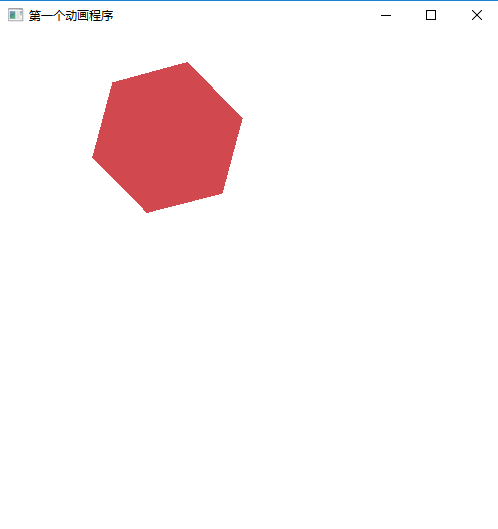
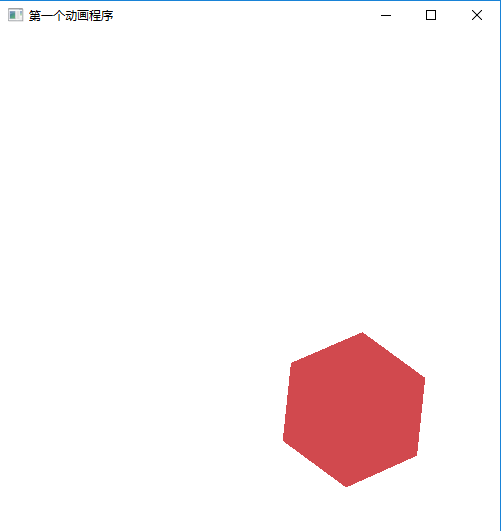

OpenGL——旋转的六边形(动画)的更多相关文章
- 用css3制作旋转加载动画的几种方法
以WebKit为核心的浏览器,例如Safari和Chrome,对html5有着很好的支持,在移动平台中这两个浏览器对应的就是IOS和Android.最近在开发一个移动平台的web app,那么就有机会 ...
- Canvas 图片绕边旋转的小动画
/** * 图片绕边旋转的小动画 */ function initDemo10() { var canvas = document.getElementById("demo10") ...
- OpenGL旋转平移 变换
#include<gl/glut.h> #include<gl/GL.h> #include<gl/GLU.h> #include<math.h> #i ...
- QPropertyAnimation实现图形,控件的旋转和位移动画,尤其是旋转
QPropertyAnimation可以简单方便的实现对象的旋转和移动的动画效果. 1. 移动 Pixmap *item = new Pixmap(kineticPix); QPropertyAnim ...
- 代码创建 WPF 旋转、翻转动画(汇总)
先建立一个button <Button Width="80" Height="60" Content="旋转" Name=" ...
- WPF 鼠标移动时触发图片旋转(非动画)
非动画,只是简单的触发器. 主要是针对旋转的写法. 代码 <Grid> <Image x:Name="image" Source="nifi3.gif& ...
- 第04课 OpenGL 旋转
旋转: 在这一课里,我将教会你如何旋转三角形和四边形.左图中的三角形沿Y轴旋转,四边形沿着X轴旋转. 上一课中我教给您三角形和四边形的着色.这一课我将教您如何将这些彩色对象绕着坐标轴旋转.其实只需在上 ...
- openGL 旋转的图形 矩阵操作
#include <windows.h> #ifdef __APPLE__ #include <GLUT/glut.h> #else #include <GL/glut. ...
- swift 旋转加载动画
https://github.com/naoyashiga/RPLoadingAnimation
随机推荐
- jupyter notebook 在mac OS上的安装
一.关于Anaconda python中有很多包,类似于java中的jar包,java中用maven.gradle来管理依赖的jar包,而在python中类似的工具就是anaconda(当然还有其它工 ...
- android:单位和尺寸
为了要让程序拥有更好的屏幕适配能力,在指定控件和布局大小的时候 最好使用 match_parent 和 wrap_content,尽量避免将控件的宽和高设定一个固定值.不过在 有些情况下,仅仅使用 m ...
- UIView的层次结构–code
转:http://blog.dongliwei.cn/archives/uiview-tree-code // Recursively travel down the view tree, incre ...
- 线程安全的CopyOnWriteArrayList介绍
证明CopyOnWriteArrayList是线程安全的 先写一段代码证明CopyOnWriteArrayList确实是线程安全的. ReadThread.java import java.util. ...
- 包含MIN函数的栈+一个数组实现两个堆栈+两个数组实现MIN栈
1.题目描述 定义栈的数据结构,请在该类型中实现一个能够得到栈最小元素的min函数. 思路:利用一个辅助栈来存放最小值 栈 3,4,2,5,1 辅助栈 3,2,1 每入栈一次,就与辅 ...
- python BeautifulSoup的简单使用
官网:https://www.crummy.com/software/BeautifulSoup/bs4/doc/ 参考:https://www.cnblogs.com/yupeng/p/336203 ...
- oracle-用户和表空间创建
windows下 创建临时表空间 create temporary tablespace user_temp tempfile 'D:\oracle\oradata\Oracle11i\user_te ...
- WPF的5种绑定模式(mode)
WPF的绑定模式(mode)是枚举的 枚举值共有5个 1:OneWay(源变就更新目标属性) 2:TwoWay(源变就更新目标并且目标变就更新源) 3:OneTime(只根据源来设置目标,以后都不会变 ...
- AutoMapperExtension
using System; using System.Collections.Generic; using System.Linq; using AutoMapper; using System.Co ...
- java command line error opening registry key 'Software\JavaSoft\Java Runtime Environment' java.dll
C:\Users\huxxxxchan>javaError: opening registry key 'Software\JavaSoft\Java Runtime Environment'E ...