
如何将JAR包发布到Maven中央仓库?
将jar包发布到Maven中央仓库(Maven Central Repository),这样所有的Java开发者都可以使用Maven直接导入依赖,例如fundebug-java:
<!-- https://mvnrepository.com/artifact/com.fundebug/fundebug-java -->

<dependency>

    <groupId>com.fundebug</groupId>

    <artifactId>fundebug-java</artifactId>

    <version>0.2.0</version>

</dependency>
但是,Maven中央仓库并不支持直接发布jar包。我们需要将jar包发布到一些指定的第三方Maven仓库,然后该仓库再将jar包同步到Maven中央仓库。
其中,最"简单"的方式是通过Sonatype OSSRH仓库来发布jar包。接下来,我会介绍如何将jar包发布到Sonatype OSSRH。
本教程所使用的系统配置如下:
- OS:macOS 10.14.2
- JDK:1.8.0_192
- Maven:3.5.4
1. 注册JIRA账号
JIRA是一个项目管理服务,类似于国内的Teambition。Sonatype通过JIRA来管理OSSRH仓库。
注册地址:https://issues.sonatype.org/secure/Signup!default.jspa
需要填写Email, Full Name, Username以及password,其中Username与Password后面的步骤需要用到,请记下来。
2. 创建issue
通过在JIRA上创建issue来申请发布新的jar包,Sonatype的工作人员会进行审核,审核不算严格,一般按照要求填写不会有问题。
创建链接:https://issues.sonatype.org/secure/CreateIssue.jspa?issuetype=21&pid=10134
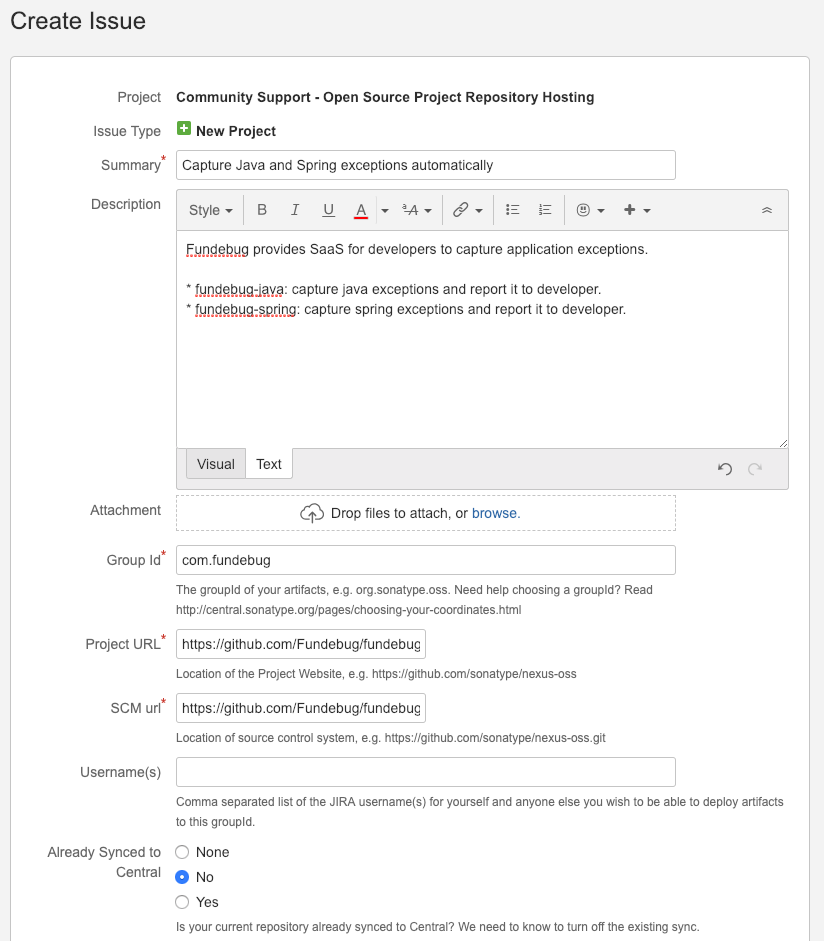
创建issue的时候需要填写下面这些信息:
- Summary
- Description
- Group Id
- Project URL
- SCM url
大家可以参考我申请发布fundebug-java与fundebug-spring时所填写的内容:OSSRH-45238
由于时差,前一天创建issue,第二天早上才会有回应。当issue的status变为RESOLVED,我们就可以进行下一步操作了。
3. 安装并配置GPG
发布到Maven仓库中的所有文件都要使用GPG签名,以保障完整性。因此,我们需要在本地安装并配置GPG。
安装GPG
MacBook安装GPG非常简单,下载并安装GPG Suite即可。
生成GPG密钥对
gpg --gen-key
生成密钥时将需要输入name、email以及password。password在之后的步骤需要用到,请记下来。
上传GPG公钥
将公钥上传到公共的密钥服务器,这样其他人才可以通过公钥来验证jar包的完整性。
gpg --keyserver hkp://keyserver.ubuntu.com:11371 --send-keys CAB4165C69B699D989D2A62BD74A11D3F9F41243
其中CAB4165C69B699D989D2A62BD74A11D3F9F41243为密钥的ID,可以通过gpg --list-keys命令查看
gpg --list-keys

/Users/kiwenlau/.gnupg/pubring.kbx

----------------------------------

pub   dsa2048 2010-08-19 [SC] [expires: 2020-06-15]

      85E38F69046B44C1EC9FB07B76D78F0500D026C4

uid           [ unknown] GPGTools Team <team@gpgtools.org>

sub   elg2048 2010-08-19 [E] [expires: 2020-06-15]

sub   rsa4096 2014-04-08 [S] [expires: 2024-01-02]

pub   rsa2048 2019-01-03 [SC] [expires: 2021-01-02]

      CAB4165C69B699D989D2A62BD74A11D3F9F41243

uid           [ultimate] kiwenlau <kiwenlau@gmail.com>

sub   rsa2048 2019-01-03 [E] [expires: 2021-01-02]
4. 配置Maven的setting.xml
setting.xml为Maven的全局配置文件,在MacBook上的位置为/usr/local/Cellar/maven/3.5.4/libexec/conf/settings.xml,我们需要将第1步配置的Username和Password添加到<servers></servers>标签中,这样我们才能将jar包部署到Sonatype OSSRH仓库:
<servers>

        <server>

                <id>ossrh</id>

                <username>Fundebug</username>

                <password>passsword</password>

        </server>

</servers>
5. 配置项目的pom.xml
pom.xml挺长的。根据Sonatype OSSRH的要求,以下信息都必须配置:
- Supply Javadoc and Sources
- Sign Files with GPG/PGP
- Sufficient Metadata
- Correct Coordinates
- Project Name, Description and URL
- License Information
- Developer Information
- SCM Information
配置时参考我的pom.xml,根据需要修改即可。
<project xmlns="http://maven.apache.org/POM/4.0.0"

	xmlns:xsi="http://www.w3.org/2001/XMLSchema-instance" xsi:schemaLocation="http://maven.apache.org/POM/4.0.0 http://maven.apache.org/xsd/maven-4.0.0.xsd">

	<modelVersion>4.0.0</modelVersion>

	<groupId>com.fundebug</groupId>

	<artifactId>fundebug-java-notifier</artifactId>

	<version>0.2.0</version>

	<packaging>pom</packaging>

	<name>fundebug-java-notifier</name>

	<url>https://github.com/Fundebug/fundebug-java-notifier</url>

	<description>Capture Java and Spring exceptions automatically</description>

	<licenses>

		<license>

			<name>Server Side Public License</name>

			<url>https://www.mongodb.com/licensing/server-side-public-license</url>

			<distribution>repo</distribution>

			<comments>A not business-friendly OSS license</comments>

		</license>

	</licenses>

	<scm>

		<url>https://github.com/Fundebug/fundebug-java-notifier</url>

		<connection>https://github.com/Fundebug/fundebug-java-notifier.git</connection>

	</scm>

	<properties>

		<maven.compiler.source>1.8</maven.compiler.source>

		<maven.compiler.target>1.8</maven.compiler.target>

		<maven.deploy.skip>true</maven.deploy.skip>

	</properties>

	<developers>

		<developer>

			<name>kiwenlau</name>

			<id>kiwenlau</id>

			<email>kiwenlau@gmail.com</email>

			<roles>

				<role>Developer</role>

			</roles>

			<timezone>+8</timezone>

		</developer>

	</developers>

	<profiles>

		<profile>

			<id>default</id>

			<activation>

				<activeByDefault>true</activeByDefault>

			</activation>

			<build>

				<plugins>

					<plugin>

						<groupId>org.apache.maven.plugins</groupId>

						<artifactId>maven-source-plugin</artifactId>

						<version>2.2.1</version>

						<executions>

							<execution>

								<phase>package</phase>

								<goals>

									<goal>jar-no-fork</goal>

								</goals>

							</execution>

						</executions>

					</plugin>

					<plugin>

						<groupId>org.apache.maven.plugins</groupId>

						<artifactId>maven-javadoc-plugin</artifactId>

						<version>2.9.1</version>

						<executions>

							<execution>

								<phase>package</phase>

								<goals>

									<goal>jar</goal>

								</goals>

							</execution>

						</executions>

					</plugin>

					<plugin>

						<groupId>org.apache.maven.plugins</groupId>

						<artifactId>maven-gpg-plugin</artifactId>

						<version>1.6</version>

						<executions>

							<execution>

								<phase>verify</phase>

								<goals>

									<goal>sign</goal>

								</goals>

							</execution>

						</executions>

					</plugin>

				</plugins>

			</build>

			<distributionManagement>

				<snapshotRepository>

					<id>ossrh</id>

					<url>https://oss.sonatype.org/content/repositories/snapshots/</url>

				</snapshotRepository>

				<repository>

					<id>ossrh</id>

					<url>https://oss.sonatype.org/service/local/staging/deploy/maven2/</url>

				</repository>

			</distributionManagement>

		</profile>

	</profiles>

	<modules>

		<module>fundebug-java</module>

		<module>fundebug-spring</module>

		<module>examples/hello-world</module>

		<module>examples/spring-rest-api</module>

	</modules>

</project>
6. 发布jar包
执行mvn clean deploy处理,即可将jar包发布到Sonatype OSSRH仓库。
mvn clean deploy -projects fundebug-java,fundebug-spring
我们的项目fundebug-java-notifier含有多个模块,仅需部署fundebug-java与fundebug-spring,因此使用-projects选项来指定。
第一次执行mvn clean deploy命令时,需要输入GPG密钥的密码。
mvn clean deploy命令执行成功的输出是这样的(部分日志):
[INFO] ------------------------------------------------------------------------

[INFO] Reactor Summary:

[INFO]

[INFO] fundebug-java 0.2.0 ................................ SUCCESS [ 22.183 s]

[INFO] fundebug-spring 0.2.0 .............................. SUCCESS [ 16.383 s]

[INFO] ------------------------------------------------------------------------

[INFO] BUILD SUCCESS

[INFO] ------------------------------------------------------------------------

[INFO] Total time: 38.728 s

[INFO] Finished at: 2019-01-12T20:10:16+08:00

[INFO] ------------------------------------------------------------------------
7. close并release
mvn clean deploy命令执行成功,使用JIRA账号登陆:https://oss.sonatype.org/#stagingRepositories,就可以看到你所发布的jar包了:
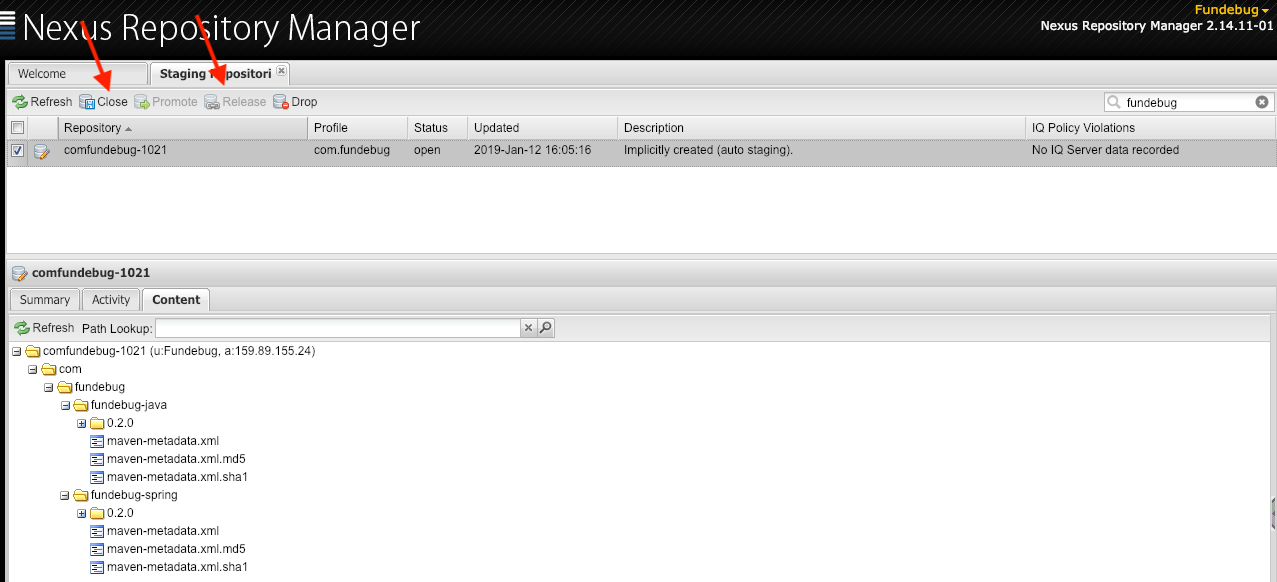
选中对于的repository之后,点击箭头所指的close,close时会检查发布的构件是否符合要求。若符合要求,则close成功,成功之后点击箭头所指的release,即可正式将jar包发布到Sonatype OSSRH仓库。
release成功大概2个小时之后,该构件就会同步到Maven中央仓库:

参考
关于Fundebug
Fundebug专注于JavaScript、微信小程序、微信小游戏、支付宝小程序、React Native、Node.js和Java线上应用实时BUG监控。 自从2016年双十一正式上线,Fundebug累计处理了9亿+错误事件,付费客户有Google、360、金山软件、百姓网等众多品牌企业。欢迎大家免费试用!

版权声明
转载时请注明作者Fundebug以及本文地址:
https://blog.fundebug.com/2019/01/14/how-to-deploy-jar-to-maven-central-repository/
如何将JAR包发布到Maven中央仓库?的更多相关文章
- 将jar包发布到maven中央仓库
将jar包发布到maven中央仓库 最近做了一个swagger-ui的开源项目,因为是采用vue进行解析swagger-json,需要前端支持,为了后端也能方便的使用此功能,所以将vue项目编译后的结 ...
- 贡献你的代码,将jar包发布到Maven中央仓库以及常见错误的解决办法
前几天将自己的日志工具发布到了Maven中央仓库中.这个工具本省没有多少技术含量,因为是修改别人的源代码实现的,但是将jar发布到Maven仓库却收获颇丰,因为网上有些教程过时了,在此分享下自己发布j ...
- Dev 日志 | 如何将 jar 包发布到 Maven 中央仓库
摘要 Maven 中央仓库并不支持直接上传 jar 包,因此需要将 jar 包发布到一些指定的第三方 Maven 仓库,比如:Sonatype OSSRH 仓库,然后该仓库再将 jar 包同步到 Ma ...
- 将自己的项目作为jar包发布到maven中央仓库
maven版本是3.5.0,jdk是1.8(注意,不是说项目是1.8就行,必须是环境变量里的也是,不能超过1.8,否则一大堆问题,执行mvn前用javac -version看下版本) 一:先在sona ...
- 如何将自己的jar包发布到mavan中央仓库
最近自己写了一个关于网关限流的插件,然后想着肯定会有很多兄弟也需要使用到,所以就想着把jar包上传到Maven的中央仓库上让大家可以更方便的使用 现在咱们来看一下这个流程是什么样的呢. 首先呢,你得去 ...
- 将jar包发布到maven的中央仓库细节整理
在学习springboot框架的时候,会引入各种各样的starter依赖,照着教程尝试写了个demo-spring-boot-stater,可以理解为一个组件,随引随用 但是只能自己引用,无法共享,于 ...
- 解决Maven本地仓库没有Jar包问题,请求中央仓库自动下载以及手动下载方法
一.首先指定本地仓库 <localRepository>D:\software\Maven_Home\mvn_repository</localRepository> 二.修改 ...
- 如何将自己的代码发布到Maven中央仓库?
去年在公司做工作流相关业务时,当时使用flowable做引擎,中途涉及到一些业务上的需求,自己整理了一些代码,考虑到开源精神,当时就想着将于公司业务无关的代码抽离出来,放到Maven中央仓库中,以供别 ...
- 喜大普奔,微软Microsoft JDBC Driver For SQL Server已发布到maven中央仓库
相信通过java和SQLServer开发应用的同学们都经历过如下类似的问题. 微软提供的JDBC官方驱动没有放置在Maven仓库中,这样如果你的Java应用需要访问SQL Server,你不得不下载s ...
随机推荐
- js中的单例模式
1.场景:当我们需要多人合作完成一个项目,但是有一些操作是同样的操作时(例如:点击按钮显示加载的遮罩层:例如:提交表单时的验证都是一样的),这个时候我们就需要单例模式: 2.什么是单例模式:是一种常见 ...
- Java实现单例模式的9种方法
一. 什么是单例模式 因程序需要,有时我们只需要某个类同时保留一个对象,不希望有更多对象,此时,我们则应考虑单例模式的设计. 二. 单例模式的特点 1. 单例模式只能有一个实例. 2. 单例类必须创建 ...
- Array.find()和Array.findIndex()
ES6新增的两个方法,根据回调函数返回作为判断依据,按照数组顺序进行遍历,符合条件(为真)时find()返回该值.findIndex()返回下标. 1.语法 arr.find(callback[, t ...
- [Swift]LeetCode395. 至少有K个重复字符的最长子串 | Longest Substring with At Least K Repeating Characters
Find the length of the longest substring T of a given string (consists of lowercase letters only) su ...
- [Swift]LeetCode561. 数组拆分 I | Array Partition I
Given an array of 2n integers, your task is to group these integers into n pairs of integer, say (a1 ...
- [Swift]LeetCode790. 多米诺和托米诺平铺 | Domino and Tromino Tiling
We have two types of tiles: a 2x1 domino shape, and an "L" tromino shape. These shapes may ...
- [Swift]LeetCode973. 最接近原点的 K 个点 | K Closest Points to Origin
We have a list of points on the plane. Find the K closest points to the origin (0, 0). (Here, the d ...
- 接口平台经常报server internal error(500)错误
查询日志,发现连接mysql报错,web页面显示server internal error(500) 解决方法:重启mysql服务器 systemctl start mysqld #安装mysql # ...
- TCP/IP 详解常用术语
业务需要,最近看TCP/IP 这本书,专业名词太多了,总结一下,给后来着参考,直接使用. 后续会在读书时慢慢添加. ACK:(ACKnowledgment)TCP首部中的确认标志. ARP:地址解析协 ...
- Python数据分析(一): ipython 技巧!
不一定非得使用Jupyter Notebook,试试ipython命令行 安装 ipython 我只试过Windows 10环境下的. 1.安装python安装包之后,应该就有ipython了. 2. ...