
3.Servlet实例
一.基础实例
1.参照如下例子创建maven web工程:
https://www.cnblogs.com/lukelook/p/9187313.html
2.创建一个简单的Servlet 类
package com.my.web;

import java.io.IOException;

import javax.servlet.ServletException;

import javax.servlet.http.HttpServlet;

import javax.servlet.http.HttpServletRequest;

import javax.servlet.http.HttpServletResponse;

/**

 * Servlet implementation class CallWeb

 */

public class CallWeb extends HttpServlet {

    private static final long serialVersionUID = 1L;

    /**

     * @see HttpServlet#HttpServlet()

     */

    public CallWeb() {

        super();

        // TODO Auto-generated constructor stub

    }

    /**

     * @see HttpServlet#doGet(HttpServletRequest request, HttpServletResponse response)

     */

    protected void doGet(HttpServletRequest request, HttpServletResponse response) throws ServletException, IOException {

        // TODO Auto-generated method stub

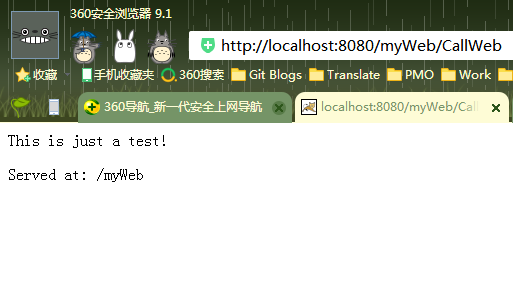
        response.getWriter().append("<p>").append("This is just a test!").append("</p>");

        response.getWriter().append("Served at: ").append(request.getContextPath());

    }

    /**

     * @see HttpServlet#doPost(HttpServletRequest request, HttpServletResponse response)

     */

    protected void doPost(HttpServletRequest request, HttpServletResponse response) throws ServletException, IOException {

        // TODO Auto-generated method stub

        doGet(request, response);

    }

}
3.在web.xml中配置如下:
<?xml version="1.0" encoding="UTF-8"?>

<web-app version="3.0"

xmlns="http://java.sun.com/xml/ns/javaee"

xmlns:xsi="http://www.w3.org/2001/XMLSchema-instance"

xsi:schemaLocation="http://java.sun.com/xml/ns/javaee

http://java.sun.com/xml/ns/javaee/web-app_3_0.xsd">

 <!--如果 Servlet class 中已经用@WebServlet("/XXX")则不需要次配置,要不然会发生冲突-->

<!--

<display-name>Archetype Created Web Application</display-name>

    <servlet>

          <servlet-name>CallWeb</servlet-name>

          <servlet-class>com.my.web.CallWeb</servlet-class>

  </servlet>

  <servlet-mapping>

      <servlet-name>CallWeb</servlet-name>

      <url-pattern>/CallWeb</url-pattern>

  </servlet-mapping>

-->

</web-app>
4.Run On Server CallWeb.class
5.在浏览器中输入如下地址即可访问:
http://localhost:8080/myWeb/CallWeb
二.表单数据提交
1.JSP界面
<%@ page language="java" contentType="text/html; charset=UTF-8"

    pageEncoding="UTF-8"%>

<!DOCTYPE html PUBLIC "-//W3C//DTD HTML 4.01 Transitional//EN" "http://www.w3.org/TR/html4/loose.dtd">

<html>

<head>

<meta http-equiv="Content-Type" content="text/html; charset=UTF-8">

<title>show</title>

</head>

<body>

<form action="CallWeb" method="post">
<!--fieldset 对信息分组-->
<fieldset>

      <legend>个人信息:</legend>

    班级:<input list="browsers" name="stuClass">

    <datalist id="browsers">

         <option value="一一班">

         <option value="一二班">

         <option value="二一班">

         <option value="二二班">

         <option value="三一班">

    </datalist><br/><br/>

    用户名:<input type="text" name="stuName" id="stuName" value="请输入用户名"><br/><br/>

    密码:<input type="password" name="stuPassword" id="stuPassword"><br/><br/>

    <!-- label 当点击字时单选框也会被选上 -->

    性别:<input type="radio" name="sex" value="女" id="male"><label for="male">女</label>

        <input type="radio" name="sex" value="男" id="female"> <label for="female">男</label>

        <input type="radio" name="sex" value="保密" id="unknow" checked="checked"><label for="unknow">保密</label><br/><br/>

</fieldset>

<fieldset>

          <legend>其他信息:</legend>

    兴趣爱好:<input type="checkbox" name="love" value="足球 ">足球

          <input type="checkbox" name="love" value="篮球 ">篮球

          <input type="checkbox" name="love" value="排球 ">排球<br/><br/>

    地址:    <select name="address">

                  <optgroup label="河南省">

                    <option value="RuZhou">汝州</option>

                    <option value="ZhengZhou">郑州</option>

                  </optgroup>

                  <optgroup label="陕西省">

                    <option value="XiAn">西安</option>

                    <option value="WeiNan">渭南</option>

                  </optgroup>

        </select>

</fieldset>

<input type="submit" value="提交">

</form>

</body>

</html>
2.Servlet处理类
package com.my.web;

import java.io.IOException;

import java.io.PrintWriter;

import javax.servlet.ServletException;

import javax.servlet.annotation.WebServlet;

import javax.servlet.http.HttpServlet;

import javax.servlet.http.HttpServletRequest;

import javax.servlet.http.HttpServletResponse;

/**

 * Servlet implementation class Show

 */

@WebServlet("/CallWeb")

public class CallWeb extends HttpServlet {

    private static final long serialVersionUID = 1L;

    /**

     * @see HttpServlet#HttpServlet()

     */

    public CallWeb() {

        super();

        // TODO Auto-generated constructor stub

    }

    /**

     * @see HttpServlet#doGet(HttpServletRequest request, HttpServletResponse response)

     */

    protected void doGet(HttpServletRequest request, HttpServletResponse response) throws ServletException, IOException {

        // TODO Auto-generated method stub

        request.setCharacterEncoding("UTF-8");

        response.setCharacterEncoding("UTF-8");

        response.setContentType("text/html");

        PrintWriter pw = response.getWriter();

        pw.println("班级:"+request.getParameter("stuClass")+"<br/>");

        pw.println("用户名:"+request.getParameter("stuName")+"<br/>");

        pw.println("密码:"+request.getParameter("stuPassword")+"<br/>");

        pw.println("性别:"+request.getParameter("sex")+"<br/>");

        String[] arr=request.getParameterValues("love");

        for (String string : arr) {

            pw.println("兴趣:"+string+"<br/>");

        }

        pw.println("地址:"+request.getParameter("address")+"<br/>");

    }

    /**

     * @see HttpServlet#doPost(HttpServletRequest request, HttpServletResponse response)

     */

    protected void doPost(HttpServletRequest request, HttpServletResponse response) throws ServletException, IOException {

        // TODO Auto-generated method stub

        doGet(request, response);

    }

}
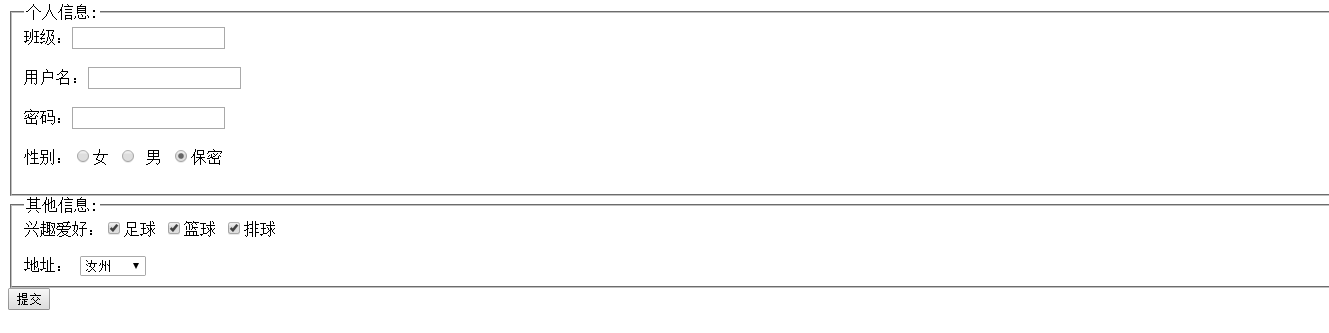
3.界面效果
3.Servlet实例的更多相关文章
- servlet的一个web容器中有且只有一个servlet实例或有多个实例的理解1
servlet的一个web容器中有且只有一个servlet实例或有多个实例的理解 (2013-06-19 19:30:40) 转载▼ servlet的非线程安全,action的线程安全 对提交 ...
- myeclipse实现Servlet实例(1) 通过继承servlet接口实现
1.在myeclipse新建web project,配置Tomcat(在myeclipse的Window--preferences) 2.然后在src新建servlet文件( 此处放在com.tsin ...
- Java Servlet(十一):一个servlet被10个浏览器客户端访问时会创建几个servlet实例?
一般Servlet只初始化一次(只有一个实例).对于更多的客户端请求,Server创建新的请求和响应对象,仍然激活此Servlet的service()方法,将这两个对象作为参数传递给该方法.如此重复以 ...
- Servlet:从入门到实战学习(3)---Servlet实例【图文】
本篇通过图文实例给大家详细讲述如何建立一个Servlet,配置好运行环境并成功连接到MYSQL的数据库,进行数据的查询展示. 1.项目创建:IDEA -> Create New Project ...
- Hessian Servlet实例
Servlet实例 业务场景 在下面的例子中我会发布一个简单的输出字符串的方法,然后在客户端调用并输出结果. 服务器端 环境搭建 在服务端,我们需要引入hessian和servlet的包.编写服务.配 ...
- Servlet实例解说
打开昨天上午,负责人突然问我,client控制信息,如何让在后台?我想回答:假设总体提交form,在C#使用代码request获取表单的内容.假设局部提交,在用JS和Ajax交互,通过Ajax的ope ...
- Servlet(9)—HttpServlet和改进Servlet实例
HttpServlet:针对Http协议定义的一个Servlet基类,唯一的功能就是强制类型转换ServletRequest转换成HttpServletRequest,ServletResponse转 ...
- Servlet(4)—一个简单的Servlet实例
简单实例 页面请求登陆,提交表单数据 <body> <form action="loginServlet" method="get"> ...
- 【JDBC】Servlet实例
import java.io.IOException;import java.io.PrintWriter;import java.sql.Connection;import java.sql.Dri ...
随机推荐
- rails中 flash 和 flash.now的区别
Flash[:notice]’s message will persist to the next action and should be used when redirecting to anot ...
- NiftyDialogEffects-多种弹出效果的对话框
感觉系统自带的对话框弹出太生硬?那就试试NiftyDialogEffects吧,类似于(Nifty Modal Window Effects),效果是模仿里面实现的 ScreenShot . . ...
- 关于注解Annotation第二篇
写一个注解使用类,如下: public class Test { @Code(author = "mazhi",date="20170611") private ...
- 《Mysql技术内幕,Innodb存储引擎》——Innodb体系结构
Innodb体系结构 Innodb存储引擎主要包括内存池以及后台线程. 内存池:多个内存块组成一个内存池,主要维护进程/线程的内部数据.缓存磁盘数据,修改文件前先修改内存.redo log 后台线程: ...
- bzoj 5341: [Ctsc2018]暴力写挂
Description Solution 边分治+边分树合并 这个题很多做法都是启发式合并的复杂度的,都有点卡 以前有个套路叫做线段树合并优化启发式合并,消掉一个 \(log\) 这个题思路类似,建出 ...
- Spring-----AOP深度理解
AOP定义了一些新的概念,要想深入的理解AOP的原理,就必须掌握这些概念的具体含义,本人菜鸡一枚,一下是自己对一些概念的理解,如果哪里不对,欢迎评论区指正 AOP核心概念AOP即Aspect-Orie ...
- The "tsconfig.json" file must have compilerOptions.sourceMap set to true
在编译ionic项目的时候出现:Error:The "tsconfig.json" file must have compilerOptions.sourceMap set to ...
- jQuery源码分析-03构造jQuery对象-源码结构和核心函数
3. 构造jQuery对象 3.1源码结构 先看看总体结构,再做分解: (function( window, undefined ) { var jQuery = (function() { // 构 ...
- Vertica备份恢复
Vertica备份和恢复数据库 Vertica提供了一个功能全面的使用程序--vbr, 他是一个Python脚本.使用vbr脚本可以备份和还原完整备份以及为特定架构或表创建备份.vbr实用程序会在首次 ...
- JavaScript pop()函数弹出数组最后数据
改变数组中数据的另一种方法是用 .pop() 函数. .pop() 函数用来“抛出”一个数组末尾的值.我们可以把这个“抛出”的值赋给一个变量存储起来. 数组中任何类型的数据条目(数值,字符串,甚至是数 ...