
C++操作Json字符串
一、从字符串中读取JSON
a.cpp
|
1
2
3
4
5
6
7
8
9
10
11
12
13
14
15
16
17
18
19
20
21
22
23
24
25
26
27
28
29
30
31
32
|
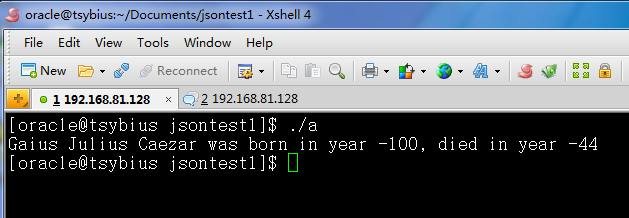
#include <iostream>#include "json/json.h"using namespace std;int main(){ //字符串 const char* str = "{\"praenomen\":\"Gaius\",\"nomen\":\"Julius\",\"cognomen\":\"Caezar\"," "\"born\":-100,\"died\":-44}"; Json::Reader reader; Json::Value root; //从字符串中读取数据 if(reader.parse(str,root)) { string praenomen = root["praenomen"].asString(); string nomen = root["nomen"].asString(); string cognomen = root["cognomen"].asString(); int born = root["born"].asInt(); int died = root["died"].asInt(); cout << praenomen + " " + nomen + " " + cognomen << " was born in year " << born << ", died in year " << died << endl; } return 0;} |
makefile文件
|
1
2
3
4
5
6
7
8
|
LIB=-L/usr/local/lib/libjson/ -ljson_linux-gcc-4.4.7_libmta: a.o g++ -o a -std=c++0x a.o $(LIB)a.o: a.cpp g++ -c a.cppclean: rm -rf a.o a |
执行结果
二、从文件里读取JSON
PersonalInfo.json(一个存储了JSON格式字符串的文件)
|
1
2
3
4
5
6
7
8
9
10
11
12
|
{ "name":"Tsybius", "age":23, "sex_is_male":true, "partner": { "partner_name":"Galatea", "partner_age":21, "partner_sex_is_male":false }, "achievement":["ach1","ach2","ach3"]} |
a.cpp
|
1
2
3
4
5
6
7
8
9
10
11
12
13
14
15
16
17
18
19
20
21
22
23
24
25
26
27
28
29
30
31
32
33
34
35
36
37
38
39
40
41
42
43
44
45
46
47
48
49
50
51
52
|
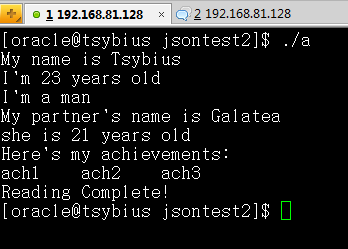
#include <iostream>#include <fstream>#include "json/json.h"using namespace std;int main(){ Json::Reader reader; Json::Value root; //从文件里读取 ifstream is; is.open("PersonalInfo.json", ios::binary); if(reader.parse(is,root)) { //读取根节点信息 string name = root["name"].asString(); int age = root["age"].asInt(); bool sex_is_male = root["sex_is_male"].asBool(); cout << "My name is " << name << endl; cout << "I'm " << age << " years old" << endl; cout << "I'm a " << (sex_is_male ?
"man" : "woman") << endl; //读取子节点信息 string partner_name = root["partner"]["partner_name"].asString(); int partner_age = root["partner"]["partner_age"].asInt(); bool partner_sex_is_male = root["partner"]["partner_sex_is_male"].asBool(); cout << "My partner's name is " << partner_name << endl; cout << (partner_sex_is_male ? "he" : "she") << " is " << partner_age << " years old" << endl; //读取数组信息 cout << "Here's my achievements:" << endl; for(int i = 0; i < root["achievement"].size(); i++) { string ach = root["achievement"][i].asString(); cout << ach << '\t'; } cout << endl; cout << "Reading Complete!" << endl; } is.close(); return 0;} |
makefile
|
1
2
3
4
5
6
7
8
|
LIB=-L/usr/local/lib/libjson/ -ljson_linux-gcc-4.4.7_libmta: a.o g++ -o a -std=c++0x a.o $(LIB)a.o: a.cpp g++ -c a.cppclean: rm -rf a.o a |
执行结果
三、将信息保存为JSON格式
a.cpp
|
1
2
3
4
5
6
7
8
9
10
11
12
13
14
15
16
17
18
19
20
21
22
23
24
25
26
27
28
29
30
31
32
33
34
35
36
37
38
39
40
41
42
43
44
45
46
47
48
49
50
51
|
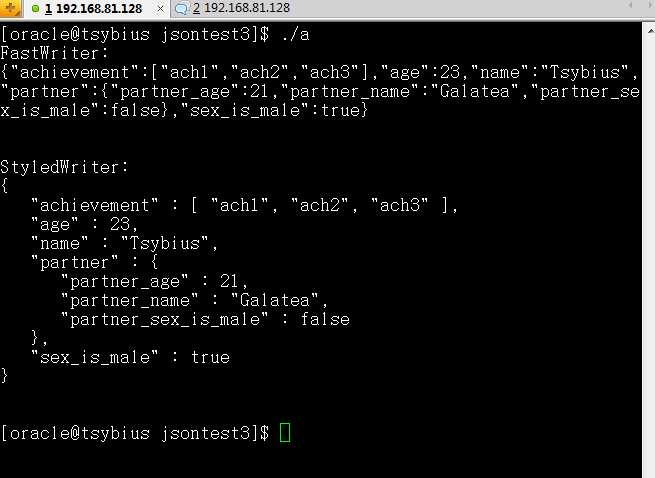
#include <iostream>#include <fstream>#include "json/json.h"using namespace std;int main(){ //根节点 Json::Value root; //根节点属性 root["name"] = Json::Value("Tsybius"); root["age"] = Json::Value(23); root["sex_is_male"] = Json::Value(true); //子节点 Json::Value partner; //子节点属性 partner["partner_name"] = Json::Value("Galatea"); partner["partner_age"] = Json::Value(21); partner["partner_sex_is_male"] = Json::Value(false); //子节点挂到根节点上 root["partner"] = Json::Value(partner); //数组形式 root["achievement"].append("ach1"); root["achievement"].append("ach2"); root["achievement"].append("ach3"); //直接输出 cout << "FastWriter:" << endl; Json::FastWriter fw; cout << fw.write(root) << endl << endl; //缩进输出 cout << "StyledWriter:" << endl; Json::StyledWriter sw; cout << sw.write(root) << endl << endl; //输出到文件 ofstream os; os.open("PersonalInfo"); os << sw.write(root); os.close(); return 0;} |
makefile
|
1
2
3
4
5
6
7
8
|
LIB=-L/usr/local/lib/libjson/ -ljson_linux-gcc-4.4.7_libmta: a.o g++ -o a -std=c++0x a.o $(LIB)a.o: a.cpp g++ -c a.cppclean: rm -rf a.o a |
执行结果
生成的文件PersonalInfo.json
|
1
2
3
4
5
6
7
8
9
10
11
|
{ "achievement" : [ "ach1", "ach2", "ach3" ], "age" : 23, "name" : "Tsybius", "partner" : { "partner_age" : 21, "partner_name" : "Galatea", "partner_sex_is_male" : false }, "sex_is_male" : true} |
END
C++操作Json字符串的更多相关文章
- JS 操作JSON字符串
用Js的eval解析JSON中的注意点 在JS中将JSON的字符串解析成JSON数据格式,一般有两种方式: 1.一种为使用eval()函数. 2. 使用Function对象来进行返回解析. 使用eva ...
- 使用 Newtonsoft.Json 操作 JSON 字符串
一.把实体类转化为 JSON 字符串 1. 为实体类赋值 SenderFromMQSearch senderFromMQSearch = new SenderFromMQSearch(); sende ...
- Newtonsoft.Json 操作 JSON 字符串
Newtonsoft.Json介绍 在做开发的时候,很多数据交换都是以json格式传输的.而使用Json的时候,我们很多时候会涉及到几个序列化对象的使用:DataContractJsonSeriali ...
- 基于 Vue.js 之 iView UI 框架非工程化实践记要 使用 Newtonsoft.Json 操作 JSON 字符串 基于.net core实现项目自动编译、并生成nuget包 webpack + vue 在dev和production模式下的小小区别 这样入门asp.net core 之 静态文件 这样入门asp.net core,如何
基于 Vue.js 之 iView UI 框架非工程化实践记要 像我们平日里做惯了 Java 或者 .NET 这种后端程序员,对于前端的认识还常常停留在 jQuery 时代,包括其插件在需要时就引 ...
- java操作JSON字符串转换成对象的时候如何可以不建立实体类也能获取数据
引入依赖 <dependency> <groupId>com.alibaba</groupId> <artifactId>fastjson& ...
- 让C#可以像Javascript一样操作Json
Json的简介 JSON(JavaScript Object Notation) 是一种轻量级的数据交换格式.它基于ECMAScript的一个子集. JSON采用完全独立于语言的文本格式,但是也使用了 ...
- C# 技巧(3) C# 操作 JSON
RestAPI中, 经常需要操作json字符串, 需要把json字符串"反序列化"成一个对象, 也需要把一个对象"序列化"成一字符串. C# 操作json, ...
- .NET操作JSON
http://www.cnblogs.com/txw1958/archive/2012/08/01/csharp-json.html JSON文件读入到内存中就是字符串,.NET操作JSON就是生成与 ...
- C#操作JSON学习
JSON(全称为JavaScript Object Notation) 是一种轻量级的数据交换格式.它是基于JavaScript语法标准的一个子集. JSON采用完全独立于语言的文本格式,可以很容易在 ...
随机推荐
- JSP所需要掌握的部分
JSP基本语法 指令 <%@ 指令%> JSP指令是JSP的引擎 主要的两种指令是page和include(taglib) <%@ page import="java.ut ...
- [转]mysql触发器的作用及语法
转自:http://blog.csdn.net/cloudday/article/details/6905590 触发器是一种特殊的存储过程,它在插入,删除或修改特定表中的数据时触发执行,它比数据库本 ...
- [ JSOI 2015 ] Salesman
\(\\\) \(Description\) 给出一棵以\(1\)为根的\(N\)个节点的树,开始的时候你在\(1\)号节点. 除了\(1\)号节点以外,每个点都有访问次数限制\(t_i\),即到达该 ...
- Andorid Scrolling Activity(CoordinatorLayout详情)
1.new project -> Scrolling Activity 2.Layout xml code activity_scrolling.xml <?xml version=&qu ...
- node(koa)微信公众号接口认证
使用微信测试号, 花生壳内网穿透 需要注意 token 两边都是自定义, 需要保持一致, const Koa = require('koa') const sha1 = require('sha1') ...
- html5——多媒体(二)
基本方法 load() //重新加载视频 play() //播放 pause() //暂停 基本属性 currentTime //视频播放的当前进度. duration //视频的总时间 paused ...
- [Windows Server 2008] 安装Apache+PHP+MySQL
★ 欢迎来到[护卫神·V课堂],网站地址:http://v.huweishen.com★ 护卫神·V课堂 是护卫神旗下专业提供服务器教学视频的网站,每周更新视频.★ 本节我们将带领大家:Win2008 ...
- 轻松理解 Android Binder,只需要读这一篇
在 Android 系统中,Binder 起着非常重要的作用,它是整个系统 IPC 的基石.网上已经有很多文章讲述 Binder 的原理,有的讲的比较浅显,没有触及到关键,有的讲的太过于深入底层,难以 ...
- 如何让字体大小<12px
transform:scale( ) -webkit-transform:scale( )
- Lua操作符的优先级
lua 操作符的优先级 lua操作符的优先级 如表所示(从高到低) 在二元操作符中,除了指数操作符 “^” 和连接操作符 “..” 是 ”右结合” 的,是所有其他操作符都是 “左结合” 的.因此如 ...