
HBase编程 API入门系列之modify(管理端而言)(10)
这里,我带领大家,学习更高级的,因为,在开发中,尽量不能去服务器上修改表。
所以,在管理端来修改HBase表。采用线程池的方式(也是生产开发里首推的)
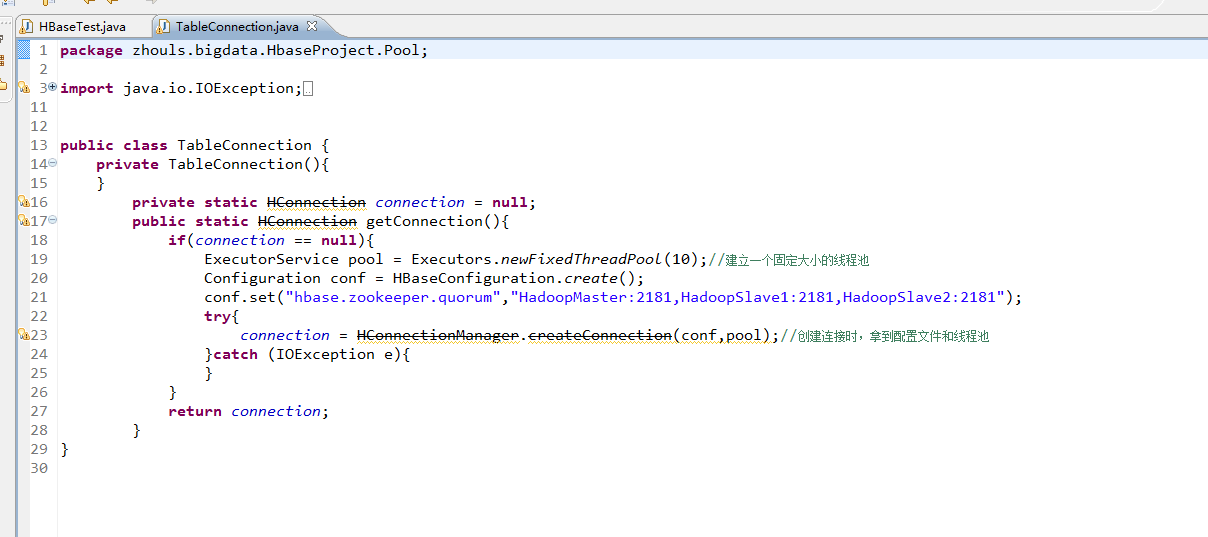
package zhouls.bigdata.HbaseProject.Pool;
import java.io.IOException;
import java.util.concurrent.ExecutorService;
import java.util.concurrent.Executors;
import org.apache.hadoop.conf.Configuration;
import org.apache.hadoop.hbase.HBaseConfiguration;
import org.apache.hadoop.hbase.client.HConnection;
import org.apache.hadoop.hbase.client.HConnectionManager;
public class TableConnection {
private TableConnection(){
}
private static HConnection connection = null;
public static HConnection getConnection(){
if(connection == null){
ExecutorService pool = Executors.newFixedThreadPool(10);//建立一个固定大小的线程池
Configuration conf = HBaseConfiguration.create();
conf.set("hbase.zookeeper.quorum","HadoopMaster:2181,HadoopSlave1:2181,HadoopSlave2:2181");
try{
connection = HConnectionManager.createConnection(conf,pool);//创建连接时,拿到配置文件和线程池
}catch (IOException e){
}
}
return connection;
}
}
1、修改HBase表
暂时,有错误
package zhouls.bigdata.HbaseProject.Pool;
import java.io.IOException;
import zhouls.bigdata.HbaseProject.Pool.TableConnection;
import javax.xml.transform.Result;
import org.apache.hadoop.conf.Configuration;
import org.apache.hadoop.hbase.Cell;
import org.apache.hadoop.hbase.CellUtil;
import org.apache.hadoop.hbase.HBaseConfiguration;
import org.apache.hadoop.hbase.HColumnDescriptor;
import org.apache.hadoop.hbase.HTableDescriptor;
import org.apache.hadoop.hbase.MasterNotRunningException;
import org.apache.hadoop.hbase.NamespaceDescriptor;
import org.apache.hadoop.hbase.TableName;
import org.apache.hadoop.hbase.ZooKeeperConnectionException;
import org.apache.hadoop.hbase.client.Delete;
import org.apache.hadoop.hbase.client.Get;
import org.apache.hadoop.hbase.client.HBaseAdmin;
import org.apache.hadoop.hbase.client.HTable;
import org.apache.hadoop.hbase.client.HTableInterface;
import org.apache.hadoop.hbase.client.Put;
import org.apache.hadoop.hbase.client.ResultScanner;
import org.apache.hadoop.hbase.client.Scan;
import org.apache.hadoop.hbase.util.Bytes;
public class HBaseTest {
public static void main(String[] args) throws Exception {
// HTable table = new HTable(getConfig(),TableName.valueOf("test_table"));//表名是test_table
// Put put = new Put(Bytes.toBytes("row_04"));//行键是row_04
// put.add(Bytes.toBytes("f"),Bytes.toBytes("name"),Bytes.toBytes("Andy1"));//列簇是f,列修饰符是name,值是Andy0
// put.add(Bytes.toBytes("f2"),Bytes.toBytes("name"),Bytes.toBytes("Andy3"));//列簇是f2,列修饰符是name,值是Andy3
// table.put(put);
// table.close();
// Get get = new Get(Bytes.toBytes("row_04"));
// get.addColumn(Bytes.toBytes("f1"), Bytes.toBytes("age"));如现在这样,不指定,默认把所有的全拿出来
// org.apache.hadoop.hbase.client.Result rest = table.get(get);
// System.out.println(rest.toString());
// table.close();
// Delete delete = new Delete(Bytes.toBytes("row_2"));
// delete.deleteColumn(Bytes.toBytes("f1"), Bytes.toBytes("email"));
// delete.deleteColumn(Bytes.toBytes("f1"), Bytes.toBytes("name"));
// table.delete(delete);
// table.close();
// Delete delete = new Delete(Bytes.toBytes("row_04"));
//// delete.deleteColumn(Bytes.toBytes("f"), Bytes.toBytes("name"));//deleteColumn是删除某一个列簇里的最新时间戳版本。
// delete.deleteColumns(Bytes.toBytes("f"), Bytes.toBytes("name"));//delete.deleteColumns是删除某个列簇里的所有时间戳版本。
// table.delete(delete);
// table.close();
// Scan scan = new Scan();
// scan.setStartRow(Bytes.toBytes("row_01"));//包含开始行键
// scan.setStopRow(Bytes.toBytes("row_03"));//不包含结束行键
// scan.addColumn(Bytes.toBytes("f"), Bytes.toBytes("name"));
// ResultScanner rst = table.getScanner(scan);//整个循环
// System.out.println(rst.toString());
// for (org.apache.hadoop.hbase.client.Result next = rst.next();next !=null;next = rst.next() )
// {
// for(Cell cell:next.rawCells()){//某个row key下的循坏
// System.out.println(next.toString());
// System.out.println("family:" + Bytes.toString(CellUtil.cloneFamily(cell)));
// System.out.println("col:" + Bytes.toString(CellUtil.cloneQualifier(cell)));
// System.out.println("value" + Bytes.toString(CellUtil.cloneValue(cell)));
// }
// }
// table.close();
HBaseTest hbasetest =new HBaseTest();
// hbasetest.insertValue();
// hbasetest.getValue();
// hbasetest.delete();
// hbasetest.scanValue();
hbasetest.createTable("test_table3", "f");//先判断表是否存在,再来创建HBase表(生产开发首推)
// hbasetest.deleteTable("test_table4");//先判断表是否存在,再来删除HBase表(生产开发首推)
// hbasetest.modifyTable("test_table","row_02","f",'f:age');
}
//生产开发中,建议这样用线程池做
// public void insertValue() throws Exception{
// HTableInterface table = TableConnection.getConnection().getTable(TableName.valueOf("test_table"));
// Put put = new Put(Bytes.toBytes("row_01"));//行键是row_01
// put.add(Bytes.toBytes("f"),Bytes.toBytes("name"),Bytes.toBytes("Andy0"));
// table.put(put);
// table.close();
// }
//生产开发中,建议这样用线程池做
// public void getValue() throws Exception{
// HTableInterface table = TableConnection.getConnection().getTable(TableName.valueOf("test_table"));
// Get get = new Get(Bytes.toBytes("row_03"));
// get.addColumn(Bytes.toBytes("f"), Bytes.toBytes("name"));
// org.apache.hadoop.hbase.client.Result rest = table.get(get);
// System.out.println(rest.toString());
// table.close();
// }
//
//生产开发中,建议这样用线程池做
// public void delete() throws Exception{
// HTableInterface table = TableConnection.getConnection().getTable(TableName.valueOf("test_table"));
// Delete delete = new Delete(Bytes.toBytes("row_01"));
// delete.deleteColumn(Bytes.toBytes("f"), Bytes.toBytes("name"));//deleteColumn是删除某一个列簇里的最新时间戳版本。
//// delete.deleteColumns(Bytes.toBytes("f"), Bytes.toBytes("name"));//delete.deleteColumns是删除某个列簇里的所有时间戳版本。
// table.delete(delete);
// table.close();
//
// }
//生产开发中,建议这样用线程池做
// public void scanValue() throws Exception{
// HTableInterface table = TableConnection.getConnection().getTable(TableName.valueOf("test_table"));
// Scan scan = new Scan();
// scan.setStartRow(Bytes.toBytes("row_02"));//包含开始行键
// scan.setStopRow(Bytes.toBytes("row_04"));//不包含结束行键
// scan.addColumn(Bytes.toBytes("f"), Bytes.toBytes("name"));
// ResultScanner rst = table.getScanner(scan);//整个循环
// System.out.println(rst.toString());
// for (org.apache.hadoop.hbase.client.Result next = rst.next();next !=null;next = rst.next() )
// {
// for(Cell cell:next.rawCells()){//某个row key下的循坏
// System.out.println(next.toString());
// System.out.println("family:" + Bytes.toString(CellUtil.cloneFamily(cell)));
// System.out.println("col:" + Bytes.toString(CellUtil.cloneQualifier(cell)));
// System.out.println("value" + Bytes.toString(CellUtil.cloneValue(cell)));
// }
// }
// table.close();
// }
//
//生产开发中,建议这样用线程池做
public void createTable(String tableName,String family) throws MasterNotRunningException, ZooKeeperConnectionException, IOException{
Configuration conf = HBaseConfiguration.create(getConfig());
HBaseAdmin admin = new HBaseAdmin(conf);
HTableDescriptor tableDesc = new HTableDescriptor(TableName.valueOf(tableName));
HColumnDescriptor hcd = new HColumnDescriptor(family);
hcd.setMaxVersions(3);
// hcd.set//很多的带创建操作,我这里只抛砖引玉的作用
tableDesc.addFamily(hcd);
if (!admin.tableExists(tableName)){
admin.createTable(tableDesc);
}else{
System.out.println(tableName + "exist");
}
admin.close();
}
public void modifyTable(String tableName,String rowkey,String family,HColumnDescriptor hColumnDescriptor) throws MasterNotRunningException, ZooKeeperConnectionException, IOException{
Configuration conf = HBaseConfiguration.create(getConfig());
HBaseAdmin admin = new HBaseAdmin(conf);
// HTableDescriptor tableDesc = new HTableDescriptor(TableName.valueOf(tableName));
HColumnDescriptor hcd = new HColumnDescriptor(family);
// NamespaceDescriptor nsd = admin.getNamespaceDescriptor(tableName);
// nsd.setConfiguration("hbase.namespace.quota.maxregion", "10");
// nsd.setConfiguration("hbase.namespace.quota.maxtables", "10");
if (admin.tableExists(tableName)){
admin.modifyColumn(tableName, hcd);
// admin.modifyTable(tableName, tableDesc);
// admin.modifyNamespace(nsd);
}else{
System.out.println(tableName + "not exist");
}
admin.close();
}
//生产开发中,建议这样用线程池做
// public void deleteTable(String tableName)throws MasterNotRunningException, ZooKeeperConnectionException, IOException{
// Configuration conf = HBaseConfiguration.create(getConfig());
// HBaseAdmin admin = new HBaseAdmin(conf);
// if (admin.tableExists(tableName)){
// admin.disableTable(tableName);
// admin.deleteTable(tableName);
// }else{
// System.out.println(tableName + "not exist");
// }
// admin.close();
// }
public static Configuration getConfig(){
Configuration configuration = new Configuration();
// conf.set("hbase.rootdir","hdfs:HadoopMaster:9000/hbase");
configuration.set("hbase.zookeeper.quorum", "HadoopMaster:2181,HadoopSlave1:2181,HadoopSlave2:2181");
return configuration;
}
}
HBase编程 API入门系列之modify(管理端而言)(10)的更多相关文章
- HBase编程 API入门系列之create(管理端而言)(8)
大家,若是看过我前期的这篇博客的话,则 HBase编程 API入门系列之put(客户端而言)(1) 就知道,在这篇博文里,我是在HBase Shell里创建HBase表的. 这里,我带领大家,学习更高 ...
- HBase编程 API入门系列之delete(客户端而言)(3)
心得,写在前面的话,也许,中间会要多次执行,连接超时,多试试就好了. 前面的基础,如下 HBase编程 API入门系列之put(客户端而言)(1) HBase编程 API入门系列之get(客户端而言) ...
- HBase编程 API入门系列之get(客户端而言)(2)
心得,写在前面的话,也许,中间会要多次执行,连接超时,多试试就好了. 前面是基础,如下 HBase编程 API入门系列之put(客户端而言)(1) package zhouls.bigdata.Hba ...
- HBase编程 API入门系列之HTable pool(6)
HTable是一个比较重的对此,比如加载配置文件,连接ZK,查询meta表等等,高并发的时候影响系统的性能,因此引入了“池”的概念. 引入“HBase里的连接池”的目的是: 为了更高的,提高程序的并发 ...
- HBase编程 API入门系列之delete(管理端而言)(9)
大家,若是看过我前期的这篇博客的话,则 HBase编程 API入门之delete(客户端而言) 就知道,在这篇博文里,我是在客户端里删除HBase表的. 这里,我带领大家,学习更高级的,因为,在开发中 ...
- HBase编程 API入门系列之工具Bytes类(7)
这是从程度开发层面来说,为了方便和提高开发人员. 这个工具Bytes类,有很多很多方法,帮助我们HBase编程开发人员,提高开发. 这里,我只赘述,很常用的! package zhouls.bigda ...
- HBase编程 API入门系列之put(客户端而言)(1)
心得,写在前面的话,也许,中间会要多次执行,连接超时,多试试就好了. [hadoop@HadoopSlave1 conf]$ cat regionservers HadoopMasterHadoopS ...
- HBase编程 API入门系列之scan(客户端而言)(5)
心得,写在前面的话,也许,中间会要多次执行,连接超时,多试试就好了. package zhouls.bigdata.HbaseProject.Test1; import javax.xml.trans ...
- HBase编程 API入门系列之delete.deleteColumn和delete.deleteColumns区别(客户端而言)(4)
心得,写在前面的话,也许,中间会要多次执行,连接超时,多试试就好了. delete.deleteColumn和delete.deleteColumns区别是: deleteColumn是删除某一个列簇 ...
随机推荐
- 读书笔记「Python编程:从入门到实践」_9.类
9.1 创建和使用类 面向对象编程——Object Oriented Programming,简称OOP,是一种程序设计思想. OOP把对象作为程序的基本单元,一个对象包含了数据和操作数据的函数. 把 ...
- C# tostring("0000000")
public string ConverNo(string str) { string result = ""; ]; ; i < chars.Length; i++) ch ...
- django分页功能,templatetags的应用
django 将不会将得到的html代码自动转化 from django.utils.html import format_html html =''' <a href='http://www. ...
- react工具库
采用了react框架后,需要找到一些常用的库,常见的需求比如: 1)react生成二维码 2)react的轮播banner图 随着react的社区的壮大,以上的需求都有专门的库帮我们做这个: 1)re ...
- Jmeter的参数签名测试
简介 参数签名可以保证开发的者的信息被冒用后,信息不会被泄露和受损.原因在于接入者和提供者都会对每一次的接口访问进行签名和验证. 签名sign的方式是目前比较常用的方式. 第1步:接入者把需求访问的接 ...
- CentOS 7.2 安装Python3.5.2
系统环境: CentOS 7.2 x86_64 安装相关包 (1)# yum install zlib-devel bzip2-devel openssl-devel ncurses-devel sq ...
- Golang Gin实践 番外 请入门 Makefile
Golang Gin实践 番外 请入门 Makefile 原文地址:Golang Gin实践 番外 请入门 Makefile 前言 含一定复杂度的软件工程,基本上都是先编译 A,再依赖 B,再编译 C ...
- spi简介(自我理解)
因为项目中用到spi总线,网上看了下资料,总感觉云山雾罩的,就向身边的同事问了下,他给我解释了下, 我现在把自己理解的写下来 spi一共四条线,一条选择线,一条数据线,2条数据线.spi是一对多设备, ...
- IMSI MCC MNC概念
TelephonyManager telManager = (TelephonyManager) getSystemService(Context.TELEPHONY_SERVICE); /** 获取 ...
- Unity 利用FFmpeg实现录屏、直播推流、音频视频格式转换、剪裁等功能
目录 一.FFmpeg简介. 二.FFmpeg常用参数及命令. 三.FFmpeg在Unity 3D中的使用. 1.FFmpeg 录屏. 2.FFmpeg 推流. 3.FFmpeg 其他功能简述. 一. ...