
C#简单工厂模式学习
刚学习设计模式,还不是太了解,感觉只有多数据库的情况下才用的到,待学习
首先创建空白解决方案,依次创建类库Model,IDAL,SqlServerDAL,DALFactory,BLL,DBUtility,并创建一个窗体程序
首先在窗体程序的App.Config中添加以下设置
  <appSettings>
    //指定DAL调用类型,DALFactory中使用

    <add key="DAL" value=" Nothwind.SqlServerDAL"/>

  </appSettings>

  <connectionStrings>

    <add name="con" connectionString="Data Source=127.0.0.1;Initial Catalog=Northwind;User ID=sa;Password=*******;Connect Timeout=30;Encrypt=False;TrustServerCertificate=False;ApplicationIntent=ReadWrite;MultiSubnetFailover=False"/>

  </connectionStrings>
在DBUtility中添加助手函数,这里只为了读取连接字符串
namespace Nothwind.DBUtility

{

    public class SqlHelper

    {

        public static string connStr

        {

            get { return ConfigurationManager.ConnectionStrings["con"].ConnectionString; }

        }

    }

}
在Nothwind数据库中创建一张表Studen,为了学习及演示方便只创建2个字段Id Int ,Name nvarchar(50),并根据数据库结构创建模型类
namespace Nothwind.Model

{

    public class Student

    {

        public int Id { get; set; }

        public string Name { get; set; }

    }

}
创建接口类IStudent.cs,IDAL需要添加引用Model类
namespace Nothwind.IDAL

{

    public interface IStudent

    {

        List<Model.Student> GetStudents(); //读取所有Student

        Model.Student GetStudentById(int id); //根据Id返回单个Student

    }

}
在SqlServerDAL中创建接口实现类Student.cs,SqlServerDAL需要添加DBUtility,IStuden,Model三个项目引用,因为需要读取数据库所以NuGet中安装Dapper
namespace Nothwind.SqlServerDAL

{

    public class Student : IDAL.IStudent

    {

        //根据Id返回单个Student

        public Model.Student GetStudentById(int id)

        {

            using (IDbConnection conn = new SqlConnection(DBUtility.SqlHelper.connStr))

            {

                string sql = "SELECT Id,Name FROM Student WHERE Id=@Id";

                DynamicParameters parameters = new DynamicParameters();

                parameters.Add("Id", id);

                Model.Student students = conn.Query<Model.Student>(sql, parameters).FirstOrDefault();

                return students;

            }

        }

        //返回所有Student

        public List<Model.Student> GetStudents()

        {

            using (IDbConnection conn = new SqlConnection(DBUtility.SqlHelper.connStr))

            {

                string sql = "SELECT Id,Name FROM Student";

                IEnumerable<Model.Student> students = conn.Query<Model.Student>(sql);

                return students.ToList();

            }

        }

    }

}
在DALFactory类库中添加DataAccess.cs,为了根据配置文件选择不同的数据库,创建DALFactory。返回程序集的指定类的实例。需要引用IDAL,DBUtility
namespace Nothwind.DALFactory

{

    public class DataAccess

    {

        private static readonly string path = ConfigurationManager.AppSettings["DAL"];

        public static IDAL.IStudent CreateStudent()

        {

            object objectType = Assembly.Load(path).CreateInstance(path + ".Student");

            return (IDAL.IStudent)objectType;

        }

    }

}
BLL类库中添加Student.cs,并添加引用Model,IDAL,DALFactory
namespace Nothwind.BLL

{

    public class Student

    {

        public static Model.Student GetStudentById(int id)

        {

            IDAL.IStudent student = DALFactory.DataAccess.CreateStudent();

            return student.GetStudentById(id);

        }

        public static List<Model.Student> GetStudents()

        {

            IDAL.IStudent student = DALFactory.DataAccess.CreateStudent();

            return student.GetStudents();

        }

    }

}
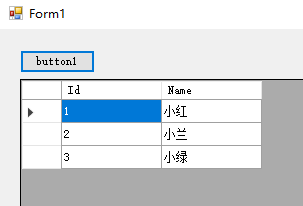
在窗体程序中添加一个button及dataGridView,添加以下代码
private void button1_Click(object sender, EventArgs e)

{

    List<Model.Student> student = new List<Model.Student>();

    student = BLL.Student.GetStudents();

    dataGridView1.DataSource = student;

}
效果展示
C#简单工厂模式学习的更多相关文章
- 【2016-10-17】【坚持学习】【Day8】【简单工厂模式】
今天学习简单工厂模式, 结构 一个抽象产品 多个具体产品 一个工厂类,通过传入参数,new出不同的产品 代码: abstract class Product { //所有产品类的公共业务方法 publ ...
- Java设计模式学习记录-简单工厂模式、工厂方法模式
前言 之前介绍了设计模式的原则和分类等概述.今天开启设计模式的学习,首先要介绍的就是工厂模式,在介绍工厂模式前会先介绍一下简单工厂模式,这样由浅入深来介绍. 简单工厂模式 做法:创建一个工厂(方法或类 ...
- 再起航,我的学习笔记之JavaScript设计模式05(简单工厂模式)
我的学习笔记是根据我的学习情况来定期更新的,预计2-3天更新一章,主要是给大家分享一下,我所学到的知识,如果有什么错误请在评论中指点出来,我一定虚心接受,那么废话不多说开始我们今天的学习分享吧! 前几 ...
- Java设计模式学习笔记(二) 简单工厂模式
前言 本篇是设计模式学习笔记的其中一篇文章,如对其他模式有兴趣,可从该地址查找设计模式学习笔记汇总地址 正文开始... 1. 简介 简单工厂模式不属于GoF23中设计模式之一,但在软件开发中应用也较为 ...
- 学习设计模式第二十七 - GoF之外简单工厂模式
示例代码来自<深入浅出设计模式>和<大话设计模式> 概述 简单工厂模式又被称为静态工厂模式,属于类的创建型模式.其实质是由一个工厂类根据传入的参量,动态决定应该创建出哪一个产品 ...
- C#简单工厂模式(学习Learning hard讲解笔记)
原味地址http://www.cnblogs.com/zhili/p/SimpleFactory.html 简单工厂模式通俗的理解就是用户与工厂的关系,用户用的东西,工厂来生成,责任明确. 就像大神展 ...
- C#设计模式学习笔记:简单工厂模式(工厂方法模式前奏篇)
本笔记摘抄自:https://www.cnblogs.com/PatrickLiu/p/7551373.html,记录一下学习过程以备后续查用. 一.引言 简单工厂模式并不属于GoF23里面的设计模式 ...
- C++简单工厂模式的学习
我们先从最常见的C++类的一个实现开始说起, class API { public: virtual test(std::string s)=0; protected: API(){}; }; cla ...
- 设计模式(二)简单工厂模式(Simple Factory Pattern)
一.引言 这个系列也是自己对设计模式的一些学习笔记,希望对一些初学设计模式的人有所帮助的,在上一个专题中介绍了单例模式,在这个专题中继续为大家介绍一个比较容易理解的模式——简单工厂模式. 二.简单工厂 ...
随机推荐
- shell的图形排列
目录 一.矩形 二.直角三角形 三.倒直角三角形 四.靠右的直角三角形 五.等腰三角形 六.平行四边形 七.等腰梯形 八.菱形 九.可变动菱形 一.矩形 二.直角三角形 三.倒直角三角形 四.靠右的直 ...
- CentOS的crond系统定时服务
crond 服务管理 [root@node01 ~]# service crond start (启动服务) [root@node01 ~]# service crond stop ...
- 使用Windows客户端连接Linux系统中的MySQL时产生的错误已经解决
.personSunflowerP { background: rgba(51, 153, 0, 0.66); border-bottom: 1px solid rgba(0, 102, 0, 1); ...
- 一个tomcat配置多个不同端口的项目
1.将要同时启动的项目放入不同的webapps文件夹中 2.修改tomcat安装目录下的conf-->setting.xml文件 <?xml version="1.0" ...
- SQL 练习33
查询课程编号为 01 且课程成绩在 80 分以上的学生的学号和姓名 SELECT Student.SId,Student.Sname,Cname,score from Student,Course,S ...
- JavaWeb学习笔记(四)
本文内容 1. 会话技术 1. Cookie 2. Session 2. JSP:入门学习 会话技术 1. 会话:一次会话中包含多次请求和响应. * 一次会话:浏览器第一次给服务器资源发送请求,会话建 ...
- idea打断点后发现被标记的断点处那一行整行被标记了其他颜色,前面没有断点标识的红点
问题如下: 最后发现有两种解决办法吧,直接走起! 第一种方法: 在View====>Active Editor====>Show Gutter Icons,勾选此选项,发现小红点出来了: ...
- SpringCloud(5)之分布式锁实现
01为什么用分布式锁 在讨论这个问题之前,我们先来看一个业务场景:系统A是一个电商系统,目前是一台机器部署,系统中有一个用户下订单的接口,但是用户下订单之前一定要去检查一下库存,确保库存足够了才会给用 ...
- C# 中的异步问题 Task
public class SharedData { public int Value { get; set; } } public class Test { async Task ModifyValu ...
- 转:C语言自增自減问题总结
C语言自增自減问题总结 在程序设计中,经常遇到"i=i+1"和"i=i-1"这两种极为常用的操作.C语言为这种操作提供了两个更为简洁的运算符,即++和--,分别 ...