
wpf 中的 自定义控件的 binding

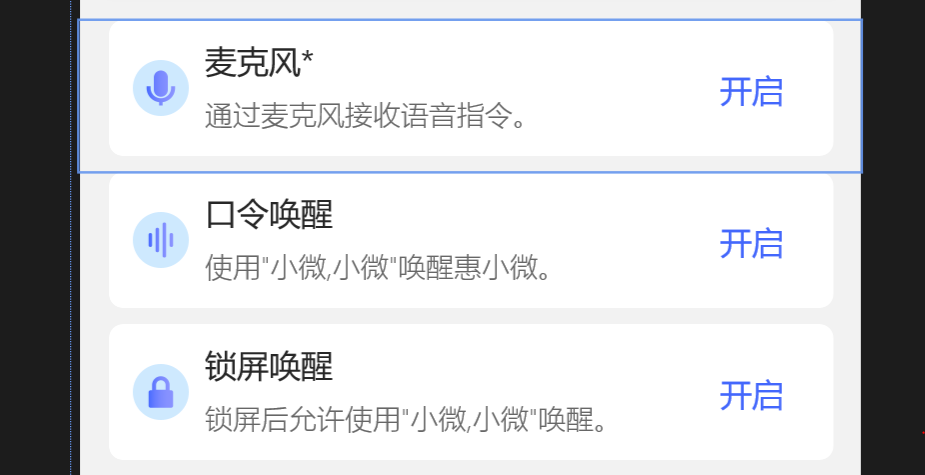
XMl 代码
-------------------------------------------------------------------------------------------------------------------------------
<UserControl
x:Class="Xiaowei.Controls.PermissionBlock"
xmlns="http://schemas.microsoft.com/winfx/2006/xaml/presentation"
xmlns:x="http://schemas.microsoft.com/winfx/2006/xaml"
xmlns:local="using:Xiaowei.Controls"
xmlns:d="http://schemas.microsoft.com/expression/blend/2008"
xmlns:mc="http://schemas.openxmlformats.org/markup-compatibility/2006"
xmlns:tk="using:Microsoft.Toolkit.Uwp.UI.Controls"
mc:Ignorable="d"
d:DesignHeight="200"
d:DesignWidth="480"
Height="76"
x:Name="permissionBlock">
<UserControl.Resources>
<Storyboard x:Name="GIFStoryBoard">
<DoubleAnimation
x:Name="GIFDoubleAnimation"
EnableDependentAnimation="True"
To="176" Duration="00:00:0.3"
Storyboard.TargetName="borderGrid"
Storyboard.TargetProperty="Height">
<DoubleAnimation.EasingFunction>
<PowerEase EasingMode="EaseInOut"/>
</DoubleAnimation.EasingFunction>
</DoubleAnimation>
<DoubleAnimation
x:Name="GIFBorderDoubleAnimation"
EnableDependentAnimation="True"
To="1" Duration="00:00:0.3"
Storyboard.TargetName="shadowBorder"
Storyboard.TargetProperty="Opacity">
<DoubleAnimation.EasingFunction>
<PowerEase EasingMode="EaseInOut"/>
</DoubleAnimation.EasingFunction>
</DoubleAnimation>
</Storyboard>
</UserControl.Resources>
<Grid x:Name="borderGrid" Height="76" VerticalAlignment="Top" Margin="0,0,0,-200">
<tk:DropShadowPanel Opacity="0"
x:Name="shadowBorder"
VerticalContentAlignment="Stretch"
Margin="14,0,14,8"
HorizontalContentAlignment="Stretch">
<Grid Background="White"
CornerRadius="7" >
</Grid>
</tk:DropShadowPanel>
<Grid Background="White" CornerRadius="7" Margin="14,0,14,8" VerticalAlignment="Stretch" PointerEntered="PointerEntered" PointerExited="PointerExited">
<Grid.RowDefinitions>
<RowDefinition Height="auto"/>
<RowDefinition Height="1*"/>
</Grid.RowDefinitions>
<Image
Width="28"
Height="28"
Margin="12,20,0,20"
HorizontalAlignment="Left"
VerticalAlignment="Center"
Source="{Binding Icon, ElementName=permissionBlock, Mode=OneWay}"
/>
<TextBlock
HorizontalAlignment="Left"
VerticalAlignment="Top"
FontSize="16"
Foreground="#272727"
Margin="48,12,0,0"
Text="{Binding Title, ElementName=permissionBlock, Mode=OneWay}">
</TextBlock>
<TextBlock
Foreground="#666666"
HorizontalAlignment="Left"
VerticalAlignment="Bottom"
FontSize="14"
FontWeight="Light"
Text="{Binding Comment, ElementName=permissionBlock, Mode=OneWay}"
Margin="48,0,0,11">
</TextBlock>
<Button
Style="{ThemeResource ButtonStyleTransBack}"
Content="开启"
Click="ActiveButton_Click"
HorizontalAlignment="Right"
Margin="0,0,25,0"
Foreground="#4367FC"
FontSize="16"/>
<Image
Grid.Row="1" Height="119" Margin="12,0,12,12"
Source="{Binding GIFSource, ElementName=permissionBlock, Mode=OneWay}"
/>
</Grid>
</Grid>
</UserControl>
C# code
-----------------------------------------------------------------------------------------------------------------------------------
using System;
using Windows.UI;
using Windows.UI.Xaml;
using Windows.UI.Xaml.Controls;
using Windows.UI.Xaml.Media;
// The User Control item template is documented at https://go.microsoft.com/fwlink/?LinkId=234236
namespace Xiaowei.Controls
{
public sealed partial class PermissionBlock : UserControl
{
public static DependencyProperty TitleProperty { get; } = DependencyProperty.Register(
"Title", typeof(string), typeof(PermissionBlock), new PropertyMetadata("")
);
public string Title
{
get
{
return (string)GetValue(TitleProperty);
}
set
{
SetValue(TitleProperty, value);
}
}
public static DependencyProperty CommentProperty { get; } = DependencyProperty.Register(
"Comment", typeof(string), typeof(PermissionBlock), new PropertyMetadata("")
);
public string Comment
{
get
{
return (string)GetValue(CommentProperty);
}
set
{
SetValue(CommentProperty, value);
}
}
public static DependencyProperty IconProperty { get; } = DependencyProperty.Register(
"Icon", typeof(ImageSource), typeof(PermissionBlock), new PropertyMetadata(null)
);
public ImageSource Icon
{
get
{
return (ImageSource)GetValue(IconProperty);
}
set
{
SetValue(IconProperty, value);
}
}
public static DependencyProperty GIFSourceProperty { get; } = DependencyProperty.Register(
"GIFSource", typeof(ImageSource), typeof(PermissionBlock), new PropertyMetadata(null)
);
public ImageSource GIFSource
{
get
{
return (ImageSource)GetValue(GIFSourceProperty);
}
set
{
SetValue(GIFSourceProperty, value);
}
}
private void ShowGif()
{
GIFDoubleAnimation.To = 210;
GIFBorderDoubleAnimation.To = 1;
GIFStoryBoard.Begin();
}
private void HideGif()
{
GIFDoubleAnimation.To = 76;
GIFBorderDoubleAnimation.To = 0;
GIFStoryBoard.Begin();
}
public static DependencyProperty IsAllowProperty { get; } = DependencyProperty.Register(
"IsAllow", typeof(bool), typeof(PermissionBlock), new PropertyMetadata(false, IsAllowPropertyChanged)
);
private static void IsAllowPropertyChanged(DependencyObject d, DependencyPropertyChangedEventArgs e)
{
if ((bool)e.NewValue)
{
((PermissionBlock)d).Hide();
}
else
{
((PermissionBlock)d).Show();
}
}
public bool IsAllow
{
get
{
return (bool)GetValue(IsAllowProperty);
}
set
{
SetValue(IsAllowProperty, value);
}
}
private void Show()
{
Visibility = Visibility.Visible;
}
private void Hide()
{
Visibility = Visibility.Collapsed;
HideGif();
}
public PermissionBlock()
{
this.InitializeComponent();
}
public event Action Click;
private void ActiveButton_Click(object sender, RoutedEventArgs e)
{
Click?.Invoke();
}
private void PointerEntered(object sender, Windows.UI.Xaml.Input.PointerRoutedEventArgs e)
{
ShowGif();
}
private void PointerExited(object sender, Windows.UI.Xaml.Input.PointerRoutedEventArgs e)
{
HideGif();
}
}
}
wpf 中的 自定义控件的 binding的更多相关文章
- WPF中关于自定义控件的滚动条鼠标停留在内容上鼠标滚轮滚动无效的问题
问题起因:在一个用户控件里放置了1个TreeView垂直顺序放置. 当用户控件中的内容超过面板大小时,滚动条会自动出现 ,但是只有当鼠标指示在右边滚动条的那一条位置时,才支持鼠标滚轴滚动. 点在控件内 ...
- WPF中的数据绑定Data Binding使用小结
完整的数据绑定的语法说明可以在这里查看: http://www.nbdtech.com/Free/WpfBinding.pdf MSDN资料: Data Binding: Part 1 http:// ...
- 在WPF中自定义控件
一, 不一定需要自定义控件在使用WPF以前,动辄使用自定义控件几乎成了惯性思维,比如需要一个带图片的按钮,但在WPF中此类任务却不需要如此大费周章,因为控件可以嵌套使用以及可以为控件外观打造一套新的样 ...
- 【转】WPF中Binding的技巧(一)
WPF中Binding的技巧(一) 在WPF应用的开发过程中Binding是一个非常重要的部分. 在实际开发过程中Binding的不同种写法达到的效果相同但事实是存在很大区别的. 这里将实际中碰到 ...
- 【转】WPF中的Binding技巧(二)
WPF中的Binding技巧(二) 接上篇, 我们来看一看Elementname,Source,RelativeSource 三种绑定的方式 1.ElementName顾名思义就是根据Ui元素 ...
- Binding在WPF中的使用
闲来无事,不想打DOTA,在这里小小研究下wpf中关于Binding的东西. 咯咯 在我们印象中,Binding的意思是“绑定”,这个“绑”大概取自于Bind这个单词吧,这么理解的话就是以音译英了,没 ...
- WPF中添加Winform用户自定义控件
过程:创建WPF工程->创建Winform用户自定义控件工程->WPF中引用控件->添加到Xaml页面 1.首先在WPF工程的解决方案上右击选择添加新建项目: 选择Windows窗体 ...
- WPF binding<一> Data Binding在WPF中的地位
在代码中看到 <Image Source="{Binding ElementName=LBoxImages, Path=SelectedItem.Source}" /> ...
- 在WPF中自定义控件(3) CustomControl (上)
原文:在WPF中自定义控件(3) CustomControl (上) 在WPF中自定义控件(3) CustomControl (上) 周银辉 ...
随机推荐
- UI自动化测试框架Gauge 碰到无法识别Undefined Steps 红色波纹标记
如果碰到无法识别的情况,例如下面的红色波纹,可以试一下: 第一步: 第二步: 不勾选'offline work' 第三部:刷新之后可以重新编译.
- CTF-Streamgame2-writeup
Streamgame2 题目信息: 附件: streamgame2.py from flag import flag assert flag.startswith("flag{") ...
- 前端性能优化实践-gzip
一名优秀的前端工程师必备技能之一就是要会性能监控,并且能相应的进行性能优化.最近,有需求将项目做一些优化,提升用户的体验.看了一下项目并没有开启gzip,于是着手实现gzip压缩,下面就是具体的实践过 ...
- 购买二手iPhone需要注意什么?这份避坑指南请收好!
iPhone二手机市场一直非常火热,有时甚至出现供不应求的情况.主要是因为新机的价格不便宜,没什么性价比,很多小伙伴会选择低价购买二手iPhone,价格基本只要新机的二到五折.不过二手机的水深相信大家 ...
- P5591 小猪佩奇学数学
P5591 小猪佩奇学数学 知识点 二项式定理 \[(x+1)^n=\sum_{i=0}^n\binom nix^i \] 单位根反演 \[[n\mid k]=\frac 1n\sum_{i=0}^{ ...
- shell编程-ssh免交互批量分发公钥脚本
脚本基本原理 1.控制端免交互创建秘钥和公钥: 1 ssh-keygen -t rsa -f /root/.ssh/id_rsa -N "" 2.免交互发送公钥 1 sshpass ...
- Skywalking-05:在Skywalking RocketBot上添加监控图表
在 Skywalking RocketBot 上添加监控图表 效果图 该图的一些配置信息如下: 标题为: JVM Thread State Count (Java Service) 指标为: read ...
- AWS 安全信息泄露-----21天烧了27万
安全问题一直都是个老生常谈的话题,对于我们做IT的来说,是更为重视的.从使用开发工具的是否授权合规,到从事的工作内容是否合法.我们都应该认真的思考一下这些问题,毕竟我们要靠IT这门手艺吃饭. 2021 ...
- shell中cmd1 && cmd2 || cmd3的含义
在某些情况下,很多指令我想要一次输入去执行,而不想要分次去执行时,就要用到 && || 了.cmd 1 && cmd21,若cmd1执行完毕之后且正确执行($?=0), ...
- rot位移密码详解(rot5、rot13、rot18、rot47)
最近训练CTF的时候,发现密码学这块的知识不太系统,所以自己接下来会陆陆续续整理出来 rot密码 rot密码其实可以看作是凯撒密码的一种变式 本质都是移位运算 rot密码按种类大致分为以下几类 rot ...