
【转】WPF中Binding的技巧(一)
WPF中Binding的技巧(一)
在WPF应用的开发过程中Binding是一个非常重要的部分。
在实际开发过程中Binding的不同种写法达到的效果相同但事实是存在很大区别的。
这里将实际中碰到过的问题做下汇总记录和理解。
1. source = {binding} 和source = {binding RelativeSource={RelativeSource self},Path=DataContext}效果相同
理解:{binding} 不设定明确的绑定的source,这样binding就去从本控件类为开始根据可视树的层次结构自下而上查找不为空的Datacontext属性的值。
{binding RelativeSource={RelativeSource self},Path=DataContext}中RelativeSource self的含义为绑定的source为控件自身,这样binding 就绑定了自身控件的Datacontext。
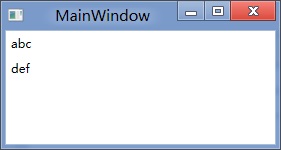
效果:
<StackPanel DataContext="abc">
<Label Content="{Binding}"></Label>
<Label Content="{Binding RelativeSource={RelativeSource Self},Path=DataContext}"></Label>
</StackPanel>

<StackPanel DataContext="abc">
<Label Content="{Binding}"></Label>
<Label DataContext="def" Content="{Binding RelativeSource={RelativeSource Self},Path=DataContext}"></Label>
</StackPanel>
2.在Template的Trigger中改变Template中某个样式控件的属性
<Style TargetType="{x:Type Button}">
<Setter Property="Template">
<Setter.Value>
<ControlTemplate TargetType="{x:Type Button}">
<Border>
<Label x:Name="PART_Label" Content="{TemplateBinding ContentA}" />
</Border>
<ControlTemplate.Triggers>
<Trigger Property="IsChecked" Value="True">
注: <Setter TargetName="PART_Label" Property="Content" Value="{Binding Path=ContentB, RelativeSource={RelativeSource TemplatedParent}}" />
</Trigger>
</ControlTemplate.Triggers>
</ControlTemplate>
</Setter.Value>
</Setter>
</Style>
当然把注:的这句改成<Setter TargetName="PART_Label" Property="Content" Value="{Binding Path=ContentB, RelativeSource={RelativeSource AncestorType={x:Type Button}}}">效果一样。
先写到这,下篇继续关注Binding中ElementName,RelativeSource,Source的相同点和区别。
转载时,请注明本文来源:www.cnblogs.com/tmywu
作者: 淘米部落
mail:tommywu23@126.com
【转】WPF中Binding的技巧(一)的更多相关文章
- [转]WPF中Binding的技巧
在WPF应用的开发过程中Binding是一个非常重要的部分. 在实际开发过程中Binding的不同种写法达到的效果相同但事实是存在很大区别的. 这里将实际中碰到过的问题做下汇总记录和理解. 1. so ...
- WPF中Binding使用StringFormat格式化字符串方法
原文:WPF中Binding使用StringFormat格式化字符串方法 货币格式 <TextBlock Text="{Binding Price, StringFormat={}{0 ...
- 整理:WPF中Binding的几种写法
原文:整理:WPF中Binding的几种写法 目的:整理WPF中Bind的写法 <!--绑定到DataContext--> <Button Content="{Bindin ...
- WPF之Binding深入探讨
原文:http://blog.csdn.net/fwj380891124/article/details/8107646 1,Data Binding在WPF中的地位 程序的本质是数据+算法.数据会在 ...
- WPF的Binding功能解析
1,Data Binding在WPF中的地位 程序的本质是数据+算法.数据会在存储.逻辑和界面三层之间流通,所以站在数据的角度上来看,这三层都很重要.但算法在3层中的分布是不均匀的,对于一个3层结构的 ...
- WPF之Binding的使用
引出: 在WPF中Binding可以比作数据的桥梁,桥梁的两端分别是Binding的源(Source)和目标(Target).一般情况下,Binding源是逻辑层对象,Binding目标是UI层的控件 ...
- WPF之Binding深入探讨--Darren
1,Data Binding在WPF中的地位 程序的本质是数据+算法.数据会在存储.逻辑和界面三层之间流通,所以站在数据的角度上来看,这三层都很重要.但算法在3层中的分布是不均匀的,对于一个3层结构的 ...
- 深入浅出WPF之Binding的使用(一)
在WPF中Binding可以比作数据的桥梁,桥梁的两端分别是Binding的源(Source)和目标(Target).一般情况下,Binding源是逻辑层对象,Binding目标是UI层的控件对象:这 ...
- WPF之Binding【转】
WPF之Binding[转] 看到WPF如此之炫,也想用用,可是一点也不会呀. 从需求谈起吧: 首先可能要做一个很炫的界面.见MaterialDesignInXAMLToolKit. 那,最主要的呢, ...
随机推荐
- System Address Map Initialization in x86/x64 Architecture Part 2: PCI Express-Based Systems
原文 http://resources.infosecinstitute.com/system-address-map-initialization-x86x64-architecture-pa ...
- mysql my.ini 详解
linux下mysql配置文件my.cnf详解[转] basedir = path 使用给定目录作为根目录(安装目录). character-sets-dir = path 给出存放着字符集的目录 ...
- setvbuf
函数名: setvbuf 用 法: int setvbuf(FILE *stream, char *buf, int type, unsigned size); type : 期望缓冲区的类型: _I ...
- Android5.0之CardView的使用
CardView也是一个非常炫酷的控件,一般我们将CardView配合RecyclerView来使用,当然,CardView也可以配合ListView来使用,都是可以的.OK,我们先来看一张CardV ...
- WPF在后台中写一个鼠标移入移出的操作
在这个问题上我纠结了好久就是为了一个问题就是forebackground这个属性 lblPwd.Foreground = Brushes.Black;我以前一直以为是fontground这个属性可是我 ...
- Android 自学之线性布局 LinearLayout
线性布局(LinearLayout),线性布局有点想AWT编程里面的FolwLayout,他们都会将容器里面的组件挨个的排列起来. 他们最大的区别在于:Android的线性布局不会换行:AWT里面的F ...
- 获取tcl开发工具
本篇文章对tcl脚本的解释工具获取和编辑工具进行一个简单的介绍,工欲善其事,必先利其器,掌握好解释工具的用法,能够使后续的脚本开发工作更加顺利.从源代码的获取到编译,详细解释在linux和window ...
- day0
/* 考前最后一天了 由于下午赶路 就放到上午发了 早晨浏览博客 上午浏览博客 感谢学弟为我写的博客233 很开心认识你们这一群人 嗯 最后一天了 就要说再见了 大家加油吧 ^ ^ */
- .net+easyui系列--Pagination 分页
使用 JS 创建分页 <div id="pat" style="background:#efefef;border:1px solid #ccc;"> ...
- js高程 第 4章 变量、作用域和内存问题 【笔记】
4.4 小结 JavaScript变量可以用来保存两种类型的值:基本类型值和引用类型值.基本类型的值源自以下 5 种基本数据类型:Undefined.Null.Boolean.Number 和 Str ...