
git安装和项目上传到GitHub
重装系统后,Git安装也要来重来
下载
国内下载地址:https://npm.taobao.org/mirrors/git-for-windows
安装忽略
生成密钥
输入然后都是下一步,生成密钥,生成的在C:\Users\Admin\.ssh
ssh-keygen -t rsa -C "email@qq.com"
进入C:\Users\Admin\.ssh 打开git 代理输入
ssh-agent bash
然后
ssh-add ~/.ssh/id_rsa
复制,粘贴到github账号ssh密钥里
clip < ~/.ssh/id_rsa.pub
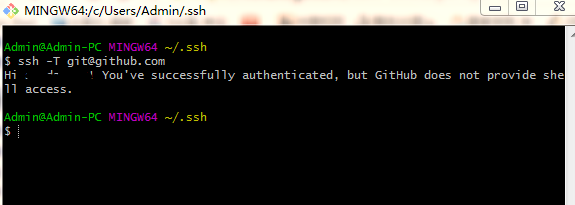
检查连接
ssh -T git@github.com
成功连接如图
上传项目
cd方式进入目录

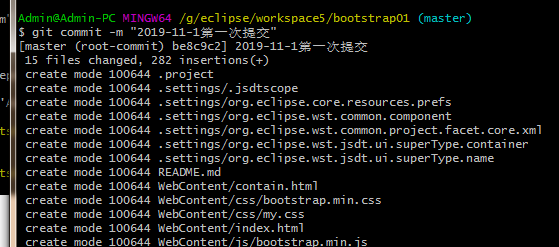
提交注释和配置用户
git commit -m "first commit"
  git config --global user.email "you@example.com"

  git config --global user.name "Your Name"
Config file location

    --global              use global config file

    --system              use system config file

    --local               use repository config file

    --worktree            use per-worktree config file

    -f, --file <file>     use given config file

    --blob <blob-id>      read config from given blob object

Action

    --get                 get value: name [value-regex]

    --get-all             get all values: key [value-regex]

    --get-regexp          get values for regexp: name-regex [value-regex]

    --get-urlmatch        get value specific for the URL: section[.var] URL

    --replace-all         replace all matching variables: name value [value_regex]

    --add                 add a new variable: name value

    --unset               remove a variable: name [value-regex]

    --unset-all           remove all matches: name [value-regex]

    --rename-section      rename section: old-name new-name

    --remove-section      remove a section: name

    -l, --list            list all

    -e, --edit            open an editor

    --get-color           find the color configured: slot [default]

    --get-colorbool       find the color setting: slot [stdout-is-tty]

Type

    -t, --type <>         value is given this type

    --bool                value is "true" or "false"

    --int                 value is decimal number

    --bool-or-int         value is --bool or --int

    --path                value is a path (file or directory name)

    --expiry-date         value is an expiry date

Other

    -z, --null            terminate values with NUL byte

    --name-only           show variable names only

    --includes            respect include directives on lookup

    --show-origin         show origin of config (file, standard input, blob, command line)

    --default <value>     with --get, use default value when missing entry

代码关联到github
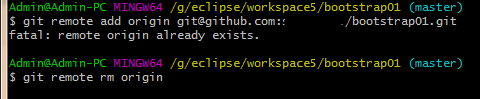
git remote add origin git@github.com:sunday123/bootstrap01.git
如果出现

就删掉远程的
git remote rm origin
提交
git push -u origin master
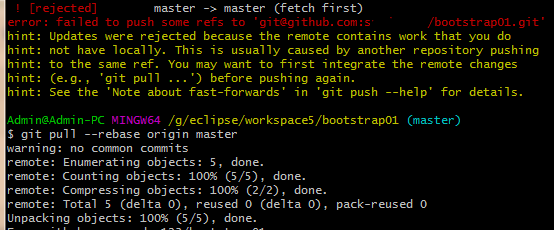
可能报错
 ! [rejected]        master -> master (fetch first)

error: failed to push some refs to 'git@github.com:s....'
用下面上传
git pull --rebase origin master
再
git push --set-upstream origin master
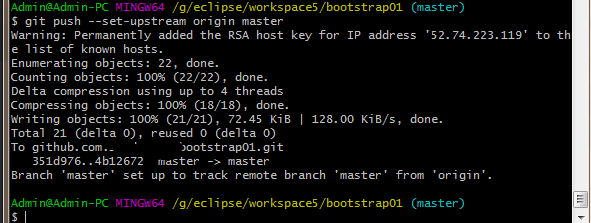
大功告成
git安装和项目上传到GitHub的更多相关文章
- GIT将本地项目上传到Github(两种简单、方便的方法)
GIT将本地项目上传到Github(两种简单.方便的方法) 一.第一种方法: 首先你需要一个github账号,所有还没有的话先去注册吧! https://github.com/ 我们使用git需要先安 ...
- 使用Git将本地项目上传到Github操作详解
Git的安装就不说了. 一.建本地仓库 1.第一步:我们需要先创建一个本地的版本库(其实也就是一个文件夹). 你可以直接右击新建文件夹,也可以右击打开Git bash命令行窗口通过命令来创建. 反正就 ...
- idea git 把本地项目上传到github上
创建一个项目,在项目文件夹下执行以下命令 第二种方法: 先在idea上创建一个项目 注意以上只是在本地建立了本地仓库,代码都放在本地仓库. 现在上传到github上 到此才上传成功
- 从零开始使用git将本地项目上传到GitHub
直接进入主题 1. 注册GitHub(官网:https://github.com/),打开官网,右上角点击sign up注册按钮,进入注册界面,根据提示填写信息注册.
- 使用git工具将项目上传到github
注册github账号 https://github.com/ 安装git工具: https://git-for-windows.github.io/ 上面的准备工作完成后,现在开始操作. 一.进入gi ...
- Git将本地项目上传到GitHub
本文转载于:https://segmentfault.com/a/1190000011909294 https://www.cnblogs.com/cxk1995/p/5800196.html 我们使 ...
- 如何用命令将本地项目上传到github
一.Git终端软件安装 1.下载windows上git终端,类似shell工具,下载地址:http://msysgit.github.io/ 2.安装方法,打开文件,一路点击Next即可 3.安装完成 ...
- mac下安装git,并将本地的项目上传到github
mac下安装git 安装过程: 1.下载Git installer http://git-scm.com/downloads 2.下载之后打开,双击.pkg安装 3.打开终端,使用git --vers ...
- 如何通过Git GUI将自己本地的项目上传至Github
最近在学习node.js和react,顺便复习了下AngluarJS相关的东西,写了些小demo想放在GitHub上,之前仅限于只申请了GitHub账号从没用过,今天花半天时间查资料认真学习Githu ...
随机推荐
- 关于HACLON程序导出C#程序,运行报错解决方法
摘要:一些环境配置异常的解决方法. 一,打不开相机: 1.打开系统高级设置--环境变量中是否有 HALCONROOT+安装目录名,若无进行添加. 2.关闭计算机其他连接相机的软件,例如海康的MVS,H ...
- 剑指offer笔记面试题13----机器人的运动范围
题目:地上有一个m行n列的方格.一个机器人从坐标(0, 0)的格子开始移动,它每次可以向左.右.上.下移动一格,但不能进入行坐标和列坐标的数位之和大于k的格子.例如,当k为18时,机器人能够进入方格( ...
- Bootstrap 基于Bootstrap和JQuery实现动态打开和关闭tab页
基于Bootstrap和JQuery实现动态打开和关闭tab页 by:授客 QQ:1033553122 1. 测试环境 JQuery-3.2.1.min.j Bootstrap-3.3.7-d ...
- python获取指定文件夹下的文件和文件夹
import os filepaths = []; dirpaths = []; pathName = r'C:\anfei\json\20191128' for root, dirs, files ...
- JVM-5-GC(Garbage Collection) 垃圾回收机制
GC(Garbage Collection) 垃圾回收机制 什么是垃圾回收机制 垃圾回收是一种动态存储管理技术,它自动地释放不再被程序引用的对象,按照特定的垃圾收集算法来实现资源自动回收的功能. ...
- Re-stheasy
https://dn.jarvisoj.com/challengefiles/ctf2.b93676be23733b2fcda3988c1133c1c1 用IDA-32bit 打开,找到main函数 ...
- python连接MySQL pymysql模块,游标,SQL注入问题,增删改查操作
pymysql模块 pymysql是用python控制终端对MySQL数据库进行操作的第三方模块 import pymysql # 1.连接数据库 client = pymysql.connect( ...
- js获取url参数值的方法总结
1.方式一:通过字符串截取的方式获取参数值: 1).函数一:获取URL中的参数名及参数值的集合 /** * [获取URL中的参数名及参数值的集合] * 示例URL:http://htmlJsTest/ ...
- transaction事务案例--银行转账
1)dao层 package cn.spring.transaction.dao; public interface MoneyDao { //加钱的方法 void addMoney(double m ...
- Qt Designer布局预览正常,代码调用时所有控件堆在一起
一.实验环境 1.Windows10x64 2.anaconda4.6.9 + python3.7.1(anaconda集成,不需单独安装) 3.pyinstaller3.5 二.问题描述 1.Qt ...