
UIAlertController(警告栏) 自学之初体验
UIAlertController有两种样式 preferredStyle:
UIAlertControllerStyleAlert (位于屏幕的中部)
UIAlertControllerStyleActionSheet(位于屏幕的下方)
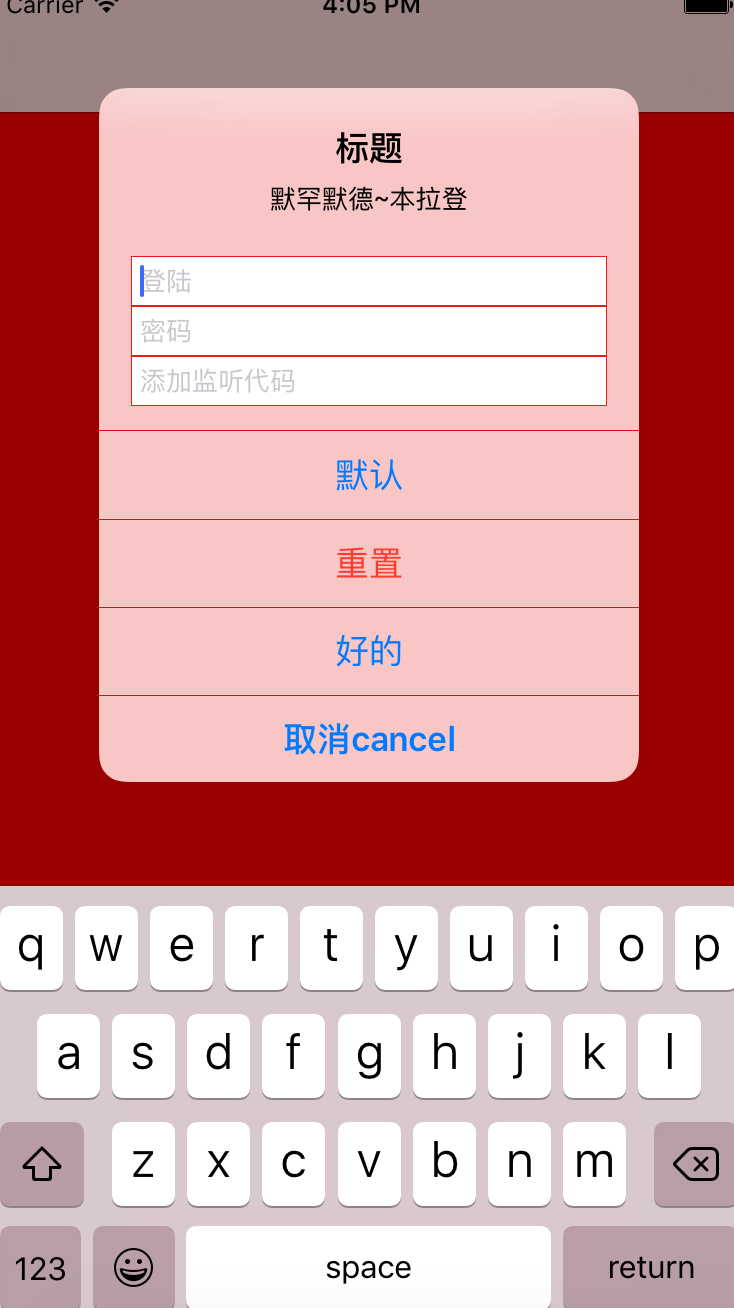
UIAlertController *alert = [UIAlertController alertControllerWithTitle:@"标题" message:@"默罕默德~本拉登" preferredStyle:UIAlertControllerStyleAlert]; //UIAlertController的创建
UIAlertAction是UIAlertController的按钮样式
title按钮的名称,style按钮的样式,handler处理层序(点击按钮执行的代码)
UIAlertAction *cancelAction = [UIAlertAction actionWithTitle:@"取消cancel" style:UIAlertActionStyleCancel handler:nil];
UIAlertAction *defaultAction = [UIAlertAction actionWithTitle:@"默认" style:UIAlertActionStyleDefault handler:nil];
UIAlertAction *resetAction = [UIAlertAction actionWithTitle:@"重置" style:UIAlertActionStyleDestructive handler:nil];
//添加按钮到UIAlertController上
[alert addAction:cancelAction];
[alert addAction:defaultAction];
[alert addAction:resetAction];
1、文本输入框只能添加到Alert的风格中,ActionSheet是不允许的;
2、UIAlertController具有只读属性的textFields数组,需要可直接按自己需要的顺序添加;
3、添加方式是使用block,参数是UITextField;
4、添加UITextField监听方法和实现方法。
//添加文本输入框
[alert addTextFieldWithConfigurationHandler:^(UITextField *textField){
textField.placeholder = @"登陆";
//可以为textField添加事件
}];
[alert addTextFieldWithConfigurationHandler:^(UITextField *textField){
textField.placeholder = @"密码";
textField.secureTextEntry = YES;
//可以为textField添加事件
}];
添加一个事件可以用来输出用户名和密码(textFields是属性,是一个数组)
UIAlertAction *getAction = [UIAlertAction actionWithTitle:@"确定" style:UIAlertActionStyleDefault handler:^(UIAlertAction *action){
UITextField *login = alert.textFields[0];
UITextField *passWord = alert.textFields[1];
NSLog(@"登陆:%@ 密码:%@",login.text,passWord.text);
}];//获取textField的文本内容
[alert addAction:getAction];
如果要监听textField开始,结束,改变状态,需要添加监听代码
[alert addTextFieldWithConfigurationHandler:^(UITextField *textField){
textField.placeholder = @"添加监听代码";
[[NSNotificationCenter defaultCenter]addObserver:self selector:@selector(alertTextFieldDidChange:) name:UITextFieldTextDidChangeNotification object:textField];
}];
[self presentViewController:alert animated:YES completion:^{
}]; //模态推送到页面上
//监听的方法
-(void)alertTextFieldDidChange:(NSNotification *)notification{
UIAlertController *alertController = (UIAlertController *)self.presentedViewController;
if (alertController) {
//为textFields数组中下标为2的textField为监听对象
//也是alertController.textFields.lastObject
UITextField *listen = alertController.textFields[2];
//限制,如果listen限制输入长度在5个字符内,否则不允许点击默认Defult键
//当UITextField输入字数超过5个,按钮变灰色,enable为NO
UIAlertAction *action = alertController.actions.lastObject;
action.enabled = listen.text.length<=5;
}
UIAlertController(警告栏) 自学之初体验的更多相关文章
- UIPickerView(选择控制器) 自学之初体验
UIPickerView 是一个选择器控件, 它可以生成单列的选择器,也可生成多列的选择器,而且开发者完全可以自定义选择项的外观,因此用法非常灵活.UIPickerView 直接继承了 UIView ...
- iOS7 初体验
iOS7 初体验 近日来由于iOS7的发布,引来业界的各种吐槽. 为了体验一把,我已经把iPhone5刷成了iOS7,也下载Xcode5-DP并进行了测试.我想说的是iOS7与Xcode5-DP中新增 ...
- 在同一个硬盘上安装多个 Linux 发行版及 Fedora 21 、Fedora 22 初体验
在同一个硬盘上安装多个 Linux 发行版 以前对多个 Linux 发行版的折腾主要是在虚拟机上完成.我的桌面电脑性能比较强大,玩玩虚拟机没啥问题,但是笔记本电脑就不行了.要在我的笔记本电脑上折腾多个 ...
- python--爬虫入门(七)urllib库初体验以及中文编码问题的探讨
python系列均基于python3.4环境 ---------@_@? --------------------------------------------------------------- ...
- iOS7初体验(3)——图像资源Images Assets
开始之前,首先回顾一下iOS7初体验(1)——第一个应用程序HelloWorld中的一张图,如下所示: 本文便分享一下Images.xcassets的体验~_~ 1. 打开此前使用过的HelloWor ...
- OPhone SDK初体验
OPhone SDK初体验 write by 九天雁翎(JTianLing) -- blog.csdn.net/vagrxie 讨论新闻组及文件 背景说明 中国伟大的垄断龙头,世界上也是顶尖的中移动最 ...
- Git 使用初体验
http://my.oschina.net/moooofly/blog/228608 很久之前在 http://git.oschina.net/ 上创建了一个私有项目 modb ,目的主要是用来学习如 ...
- vue.js2.0 自定义组件初体验
理解 组件(Component)是 Vue.js 最强大的功能之一.组件可以扩展 HTML 元素,封装可重用的代码.在较高层面上,组件是自定义元素, Vue.js 的编译器为它添加特殊功能.在有些情况 ...
- PHP初体验
PHP初体验 提笔写初体验总不知道从何说起,直接聊PHP中的函数.PHP网络技术.数据库操作.PHP模板等感觉又不是初体验.最后还是决定从PHP的面向对象.PHP的魔术方法.PHP的反射.PHP中的异 ...
随机推荐
- 如何在Visual studio中修改所使用C#语言的版本
有时候,我们需要在Visual studio里修改当前使用的C#语言的版本,具体修改方法如下:在solution explorer中右键工程->选择属性->切换到Build页->点击 ...
- 关于局域网内IIS部署网站,本机可访问,而网内其他用户无法访问问题的解决方法
在Window7操作系统中安装配置好IIS后,在本地IIS上部署网站程序没有问题,但是局域网等远程用户不能正常访问网站程序,提示“Internet Explorer 无法显示该网页”. 问题解决思路如 ...
- UVA10562 数据结构题目
题目链接:https://uva.onlinejudge.org/index.php?option=com_onlinejudge&Itemid=8&page=show_problem ...
- hdu Red and Black
算法:深搜 题意:就是让你找到一共可以移动多少次,每次只能移到黑色格子上, Problem Description There is a rectangular room, covered with ...
- php+mysql将大数据sql文件导入数据库
<?php $file_name = "d:test.sql"; $dbhost = "localhost"; $dbuser = "root& ...
- BZOJ 1063 道路设计NOI2008
http://www.lydsy.com/JudgeOnline/problem.php?id=1063 题意:给你一棵树,也有可能是不连通的,把树分成几个链,求每个点到根经过的最大链数最小,而且要输 ...
- LeetCode_Pascal's Triangle II
Given an index k, return the kth row of the Pascal's triangle. For example, given k = 3, Return [1,3 ...
- double类型如何保留2为小数
double d=12.2121;string str = d.ToString("F2"); double x = 29.982;Console.WriteLine(x.ToSt ...
- 如何向投资人展示——How to Present to Investors
著作权归作者所有.商业转载请联系作者获得授权,非商业转载请注明出处.作者:茶叶末链接:http://www.zhihu.com/question/23638879/answer/34525204来源: ...
- 字符串转换为float<2>
Configuration OK zjtest7-frontend:/usr/local/logstash-2.3.4/config# ../bin/logstash -f g01.conf Sett ...