
[转]TOMCAT原理以及处理HTTP请求的过程、ContextPath ServletPath
一、TOMCAT
1 - Tomcat Server的组成部分
1.1 - Server
A Server element represents the entire Catalina servlet container. (Singleton)
<Server port="8005" shutdown="SHUTDOWN" debug="0">
<Server>属性含义:
--------------------------------------------------------------
className :指定实现org.apache.catalina.Server接口的类,默认值为org.apache.catalina.core.StandardServer.
port :指定Tomcat服务器监听shutdown命令的端口.终止Tomcat服务运行时,必须在Tomcat服务器所在的机器上发出Shutdown命令.该属性是必须设定的.
shutdown :指定终止Tomcat服务器运行时,发给Tomcat服务器的shutdown监听端口的字符串.该属性是必须设定的.
1.2 - Service
A Service element represents the combination of one or more Connector components that share a single Engine
Service是这样一个集合:它由一个或者多个Connector组成,以及一个Engine,负责处理所有Connector所获得的客户请求
<Service>元素由org.apache.catalina.Service接口定义,它包含一个<Engine>元素,以及一个或多个<Connector>元素,这些<Connector>元素共享一个<Engine>元素. 例如,在范例文件中配置了两个<Service>元素
<Service name="Catalina">
name="Apache">
第一个<Service>处理所有直接由Tomcat服务器接收的Web客户请求,第二个<Service>处理由Apache服务器转发过来的Web客户请求.
<Service <Service>属性含义:
--------------------------------------------------------------
className :指定实现org.apache.catalina.Service接口的类,默认值为org.apache.catalina.core.StandardService.
name :定义Service的名字.
1.3 - Connector
一个Connector将在某个指定端口上侦听客户请求,并将获得的请求交给Engine来处理,从Engine处获得回应并返回客户
TOMCAT有两个典型的Connector,一个直接侦听来自browser的http请求,一个侦听来自其它WebServer的请求
Coyote Http/1.1 Connector 在端口8080处侦听来自客户browser的http请求
Coyote JK2 Connector 在端口8009处侦听来自其它WebServer(Apache)的servlet/jsp代理请求
1.4 - Engine
The Engine element represents the entire request processing machinery associated with a particular Service
It receives and processes all requests from one or more Connectors
and returns the completed response to the Connector for ultimate transmission back to the client
Engine下可以配置多个虚拟主机Virtual Host,每个虚拟主机都有一个域名
当Engine获得一个请求时,它把该请求匹配到某个Host上,然后把该请求交给该Host来处理
Engine有一个默认虚拟主机,当请求无法匹配到任何一个Host上的时候,将交给该默认Host来处理
1.5 - Host
代表一个Virtual Host,虚拟主机,每个虚拟主机和某个网络域名Domain Name相匹配
每个虚拟主机下都可以部署(deploy)一个或者多个Web App,每个Web App对应于一个Context,有一个Context path
当Host获得一个请求时,将把该请求匹配到某个Context上,然后把该请求交给该Context来处理
匹配的方法是“最长匹配”,所以一个path==""的Context将成为该Host的默认Context
所有无法和其它Context的路径名匹配的请求都将最终和该默认Context匹配
1.6 - Context
一个Context对应于一个Web Application,一个Web Application由一个或者多个Servlet组成
Context在创建的时候将根据配置文件$CATALINA_HOME/conf/web.xml和$WEBAPP_HOME/WEB-INF/web.xml载入Servlet类
当Context获得请求时,将在自己的映射表(mapping table)中寻找相匹配的Servlet类
如果找到,则执行该类,获得请求的回应,并返回
假设来自客户的请求为:
http://localhost:8080/wsota/wsota_index.jsp
1) 请求被发送到本机端口8080,被在那里侦听的Coyote HTTP/1.1 Connector获得
2) Connector把该请求交给它所在的Service的Engine来处理,并等待来自Engine的回应
3) Engine获得请求localhost/wsota/wsota_index.jsp,匹配它所拥有的所有虚拟主机Host
4) Engine匹配到名为localhost的Host(即使匹配不到也把请求交给该Host处理,因为该Host被定义为该Engine的默认主机)
5) localhost Host获得请求/wsota/wsota_index.jsp,匹配它所拥有的所有Context
6) Host匹配到路径为/wsota的Context(如果匹配不到就把该请求交给路径名为""的Context去处理)
7) path="/wsota"的Context获得请求/wsota_index.jsp,在它的mapping table中寻找对应的servlet
8) Context匹配到URL PATTERN为*.jsp的servlet,对应于JspServlet类
9) 构造HttpServletRequest对象和HttpServletResponse对象,作为参数调用JspServlet的doGet或doPost方法
10)Context把执行完了之后的HttpServletResponse对象返回给Host
11)Host把HttpServletResponse对象返回给Engine
12)Engine把HttpServletResponse对象返回给Connector
13)Connector把HttpServletResponse对象返回给客户browser
执行流程

Tomcat处理http的请求处理过程(来自极客学院)
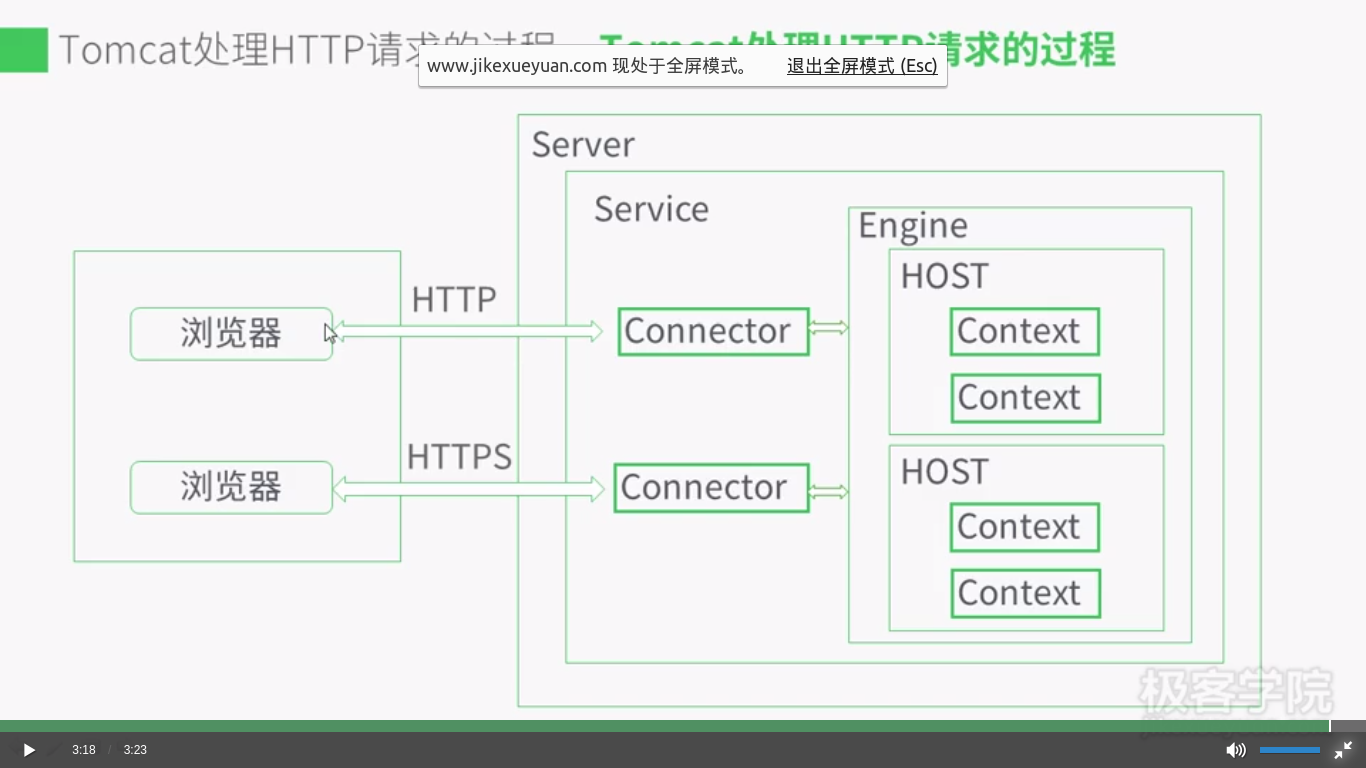
二、Context Path、Servlet Path、Path info
                        |-- Context Path --|-- Servlet Path -|--Path Info--|

http://www.myserver.com     /mywebapp        /helloServlet      /hello

                        |-------- Request URI  ----------------------------|
Remember the following three points:
1. Request URI = context path + servlet path + path info.
2. Context paths and servlet paths start with a / but do not end with it.
3. HttpServletRequest provides three methods getContextPath(),
getServletPath() and getPathInfo() to retrieve the context path,
the servlet path, and the path info, respectively, associated with a request.
Identifying the servlet path Servlet 路径匹配
To match a request URI with a servlet, the servlet container follows a simple algorithm.
Once it identifies the context path, if any, it evaluates the remaining part of the
request URI with the servlet mappings specified in the deployment descriptor, in the
following order. If it finds a match at any step, it does not take the next step.
1 The container tries to match the request URI to a servlet mapping. If it finds a
match, the complete request URI (except the context path) is the servlet path. In
this case, the path info is null. 精确匹配优先
2 It tries to recursively match the longest path by stepping down the request URI
path tree a directory at a time, using the / character as a path separator, and determining
if there is a match with a servlet. If there is a match, the matching part
of the request URI is the servlet path and the remaining part is the path info. 最长匹配
3 If the last node of the request URI contains an extension (.jsp, for example),
the servlet container tries to match it to a servlet that handles requests for the
specified extension. In this case, the complete request URI is the servlet path
and the path info is null.扩展匹配,如果url最后一段包含扩展,容器将会根据扩展选择合适的servlet。
4 If the container is still unable to find a match, it will forward the request to the
default servlet. If there is no default servlet, it will send an error message indicating
the servlet was not found.默认或报错
<servlet-mapping>
<servlet-name>RedServlet</servlet-name>
<url-pattern>/red/*</url-pattern>
</servlet-mapping>
<servlet-mapping>
<servlet-name>RedServlet</servlet-name>
<url-pattern>/red/red/*</url-pattern>
</servlet-mapping>
<servlet-mapping>
<servlet-name>RedBlueServlet</servlet-name>
<url-pattern>/red/blue/*</url-pattern>
</servlet-mapping>
<servlet-mapping>
<servlet-name>BlueServlet</servlet-name>
<url-pattern>/blue/</url-pattern>
</servlet-mapping>
<servlet-mapping>
<servlet-name>GreenServlet</servlet-name>
<url-pattern>/green</url-pattern>
</servlet-mapping>
<servlet-mapping>
<servlet-name>ColorServlet</servlet-name>
<url-pattern>*.col</url-pattern>
</servlet-mapping>
Request URI Servlet Used Servlet Path Path Info
/colorapp/red RedServlet /red null
/colorapp/red/ RedServlet /red /
/colorapp/red/aaa RedServlet /red /aaa
/colorapp/red/blue/aa RedBlueServlet /red/blue /aa
/colorapp/red/red/aaa RedServlet /red/red /aaa
/colorapp/aa.col ColorServlet /aa.col null
/colorapp/hello/aa.col ColorServlet /hello/aa.col null
/colorapp/red/aa.col RedServlet /red /aa.col
/colorapp/blue NONE(Error message)
/colorapp/hello/blue/ NONE(Error message)
/colorapp/blue/mydir NONE(Error message)
/colorapp/blue/dir/aa.col ColorServlet /blue/dir/aa.col null
/colorapp/green GreenServlet /green null
[转]TOMCAT原理以及处理HTTP请求的过程、ContextPath ServletPath的更多相关文章
- TOMCAT原理详解及请求过程(转载)
转自https://www.cnblogs.com/hggen/p/6264475.html TOMCAT原理详解及请求过程 Tomcat: Tomcat是一个JSP/Servlet容器.其作为Ser ...
- TOMCAT原理详解及请求过程
Tomcat: Tomcat是一个JSP/Servlet容器.其作为Servlet容器,有三种工作模式:独立的Servlet容器.进程内的Servlet容器和进程外的Servlet容器. Tomcat ...
- Tomcat学习(二)------Tomcat原理详解及请求过程
Tomcat: Tomcat是一个JSP/Servlet容器.其作为Servlet容器,有三种工作模式:独立的Servlet容器.进程内的Servlet容器和进程外的Servlet容器. Tomcat ...
- 网站开发进阶(四)Tomcat Server处理一个http请求的过程
Tomcat Server处理一个http请求的过程 假设来自客户的请求为: http://localhost:8080/wsota/wsota_index.jsp 1) 请求被发送到本机端口8080 ...
- Tomcat Server处理一个http请求的过程
Tomcat Server处理一个http请求的过程 假设来自客户的请求为: http://localhost:8080/wsota/wsota_index.jsp 1) 请求被发送到本机端口8080 ...
- Spring框架系列(14) - SpringMVC实现原理之DispatcherServlet处理请求的过程
前文我们有了IOC的源码基础以及SpringMVC的基础,我们便可以进一步深入理解SpringMVC主要实现原理,包含DispatcherServlet的初始化过程和DispatcherServlet ...
- Tomcat目录结构及Tomcat Server处理一个http请求的过程
http://blog.sina.com.cn/s/blog_62cb15980101jh9x.html 1.Tomcat的结构概述 Tomcat服务器是由一系列可配置的组件构成,其核心组件是 ...
- Tomcat 原理篇
TOMCAT 原理篇一.Tomcat 组成(Tomcat 由以下组件组成) 1.server a) Server是一个Catalina Servlet容器: b) Server 可以包含一个或多个se ...
- tomcat原理
1 - Tomcat Server的组成部分 1.1 - Server A Server element represents the entire Catalina servlet containe ...
随机推荐
- ES6学习笔记:Module的基本用法
export和import ES6实现了模块功能,试图解决JavaScript代码上的依赖和部署上的问题,取代现有的CommonJs的AMD规范,成为浏览器和服务器通用的模块解决方案. 模块功能有两个 ...
- 操作 IoT 设备内嵌 SQLite
Win10 IoT C#开发 5 - 操作 IoT 设备内嵌 SQLite 数据库 CURD Windows 10 IoT Core 是微软针对物联网市场的一个重要产品,与以往的Windows版本 ...
- cython教程
.写测试代码: zhouhh@zhouhh-home:~$ vi test.pyx [python] view plaincopy def sayhello(char* str): if str == ...
- 常用 API
运行 Java 程序的参数.使用 Scanner 获取键盘输入.使用 BufferedReader 获取键盘输入.System类.Runtime类.Object类.Java 7新增的 Objects ...
- powerdesigner数据建模
目标: 本文主要介绍PowerDesigner中概念数据模型 CDM的基本概念.一.概念数据模型概述数据模型是现实世界中数据特征的抽象.数据模型应该满足三个方面的要求:1)能够比较真实地模拟现实世界2 ...
- 关于SpringMVC中找不到<mvc:resources/>标签的解决办法
在springMVC中我们经常会用到<mvc:resources/>标签,但是有些编辑器中的schema过于陈旧.导致找不到<mvc:resources/>标签. 经过试验,有 ...
- 分析php获取客户端ip
用php能获取客户端ip,这个大家都知道,代码如下: /** * 获取客户端ip * @param number $type * @return string */ function getClien ...
- 程序中的Cookie 和Session
这几天回家休息后,想想放假之前的几天,主要看的一些工作上的东西,发现对Session和Cookie这两个东西,我还是很陌生.恩,趁着有网,看了点相关的资料,打算整理下.一翻博客,发现已经有前辈已经对这 ...
- python命令行解析工具argparse模块【5】
上一节我们学习了parse_args()的用法,这一节,我们将继续学习argparse的其他一些用法. 1.sub-commands子命令 argpar ...
- Python网络编程——处理套接字错误
在网络应用中,经常会遇到这种情况:一方尝试连接,但另一方由于网络媒介失效或者其他原因无法响应. Python的Socket库提供了一个方法,能通过socket.error异常优雅地处理套接字错误. 1 ...