
微信小程序 自定义tabbar实例
在小程序的开发文档中,对tabbar是这样说明的:
如果小程序是一个多 tab 应用(客户端窗口的底部或顶部有 tab 栏可以切换页面),可以通过 tabBar 配置项指定 tab 栏的表现,以及 tab 切换时显示的对应页面。
Tip:
当设置 position 为 top 时,将不会显示 icon
tabBar 中的 list 是一个数组,只能配置最少2个、最多5个 tab,tab 按数组的顺序排序。
在实际开发过程中,小程序自带的tabbar样式并不能满足设计提供的开发需求,所以需要我们自定义一套属于自己的tabbar。
需求如下图:
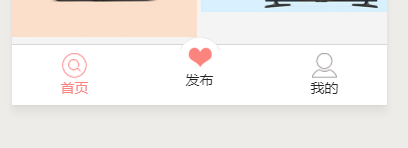
新建template.wxml

<template name="tabbar">

    <view class="tabbar_box" style=" border-top-color:{{tabbar.borderStyle}}; {{tabbar.position == 'top' ? 'top:0' : 'bottom:0'}}">

        <block wx:for="{{tabbar.list}}" wx:for-item="item" wx:key="index">

            <navigator class="tabbar_nav" url="{{item.pagePath}}" style="width:{{1/tabbar.list.length*100}}%; " open-type="redirect">

                <image class="tabbar_icon" src="{{item.selected ? item.selectedIconPath : item.iconPath}}"></image>

                <text style="color:{{item.selected ? tabbar.selectedColor : tabbar.color}}">{{item.text}}</text>

            </navigator>

        </block>

    </view>

</template>
app.wxss里定义组件样式
.tabbar_box{

    display: flex;

    flex-direction: row;

    justify-content: space-around;

    position: fixed;

    bottom: 0;

    left: 0;

    z-index: 999;

    width: 100%;

    height: 120rpx;

    border-top: 1rpx solid #d7d7d7;

}

.tabbar_nav{

    display: flex;

    flex-direction: column;

    justify-content: center;

    align-items: center;

    font-size: 28rpx;

    height: 100%;

}

.tabbar_icon{

    width: 50rpx;

    height:50rpx;

}

.tabbar_nav:nth-child(2) image{

    position:relative;

    top:-32rpx;

    width:80rpx;

    height:80rpx;

}

.tabbar_nav:nth-child(2) text{

    position:relative;

    top:-32rpx;

}
app.js里面进行tabBar的参数配置;
默认第一个选中;然后封装一个函数,方便需要用到的页面调用
//app.js

App({

  tabbar: {

    color: "#242424",

    selectedColor: "#fa8582",

    backgroundColor: "#ffffff",

    borderStyle: "#d7d7d7",

    list: [

      {

        pagePath: "/pages/index/index",

        text: "首页",

        iconPath: "../../assets/images/tab1.png",

        selectedIconPath: "../../assets/images/tab1_cur.png",

        selected: true

      },

      {

        pagePath: "/pages/fabu/fabu",

        text: "发布",

        iconPath: "../../assets/images/tab_new.png",

        selectedIconPath: "../../assets/images/tab_new.png",

        selected: false

      },

      {

        pagePath: "/pages/user/user",

        text: "我的",

        iconPath: "../../assets/images/tab4.png",

        selectedIconPath: "../../assets/images/tab4_cur.png",

        selected: false

      }

    ],

    position: "bottom"

  },

  changeTabBar: function () {

    var _curPageArr = getCurrentPages();

    var _curPage = _curPageArr[_curPageArr.length - 1];

    var _pagePath = _curPage.__route__;

    if (_pagePath.indexOf('/') != 0) {

      _pagePath = '/' + _pagePath;

    }

    var tabBar = this.tabbar;

    for (var i = 0; i < tabBar.list.length; i++) {

      console.log(_pagePath + '--' + tabBar.list[i].pagePath)

      tabBar.list[i].selected = false;

      if (tabBar.list[i].pagePath == _pagePath) {

        tabBar.list[i].selected = true;//根据页面地址设置当前页面状态

      }

    }

    _curPage.setData({

      tabbar: tabBar

    });

  },

})
在这里,getCurrentPages()方法,用来获取页面page对象,执行非当前页js里的方法,打印查看一目了然

下面就是调用了,每个配置在tabbar中的页面都要,因为这个是页面跳转了
在wxml引入创建的模板并使用
<import src="../template/template.wxml" />

<template is="tabbar" data="{{tabbar}}"/>
在js中调用函数
const app = getApp();

Page({

  data: {

    tabbar: {},

  },

  onLoad: function (options){

     //调用app中的函数

    app.changeTabBar();

  },

})
原文地址:https://www.cnblogs.com/xiao-ling-zi/p/9329612.html
微信小程序 自定义tabbar实例的更多相关文章
- 微信小程序自定义 tabbar
一定的需求情况下,无法使用小程序原生的 tabbar 的时候,需要自行实现一个和 tabbar 功能一模一样的自制组件. 查阅了海量的博客和文档之后,亲自踩坑.总结了三种在不使用微信小程序原生 tab ...
- 微信小程序自定义tabbar的实现
微信小程序自定义tabbar的实现 目的:当采用微信的自定义tabbar组件的时候,切换的时候会出现闪屏的效果:当使用微信默认的tabbar的时候,限制了tabbar的数量以及灵活配置. 方案:自己动 ...
- 微信小程序自定义tabbar的问题
个人感觉小程序的tab样式自定义的能力有所欠缺,不够美观,于是今天自己diy了一个tab 测试的时候发现,无论是使用navigator跳转(会出现点击的效果)还是用bindtap(触摸),因为没有定义 ...
- 微信小程序自定义TabBar
项目中需要根据用户角色控制TabBar中各Item的显示和隐藏,然而小程序自带TabBar没有提供隐藏某个item的功能,只好自己动手写了一个. 1.wxml文件 <view class=&qu ...
- 微信小程序 - 自定义tabbar
更新: 2019-1-18:自定义tabbar组件已发布 各种奇葩的需求,造就了我们 wxml <view class="nav-tabs"> <view cla ...
- 微信小程序 - 自定义tabbar(组件)
配置项(关于使用组件) index.wxml <!-- tabBar:tabBar配置 activeIndex: 激活页面下标 slots: 多插槽配置(需与页面一致) --> <t ...
- 微信小程序——自定义导航栏
微信头部导航栏可能通过json配置: 但是有时候我们项目需求可能需要自定义头部导航栏,如下图所示: 现在具体说一下实现步骤及方法: 步骤: 1.在 app.json 里面把 "navigat ...
- 微信小程序自定义弹窗wcPop插件|仿微信弹窗样式
微信小程序自定义组件弹窗wcPop|小程序消息提示框|toast自定义模板弹窗 平时在开发小程序的时候,弹窗应用场景还是蛮广泛的,但是微信官方提供的弹窗比较有局限性,不能自定义修改.这个时候首先想到的 ...
- 微信小程序-自定义底部导航
代码地址如下:http://www.demodashi.com/demo/14258.html 一.前期准备工作 软件环境:微信开发者工具 官方下载地址:https://mp.weixin.qq.co ...
随机推荐
- Linux系统自动化安装之cobbler实现
一.cobbler简介 cobbler是快速网络安装linux操作系统的服务,支持众多的Linux发行版本,如redhat|.fedora.centos.debian.ubuntu和suse,也可以支 ...
- 进程间通信之数据传输--FIFO
One of the fundamental features that makes Linux and other Unices useful is the “pipe”. Pipes allow ...
- ADAS 实车道路及场地测试服务
概述 高级驾驶员辅助系统(ADAS)作为车辆主动安全的关键系统,已经被越来越多的车辆配置.ADAS系统与车辆动力.制动.转向系统有直接耦合,是车辆中可靠性要求很高的控制系统,因此针对A ...
- unicode转换为中文
unicode转换为中文 \u5f53\u5730\u65f6\u95f42019\u5e747\u670813\u65e5\uff0c\u82f1\u56fd\u8d1d\u5fb7\u798f\u ...
- mac随笔
1.查看端口,lsof -i tcp:post lsof -i tcp:8086 2.kill进程 找到进程的PID,使用kill命令:kill PID(进程的PID,如2044),杀死对应的进程 k ...
- C#模拟鼠标、键盘操作
C语言 在程序中打开网页,模拟鼠标点击.键盘输入 一.简述 记--使用C语言 打开指定网页,并模拟鼠标点击.键盘输入.实现半自动填写账号密码,并登录网站(当然现在的大部分网站都有验证码 ...
- 基于Chrome内核(WebKit内核)定制开发DoNet浏览器
1. 源起 a) 定制.Net浏览器 本人是一名C#开发者,而作为C#开发者,做客户端应用中最头痛的一件事就是没有一个好的UI解决方案, WinFrom嘛,效率虽然还不错,但是做一些特殊 ...
- Thinkphp下记录和统计时间(微秒)和内存使用情况
* 记录和统计时间(微秒)和内存使用情况 * 使用方法: * <code> * G('begin'); // 记录开始标记位 * // ... 区间运行代码 * G('end'); // ...
- 目标检测中的bounding box regression
目标检测中的bounding box regression 理解:与传统算法的最大不同就是并不是去滑窗检测,而是生成了一些候选区域与GT做回归.
- toB创业中的5个行动原则- SaaS创业路线图
https://www.iyiou.com/p/84471.html 1.硬骨头原则 很多创业者急于求成,这做不好toB创业. 举例来说,产品价值阶段如果发现效果不明显,硬要推进到营销阶段在销售上想办 ...