
微信小程序自定义tabbar的实现
微信小程序自定义tabbar的实现
目的:当采用微信的自定义tabbar组件的时候,切换的时候会出现闪屏的效果;当使用微信默认的tabbar的时候,限制了tabbar的数量以及灵活配置。
方案:自己动手写一个和微信小程序提供的tabbar相同的效果,而且还可以满足灵活配置的功能.有参照有赞小程序
效果:
- 效果A:

2.效果B:

实现:
项目结构如下:
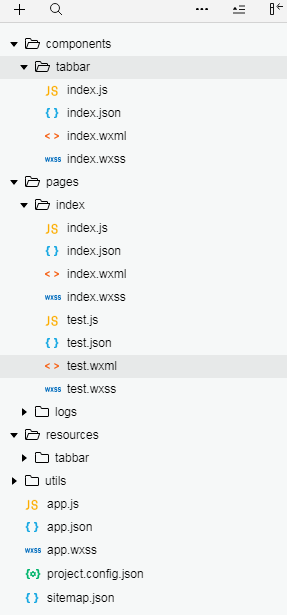
II 效果A实现:
1》wxml的代码:
Page({

  data: {

    blockid:0,

    bgcolor:'#ffffff',

    color:"#cccccc",

    selectedColor:'#333333',

    showborder:false,

    bordercolor:"",

    tabbar:[

      {

        pagePath: "page/home0/index",

        selectedIconPath: '/resources/tabbar/homeh.png',

        iconPath: '/resources/tabbar/home.png',

        text: '首页A',

        isdot: false,

        number: 0

      }, {

        pagePath: "page/home1/index",

        selectedIconPath: '/resources/tabbar/kindh.png',

        iconPath: '/resources/tabbar/kind.png',

        text: '首页B',

        isdot: true,

        number: 0

      }, {

        pagePath: "page/home2/index",

        selectedIconPath: '/resources/tabbar/myh.png',

        iconPath: '/resources/tabbar/my.png',

        text: '首页C',

        isdot: false,

        number: 5

      }, {

        pagePath: "page/home3/index",

        selectedIconPath: '/resources/tabbar/shopcarth.png',

        iconPath: '/resources/tabbar/shopcart.png',

        text: '首页D',

        isdot: false,

        number: 0

      }

    ]

  },

  // event.detail 的值为当前选中项的索引

  tabbarChange(e) {

    var index = parseInt(e.detail);

    this.setData({

      blockid:index

    })

  }

})
2》json文件如下:
{

  "usingComponents": {

    "tabbar": "../../components/tabbar/index"

  }

}
Page({

  data: {

    blockid:0,

    bgcolor:'#ffffff',

    color:"#cccccc",

    selectedColor:'#333333',

    showborder:false,

    bordercolor:"",

    tabbar:[

      {

        pagePath: "page/home0/index",

        selectedIconPath: '/resources/tabbar/homeh.png',

        iconPath: '/resources/tabbar/home.png',

        text: '首页A',

        isdot: false,

        number: 0

      }, {

        pagePath: "page/home1/index",

        selectedIconPath: '/resources/tabbar/kindh.png',

        iconPath: '/resources/tabbar/kind.png',

        text: '首页B',

        isdot: true,

        number: 0

      }, {

        pagePath: "page/home2/index",

        selectedIconPath: '/resources/tabbar/myh.png',

        iconPath: '/resources/tabbar/my.png',

        text: '首页C',

        isdot: false,

        number: 5

      }, {

        pagePath: "page/home3/index",

        selectedIconPath: '/resources/tabbar/shopcarth.png',

        iconPath: '/resources/tabbar/shopcart.png',

        text: '首页D',

        isdot: false,

        number: 0

      }

    ]

  },

  // event.detail 的值为当前选中项的索引

  tabbarChange(e) {

    var index = parseInt(e.detail);

    this.setData({

      blockid:index

    })

  }

})
III效果B实现:
1》wxml的代码:
<block wx:if="{{blockid==0}}">

  这里是首页A

</block>

<block wx:if="{{blockid==1}}">

  这里是首页B

</block>

<block wx:if="{{blockid==2}}">

  这里是首页C

</block>

<block wx:if="{{blockid==3}}">

  这里是首页D

</block>

<!--底部tabbar【一般正常用法,index页面特殊用法】-->

<tabbar tabbarData="{{tabbar}}" active="{{0}}" bgcolor="{{bgcolor}}" color="{{color}}" selectedColor="{{selectedColor}}"  showborder="{{showborder}}"  bind:tapChange="tabbarChange" />
2》json的代码
{

  "usingComponents": {

    "tabbar": "../../components/tabbar/index"

  }

}
3》js的代码
Page({

  /**

   * 页面的初始数据

   */

  data: {

    blockid: 0,

    bgcolor: 'green',

    color: "red",

    selectedColor: 'blue',

    showborder: false,

    bordercolor: "",

    tabbar: [{

      pagePath: "page/home0/index",

      selectedIconPath: '/resources/tabbar/homeh.png',

      iconPath: '/resources/tabbar/home.png',

      text: '首页A',

    }, {

      pagePath: "page/home1/index",

      selectedIconPath: '/resources/tabbar/kindh.png',

      iconPath: '/resources/tabbar/kind.png',

      text: '首页B',

    }, {

      pagePath: "page/home2/index",

      selectedIconPath: '/resources/tabbar/myh.png',

      iconPath: '/resources/tabbar/my.png',

      text: '首页C',

    }, {

      pagePath: "page/home3/index",

      selectedIconPath: '/resources/tabbar/shopcarth.png',

      iconPath: '/resources/tabbar/shopcart.png',

      text: '首页D',

    }]

  },

  // event.detail 的值为当前选中项的索引

  tabbarChange(e) {

    var index = parseInt(e.detail);

    this.setData({

      blockid: index

    })

  },

})
github地址如下:https://github.com/weiyunhelong/WeChatTabbar,欢迎下载并使用!
微信小程序自定义tabbar的实现的更多相关文章
- 微信小程序自定义 tabbar
一定的需求情况下,无法使用小程序原生的 tabbar 的时候,需要自行实现一个和 tabbar 功能一模一样的自制组件. 查阅了海量的博客和文档之后,亲自踩坑.总结了三种在不使用微信小程序原生 tab ...
- 微信小程序自定义tabbar的问题
个人感觉小程序的tab样式自定义的能力有所欠缺,不够美观,于是今天自己diy了一个tab 测试的时候发现,无论是使用navigator跳转(会出现点击的效果)还是用bindtap(触摸),因为没有定义 ...
- 微信小程序 自定义tabbar实例
在小程序的开发文档中,对tabbar是这样说明的: 如果小程序是一个多 tab 应用(客户端窗口的底部或顶部有 tab 栏可以切换页面),可以通过 tabBar 配置项指定 tab 栏的表现,以及 t ...
- 微信小程序自定义TabBar
项目中需要根据用户角色控制TabBar中各Item的显示和隐藏,然而小程序自带TabBar没有提供隐藏某个item的功能,只好自己动手写了一个. 1.wxml文件 <view class=&qu ...
- 微信小程序 - 自定义tabbar
更新: 2019-1-18:自定义tabbar组件已发布 各种奇葩的需求,造就了我们 wxml <view class="nav-tabs"> <view cla ...
- 微信小程序 - 自定义tabbar(组件)
配置项(关于使用组件) index.wxml <!-- tabBar:tabBar配置 activeIndex: 激活页面下标 slots: 多插槽配置(需与页面一致) --> <t ...
- 微信小程序——自定义导航栏
微信头部导航栏可能通过json配置: 但是有时候我们项目需求可能需要自定义头部导航栏,如下图所示: 现在具体说一下实现步骤及方法: 步骤: 1.在 app.json 里面把 "navigat ...
- 微信小程序自定义弹窗wcPop插件|仿微信弹窗样式
微信小程序自定义组件弹窗wcPop|小程序消息提示框|toast自定义模板弹窗 平时在开发小程序的时候,弹窗应用场景还是蛮广泛的,但是微信官方提供的弹窗比较有局限性,不能自定义修改.这个时候首先想到的 ...
- 微信小程序-自定义底部导航
代码地址如下:http://www.demodashi.com/demo/14258.html 一.前期准备工作 软件环境:微信开发者工具 官方下载地址:https://mp.weixin.qq.co ...
随机推荐
- 【Servlet】JavaWeb应用的执行流程
Tomcat与Servlet简介 Tomcat Tomcat是Apache 软件基金会(Apache Software Foundation)的Jakarta 项目中的一个核心项目,由Apache.S ...
- ubuntu 查看软件包中的内容 (已经安装)
在 使用 apt 进行安装软件的时候,我们要经常判断,软件安装了什么和安装到什么地方.这时候 我们要使用 dpkg -L 命令来进行查看: 同样 在 fedora 上可以使用 rpm -ql iper ...
- 高频Python面试题分享
一.Python语言中你用过哪些方式来实现进程间通信1.队列Queue 2.Pipe管道 只适用于两个进程之间的通信, pipe的效率高于queue 3.共享内存 4.socket套接字(UDP即可) ...
- cidr地址段
CIDR采用各种长度的"网络前缀"来代替分类地址中的网络号和子网号,其格式为:IP地址 = {<网络前缀>,<主机号>}.为了区分网络前缀,通常采用&quo ...
- Re-androideasy
题目地址 https://dn.jarvisoj.com/challengefiles/androideasy.apk.17e528e9498d4ae25dc82ad43730a03d 先看看功能 然 ...
- 配置Ngnix1.15.11+php5.4出现502 Bad Gateway问题
今天在调试Ngnix1.15.11+php5.4网站时候,因为网站数据和并发过大,出现502 Bad Gateway问题,所以记下笔记. 只需要修改php-fpm.conf的request_termi ...
- java中的字符串二
public class TestString { public static void main(String[] args) { // TODO Auto-generated method stu ...
- ShuffleNet:
ShuffleNet算法详解 论文:ShuffleNet: An Extremely Efficient Convolutional Neural Network for Mobile Devices ...
- Python高级应用程序设计任务要求
Python高级应用程序设计任务要求 用Python实现一个面向主题的网络爬虫程序,并完成以下内容:(注:每人一题,主题内容自选,所有设计内容与源代码需提交到博客园平台) 一.主题式网络爬虫设计方案( ...
- vue.js操作元素属性
vue动态操作div的class 看代码: <!doctype html> <html lang="en"> <head> <meta c ...