
007 SpringBoot的@EnableAutoConfiguration注解
一:原理
1.
首先Spring Boot项目中都会如下启动类:
@SpringBootApplication

public class Application {

    public static void main(String[] args) {

        SpringApplication.run(Application.class, args);

    }

}
其中,@SpringBootApplication中有三个重要的注解合一。
@Target(ElementType.TYPE)

@Retention(RetentionPolicy.RUNTIME)

@Documented

@Inherited

@SpringBootConfiguration

@EnableAutoConfiguration

@ComponentScan(excludeFilters = { @Filter(type = FilterType.CUSTOM, classes = TypeExcludeFilter.class),

        @Filter(type = FilterType.CUSTOM, classes = AutoConfigurationExcludeFilter.class) })

public @interface SpringBootApplication {
所以,来说说@EnableAutoConfiguration的作用。
 @Target(ElementType.TYPE)

 @Retention(RetentionPolicy.RUNTIME)

 @Documented

 @Import(EnableConfigurationPropertiesImportSelector.class)

 public @interface EnableConfigurationProperties {
2.作用
借助AutoConfigurationImportSelector,@EnableAutoConfiguration可以帮助SpringBoot应用将所有符合条件的@Configuration配置都加载到当前SpringBoot创建并使用的IoC容器。
借助于Spring框架原有的一个工具类:SpringFactoriesLoader的支持,@EnableAutoConfiguration可以智能的自动配置功效才得以大功告成!
3.进一步说明如何加载
在AutoConfigurationImportSelector类中可以看到通过 SpringFactoriesLoader.loadFactoryNames()把 spring-boot-autoconfigure.jar/META-INF/spring.factories中每一个xxxAutoConfiguration文件都加载到容器中。
spring.factories文件里每一个xxxAutoConfiguration文件一般都会有下面的条件注解:
@ConditionalOnClass : classpath中存在该类时起效
@ConditionalOnMissingClass : classpath中不存在该类时起效
@ConditionalOnBean : DI容器中存在该类型Bean时起效
@ConditionalOnMissingBean : DI容器中不存在该类型Bean时起效
@ConditionalOnSingleCandidate : DI容器中该类型Bean只有一个或@Primary的只有一个时起效
@ConditionalOnExpression : SpEL表达式结果为true时
@ConditionalOnProperty : 参数设置或者值一致时起效
@ConditionalOnResource : 指定的文件存在时起效
@ConditionalOnJndi : 指定的JNDI存在时起效
@ConditionalOnJava : 指定的Java版本存在时起效
@ConditionalOnWebApplication : Web应用环境下起效
@ConditionalOnNotWebApplication : 非Web应用环境下起效
二:示例
1.结构
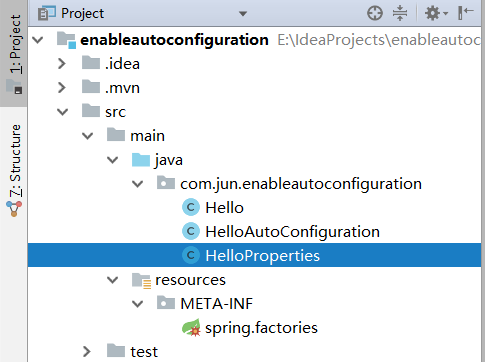
2.说明
在加载的时候,会通过一些注解进行匹配,然后都通过了,@EnableConfiguration才可以加载。
同时,可以不写@SpringBootApplication注解了。
3.说明项目
一共两个。
第一个是加载合适的bean
第二个是使用。
三:项目一
1.pom文件
<?xml version="1.0" encoding="UTF-8"?>

<project xmlns="http://maven.apache.org/POM/4.0.0" xmlns:xsi="http://www.w3.org/2001/XMLSchema-instance"

    xsi:schemaLocation="http://maven.apache.org/POM/4.0.0 https://maven.apache.org/xsd/maven-4.0.0.xsd">

    <modelVersion>4.0.0</modelVersion>

    <parent>

        <groupId>org.springframework.boot</groupId>

        <artifactId>spring-boot-starter-parent</artifactId>

        <version>2.1.7.RELEASE</version>

        <relativePath/> <!-- lookup parent from repository -->

    </parent>

    <groupId>com.jun</groupId>

    <artifactId>enableautoconfiguration</artifactId>

    <version>0.0.1-SNAPSHOT</version>

    <name>enableautoconfiguration</name>

    <description>Demo project for Spring Boot</description>

    <properties>

        <java.version>1.8</java.version>

    </properties>

    <dependencies>

        <dependency>

            <groupId>org.springframework.boot</groupId>

            <artifactId>spring-boot-starter</artifactId>

        </dependency>

        <dependency>

            <groupId>org.springframework.boot</groupId>

            <artifactId>spring-boot-starter-test</artifactId>

            <scope>test</scope>

        </dependency>

        <dependency>

            <groupId>org.springframework.boot</groupId>

            <artifactId>spring-boot-autoconfigure</artifactId>

            <version>2.0.4.RELEASE</version>

        </dependency>

        <dependency>

            <groupId>org.springframework.boot</groupId>

            <artifactId>spring-boot-configuration-processor</artifactId>

            <version>2.0.4.RELEASE</version>

            <optional>true</optional>

        </dependency>

        <dependency>

            <groupId>org.springframework.boot</groupId>

            <artifactId>spring-boot-starter-web</artifactId>

        </dependency>

    </dependencies>

</project>
2.hello
<?xml version="1.0" encoding="UTF-8"?>

<project xmlns="http://maven.apache.org/POM/4.0.0" xmlns:xsi="http://www.w3.org/2001/XMLSchema-instance"

    xsi:schemaLocation="http://maven.apache.org/POM/4.0.0 https://maven.apache.org/xsd/maven-4.0.0.xsd">

    <modelVersion>4.0.0</modelVersion>

    <parent>

        <groupId>org.springframework.boot</groupId>

        <artifactId>spring-boot-starter-parent</artifactId>

        <version>2.1.7.RELEASE</version>

        <relativePath/> <!-- lookup parent from repository -->

    </parent>

    <groupId>com.jun</groupId>

    <artifactId>enableautoconfiguration</artifactId>

    <version>0.0.1-SNAPSHOT</version>

    <name>enableautoconfiguration</name>

    <description>Demo project for Spring Boot</description>

    <properties>

        <java.version>1.8</java.version>

    </properties>

    <dependencies>

        <dependency>

            <groupId>org.springframework.boot</groupId>

            <artifactId>spring-boot-starter</artifactId>

        </dependency>

        <dependency>

            <groupId>org.springframework.boot</groupId>

            <artifactId>spring-boot-starter-test</artifactId>

            <scope>test</scope>

        </dependency>

        <dependency>

            <groupId>org.springframework.boot</groupId>

            <artifactId>spring-boot-autoconfigure</artifactId>

            <version>2.0.4.RELEASE</version>

        </dependency>

        <dependency>

            <groupId>org.springframework.boot</groupId>

            <artifactId>spring-boot-configuration-processor</artifactId>

            <version>2.0.4.RELEASE</version>

            <optional>true</optional>

        </dependency>

        <dependency>

            <groupId>org.springframework.boot</groupId>

            <artifactId>spring-boot-starter-web</artifactId>

        </dependency>

    </dependencies>

</project>
3.helloproperties
package com.jun.enableautoconfiguration;

import org.springframework.boot.context.properties.ConfigurationProperties;

@ConfigurationProperties(prefix = "hello") //获取属性值

public class HelloProperties {

    private static final String MSG = "world";

    private String msg = MSG ;

    public String getMsg() {

        return msg;

    }

    public void setMsg(String msg) {

        this.msg = msg;

    }

}
4.helloautoconfiguration
 package com.jun.enableautoconfiguration;

 import org.springframework.beans.factory.annotation.Autowired;

 import org.springframework.boot.autoconfigure.condition.ConditionalOnClass;

 import org.springframework.boot.autoconfigure.condition.ConditionalOnMissingBean;

 import org.springframework.boot.autoconfigure.condition.ConditionalOnProperty;

 import org.springframework.boot.context.properties.EnableConfigurationProperties;

 import org.springframework.context.annotation.Bean;

 import org.springframework.context.annotation.Configuration;

 @Configuration        //为带有@ConfigurationProperties注解的Bean提供有效的支持。

                       // 这个注解可以提供一种方便的方式来将带有@ConfigurationProperties注解的类注入为Spring容器的Bean。

 @EnableConfigurationProperties(HelloProperties.class)       //开启属性注入,通过@autowired注入

 @ConditionalOnClass(Hello.class)           //判断这个类是否在classpath中存在,如果存在,才会实例化一个Bean

 @ConditionalOnProperty(prefix="hello", value="enabled", matchIfMissing = true)

 public class HelloAutoConfiguration {

     @Autowired

     private HelloProperties helloProperties;

     @Bean

     @ConditionalOnMissingBean(Hello.class)//容器中如果没有Hello这个类,那么自动配置这个Hello

     public Hello hello() {

         Hello hello = new Hello();

         hello.setMsg(helloProperties.getMsg());

         return hello;

     }

 }
5.spring.factories
org.springframework.boot.autoconfigure.EnableAutoConfiguration=com.jun.enableautoconfiguration.HelloAutoConfiguration
四:使用项目
1.application.properties
#可以不配置
hello.enabled=true

hello.msg=uuibiu

#以debug模式运行
debug=true
2.WenApplication
 package com.jun.web;

 import com.jun.enableautoconfiguration.Hello;

 import org.slf4j.Logger;

 import org.slf4j.LoggerFactory;

 import org.springframework.beans.factory.annotation.Autowired;

 import org.springframework.boot.SpringApplication;

 import org.springframework.boot.autoconfigure.EnableAutoConfiguration;

 import org.springframework.boot.autoconfigure.SpringBootApplication;

 import org.springframework.context.ConfigurableApplicationContext;

 import org.springframework.core.env.ConfigurableEnvironment;

 import org.springframework.web.bind.annotation.RequestMapping;

 import org.springframework.web.bind.annotation.RestController;

 @SpringBootApplication

 @EnableAutoConfiguration

 @RestController

 public class WebApplication {

     private static final Logger logger = LoggerFactory.getLogger(WebApplication.class);

     @Autowired

     private Hello hello;

     @RequestMapping("/")

     public String index() {

         return hello.sayHello();

     }

     public static void main(String[] args) {

         ConfigurableApplicationContext context = SpringApplication.run(WebApplication.class, args);

         ConfigurableEnvironment environment = context.getEnvironment();

         logger.info("hello.msg:{}",environment.getProperty("hello.msg"));

     }

 }
007 SpringBoot的@EnableAutoConfiguration注解的更多相关文章
- SpringBoot之@EnableAutoConfiguration注解
源地址:https://blog.csdn.net/zxc123e/article/details/80222967 虽然定义使用了多个Annotation进行了原信息标注,但实际上重要的只有三个An ...
- SpringBoot中@EnableAutoConfiguration注解用法收集
参考: http://blog.csdn.net/xiaoyu411502/article/details/52770723 https://docs.spring.io/spring-boot/do ...
- SpringBoot自动配置注解原理解析
1. SpringBoot启动主程序类: @SpringBootApplication public class DemoApplication { public static void main(S ...
- @EnableAutoConfiguration注解原理
前言 Spring Boot中引入了自动配置,让开发者利用起来更加的简便.快捷.比如内嵌的tomcat端口默认配置是8080,这些都属于Spring Boot自动配置的范畴,当然其自动配置相当多. s ...
- SpringBoot自动化配置之三:深入SpringBoot:自定义EnableAutoConfiguration
前言 上面几篇文章介绍了SpringFramework的一些原理,这里开始介绍一下SpringBoot,并通过自定义一些功能来介绍SpringBoot的原理.SpringBoot在SpringFram ...
- 【Spring Boot源码分析】@EnableAutoConfiguration注解(一)@AutoConfigurationImportSelector注解的处理
Java及Spring Boot新手,首次尝试源码分析,欢迎指正! 一.概述 @EnableAutoConfiguration注解是Spring Boot中配置自动装载的总开关.本文将从@Enable ...
- SpringBoot相关的注解
一.注解(annotations)列表 @SpringBootApplication:包含了@ComponentScan.@Configuration和@EnableAutoConfiguration ...
- EnableAutoConfiguration注解 Spring中@Import注解的作用和使用
EnableAutoConfiguration注解 http://www.51gjie.com/javaweb/1046.html springboot@EnableAutoConfiguration ...
- SpringBoot+Spring常用注解总结
为什么要写这篇文章? 最近看到网上有一篇关于 SpringBoot 常用注解的文章被转载的比较多,我看了文章内容之后属实觉得质量有点低,并且有点会误导没有太多实际使用经验的人(这些人又占据了大多数). ...
随机推荐
- Linux--重要文件
目录 /etc/resolv.conf /etc/host /etc/sysconfig/network /etc/fstab /etc/rc.local /etc/profile /etc/bash ...
- 【Flask】 python学习第一章 - 4.0 钩子函数和装饰器路由实现 session-cookie 请求上下文
钩子函数和装饰器路由实现 before_request 每次请求都会触发 before_first_requrest 第一次请求前触发 after_request 请求后触发 并返回参数 tear ...
- spring cloud (五) 熔断面板 聚合熔断 turbine
改造feign 项目 1 启动类添加注解 @EnableHystrix 2 添加如下配置文件 #ji eureka.instance.metadata-map.cluster=MAIN#actuat ...
- MySQL与安全
说到MySQL数据库的安全性,可能有大量的相关话题,下面将对几个关键问题进行概括性描述. (1)安全的一般性因素.包括使用强密码,禁止给用户分配不必要的权限,防止SQL注入攻击. (2)安装步骤的安全 ...
- 使用aliyun的oss服务器上传照片
1.控制台操作 首先介绍一下阿里云OSS对象存储的一些基本概念. 1.1 进入对象存储界面 登录阿里云账号,进入对象存储界面,如图所示. 进入后如图所示. 1.2 OSS基本概念 这里不过多介绍如何在 ...
- 修改cloud image密码
安装libguestfs-tools yum -y install libguestfs-tools.noarch 设置固定密码 virt-customize -a CentOS-7-x86_64-G ...
- collections.defaultdict()
https://www.cnblogs.com/herbert/archive/2013/01/09/2852843.html >>> import collections > ...
- 代码编辑器与IDE(集成开发环境)
编辑器就是轻量级的只用于编辑代码: nodepad++, sublime, ...... IDE就是包含很多例如调试, 编译,UI界面的功能更为完善的软件: Pycharm(python用的多), V ...
- c++中关联容器map的使用
C++关联容器<map>简单总结(转) 补充: 使用count,返回的是被查找元素的个数.如果有,返回1:否则,返回0.注意,map中不存在相同元素,所以返回值只能是1或0. 使用find ...
- 数据分析 - Numpy
简介 Numpy是高性能科学计算和数据分析的基础包.它也是pandas等其他数据分析的工具的基础,基本所有数据分析的包都用过它.NumPy为Python带来了真正的多维数组功能,并且提供了丰富的函数库 ...