
Linux_CentOS 中systemctl 管理服务、防火墙 firewalld 以及 SELinux 配置
使用 systemctl 管理服务
systemctl 就是 service 和 chkconfig 这两个命令的整合,在 CentOS 7 就开始被使用了,systemctl是系统服务管理器命令,它实际上将 service 和 chkconfig 这两个命令组合到一起。
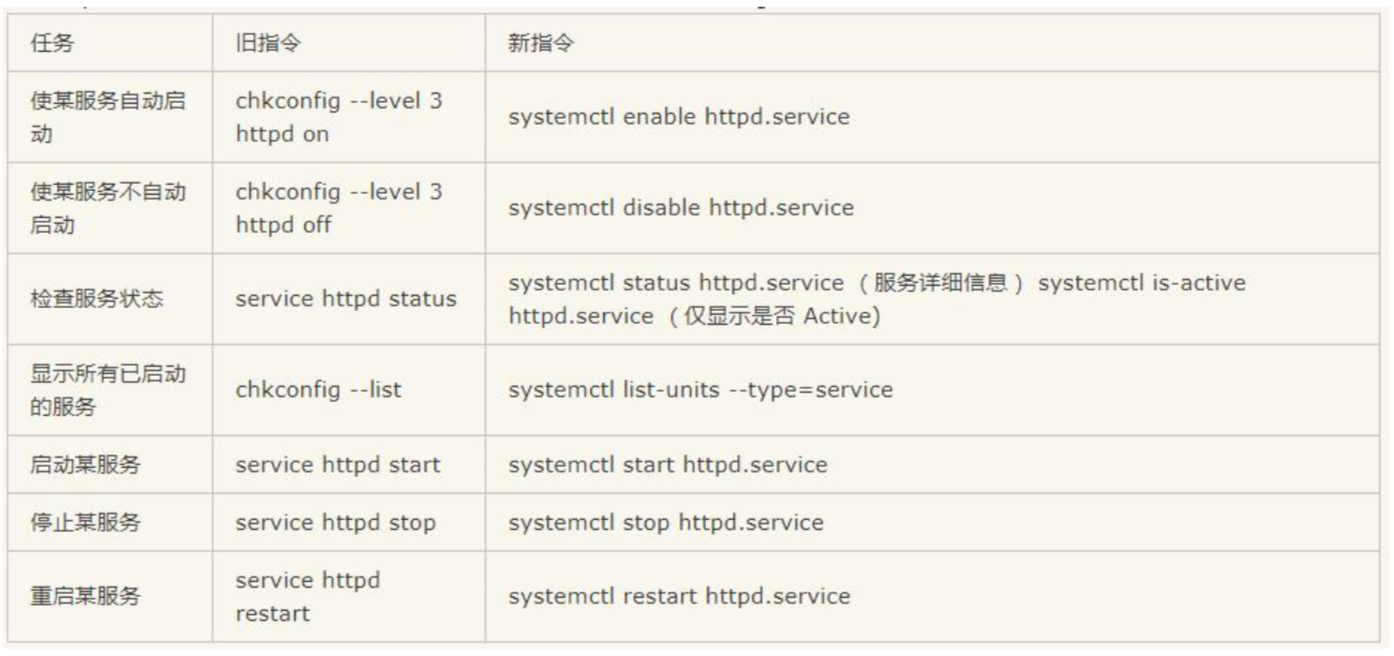
Syetemclt 管理服务常用命令
、启动服务:systemctl start httpd

、关闭服务:systemctl stop httpd

、重启服务:systemctl restart httpd

、查看一个服务的状态:systemctl status httpd

、查看一个服务是否在运行:systemctl is-active httpd

、查看当前已经运行的服务:systemctl list-units -t service

、列出所有服务: systemctl list-units -at service 注意顺序

. 设置开机自启动: systemctl enable httpd

. 停止开机自启动: systemctl disable httpd

、列出所有自启动服务:

    systemctl list-unit-files|grep enabled

    systemctl list-unit-files|grep disabled

    systemctl list-unit-files|grep disabled | grep httpd

、使指定服务从新加载配置:systemctl reload httpd
Firewalld 防火墙的设置
从 CentOS7(RHEL7)开始,官方的标准防火墙设置软件从 iptables 变更为 firewalld,相信不少习惯使用iptables 的人会感到十分不习惯,但实际上 firewalld 更为简单易用。
firewalld 的基本使用:
启动: systemctl start firewalld

关闭: systemctl stop firewalld

查看状态: systemctl status firewalld

开机禁用 : systemctl disable firewalld

开机启用 : systemctl enable firewalld
配置 firewall-cmd :
查看版本: firewall-cmd --version

查看帮助: firewall-cmd --help

显示状态: firewall-cmd --state

查看所有打开的端口: firewall-cmd --zone=public --list-ports

更新防火墙规则: firewall-cmd --reload

查看区域信息:  firewall-cmd --get-active-zones

查看指定接口所属区域: firewall-cmd --get-zone-of-interface=eth0

拒绝所有包:firewall-cmd --panic-on

取消拒绝状态: firewall-cmd --panic-off

查看是否拒绝: firewall-cmd --query-panic
怎么开启一个端口:
firewall-cmd --zone=public --add-port=/tcp --permanent (–permanent 永久生效,没有此参数重 启后失效)

重新载入:

firewall-cmd --reload 修改 firewall-cmd 配置后必须重启

查看:

firewall-cmd --zone= public --query-port=/tcp

删除:

firewall-cmd --zone= public --remove-port=/tcp --permanent
SELinux 防火墙的设置
SELinux 的结构及配置非常复杂,而且有大量概念性的东西,要学精难度较大。很多 Linux 系统管理员嫌麻烦都把 SELinux 关 闭了。阿里云安装的 centos 默认已经关闭了。西部数码云服务器默认也是关闭的。
查看 SELinux 状态:
、/usr/sbin/sestatus -v  ##如果 SELinux status 参数为 enabled 即为开启状态

SELinux status: enabled

、 getenforce  ##也可以用这个命令检查
关闭 SELinux:
、临时关闭(不用重启机器):

etenforce  ##设置 SELinux 成为 permissive 模式

setenforce  设置 SELinux 成为 enforcing 模式

、修改配置文件需要重启机器:

修改/etc/selinux/config 文件

将 SELINUX=enforcing 改为 SELINUX=disabled
Linux_CentOS 中systemctl 管理服务、防火墙 firewalld 以及 SELinux 配置的更多相关文章
- 二进制编译安装nginx并加入systemctl管理服务
一.安装nginx所需环境 # yum install gcc-c++ pcre pcre-devel zlib zlib-devel openssl openssl-devel -y 二.安装ngi ...
- CentOS 6.9下的Setup工具(用于管理服务/防火墙/网络配置/验证服务)
说明:Setup工具套件好像是CentOS下特有的用于管理服务/防火墙/网络配置等,其实就是基于命令行模式界面的GUI工具.唯一特点就是方便. 安装: #安装Setup命令工具 yum -y inst ...
- Linux学习-透过 systemctl 管理服务
透过 systemctl 管理单一服务 (service unit) 的启动/开机启动与观察状态 一般来说,服务的启动有两个阶段,一 个是『开机的时候设定要不要启动这个服务』, 以及『你现在要不要启动 ...
- RHEL7使用systemctl管理服务
1. systemctl命令 说明 systemctl start [unit type] 启动服务 systemctl stop [unit type] 停止服务 syste ...
- 使用 Centos 7 的 systemctl 管理服务
CentOS 7的服务systemctl脚本存放在:/usr/lib/systemd/,有系统(system)和用户(user)之分,像需要开机不登陆就能运行的程序,存系统服务里即:/usr/lib/ ...
- 使用systemctl管理服务
系统服务,开机不需要登录就能运行的程序(相当于开机自启)/usr/lib/systemd/system 用户服务,需要登录后才能运行的程序/usr/lib/systemd/user 目录下又存在两种类 ...
- CentOS7下普通账号通过systemctl管理服务需要输入root密码问题
问题描述: 使用普通账号test通过systemctl启动系统服务提示需要输入root密码: 解决方案: 根据上面提示得知权限由polkit进行管理,对应的是org.freedesktop.syste ...
- Windows中的DNS服务——正向解析&反向解析配置 分类: AD域 Windows服务 2015-07-16 20:21 19人阅读 评论(0) 收藏
坚信并为之坚持是一切希望的原因. DNS服务是AD域不可或缺的一部分,我们在部署AD域环境时已经搭建了DNS服务(windows server 2008 R2域中的DC部署),但是DNS服务的作用还是 ...
- CentOS7 使用systemctl来管理服务
1.建立service文件 以tomcat为例 , 建立tomcat.service文件 #服务说明 [Unit] #服务描述 Description=Tomcat Service #前置需要启动的服 ...
随机推荐
- Zabbix Documentation 4.0
Zabbix Documentation 4.0 1 Create user account For all of the Zabbix daemon processes, an unprivileg ...
- 关于sql注入盲注,谈谈自己的心得
1.没做防御的站点,拿上sqlmap直接怼就行了. 2.做了防御,有的用函数过滤了,有的用了waf(比如安全狗,云锁,华为云waf,360waf,知道创宇盾,护卫神等等) 这些就相当麻烦了,首先要探测 ...
- 关于struct和typedef struct
以 struct TelPhone{ ]; ]; }; 为例 这里先定义了一个 TelPhone的结构体. 加入需要为TelPhone定义一个别名: 其语法为 typedef TelPhone TP: ...
- KVM-virsh常用命令
virsh list #在线VM virsh list --all #所有VM virsh start #开机 virsh shutdown #软关机 virsh destroy #强制关机 virs ...
- python写入excel(方式二待完善)
import xlsxwriter #创建一个工作簿并添加一张工作表,当然工作表是可以命名的# workbook = xlsxwriter.Workbook('Expenses01.xlsx')# w ...
- Linux学习笔记——管道PIPE
管道:当从一个进程连接数据流到另一个进程时,使用术语管道(pipe).# include <unistd.h> int pipe(int filedes[2]); //创建管道 pipe( ...
- Python萌新笔记
Mychael上了大学,对Python产生了浓厚的兴趣,便开始了Python的学习 学习的时候,感觉Python确实比以往学的C++表达简洁很多,而又不失强大 以后的学习笔记就记在这啦 变量 Pyth ...
- yii2 oracle 原生sql分页
$sql_list = "SELECT ID, FID, INSID, FLIGHTNO, DEPNAME, ARRNAME, to_char(DEPDATE,'yyyy-MM-dd HH2 ...
- Linux 字符集的查看及修改
一·查看字符集 字符集在系统中体现形式是一个环境变量,以CentOS6.5为例,其查看当前终端使用字符集的方式可以有以下几种方式: 第一种: [root@Testa-www tmp]# echo $L ...
- UFUN函数 UF_CFI函数(uc4504,uc4540,uc4514,uc4547,UF_CFI_ask_file_exist )
UF_initialize(); //指定本地数据文件的路径 char file_spec[]="D://Program Files//Siemens//NX 8.0//UGII//zyTO ...